Home
>
PDF Tips
>
Google Gemini Gems: 2026 Full Guide & Gemini Skills Changes
Google Gemini Gems: 2026 Full Guide & Gemini Skills Changes
- Gemini Gems are being retired for Gemini Skills. Personal Gems go read-only on Nov 17, 2026 and are removed on Dec 17, 2026. Workspace follows in March 2027, and education in June 2027.
- Both Gemini Gems and Gemini Skills are free. Gems and Skills need only a Google account. Paid plans add usage limits and stronger models, not access.
- Gemini Skills are more flexible. A Gem runs in its own chat, while a Skill runs inline in any chat via "/". Skills support up to 100 active skills and use the open SKILL.md format with 100 MB per skill.
- Not everything carries over when shifting from Gemini Gems to Gemini Skills. Files over 100 MB, certain formats (GitHub, audio/video, legacy Office, archives), and some default tools won't migrate, so rebuild important Gems manually before Dec 17.
- Gems suit repeated tasks covering both working and studying.For repeated tasks like brand voice editing, studying, summarizing, drafting emails, policy Q&A, and research, build them as flexible skills usable in any chat.
Google Gemini Gems let you save your instructions once and reuse them, so you don't have to type the same long prompt every time. But Gems are changing fast. Google is replacing them with Gemini Skills: on November 17, 2026, Gems become read-only for personal accounts, and on December 17, 2026, they are removed.
In this guide, you'll learn what a Gemini Gem is, whether Gems are free, and how to create, use, edit and share one. You'll also see what's different about skills, what won't carry over, and how to move your Gems to skills step by step, so you don't lose your files.
Part 1. What Is a Gemini Gem?
A Gemini Gem is a custom version of Gemini. It's a saved set of three things: a name, standing instructions (for example, "You are my blog editor. Keep sentences short."), and optional knowledge files that Gemini checks on every answer.
A Gem isn't a new AI model, and it isn't trained on your data. It runs on whichever Gemini model your plan includes. Think of it as a saved prompt with extras, similar to ChatGPT's custom GPTs.
Premade Gems in the Gem Manager
The Gem manager is where you find, create and manage your Gems. To open it, go to the side panel in Gemini and click Gems. Google also offers premade Gems you can use right away:
- Brainstormer: generates ideas and concepts.
- Writing editor: gives feedback on tone, clarity and structure.
- Coding partner: helps write, explain and debug code.
- Career guide: advice on roles, skills and growth.
- Learning coach: breaks hard topics into simple steps.
You can copy a premade Gem with "Make a copy" and change it to suit you.
Part 2. Are Gemini Gems Going Away? Gems Are Becoming Gemini Skills
Yes. Google is retiring Gems and replacing them with skills. Google first announced the change on September 30, 2026, and it posted a Workspace update on November 10, 2026 as skills rolled out to more apps and teams.

Key Dates of Gemini Gems Shifting
According to Google's Gems-to-skills help page, here's what happens and when:
 Please swipe to view
Opal and Gems by Google Labs also shut down in November 2026, and they don't become skills.
What Are Gemini Skills?
Gemini Skills are reusable custom instructions that you can call in any Gemini chat. Instead of opening a separate Gem, you type "/" (soon "@") and the skill's name right in the prompt box. Gemini can also apply a skill on its own when your prompt matches it.

- You can combine several skills in one chat, and keep up to 100 skills active.
- Skills use the open SKILL.md format, so you can copy them to and from other AI tools.
- Skills are free for personal Google accounts (18+). Google lists skills under the Free plan on its Gemini subscriptions page.
What's New: Skills in Google Workspace (November 2026)
On November 10, 2026, Google announced that skills are rolling out across Google Workspace and Workspace Studio. Here's what that means for teams:
- Skills in your apps: create, edit and use skills in Gmail, Google Docs, Google Slides, Google Drive and Google Chat. Sheets and Meet aren't supported yet.
- Skill Builder in Docs: draft a skill as a Google Doc and work on it with your team, using comments, before you turn it on.
- Team sharing: share a skill from Workspace Studio. Each person gets their own copy, so your later edits don't overwrite theirs.
- Rollout: Rapid Release domains from November 9, 2026, and Scheduled Release domains from November 30, 2026 (each can take up to 15 days to show).
-
Who gets it: Business Starter, Standard and Plus;
Enterprise Starter, Standard and Plus; Google AI Pro for Education; and the
AI Expanded Access add-on. Users must be 18+, and skills support English
prompts only for now.
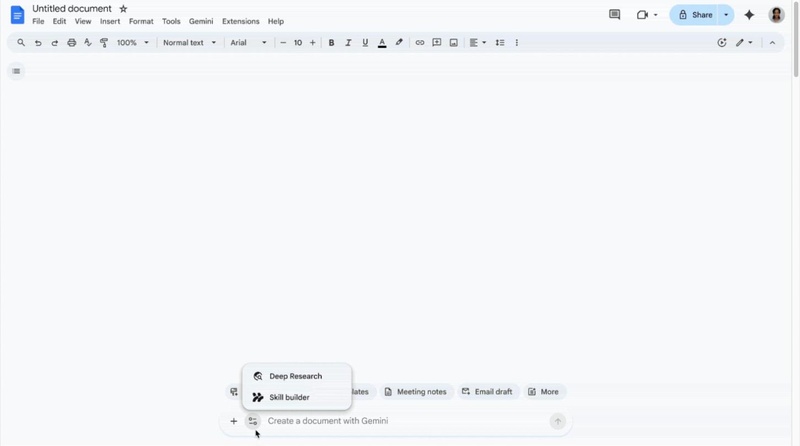

One important detail: skills in Workspace don't sync with skills in the Gemini app. If you use both, you need to create the skill in each place, or copy the SKILL.md instructions across.
Gems vs. Gemini Skills at a Glance
Please swipe to view

What Won't Carry Over
When Gems turn into skills, not everything moves with them:
- Large files: each skill holds up to 100 MB of files. If your Gem has more, the largest files are removed first.
- Some file types: GitHub files, audio, video, legacy Office files (.doc, .xls, .ppt) and archives (.zip, .rar, .7z and similar) don't carry over.
- Some default tools: Canvas, Deep Research, Create video, Create music and Guided learning don't work with skills yet.
- Sharing: you can't share skills in the Gemini app yet. Google says sharing is coming "in the coming weeks."
So if your Gem depends on files, it's worth checking them now. Part 7 shows how to move a Gem by hand, and Part 9 shows how to prepare your PDF files so they carry over.
Part 3. Is Gemini Gem Free? Do You Need Google AI Plus?
Yes, Gemini Gems are free. Google opened Gems to all Gemini users in 2025, so you only need a Google account to use one. The same is true for skills: they're free for personal accounts aged 18 and over.
Does Google AI Plus include Gems? Yes, but so does the free plan. A paid plan doesn't unlock Gems or skills. It gives you higher usage limits and access to stronger models. As of November 2026, Google lists these plans in the US:
Please swipe to view
Prices can change, so check Google's plan page before you subscribe.
How to get a Gemini Gem: go to gemini.google.com, open the side panel and click Gems. Keep in mind that personal accounts can't create new Gems after November 17, 2026. After that date, "getting a Gem" really means creating a skill.
Part 4. How to Make a Gem in Gemini (Step by Step)

creating new Gems stops on November 17, 2026 for personal accounts. After that, follow Part 7 to create a skill instead.
Here's how to create a Gemini Gem:
-
Open Gemini on the web. Go to gemini.google.com. You can only create and edit Gems on the web, not in the mobile app.
-
Click "New Gem." In the side panel, click Gems, then New Gem.
-
Name your Gem and write its instructions. Say who it is, what it should do, the tone and the format. If you're stuck, write a rough draft and let Gemini improve it.
-
Add knowledge files. Upload up to 10 files from your computer, Google Drive or Gemini Notebook.
-
Pick a default tool (optional). For example, set it to Create image.
-
Test it and save. Try a few prompts in the Preview panel, then click Save.

Tips for Writing Better Gem Instructions
- Give it a role and a goal. For example: "You are a friendly study coach. Help me prepare for my biology exam."
- Set clear rules. Say what to avoid, how long answers should be, and when to ask questions.
- Show an example. Paste one good answer so Gemini copies its style.
- Keep files clean. Short, text-based files work best. If a PDF is a scan, run OCR on it first (see Part 9).
Part 5. How to Use, Edit and Share Gemini Gems
How to Use a Gem in Gemini
Open the side panel, click Gems and pick a Gem to start chatting. Gems work on the web and in the Gemini app for Android and iOS. They don't work in Gemini Live, and they can't take actions in other apps.
How to Edit Gems in Gemini
Open the Gem manager, click the pencil icon next to a Gem, change its instructions or files, then click Update. To copy or delete a Gem, use the three-dot menu.
From November 17, 2026, Gems on personal accounts become read-only. If you want to make changes after that, recreate the Gem as a skill and edit the skill.
Can You Share Gemini Gems?
Yes. Since September 2025, you can share a Gem much like a Google Drive file: by email or with a link, as a viewer or an editor. Sharing may be blocked if the Gem uses files you can't share, or if a Workspace admin turns sharing off.
Skills work differently. In Workspace, you can already share skills from Workspace Studio, and each person gets their own copy. In the Gemini app, Google says skill sharing is coming soon.
Are Gemini Gems Private?
A Gem is private unless you share it. The people you share it with can see its instructions and, depending on their access, its files. Your chats with a Gem follow your Gemini Apps Activity settings. As a simple rule, don't add files you wouldn't want stored in your Google account, such as ID documents or bank statements.
Part 6. Gemini Gems Tools, Capabilities and Limitations
What Gems can do:
- Follow your custom instructions in every chat.
- Use up to 10 knowledge files, including live Google Docs and Sheets from Drive.
- Start with a default tool, such as Create image or Canvas.
- Be shared with other people.
What Gems can't do:
- Be created or edited in the mobile app.
- Work in Gemini Live or take actions in other apps.
- Be published in a public store, like ChatGPT's GPT Store.
- Handle very large document libraries well. For that, a tool like NotebookLM is a better fit.
The biggest limitation now is simple: Gems are being retired. Anything new you build should be a skill.
Part 7. How to Move Your Gems to Gemini Skills (Before Dec 17)
Google will turn your remaining Gems into skills automatically. But since some files and tools won't carry over, it's safer to move your important Gems yourself. Here's how, based on Google's official steps:
-
Save your Gem's files. Open the Gem from the Gems section of the side panel, click Edit and download its knowledge files.
-
Copy the Gem's details. Copy its name, description and instructions.
-
Create the skill. In Gemini, go to Customize > Skills, click Create, then Create manually. Paste the details and click Create.
-
Use the right name format. Skill names use lowercase words joined by hyphens, for example "blog-editor."
-
Add your files. Download the skill as a .zip, then put its SKILL.md file and your knowledge files in one folder with the same name as the skill. On the Skills page, choose Replace skill and upload the folder. For now, this works in the web app and the Mac app.
-
Test it. Type "/" in any chat, pick your skill and check the answer.

You can also create a skill by asking Gemini to write it, starting from a template, or uploading a SKILL.md file from another tool. When you're done, open the old Gem and the new skill side by side to make sure no file is missing.
If you use Google Workspace, you can also build skills in Google Docs with Skill Builder, which is handy when a team wants to write and review a skill together.

Part 8. Are Gemini Gems Worth Using? The Best Ways to Use Them
What's the point of Gemini Gems? They save you from typing the same instructions again and again, and they give you more consistent answers. That idea is still worth it. The only change is that you should now build these helpers as skills, which are more flexible because you can use them in any chat and combine them.
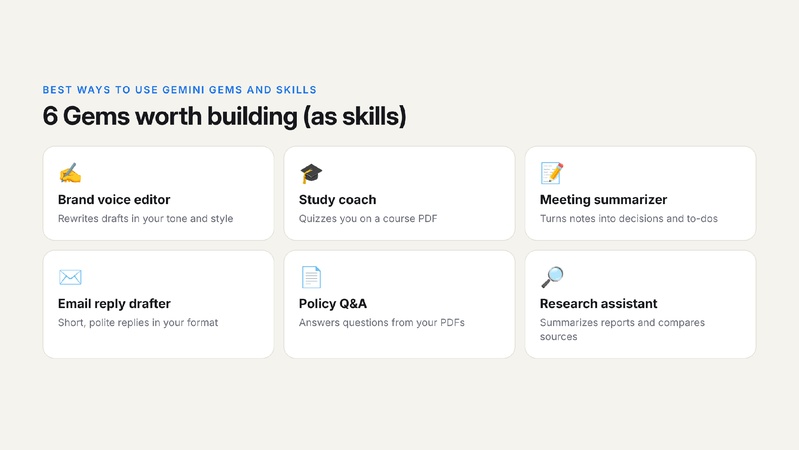
Here are six of the best ways to use Gemini Gems and skills:
- Brand voice editor: "Rewrite my draft in our brand voice: friendly, short sentences, no jargon."
- Study coach: "Quiz me on the attached course PDF, one question at a time."
- Meeting summarizer: "Turn these notes into decisions, owners and next steps."
- Email reply drafter: "Write a short, polite reply in my usual format."
- Policy Q&A: "Answer questions using only the attached policy PDFs, and quote the page."
-
Research assistant: "Summarize these reports and compare
their main findings."

Part 9. Tip: Prepare Your PDF Knowledge Files With PDNob
Many Gems and skills rely on PDFs: course notes, policies, reports and manuals. Since skills have file limits and some formats won't carry over, a little cleanup now can save you a lot of trouble. PDNob is a PDF editor with a free plan that handles all of this in one app.

- Scanned PDFs: Gemini reads real text far better than images of text. Use PDNob's OCR to turn a scanned PDF into searchable, editable text.
- Old .doc, .xls and .ppt files: these won't carry over to skills, so convert them to PDF first.
- The 100 MB limit: compress large PDFs so they fit in your skill.
- Too many files: merge related PDFs into one clean file, or batch process a whole folder at once.
- The right file: use PDNob AI to summarize or chat with a PDF and confirm it's the file you want before you upload it.
How to do it in PDNob:
-
Download and install PDNob. It's free to start, with no credit card needed.
-
Open your PDF. Launch PDNob and click "Open PDF."
-
Run OCR, convert or compress. For a scan, click OCR, choose "Editable Text" or "Searchable Text," and click Perform OCR. Then save the file and upload it to your skill.


before you upload, click Ask AI in PDNob and choose "Summarize this document" to check the file has what your skill needs.

Final Verdict
Google Gemini Gems made Gemini reusable, and they're free, but they're being retired. On personal accounts, Gems become read-only on November 17, 2026 and disappear on December 17, 2026. Download your Gem files now, rebuild your best Gems as Gemini Skills, and clean up your PDFs first so nothing gets lost along the way.
FAQ About Google Gemini Gems
Q1. Is Gemini Gem free?
A1: Yes. Gems are free for all Gemini users with a Google account. Skills, which replace Gems, are also free for personal accounts aged 18 and over.
Q2. Are Gemini Gems going away?
A2: Yes. Google is replacing Gems with Gemini Skills. On personal accounts, Gems become read-only on November 17, 2026 and are removed on December 17, 2026. Workspace business accounts follow in March 2027 and education accounts in June 2027.
Q3. What happens to my Gems on November 17, 2026?
A3: On personal accounts, your Gems become read-only. You can still open them, but you can't use them, edit them or create new ones. Then, on December 17, 2026, Gems are removed and your remaining Gems are recreated as skills.
Q4. Does Google AI Plus include Gems?
A4: Yes, but you don't need it. Gems and skills are available on the free plan. Google AI Plus mainly adds higher usage limits and extra features.
Q5. Are Gemini Gems private?
A5: Yes, a Gem is private unless you share it. People you share it with can see its instructions and, depending on their access, its files.
Q6. Can you share Gemini Gems?
A6: Yes, by email or link, as a viewer or editor. In the Gemini app, skills can't be shared yet, but Google says sharing is coming soon. In Workspace, you can share skills from Workspace Studio.
Q7. What's the difference between Gemini Gems and Gemini Skills?
A7: A Gem runs in its own chat. A skill runs inside any chat when you type "/" and its name, and you can combine several skills at once. Skills also use the open SKILL.md format, and each one can hold up to 100 MB of files.
Q8. Can I still create a new Gem in Gemini?
A8: Only until November 17, 2026 on personal accounts. After that, you can create a skill instead in Customize > Skills.



- Make scanned PDFs searchable and editable with 99% OCR precision
- Batch convert PDFs to Word, Excel, PPT, images, PDF/A, Text, EPUB, etc., up to 30% faster
- Edit PDFs easily like Word, including text, images, watermarks, links, and backgrounds
- Annotate PDF with highlights, comments, shapes, stickers, and stamps
- Run smoothly on any PC without lags or crashes, even on low-spec machines
 Secure Download


Speak Your Mind
then write your review
Speak Your Mind
Leave a Comment
Create your review for PDNob articles
Related articles

AI Tools Writer / Workflow Analyst
Rachel has spent the last 5 years testing and writing about AI-powered tools across writing, design, and research workflows. She focuses on practical AI tool usage, helping knowledge workers turn generative AI into everyday productivity.