
 Home
>
PDF Tips
>
ChatGPT Image 2.6 Review: Updated Features & Tested Guide-copy
ChatGPT Image 2.6 Review: Updated Features & Tested Guide-copy
- 1 What ChatGPT Image 2.6 is - a new OpenAI picture model, live in ChatGPT, Codex and the API
- 2 When it released- released November 4, 2026, and drawing is 50% quicker than version 2.5
- 3 What is new compared to 2.5- GIF output, SVG files and two API dials for quality and complexity
- 4 What I found in real test- editing worked, motion did not, and more frames broke it twice
- 5 What ChatGPT Image 2.6 Good for - posters with text, images you revise often, and short loops. Not for videos
OpenAI shipped ChatGPT Image 2.6 on November 4, 2026, and I tested it the next morning. It draws pictures about half again as fast, it can make GIFs, and it exports SVG files. You can see a new pop up saying 'Create GIFs with ChatGPT', but what's its limitation? How does it perform compared to ChatGPT Image 2.5 and Gemini nano banana?
I looked into ChatGPT Image 2.6 updated full features and Arena ratings on previous image editing models, and personally used the ChatGPT web app, in five rounds back to back, timing each one. I did not use the API. Below I will tell you what came back, the words I typed, and where the tool let me down. Following is what I have found.

Part 1. What ChatGPT Image 2.6 Actually Is
This is OpenAI's newest image model, released on November 4, 2026. It is inside ChatGPT, Codex and the API, rolling out to accounts a few at a time. The release post is the official answer to "openai ChatGPT image 2.6". Most "gpt new image model" roundups now list it first.

What Changed Since Version 2.5
- Faster drawing - about 50% faster than 2.5, with Flare finishing a picture in about 6 seconds
- GIF output - ChatGPT now builds a looping animated GIF from words or a photo
- SVG output - vector files that stay sharp when you zoom in for print
- Two API models - Flare for speed, Sunburst for detail and steadier repeat edits
- Two dials - quality sets sharpness, complexity sets how long it thinks first
- Circle and edit - circle a part of the picture and say change only this
- Same price - API costs did not change, though the cheaper Batch mode misses 2.6
Where Can I Access ChatGPT Image 2.6
 Please swipe to view
Part 2. ChatGPT Image 2.5 vs ChatGPT Image 2.6 vs Gemini Nano Banana
Most people may wonder a comparison of ChatGPT image 2.5 vs ChatGPT image 2.6 performance. I checked the public scoreboard that measures it. Arena is a blind test site. It shows two pictures and asks people to pick the better one, without saying which AI made them.
Two notes on the numbers. The plus and minus sign shows the score could move a few points. The word preliminary means the model has collected votes over thousand but not enought to a hundred thousands votes.
The Single-Image Editing Scores
Please swipe to view
Three Conclusions From The Data
- OpenAI took the top four places, and 2.6 stayed inside the first group
- Mixed - 2.6 tied 2.5 on text and commercial design, and trailed it on editing and photo realism
- Gemini Nano Banana 2.1 came last in every column, yet it still reaches 4096 by 4096 pixels
The vote counts explain most of this. GPT-Image-2.5 Sunburst has 114,468 votes behind its score. GPT-Image-2.6 Sunburst has 3,833, and every 2.6 row is still preliminary. So temporarily, GPT-Image-2.6 sits close to 2.5, and the real gains are speed, GIFs, SVG files and finer API control.
Part 3. Real Test: How to Use ChatGPT Image 2.6 to Make GIFs
Here is what I did, in order, with the timing for each round.
My Results At A Glance
Please swipe to view
Round 1 - Moving Text Out Of The Way
My prompt: Move the headline in front of the car. Keep the car exactly as it is.

Waiting Time:5 seconds.
Result: the full headline appeared and nudged up a little, so the car no longer cut into it. The car photo did not change. My take: local editing done well, because it touched only what I asked.
Round 2 - Adding A Date And A Color
My prompt: Add a date below the car. Make the text blue with a line above it. Fill the background behind the text.

Waiting Time:7 seconds.
Result: the date appeared and the text turned blue. A thin line was added above it, and a background filled in behind the letters.
The photo was untouched. My take: three changes in one request, and the car stayed clean.
Round 3 - Converting The Poster To GIF
My prompt: Turn this into a GIF. The car moves slowly into the photo, then the headline fades in.
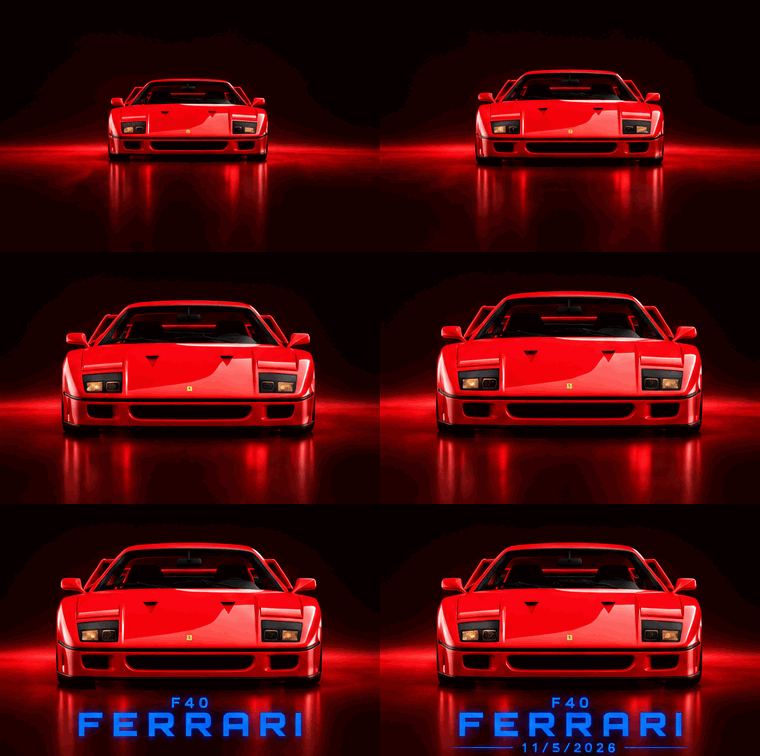
Waiting Time:10 seconds.
Result: it worked. The car and the letters kept their shapes in every frame, but playback looked choppy, like a slideshow.

the shapes held, the motion did not. Its GIF generation is not as smooth as expected.
Round 4 - Asking For 100 FPS
FPS is frames per second, how many pictures the animation swaps each second. My prompt: make the same GIF but at 100 frames per second. The car glides in slowly, and the headline appears after.
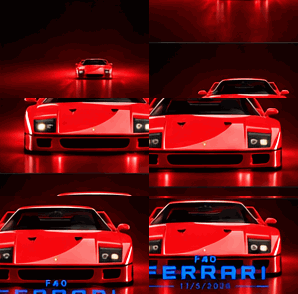
Waiting Time:24 seconds.
Result: playback felt much smoother, but the car photo flashed on and off at random. The animation fell apart.
First wall hit. Something was traded for that smoothness.
Round 5 - Asking For 50 FPS
I assumed I had pushed too hard. So I asked for a gentler number, and did not time this round.
My prompt: Same GIF, 50 frames per second, the car drifts in, then the words appear.
Result: still broken. The car flickered with no pattern and never came back to the clean frames from round 3.
the problem was never asking for too many frames per second. More frames means the car is drawn again and again, each drawing slightly different.
What Each Round of Testing Taught Me
OpenAI's API guide explains how the GIF is built. The model draws the whole animation as one picture cut into panels, like a flip book, then slices it up. Each frame can last 20 to 2000 milliseconds.
So 20 milliseconds is 50 frames per second, and that is the limit of the tool. Asked for 100, it answered by drawing more panels, each a fresh drawing of the car.
That also explains the flicker. The model cannot move a picture it already made. It redraws the whole scene for each panel, so more panels means more drift.
The official guide also warns that the result is not always what you asked for. One tester who asked for 16 frames in a 4:3 shape received 12 square ones.

How To Get A Smooth GIF Instead
- Never ask for frames per second - give the frame count and length, like 12 frames at 120 ms
- Keep big objects still - move the text, not the car
- Use the speed control, not a new prompt - change playback speed, step through frames, redraw one
- Copy the structure - the official prompt guide wants panels, one angle, and a last frame that blends back

Some people found ChatGPT generating images without asking, this might happen if you require ChatGPT to generate images in previous context, a simple description will prompt it to move on to image generation.
Part 4. Strengths and Limitations of ChatGPT Image 2.6
Strengths I Saw In My Own Test
- Local editing - my headline fix landed in 5 seconds and the photo never moved
- Multi-round stability - after five rounds the car still looked the same
- Poster layout - Flare is built for posters, and round 1 proved it
- GIF output - one prompt produced a looping file with no code at all
- No price change - 2.6 costs the same as 2.5 on the API
Limitations And The Workarounds
- Frame rate - you cannot ask for 100 fps, because the shortest frame lasts 1/50 of a second
- Frame drift - each extra frame redraws the car, so the animation flickers
- Unreliable specs - the number of frames and the shape you asked for can come back different
- No video - Sora shut down in April 2026, the video API in September, per the deprecation list
Part 5. How to Keep Your ChatGPT Images as PDF
Making the poster is the easy part, and keeping it is the annoying part. A screenshot is a picture of a picture: the text is no longer real text, so you cannot search it. It also blurs when enlarged. A PDF stays sharp at any zoom and gives you one file to send.
Why I Use PDNob For This
PDNob is a light weight AI PDF editor with high precision OCR feature and a patch of PDF batch tools. built for this job, turning generated images into files you can print, edit and archive. It converts images to PDF in batches, and its AI-powered OCR reads text out of scanned posters. It suits creators and small teams who need accurate OCR and fast PDF editing across desktop and cloud.


- Editing and annotation - change wording, add notes, highlight, rearrange pages
- Chat with PDF and image - ask questions, get summaries, translate in two modes
- Export - PDF to Word, Excel or PowerPoint, and images to PDF
- Free plan - 20 watermark-free exports, weekly OCR, batches of 5, 2GB of cloud space
Four Steps To Build Your Poster Archive
-
Download the pictures you want to keep into one folder and name them clearly.Open PDNob and use its image to PDF tool. Add the folder at once and pick the page size, like A4 or Letter. You can directly click 'add' to choose the convert file to PDF option.
-
You can also try the batch conversion tool. Upload images files or documents you need to convert and than process them in batch.
-
Check the page size before printing. The chat preview is not the print size, so set the paper size first.
-
Save the PDF to your cloud drive, so you send one link, not a pile of images.


Conclusion
ChatGPT Image 2.6 is a strong tool for the work that happens before a video starts. It edits posters quickly and keeps your picture steady while you change it. It also makes a short looping GIF from one prompt.
Do not expect it to replace a video tool. Sora is gone, GIFs carry no sound, and the frame controls are looser than the launch story suggests. I kept my Ferrari poster because I stopped chasing frame rates.
FAQ on ChatGPT image 2.6
Q1. What is the newest ChatGPT image model?
A1: A: "what is ChatGPT image 2.6" is a fair question. The short answer: it is OpenAI's newest picture model. It is also the first ChatGPT model that can output GIFs and SVG files.
Q2. How long does it take ChatGPT to generate an image?
A2: A: The answer to "how long does it take ChatGPT to generate an image" depends on the job. A plain picture takes about 6 seconds on the API, and my poster edits took 5 and 7.
Q3. Can ChatGPT make multiple images at once?
A3: A: Yes, and most people asking "can ChatGPT make multiple images at once" want a set of options. One prompt can return several versions, each using up your quota.
Q4. How many images does ChatGPT allow?
A4: A: It depends on your plan. OpenAI never published the numbers, so searching "how many images does ChatGPT allow" turns up a range, not a figure.
Q5. ChatGPT nano banana - which one should I use?
A5: A: The "ChatGPT nano banana" question usually means comparing OpenAI with Google. On the Arena board Google's Nano Banana 2.1 sits eighth, both OpenAI models in the top five.
Q6. Can ChatGPT turn a photo into a video?
A6: A: Not natively. OpenAI shut down Sora in April 2026, then the video API in September. Searching "ChatGPT image to video" mostly returns old articles.



- Make scanned PDFs searchable and editable with 99% OCR precision
- Batch convert PDFs to Word, Excel, PPT, images, PDF/A, Text, EPUB, etc., up to 30% faster
- Edit PDFs easily like Word, including text, images, watermarks, links, and backgrounds
- Annotate PDF with highlights, comments, shapes, stickers, and stamps
- Run smoothly on any PC without lags or crashes, even on low-spec machines
 Secure Download
Speak Your Mind
then write your review
Speak Your Mind
Leave a Comment
Create your review for PDNob articles
Related articles

AI Tools Writer / Workflow Analyst
Rachel has spent the last 5 years testing and writing about AI-powered tools across writing, design, and research workflows. She focuses on practical AI tool usage, helping knowledge workers turn generative AI into everyday productivity.


