
 Home
>
PDF Tips
>
How to Download and Use Google Gemini Mac App: 2026 New Guide
Home
>
PDF Tips
>
How to Download and Use Google Gemini Mac App: 2026 New Guide
How to Download and Use Google Gemini Mac App: 2026 New Guide
On April 15, 2026, Google officially released the native Gemini for Mac app, marking a significant milestone in desktop artificial intelligence. For power users and creative professionals, this isn't just a browser shortcut; it is a fully integrated macOS experience designed to streamline workflows directly from the desktop.
If you are wondering how to download and use Google Gemini Mac app to boost your productivity, you’ve come to the right place. In this comprehensive guide, we will explore the new features, the installation process, and how to integrate this powerful AI into your daily Mac life alongside essential tools.

Part 1: Gemini App, Now on Mac — What’s New?
The launch of the Gemini app for Mac brings a suite of features that move beyond the traditional web interface. Built natively using Swift, the app is optimized for Apple Silicon (M1, M2, M3, and the latest M4 chips), ensuring that the AI feels like a core part of the operating system.

1. A Native Desktop Experience
Unlike the web version, the Gemini mac desktop app download provides a persistent presence on your machine. It features a customizable "overlay mode" that allows the AI to sit on top of other windows, making it easier to reference information without constant tab-switching.
2. Keyboard Shortcuts and Instant Access
One of the most praised updates is the "Gemini Launcher." By pressing Option + Space, users can instantly summon the AI. This functionality directly challenges the traditional Spotlight search, offering a more conversational and generative approach to finding information or executing tasks.

This 'stay-in-the-flow' design is a core feature of the Gemini 3.0 ecosystem. Following the Gemini Live Android Redesign on March 12, 2026, Google replaced the clunky full-screen UI with a floating 'pill' window. Now, whether you’re using the Mac app or the new Android interface, Gemini stays as a non-intrusive layer—perfect for multitasking in PDNob without your view being blocked.
3. Screen Awareness and Multimodal Input
The Gemini app for Macbook Pro and Air now features advanced screen awareness. Users can click a "Share Screen" button within the app, allowing Gemini to "see" what is currently displayed. Whether you are analyzing a complex data set in Numbers or debugging code in Xcode, Gemini can provide context-aware suggestions in real-time.

While Google has taken the lead with this April release, the industry is buzzing with rumors that a generative AI-powered Siri upgrade is expected to debut at Apple’s WWDC in June. However, until then, the Gemini for mac app stands as the most robust native AI assistant available for macOS users.
Part 2: How to Download and Install Gemini on Mac
Getting the AI onto your desktop is a straightforward process. Follow these steps to ensure a successful Gemini mac app download free and setup.
System Requirements
Before you begin the Gemini mac download, ensure your hardware meets the following criteria:
- Operating System: macOS 15.0 (Sequoia) or later.
- Hardware: Optimized for Apple Silicon, though Intel-based Macs are supported via Rosetta 2.
- Account: A personal Google Account or a Google Workspace account with Gemini features enabled.
Step-by-Step Gemini Mac App Download Free
-
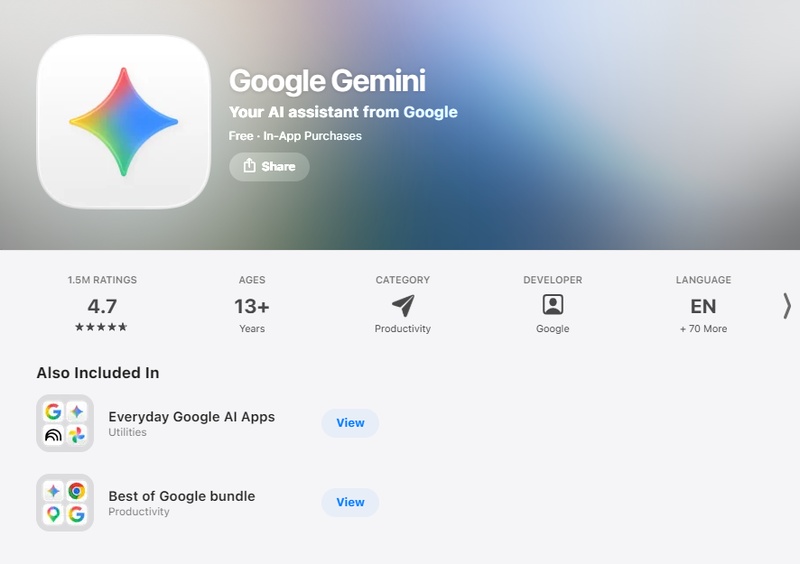
Visit the Official Site: Navigate to the official
Google Gemini download page
or
the Mac App Store.
- Download the .dmg File: Click on the Gemini mac desktop app download link to retrieve the installer.
- Mount and Drag: Open the downloaded .dmg file and drag the Gemini icon into your Applications folder.
- Security Permissions: Upon first launch, macOS may ask for permission to "Record Screen" and "Accessibility." These are necessary for the screen awareness features to function.
-
Sign In: Log in with your Google credentials to sync your
history and preferences across devices.


Tips for First-Time Setup
After completing the gemini mac download, you’ll be prompted to grant permissions such as:
- Screen access (for contextual AI features)
- Notifications
- File access (limited to reading context, not editing)
Granting these ensures the best experience when learning how to download and use google gemini mac app effectively.
While Gemini is excellent for processing the information on your screen, it sometimes lacks the "manual" tools needed to handle complex local files. For tasks that require deep document manipulation or high-precision OCR, many users pair their setup with PDNob to handle the heavy lifting that standard AI apps can't yet perform.




Part 3: How to Use Google Gemini on MacBook (Core Features Guide)
Now that you've completed your Gemini Mac app download, let's explore how to maximize its potential on your MacBook Pro or MacBook Air.
Using the Gemini Shortcut
Instead of clicking the icon in the Dock, get used to the 'Option + Space' command. This allows you to ask quick questions like, "Summarize the email I just received" or "Generate a Python script for data cleaning" without breaking your focus.
Core Features: How to Use Gemini on MacBook
1. Screen Sharing for Contextual AI
One of the standout features of Gemini app for Macbook Pro is screen sharing:
Click the screen share icon in the chat interface
Select a specific window or your entire screen
Ask Gemini questions about what you're viewing
-
Perfect for analyzing documents, debugging code, or understanding images

2. File Upload and Analysis
To upload files to Gemini for Mac:
Click the attachment icon in the chat input
Select files from your local system, Google Drive, or Photos
-
Supported formats include images, PDFs, documents, and code files
Ask specific questions about the uploaded content

3. Content Creation Tools
Access creative features through the "More tools" menu:
Create Image: Generate visuals using Nano Banana
Create Video: Produce video content with Veo
Create Music: Compose audio tracks
Canvas: Collaborative visual workspace

4. Deep Research and Learning
The Gemini Mac app includes:
Deep Research: Comprehensive research on complex topics
Guided Learning: Step-by-step educational assistance
-
Personal Intelligence: Personalized chat responses based on your context

5. Voice Interaction
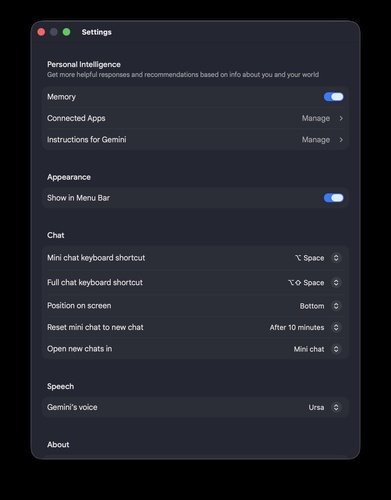
Enable voice features in Settings:
- Select your preferred voice for audio responses
- Use voice input for hands-free interaction
- Perfect for multitasking while working on your Mac
Customization Options
Make Gemini for Mac work for you:
- Mini Chat Behavior: Set auto-reset timers for temporary chats
- Voice Selection: Choose from multiple voice options
- Window Preferences: Decide where new chats open
- Shortcut Customization: Adjust keyboard combinations to avoid conflicts
However, even with these powerful features, you might find that Gemini "hits a wall" when you need to actually edit a PDF or convert a file to Word.
Part 4: Maximize Your Gemini Productivity with Advanced Document Workflows
While the Gemini for mac app is a powerhouse for brainstorming and data analysis, it hits a wall when it comes to "Final Mile" document handling. Gemini can summarize a PDF, but it cannot convert a PDF into a perfectly formatted Word document, nor can it directly edit the text within a local file or generate a ready-to-present PowerPoint from your desktop.
In the battle of utility, Gemini is your "Thinker," but PDNob PDF Editor is your "Doer." While Gemini's screen awareness is impressive, it lacks the specialized OCR and file manipulation engines required for professional document modification. To bridge this gap, using the Gemini app for mac alongside PDNob is the ultimate strategy for Mac users.
Key Advantages of PDNob
- Precision File Conversion: Unlike Gemini, PDNob can convert PDFs to Word, Excel, or PPT while perfectly preserving the original layout.
- Advanced OCR Technology: It extracts text from images and scanned documents that are too blurry for standard AI to read.
- Direct PDF Editing: You can modify text, images, and links directly within a PDF without needing the source file.
- Batch Processing: PDNob handles hundreds of files at once, a task that would trigger rate limits in any AI app.
- Privacy-First Offline Mode: Process sensitive documents locally on your Mac without uploading them to the cloud.
- Seamless Form Filling: Easily add digital signatures and fill out complex PDF forms that Gemini can only "describe."
The Ultimate Workflow: How to Use PDNob with Gemini
By integrating your Gemini mac download with PDNob, you can transform static files into actionable data in five simple steps:
- Extract Text from Non-Selectable Files
- Analyze and Optimize with Gemini
- Edit and Refine the Document Content
- Convert to Professional Office Formats
- Secure and Share Your Final File
If you have a scanned document or a locked image, open PDNob and use the OCR tool. This extracts the raw text from the file so you have something to feed into the AI.

Press Option + Space to summon the Gemini mac desktop app download interface. Paste your extracted text and ask Gemini to summarize, translate, or rewrite the content based on your specific needs.

Take the AI-generated draft and bring it back into PDNob. Use the Edit PDF feature to replace old text, insert new images, or adjust the font to match your company's branding.

Since the Gemini app for mac cannot export to .docx or .pptx, use the PDNob Converter. With one click, turn your polished content into a perfectly formatted Word document or PowerPoint presentation.

Finally, use PDNob to add a digital signature or password protection to your document. Your AI-assisted, professionally formatted file is now ready for high-stakes client delivery.

Part 5. FAQs of Google Gemini Mac APP
Q1. Is the Gemini for Mac app free?
A1: Yes, the Gemini mac app download free version is available to all. Advanced features like Gemini Ultra models may require a subscription.
Q2. Does Gemini for Mac support PDF editing?
A2: No, it can only read and summarize them. For editing and conversion, you should use PDNob.
Q3. How to enable Gemini in Chrome on Mac?
A3: To use Gemini directly in your browser, type @gemini in the Chrome address bar (Omnibox) followed by your prompt. You can also enable the "Gemini side panel" by going to Settings > AI Innovations and toggling on Gemini in Chrome. For quick access, use the shortcut Command + G
Q4. Is the new Gemini UI available on mobile as well?
A4: Yes! Along with the Mac app launch, the Gemini Live Android Redesign has rolled out for Android users. It features a minimalist floating window that lets you multitask effortlessly. Whether you are using the Mac app to analyze a report or the Android version to discuss a document on the go, the experience is now more seamless than ever.
Q5. How to install Gemini on Mac safely?
A5: You should only download the official .dmg file from the Google Gemini homepage or the Mac App Store to ensure a secure installation.
Conclusion
Learning how to download and use Google Gemini Mac app is an essential step for anyone looking to stay competitive in 2026. By completing your Gemini mac download and pairing it with PDNob for robust document handling, you ensure that no task is out of reach. The Gemini for Mac era has arrived—power up your productivity today.



- Make scanned PDFs searchable and editable with 99% OCR precision
- Batch convert PDFs to Word, Excel, PPT, images, PDF/A, Text, EPUB, etc., up to 30% faster
- Edit PDFs easily like Word, including text, images, watermarks, links, and backgrounds
- Annotate PDF with highlights, comments, shapes, stickers, and stamps
- Run smoothly on any PC without lags or crashes, even on low-spec machines
 Secure Download
Secure Download
Speak Your Mind
then write your review
Speak Your Mind
Leave a Comment
Create your review for PDNob articles

Related articles

AI Tools Writer / Workflow Analyst
Rachel has spent the last 5 years testing and writing about AI-powered tools across writing, design, and research workflows. She focuses on practical AI tool usage, helping knowledge workers turn generative AI into everyday productivity.


