How to Cancel Subscription
(Recurring Payment)
To cancel your subscription quickly, you can always contact PDNob support team. We respond within 24 hours on weekdays and 48 hours on holidays.
The cancellation steps vary by platform. Please select the platform you used for payment and follow the instructions below.
1. How to Cancel Subscription for Most PDNob Orders
Subscriptions for most PDNob orders can only be canceled by contacting customer support.
If your order number starts with T (e.g., T1234567890) or your invoice looks like the screenshot below, please contact PDNob support to cancel your subscription.
Here is an example of the invoice for reference:

2. How to Cancel Subscription on PayPal
Please follow these steps:
- Log in to your PayPal account at PayPal Website.
- Click the Settings icon.
- Select Payments.
- Under "Preapproved payments," click Manage preapproved payments.
- Choose the merchant you want to cancel and click Cancel.
- Click Cancel Profile to confirm.
More details on PayPal support: PayPal Support
3. How to Cancel Subscription for PDNob Order on Google Play
If your order number starts with GPA (e.g., GPA.1234-1234-1234-12345), contact PDNob support. You can also cancel manually:
- On your device, go to Google Play Subscriptions.
- Select Manage for the subscription you want to cancel.
- Click Cancel subscription.
- Choose a reason in the confirmation popup.
- Click Continue to confirm.
Tips:
1) Deleting the app does NOT cancel your subscription.
2) Cancelling is immediate; previous payments are non-refundable. You can always re-subscribe later.
More details: Google Play Help
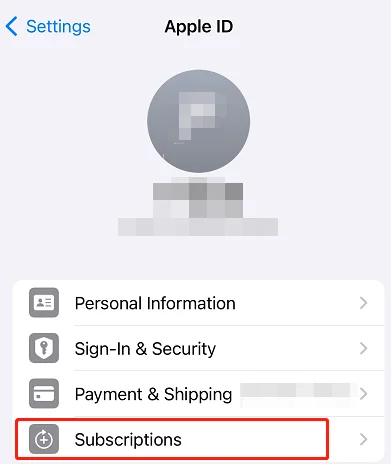
4. How to Cancel Subscription for PDNob Order on Apple Store
If your order is via Apple Store, you can cancel it directly there:
- Open the Settings app.
- Tap your name.
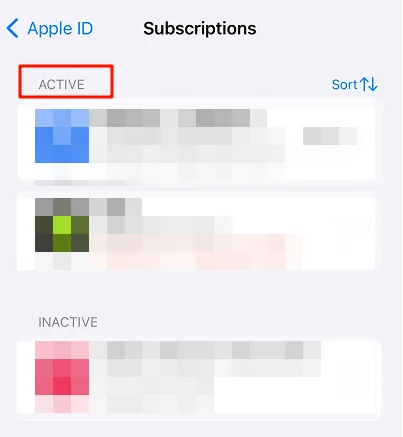
- Tap Subscriptions.
- Find the product you want to unsubscribe.
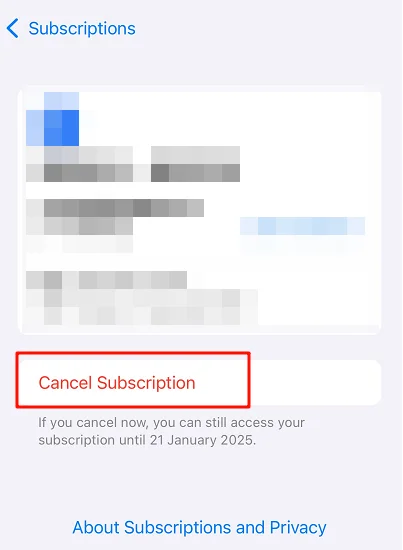
- Tap Cancel Subscription and confirm. If no button or red text shows, the subscription is already canceled.
More details: Apple Support
5. What to Do If Your Order Renewed Automatically
Because of system restrictions, subscription fees are non-refundable. Before checkout, you'll see “Renewal: Automatic.” The payment platform will send a notification email before renewal, giving you a chance to cancel.
If the email was missed or marked as spam, the payment cannot be refunded once renewed.
To prevent future automatic payments, cancel the subscription on time. For help, contact PDNob support team.