
 Home
>
PDF Editor
>
PDNob vs PDFelement: Ultimate Comparison Guide 2026
Home
>
PDF Editor
>
PDNob vs PDFelement: Ultimate Comparison Guide 2026
PDNob vs PDFelement: Ultimate Comparison Guide 2026
- 1 The price gap is real. PDNob costs $64.99 once with free lifetime updates, or $49.99 a year. PDFelement starts at $79.99 a year ($129.99 perpetually), but each upgrade is an extra charge.
- 2 They are built for different jobs. PDNob is a small, fast desktop editor with OCR repair tools. PDFelement is the wider suite: XFA forms, wider OCR languages support, more comprehensive AI writing features.
- 3 On our test file, PDNob's editing feature offer more flexibilty in text style and quick superscript/subscript, while PDFelement offers more quick AI feature access like AI rewrite and AI detection.
- 4 OCR is not a tie. Crooked, noisy scans point to PDNob's six repair switches. Clean forms full of checkboxes point to PDFelement's 40+ language engine and automatic field detection.
- 5 Both now bill AI separately at $39.99 a year, so the difference is what the AI does. PDNob's agents can run OCR, conversion or compression and hand back the finished file; PDFelement's assistant advises you instead.
Both PDNob and PDFelement can look equally useful on a website and still behave very differently once you open a real file. So pick by the job, not by the feature list: choose PDNob if your PDFs are scans and you want speed and a one-time payment; choose PDFelement if you build XFA forms, sign contracts, or need AI grammar check or AI detection.
This guide compares them on price, OCR, editing, translation and AI, then runs four everyday tasks on the same files, so you can see which one matches your work before you pay anything.

Part 1. PDNob vs PDFElement: The Differences in One Table
Here is the short version. Read the table first, then jump to the section that matches the part of your work you care about most.
 Please swipe to view
Part 2. Three Core Differences and Tested Features
Difference 1 — Product Positioning
Neither product is just a PDF reader, but they pull people in for different reasons. Think of it this way: PDNob is the tool you keep open all day, and PDFelement is the suite you open when the work turns serious.
PDNob: a Light, AI-ready Desktop Editor

PDNob is a desktop PDF editor built for speed. It opens files quickly, and it treats OCR as the main job rather than an extra. That makes sense if your PDFs are scanned papers, mixed-language documents, or long reports that you still need to search and quote.
Three things stand out, and all three are places where PDFelement has no equivalent. First, you can fix a bad scan before it is read: six separate PDF enhancement options handle crooked pages, weak contrast, black backgrounds, noise, and text that was baked into a photo. Second, your highlights stay glued to the words you highlighted, even after you edit the text three paragraphs later. Third, the AI agent actually do the work — ask for a conversion, an OCR pass or a compression, and the agent runs it and hands the finished file back.
The trade-off is feature depth. PDNob does not try to cover every corner of PDF work, and in a 2026-08 comparison it covered a smaller share of the feature surface than PDFelement did.
PDFElement: a Wide Suite for Forms, Teams and Contracts

PDFElement is the bigger product from Wondershare. It covers editing, conversion, OCR, forms, e-signature and batch processing, plus a growing set of AI tools for summarizing, translating and flagging risky contract clauses.
Its strengths are real and worth naming. The form builder handles XFA — the dynamic forms that fill themselves in — and PDFelement detects fields, checkboxes and dropdowns on a clean scan automatically. It has wider language support on OCR for clean pages, and its AI features covers AI rewrite, AI explanation, AI dectection and AI mindmap,etc .
The trade-off is the final price. AI access is sold on top of the base plan, and the plan itself is not a single number — each upgrade and AI credit ask for extra charge. You have to read the pricing page carefully.
Which Should You Choose?
- Your PDFs are mostly scans, you want one fast app that does OCR and editing together, and you prefer paying once: choose PDNob.
- You build forms, review contracts, number pages for a case file, or want more AI features like AI rewrite, AI detection or AI Grammar check: choose PDFElement.
Difference 2 — Price & Value
Price matters, but the more useful question is whether you get back what you pay for. Here is what each one actually costs today.
PDNob: Most Cost-Effective PDF Editor

PDNob publishes three simple columns. The free tier costs nothing and does not expire, though it is capped: the first 20 exported files have no watermark, you get 20 AI uses, and the heavier OCR and conversion jobs run once a week. The yearly license is $49.99 and the lifetime license is $64.99, and the lifetime option includes free updates for every future version. There is no auto-renew switch to forget about and no fee when a new version ships.
The paid plans mostly remove limits rather than add features:
- Unlimited use of editing, conversion, OCR, compression and batch tools
- Per-task time limit drops from about a minute on the free tier to under ten seconds
- Cloud storage grows from 2GB to 20GB, and the single-file limit lifts
- One license covers two devices, any mix of Windows or Mac
- Full AI access comes with the optional PDNob AI plan at $39.99 a year (7-day free trial, cancel any time), which unlocks chat, summary, translation, rewriting and explanation without the file-count limit
Latest version as of 2026-10: V2.1.1 for Windows and Mac, V1.4.1 for iOS..
PDFElement: More Comprehensive Feature Coverage

PDFelement runs three price ladders at once. Its pricing starts at $79.99 per year or $129.99 perpetually. On the store you will also find a quarterly plan, a multi-platform bundle listed at $89.99 per year, and separate Android and iOS plans.
Two details are worth knowing before you check out:
- Auto-renew is on by default. The annual Standard price is quoted both as $79.99 with auto-renew enabled and as $31.99 with it disabled. That is a real difference in cost, not a display trick — switch it off deliberately if you plan to buy annually.
- "Perpetual" means the version you bought. A perpetual PDFelement license covers the lifetime of that major version, not of the product. When Wondershare ships a new major version, upgrading costs extra, and the upgrade price for current perpetual owners runs from $29 to $59.
- AI is a separate add-on. The AI assistant, including the contract tools, is listed at $39.99 per year on top of the base plan — the same way PDNob sells its AI plan.
Latest version as of 2026-10: V12.2.2 stable, with V13 in rollout.
Is the money worth it?
Three questions answer this faster than any feature list:
- How often do you work with PDFs? Once or twice a month is different from every single day.
- What kind of files or feature you relies on most? Normal OCR or editing and translation, or less-used but necessary features may lead to very different result.
- What does the total cost look like? Compare what you pay in year one with what you pay in year three.
PDNob's specific pricing, license terms, AI usage quotas and feature scope can change between versions. Check the PDNob official purchase page before you buy, and do the same on the PDFelement store page.
Tested PDF Workflow: Which One is Best for You??
Whether a PDF editor is good cannot be judged from a feature list alone — it also has to carry out the work you actually need. We tested a PDF file to compare PDNob and PDFgear in practice.
Test files:
- A 9-page PDF with mixed text and images, used to test editing
- A screenshot used to test OCR and translation
Test device: one Windows 11 machine
Scenario 1: Editing PDF Text, Images and Pages
PDNob editing results

Tested Words:
- Double-clicking a content element in the Home view switches straight to the editing view automatically
- Supports alignment, quick superscript/subscript, and control over font width, height and letter spacing
PDFelement editing results

Tested Words:
- Requires manually switching to the content editing view
- Font styling is less flexible than PDNob's, but AI integration is very complete — AI summarize-on-selection, AI rewrite, AI detection and grammar check are all supported
Conclusion: In terms of editing, PDNob's view switching is more flexible, its editing offers a higher degree of customization, and its built-in alignment options help improve overall editing efficiency. PDFelement offers more considerate AI features to assist content writing.
Scenario 2: Turning Scans into Text with OCR
PDNob OCR results


Tested Words:
- Optional enhancement for flawed scans (blur, skew, noise and more)
- Took about 4 minutes to complete, the layout of the recognition result is preserved correctly and completely
- Supports 16 recognition languages
PDFelement OCR results
Tested Words:
- No enhancement options for flawed scans
- Also took about 5 seconds to complete, the layout of the recognition result is preserved correctly and completely
- Supports 40+ recognition languages
Conclusion: In terms of OCR, PDNob's optional scan enhancement helps clean up flawed scans before recognition, while PDFelement's advantage lies in broader language coverage with 40+ supported languages.
Scenario 3: Translating a PDF Into Another Language
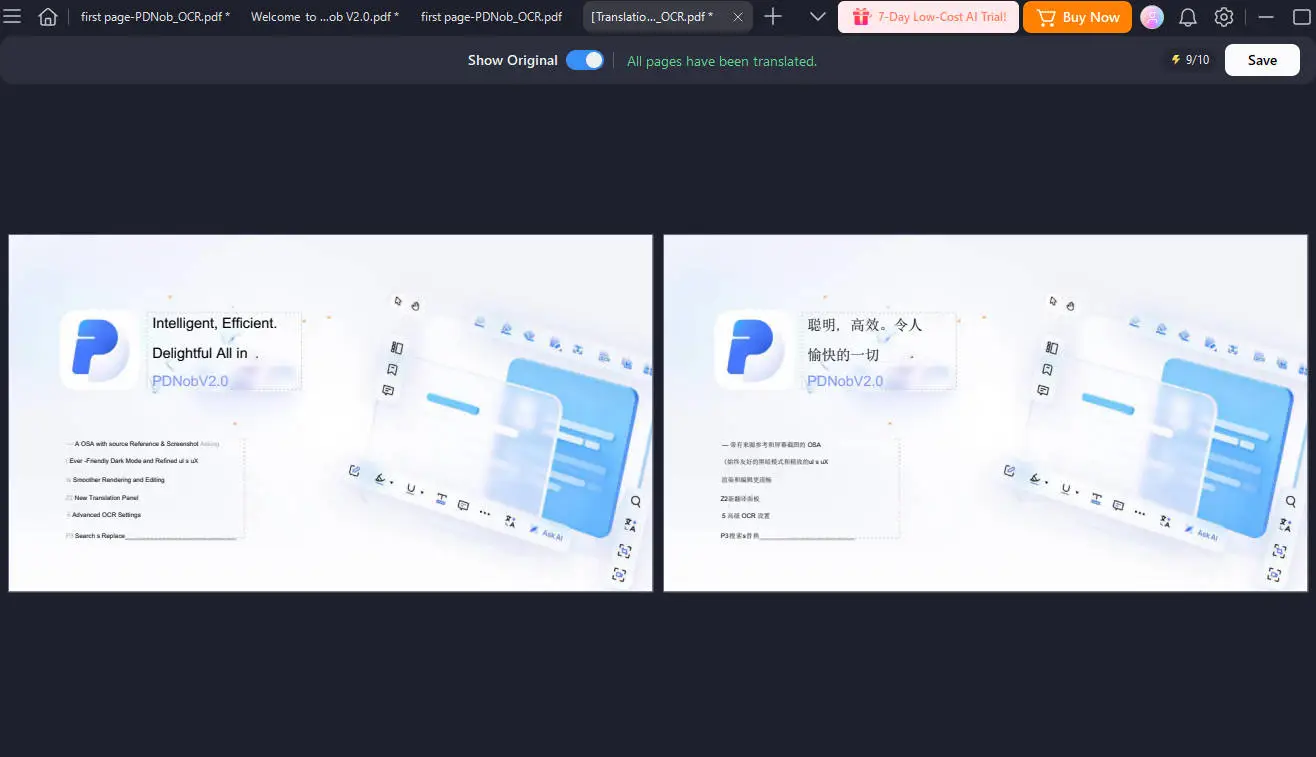
PDNob translation results


Tested Words:
- Supports both text translation and whole-file translation
- Supports a bilingual side-by-side view of the translation result
- The translated layout is accurate with no garbled characters
PDFelement translation results

Tested Words:
- Supports both text translation and whole-file translation
- Supports a bilingual side-by-side view of the translation result
- The translated layout is accurate, but a few characters remain in the source language
Conclusion: In terms of translation, both tools support whole-file translation with a bilingual side-by-side view, but PDNob keeps the translated layout accurate with no garbled characters, whereas PDFelement leaves a few characters in the source language.
Scenario 4: AI Help Inside the Editor
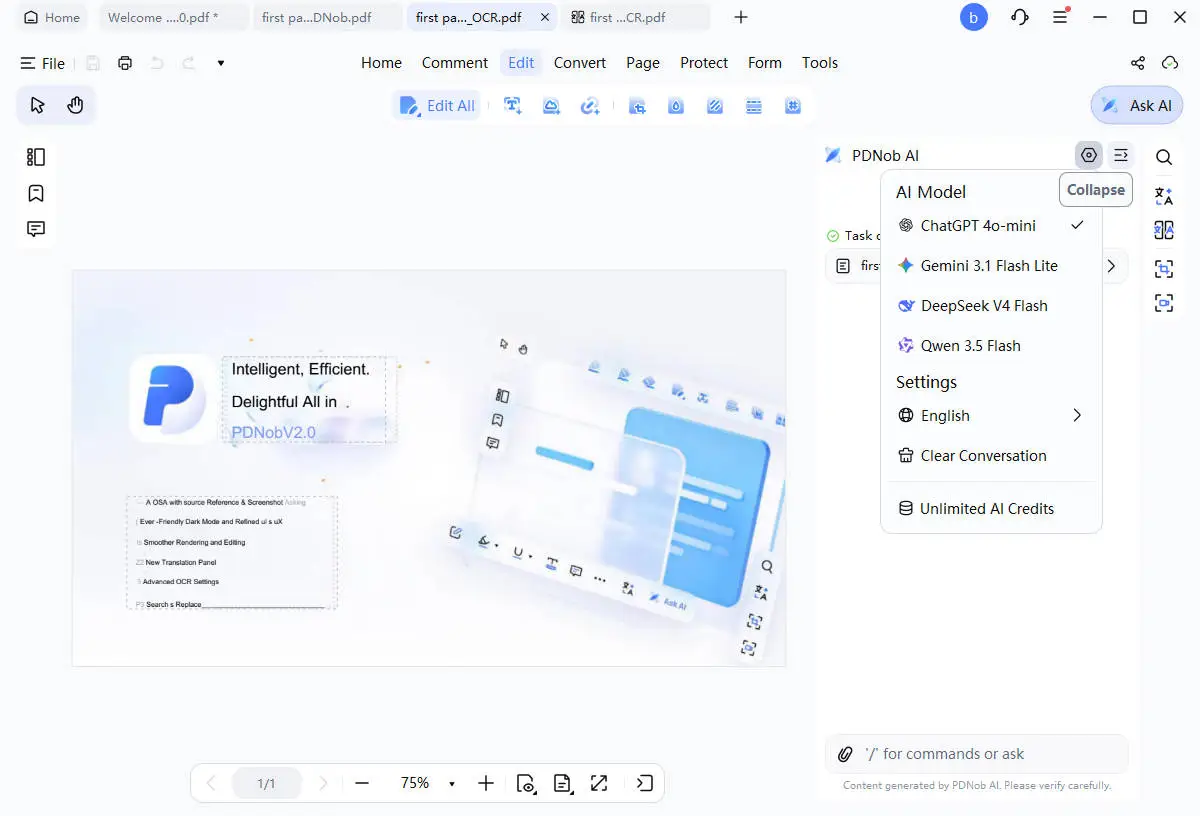
PDNob AI results

Tested Words:
- Supports custom language and model selection
- Supports natural-language commands to have AI complete work tasks, plus AI summarization and chat
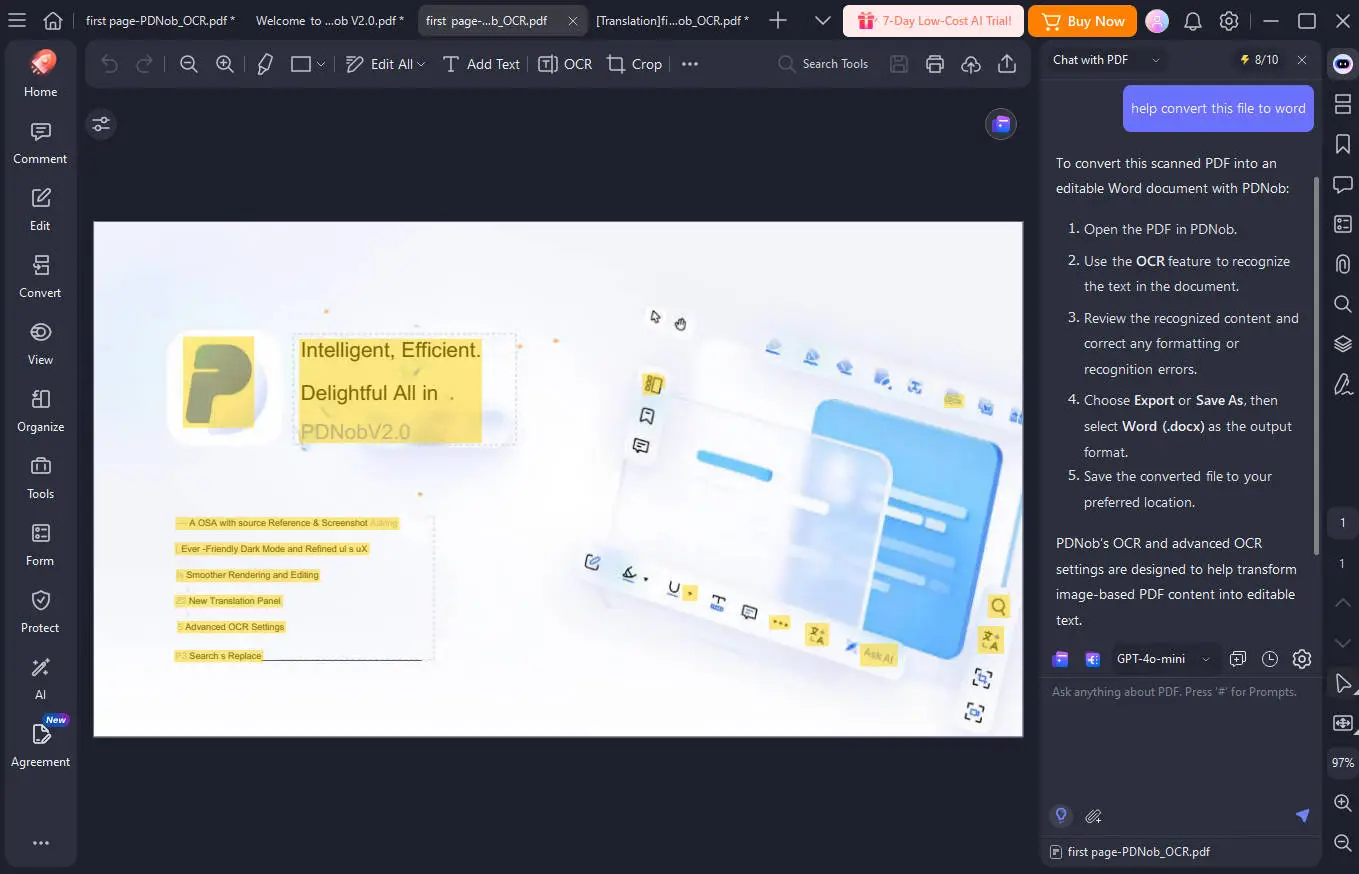
PDFelement AI results

Tested Words:
- Supports custom language, model selection, industry background knowledge base, and response structure and tone
- Supports mind-map generation, AI grammar and spell check, AI-generated-content detection, plus AI summarization and chat
Conclusion: In terms of AI, PDNob lets you drive tasks through natural-language commands, while PDFelement goes further with a wider set of built-in AI features, including mind maps, grammar and spell check, AI-content detection, and customizable knowledge base, response structure and tone.
Part 3. Final Recommendation: Which is Best for You
Choose PDFElement If…
- Your work depends on complicated forms, especially XFA forms.
- You need a legally binding e-signature, or you review contracts for a living.
- You number pages for a case file, or you work with big batches of documents.
- Your team works across phones, tablets and the web, and you want one license to cover it.
- You care about grammar checking, AI redaction and study tools for long documents.
Why: PDFelement is the broader product. Forms, signatures, contract review, batch numbering and multi-device coverage are mature here, and in the 2026-08 feature comparison it covered a much larger share of the feature surface than PDNob did. That breadth earns the subscription. Just budget for the AI add-on and the upgrade fees that come with each major version.
Choose PDNob If…
- You would rather own the software once than renew it every year.
- You work with scanned, damaged or crooked pages and want control over the repair step.
- You want editing, OCR and translation in one fast app, and you like that the AI can also do the job for you.
- You annotate a lot and want your highlights to stay attached to the text after an edit.
- Your computer is older, or you open large files and want them to open instantly.
Why: PDNob is the smaller, faster product with the harder work already done — the OCR repair switches, the side-by-side translation view, the annotations that follow edited text, and the AI agents that return a finished file. None of that is extra polish. Add the $64.99 one-time payment and the total cost over three years stays far below a subscription that renews every year.
Upgrade Once or Pay Every Year?
If the two feel equally good on your documents, price decides it. Over three years, $64.99 once is still $64.99. A $129.99 perpetual subscription is before you subsribe AI, and need to pay for each upgrade version in the following time for its comprehensive features.
Always choose the one based on your acutal work flow and demand. If XFA forms, binding signatures or contract review are part of your normal week, the broader suite is worth the subscription. If not so, PDNob will be your most cost-effective choice.
Get started:




- PDNob PDF Editor - AI-Powered Editing, Convert & Annotate
- PDFelement - All-in-One PDF Editor and Converter
Part 4. FAQ on PDNob vs PDFElement
Q1. Which one is better, PDNob or PDFelement?
A1: It depends on the documents. PDFelement suits people who need complex forms, binding signatures, contract review and coverage on every device. PDNob suits people who want a fast desktop app with OCR repair tools, side-by-side translation and an AI that can run the tools for them, and who prefer paying once. Test both on your own files before you decide.
Q2. Is PDNob cheaper than PDFelement?
A2: Yes, and the gap grows with time. PDNob's lifetime license is $64.99 and its yearly plan is $49.99. PDFelement starts at $79.99 per year or $129.99 perpetually. Both sell AI as a $39.99-a-year plan on top, so over three years it is $184.96 for PDNob lifetime plus AI against $359.94 for PDFelement annual plus AI.
Q3. Does PDFelement have a free version?
A3: Not a real one. PDFelement offers a 14-day trial whose output carries a Wondershare watermark on edits, comments and conversions, and conversion stops after a few pages. PDNob's free tier does not expire and gives you the first 20 exported files with no watermark, plus 20 AI uses.
Q4. Which is better for scanned documents?
A4: PDNob, if your scans are damaged, because its six preprocessing switches let you fix skew, noise and contrast before recognition. PDFelement, if your scans are clean and form-heavy, because its automatic field and checkbox recognition is the more mature of the two.
Q5. Can I use PDNob without an internet connection?
A5: Yes, for the core work. Editing, conversion, OCR and compression all run on your own machine, and image translation works offline too. The license makes one online check every 30 days and then renews itself automatically without uploading your files.
Q6. Does PDFelement support Android and the web?
A6: Yes, through its multi-platform bundle, alongside iOS and web access, with a browser build that needs no desktop install. PDNob covers Windows, Mac, iOS and web but has no Android app, and that is the clearest single gap in its platform coverage.
Q7. Which one is better for a legal team?
A7: PDFelement, on three points that are not close: legally binding e-signature, contract risk review, and Bates numbering for case files — plus ISO 27001 certification, which procurement teams often ask for. PDNob wins on annotation handling across revisions and on predictable cost.
Q8. Is PDNob worth paying for?
A8: If you only touch PDFs now and then, the free tier is enough. If you handle documents often and can remove repeated steps with OCR, translation and AI in one app, $64.99 once is likely to pay for itself. Try it with your own files first, then decide.
Conclusion
PDNob and PDFelement both do real work, but they were built for different days. PDFelement is the wider suite, and if your week involves complex forms, contract review, page numbering or people working on different devices, that breadth earns the subscription.
PDNob is the smaller and cheaper product over time. The OCR repair switches, the side-by-side translation view, the annotations that follow edited text, and the AI agents that return a finished file are not small extras — they are the reason people who process damaged scans and heavily annotated files switch and stay.
If forms, signatures and case-file numbering run your week, start with PDFelement. If scans, speed and a single payment run your week, start with PDNob and test it on your own files.



- Make scanned PDFs searchable and editable with 99% OCR precision
- Batch convert PDFs to Word, Excel, PPT, images, PDF/A, Text, EPUB, etc., up to 30% faster
- Edit PDFs easily like Word, including text, images, watermarks, links, and backgrounds
- Annotate PDF with highlights, comments, shapes, stickers, and stamps
- Run smoothly on any PC without lags or crashes, even on low-spec machines
 Secure Download
Secure Download
Speak Your Mind
then write your review
Speak Your Mind
Leave a Comment
Create your review for PDNob articles

Related articles

AI Tools Writer / Workflow Analyst
Rachel has spent the last 5 years testing and writing about AI-powered tools across writing, design, and research workflows. She focuses on practical AI tool usage, helping knowledge workers turn generative AI into everyday productivity.


