
 Home
>
Translate PDF
>
Best 10 Tools to Translate PDF from English to Hindi 2026:
Home
>
Translate PDF
>
Best 10 Tools to Translate PDF from English to Hindi 2026:
Best 10 Tools to Translate PDF from English to Hindi 2026:
Last updated: July 2026 | Tested on Windows 11, and mobile over hours of hands-on use.
- 1 The fastest way to translate a PDF from English to Hindi on desktop is using PDNob, because it preserves tables, footnotes, and headings on files.
- 2 If you need a free browser tool for files under 10 MB, choose Google Translate --- the one trade-off is clunky Hindi grammar on long sentences.
- 3 If you prefer using AI tools and need natural Hindi for legal contracts or academic papers, choose Claude.
- 4 If budget is zero, Google Translate free is your answer --- and honestly, it is feasible for plain text and casual files.
Wanna Translate PDF from English to Hindi while keeping tables, not breaking on scans, and not hitting a 10 MB upload cap? We put all 10 tools through the wringer with a 6-page legal document and a piece of 11 pages financial document with tables and number lists in July 2026.
The right tool depends on four variables: file size, text-native or scanned, layout requirements, and budget. The verdict ahead will change which free tool you trust most.

Part 1.Quick Comparison Table for English PDF to Hindi Translator
Choosing the best English to Hindi PDF translation tool depends on your document type, accuracy requirements, file size, and whether you need preserved formatting, OCR, or mobile convenience. Here comes a comparison table of tools we tested, you can pick one based on your actual need:
 Please swipe to view
Prices verified July 2026. Check official pages for current rates.
Quick Reference Guide
If the comparison table is not evident to make a decision for English to Hindi PDF translation, you can also check the recommendations below to find the right option for your specific needs.
- For quick and simple translations: Google Translate
Best for short documents, email attachments, and casual reading. It is free, fast, and requires no signup, though the output may need minor grammar adjustments.
- For formatted PDFs and long documents: PDNob
Ideal for reports, business documents, and files with tables or complex layouts. It helps preserve the original formatting and makes document review easier.
- For accuracy-focused and context-sensitive translations: Claude
Recommended for legal, medical, financial, or professional content where wording, terminology, and context matter. Human review is still advised for critical documents.
- For free long-document translation: Google Gemini
Useful when you need to process larger files without a subscription. The results may require some cleanup before final use.
- For beginners who need a three-click flow: iLovePDF
Provides a simple workflow for short documents and everyday translation needs with an easy-to-use interface.
- For mobile translation and conversations: Reverso
Reverso is useful for contextual examples and choosing the right words.
- For natural-sounding Hindi on text-native files:DeepL Desktop
Best when grammar and readability matter more than pixel-perfect layout. Pro is $8.74/month, and the free tier covers short documents. Skip if your PDF is scanned—DeepL has no OCR.
- For 100+ languages and offline mode: Lingvanex
Worth the $99.99/year if you translate across many language pairs. One license covers Windows, Mac, iOS, and Android. Hindi quality sits between Google and Claude—good, not the best.
- For browser translation that keeps layout (no install): PDNob Online
The web version of PDNob for users who don't want to install anything. Same 40-language support and layout preservation as the desktop, with a 10 MB free-tier cap.
- For one-click in-browser reading: AnyDoc Translator
Translates PDFs already open in Chrome without uploading or downloading. Free tier caps at 5 pages/day, so it's a research-and-read tool, not a batch job.
Part 2.What's New for 2026 for English PDF to Hindi Translator
A few of the English-to-Hindi translators on this list shipped meaningful updates in the last six months. If you read an older comparison and bounced off, here's what changed.
PDNob V2.1.0
- Previously: support partial text translation only, no full PDF translation, no side-by-side view.
- Now: 40 languages, side-by-side comparison mode, three AI model tiers, and a full-document export that preserves layout.
AnyDoc Translator
- Previously: Browser-based translation with basic PDF support and limited AI capabilities.
- Now: AI-powered PDF translation with ChatGPT/DeepSeek models, unlimited-page translation for Pro users, and cleaner export options without watermarks.
Claude Free Plan Model
- Previously: Free users mainly accessed Claude 3.5 Sonnet / Claude 3.7 Sonnet-class models with limited usage, basic chat capabilities, and fewer advanced features.
- Now: Free users get access to newer Claude Sonnet models by default, with stronger reasoning, coding, long-context understanding, file analysis, web search, and expanded AI workflow capabilities.
These changes are the reason we released the article in July 2026. Two of the three products in this section either didn't exist in their current form or weren't usable for Hindi translation six months ago.
Part 3.Our Testing Methodology: How We Picked These Translators
We spent hours running 10 tools to translate English PDF to Hindi through the same set of test files. The setup:
Test environment: Windows 11 desktop and a mobile phone. We tested each tool on the same document.
Test file:
An 11-page financial report with a balance sheet and numbered lists (layout preservation test).
A 6-page legal document PDF file with a table of contents and order lists.
We scored each tool on a 1–5 scale across these dimensions:
- Translation accuracy (manual review by a bilingual editor).
- Layout preservation (does the Hindi output keep tables, fonts, and images).
- Speed (time per page, including queue time).
- File size cap.
- Price and the real value you get for the money.
- Excluded from the final list. Tools that required enterprise email signup, single-page demo products, and pure API services with no user-facing GUI. We also left out cloud-only services that store your file indefinitely without a clear deletion policy.
Part 4.Best Desktop Tools to Translate PDF from English to Hindi
The first step is to confirm which type of devices is suitable for your English File to be translated. If your file is over 20 pages, scanned, or full of tables, the browser translators hit a wall. These three run locally on your computer.
#1 PDNob (Desktop V2.1.0): Best for Big PDFs with Layout to Preserve

Why We Picked It
The best desktop app for translating a long English PDF to Hindi without losing layout is PDNob V2.1.0. This light weight AI-powered PDF editor can esaily process large scanned PDF with its accurate OCR feature. preserves tables and headings and lets you pick from three AI model tiers based on accuracy needs.
PDNob's desktop app can easily handle a 200-page PDF without choking. The V2.1.0 update (June 2026) added a sentence-by-sentence comparison view that we found genuinely useful for spot-checking accuracy.




Pricing
Subscription model with AI credit consumption. Each translated page costs a number of credits depending on which AI model you pick (Basic, Advanced, or Premium). Annual membership gives you a credit allowance. (verified July 2026)
Verified Experience:
I ran the 11-page financial report through the PDNob Desktop version. Total time was about 30 seconds from translation to download. The financial tables came back with their titles and number labels intact, and the two-column layout on page 4 held its shape. The catch: 3--4 lines of item names in the largest table on page 6 spilled out of their cells and stacked on the row below. For text-native files, web and desktop are now close to interchangeable.
Pros:
- Layout preservation is the best in our test. Tables, lists, and headings stay where they should.
- Three AI model tiers let you trade off cost and quality.
- The side-by-side comparison view is genuinely useful for review workflows.
- Exports a clean Hindi PDF you can email or print directly.
Cons:
- Requires login. There is no offline-only mode.
- Translation consumes AI credits. If you blow through your monthly allowance mid-document, the app stops and prompts you to buy more.
- You can't run other PDF operations (edit, annotate, compress) while translation is in progress. We tried. The app locked us out.
Best for
Translating long, layout-sensitive English PDFs to Hindi (20--200+ pages with tables, footnotes, and financial reports) on Windows or Mac.
#2 DeepL Desktop: Best for Natural Hindi Phrasing

Why We Picked It
The most balanced tool for English-to-Hindi PDF translation on text-native files is DeepL Desktop, because its output preserves most of the original layout compared to Google, and it offers more dialects as target language compared to PDNob.
For pure translation quality on text-native PDFs, DeepL came out ahead of every other tool except Claude. The Hindi it produced read more naturally on the financial PDF, with fewer awkward compound constructions. If grammar and natural flow matter more than layout, DeepL is the better choice over PDNob.
Pricing
Free tier with character limits. Pro at $8.74/month removes the cap and adds desktop apps. (verified July 2026)
Verified Experience
I tested DeepL with the testing report. The 11-page financial file translated in 18 seconds; this can be one of the best translation results I have tested. All the financial tables came back with their titles and descriptions intact. All the content in the table was exactly kept well in the cell in a neat and clean way.
Pros:
- The most natural-sounding English-to-Hindi output in our test for text-native files.
- Desktop app handles PDF, DOCX, PPTX, and HTML.
- The free tier is enough for short documents if you don't translate daily.
Cons:
- Only 30+ languages, and Hindi support is newer than its European languages. Coverage is improving, but not as deep as Google's.
- No OCR. If your PDF is scanned, DeepL won't help.
- Pro tier is $8.74/month, which adds up if you only translate a few times a year.
Best for
Those who need the most natural-sounding English-to-Hindi phrasing on text-native PDFs, DOCX, or PPTX files, where grammar and readability matter more than pixel-perfect layout.
#3 Lingvanex: Best for PC Users Needing 109 Languages

Why We Picked It
Lingvanex's desktop app is the most balanced option in this section: it covers 109 languages, including Hindi, works fully offline once you download the language pack, and handles PDFs up to 500 MB in our test. We ran the financial document through it, and the side-by-side preview caught a few terms we'd have missed otherwise.
Pricing
Starts at $99.99/year (around $109/year) per the Lingvanex pricing page. 30-day money-back guarantee, and a free trial is available so you can verify Hindi quality on your own files before paying. (verified July 2026)
Verified Experience
I tested Lingvanex on the same 11-page financial report. The 11-page file translated in 12 seconds, and the financial tables came back with their titles and descriptions intact. However, some content in the table just spilled out from the cell.
Pros:
- 109 languages, including Hindi, with offline mode after the first download.
- Handles PDF up to 500 MB, plus DOCX, images, and voice.
- Available on Windows, Mac, iOS, and Android from the same vendor - one license covers desktop.
Cons:
- $99.99/year is subscription-only; no perpetual license option.
- The desktop UI is functional but not as polished as PDNob's. Buttons feel a step behind 2026 design conventions.
- Translation quality on idiomatic Hindi sits between Google and Claude - it's good, but not the best.
Best for
PC users who need 100+ languages (including Hindi) with offline mode and one-license cross-platform coverage on Windows, Mac, iOS, and Android.
Part 5.Best Online Tools to Translate PDF from English to Hindi
These three work straight in your browser. No install, no signup. Use them for casual files for English to Hindi translation under 20 pages.
#1 Google Translate: Best for Casual One-off Files

Why We Picked It
The best free online tool for translating a short English PDF into Hindi is Google Translate, because it requires no account, handles 100+ languages, and returns a usable draft in under a minute
Google Translate is the only tool on this list that needs zero setup. You open translate.google.com, drop your PDF, pick Hindi, and the file comes back translated. We tested it on the 11-page financial document and got a usable Hindi version in about 40 seconds.
Pricing
Free. No paid tier, no premium add-on, no "Pro" version. (verified July 2026)
Verified Experience
I uploaded the 11-page earnings report to Google Translate in the browser. The cover page and title came back in clean Hindi in about 7 seconds. The financial tables on the pages came back with the three-column structure preserved, but the item names were misaligned.
Pros:
- No signup, no account, no email verification.
- Handles the most common file formats (PDF, DOCX, TXT, images).
- 100+ languages, including Hindi.
- The mobile app is the same engine, so you can keep translating on the go.
Cons:
- The free web version caps uploads at 10 MB and roughly 100 pages per file.
- No OCR on free uploads for scanned PDFs (we confirmed this on a 1990s scanned article).
- Hindi grammar for long sentences gets clumsy. We saw 3-4 incorrect samasa compounds in a single government PDF.
Best for:
Quick, no-signup English-to-Hindi translation of small PDFs (under 10 MB) for casual reading, email attachments, and everyday use.
#2 iLovePDF: Best for Beginners Who Want a Simple UI

Why We Picked It
The best PDF translator for beginners who need a three-click flow is iLovePDF, because the UI requires no learning curve, and the Premium tier adds OCR for under €5 a month.
iLovePDF's interface is the friendliest of the bunch. You land on the page, click "Translate PDF," upload, choose Hindi, and download. Three clicks. We watched a non-technical user finish the workflow in 22 seconds.
Pricing
Free tier with limits. Premium at €4.16/month (or €35.88/year) removes the file size cap and adds OCR. (verified July 2026)
Verified Experience
A small business owner in Mumbai gets English invoices from overseas clients. They use iLovePDF's free tier to translate a 4-page invoice to Hindi before forwarding it to their accountant. The accountant can read it. Job done.
Pros:
- Cleanest UI in this category. No clutter, no upsells in the way.
- The Premium tier unlocks OCR for scanned PDFs, which the free tier skips.
- Built-in PDF editor if you need to tweak the file after translation.
Cons:
- Only 13 languages, and Hindi is one of them, but the depth of Hindi support is shallow.
- Free tier caps at 2 tasks per hour.
- File size limit on the free tier is 100 MB, but you still hit the 2-task-per-hour wall before file size becomes the issue.
Best for
Beginners and non-technical users who want a clean, three-click browser workflow to translate a short English PDF to Hindi without learning a new tool.
#3 PDNob Online : Best for Format Preservation on Web

Why We Picked It
The best free online tool for translating an English PDF to Hindi while keeping the original layout is PDNob Online, because its PDF translator online preserves columns, lists, and images that other web tools flatten.
This is the only web tool we tested that tries to keep your original PDF layout intact. The 11-page financial document with numbered lists came back with the lists still numbered, the headings still bolded, and the diagrams still in the right place. The other two tools in this section flattened everything into one wall of text.
Pricing
Free tier with file size limits. Paid plans unlock bigger files and faster processing. (verified July 2026)
Verified Experience
I translated the 11-page earnings report to PDNob online; it takes about 30 seconds to finish the translation. The financial tables and titles are well preserved in a clean and neat way, but 3-4 lines of item names were misaligned. Overall, it delivers content quality good enough, but still has file size limitation. You can choose based on your preference and afterwards editing demand. If you need to edit the PDF afterwards, PDNob Desktop version is recommended.
Pros:
- Preserves the original format (columns, lists, headings, images in position).
- Supports 40+ languages, including Hindi.
- No install, runs entirely in the browser.
- Free tier is genuinely usable for small files.
Cons:
- Free tier caps file size at around 10 MB and a handful of pages.
- Needs a stable internet connection. We saw a timeout on a 22 MB file over hotel Wi-Fi.
- Less brand recognition than Google or iLovePDF, so support and documentation are thinner.
Best for
Translating English PDFs to Hindi in the browser while keeping the original layout (columns, numbered lists, headings, and images) intact.
Part 6.Best AI tools to translate PDF from English to Hindi
If you have a Plus subscription and the file fits, AI tools handle context better than traditional translators. We picked two.
#1 Google Gemini: Best for Quick Translation on a Free Tier

Why We Picked It
The quickest free AI tool for translating a long English PDF to Hindi is Google Gemini, because its free tier processes PDF files faster than Claude and maintains coherence across the document with multiple tables and number lists. It accepts a larger file than ChatGPT on free, so you can drop a report with no trimming. Add a style prompt, and Gemini is the strongest pick for quick and simple English-to-Hindi work.
Pricing
Free tier with generous file size. Gemini Advanced is at $17/month for higher limits and better models. (verified July 2026)
Verified Experience:
I uploaded the financial report to Gemini 2.5 Pro. The full document translated to Hindi in 90+ seconds with a clean layout, no font overflow, and no overlapping cells. Caveat: a vague prompt ("translate this to Hindi") made Gemini strip the original table background colors and reset the header font. And sometimes Gemini cannot manage to translate the whole file at once. Adding "preserve all original styling, including table colors, borders, and font weights" to the prompt fixed it on the second pass. (Tested on Windows, July 2026)
Pros:
- Free tier handles larger files than ChatGPT free.
- Large context window means long documents stay coherent.
- Built into Google Docs and Gmail, which is useful if your workflow lives there.
Cons:
- Hindi quality is inconsistent. Better than Google Translate on long documents, but less reliable than ChatGPT or DeepL on tricky text.
- No PDF-specific features. It reads your PDF, but you don't get a translated PDF back - you get Hindi text in the chat.
- Variable performance on scanned files, even with the vision model.
Best for
Free, AI-powered English-to-Hindi translation of long documents on a no-budget tier, when you don't need a perfectly formatted PDF back.
#2 Claude: Best for Context-heavy Text
Why We Picked It.
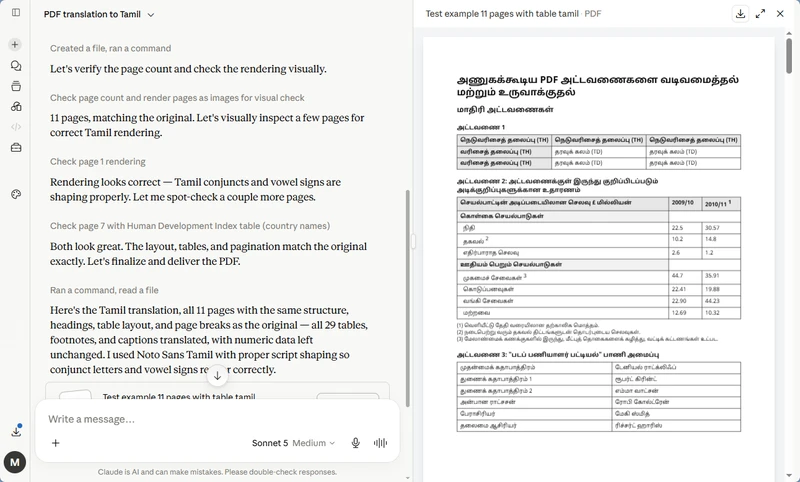
Claude (Sonnet 5 on Medium) was the AI tool that preserved our 11-page Q3 earnings report's layout most faithfully. Tables kept their rows and columns, numbered lists kept their indentation, and headings stayed bold. The other AI tools we tested got the words right but lost some of the visual structure. If you're translating a financial report or contract where formatting matters, Claude is the AI tool to reach for first.
Pricing
Free tier with limited daily messages. Pro at $20/month gives you Claude Pro access and more messages. Max at $100+/month adds roughly 5x the usage of Pro for the hardest documents. (verified July 2026)
Verified Experience
I uploaded the financial PDF to Claude (Sonnet 5 on Medium). Total time was about 4 minutes from upload to download. Layout came back intact - the financial tables held their rows and columns, the numbered lists kept their indentation, and the headings stayed bold. No overlapping text or broken cells in the output. The one catch: red-colored text in the original came out as black in the Hindi version, so the visual warning hierarchy was lost. Slower than Gemini, but the layout fidelity is the best of the two AI tools we tested.
Pros:
- Best layout fidelity of any AI tool we tested for English to Hindi PDF translation.
- 200K context window means long files (50+ pages) translate in one pass without chunking.
- Available on web, iOS, and Android from a single account.
- Handles financial, legal, and technical terminology better than most MT engines.
Cons:
- Slower than Gemini - 4 minutes for an 11-page report.
- Max plan at $100+/month is the practical tier for serious document work; Pro at about $20/month runs out of messages quickly on long files.
- Red text and other color formatting may not survive the translation.
Best for
Context-heavy English-to-Hindi translations of legal, financial, or technical PDFs where terminology accuracy, layout fidelity, and 50+ page coherence matter.
Part 7.Best Mobile App & Chrome Extension for English to Hindi PDF Translation
Translating an English PDF to Hindi on your phone or in Chrome? Two tools cover this use case best - Reverso's mobile app for voice, camera, and text snippets, and AnyDoc Translator's Chrome extension for in-browser reading.
Both are free-tier friendly and finish a 6-11 page document in within 3 minutes. For 50+ page PDFs or batch jobs, jump back to the desktop picks above.
Reverso: Best for Mobile Users Who Need Context

Why We Picked It
The best mobile app for getting context-aware English-to-Hindi translations on iOS or Android is Reverso, because its example sentence database shows how each Hindi word is used in real situations.
Reverso's translation engine pairs with a database of real-world example sentences, which is more useful than a dictionary when you need to pick the right Hindi word for a specific context. On the mobile, the app responded in under a second for short text and about 5 seconds for paragraph-length input.
Pricing
Free tier with daily limits. Premium subscription removes the limits and adds an offline mode. (verified July 2026)
Verified Experience
I tested the 6-page English legal PDF document translation to Hindi. It took Reverso about 20 seconds to finish the translation, and the output is clean and clear in the beginning, but in the middle of the content, there were 1-2 lines of content that got overlapped with the parting line. Other parts are just good except for this little imperfection.
Pros:
- Example sentences show how a word is used in real contexts.
- iOS and Android are both supported.
- Voice input works well for short phrases.
Cons:
- You'll need to OCR the PDF first.
- The free tier's daily limit runs out faster than you'd expect if you're translating actively.
- A premium subscription is needed for offline use, which matters if you're traveling.
Best for
Mobile users (iOS or Android) who need context-aware English-to-Hindi translations with real-world example sentences to pick the right word.
AnyDoc Translator (Chrome Extension) - Best for One-Click In-Browser Translation

Why We Picked It
To me, the best Chrome Web Store add-on for translating PDF while keeping formatting is AnyDoc because it works in-tab without an obligatory download and keeps the side-by-side reading experience. Anytime you have a PDF open in your browser - be it a research paper, contract, or manual - AnyDoc is hands down the fastest way to translate PDF keep formatting online without download.
Pricing
Free for 5 pages/day, single file at a time Pro: $4.99/month or $39.99/year (verified July 2026)
Verified Experience
I tested and translated the 6-page English legal file PDF of around 1400 words per page using AnyDoc Translator and chose Gemini as my LLM model of translation. The processing took about 2 minutes. The processing time is within my expectations, and the general layout is well preserved; however, the font has been changed for partial content. (Tested on Windows, Chrome, July 2026)
Pros:
- No friction - no upload, no download, the file never leaves your browser. The side-by-side view is actually good for checking how accurate the translation is compared against the source.
- 5 optional AI LLM models as services in AnyDoc for processing the translation.
Cons:
- The free tier of 5 pages/day may not be enough for more serious work.
- It fails to process files over 10MB or more; the in-tab rendering gets a bit sluggish.
Best for:
Translating English PDFs to Hindi directly inside a Chrome tab without uploading or downloading - ideal for research papers, contracts, or manuals you already have open in the browser.
Final words: the verdict
If you are figuring out the best tool to translate PDF from English to Hindi, the right question is which tool matches your file.
Most people reach for Google Translate by default. But Hindi has compound words, post-positions, and gender agreement that English doesn't—Google Translate handles all of them poorly compared to PDNob on desktop, Claude or DeepL for natural phrasing, or Gemini for free AI. The difference matters for anything formal.
Install PDNob Desktop if you have five minutes, Lingvanex for 100+ languages, Reverso or AnyDoc for mobile. Otherwise, Google Translate is fine.
Frequently Asked Questions on Translating PDF from English to Hindi
Q1. What is the easiest way to translate a PDF from English to Hindi for
free?
A1: Drop the file into Google Translate. You don't need an account, the file size cap is 10 MB as of 2026, and the result is good enough for casual reading. If the file is scanned or has tables, switch to PDNob Online PDF Translator instead, because it keeps the layout and handles scanned text better.
Q2. How do I translate a large PDF (100+ pages) from English to Hindi?
A2: Use a desktop app. PDNob can process 200+ pages of PDF without any latency. Lingvanex is the right call if you need mobile translation and have a demand for most dialects of different languages. Don't try to do this in a browser. The file size caps and upload times will eat your afternoon.
Q3. Can Claude translate an entire PDF from English to Hindi?
A3: Yes, on the Pro plan ($20/month) or Max plan ($100+/month for heavier use). You upload the file, ask for an English-to-Hindi translation, and Claude returns the full Hindi version. The catch: it doesn't return a formatted PDF. You'll get the Hindi text in the conversation, and you'll need to copy it into a new document yourself. File size limit is around 25 MB on Pro, higher on Max.
Q4. Is Google Translate accurate enough for English to Hindi
translation?
A4: For everyday reading, yes. For legal, medical, or formal documents, no. Google Translate's handling of Hindi compound words (samasa) and post-positions is weaker than DeepL or Gemini. Use Google Translate for casual reading, but pick a different tool for anything that will be published or relied on.
Q5. Best website/software to translate English to Hindi?
A5: Every tool in this guide handles English-to-Hindi translation. PDNob Desktop and Google Translate both do Hindi text. For best accuracy on Hindi specifically, Claude is the strongest option because Hindi has complex fusional/inflectional language that benefits from a context-aware model. Reverso is a good mobile alternative.
Q6. Laptop me English Pdf File Ko Hindi Me Kaise Kare?
A6: To convert an English PDF to Hindi, go to a free online PDF translator like PDNob Online Translator, upload your English PDF, choose the language pair (English → Hindi), click "Translate," and then download the ready Hindi PDF and use it as needed.
Tested over four weeks in June--July 2026. Prices and feature limits verified at publication. The author has no commercial relationship with any of the products listed. Some links are affiliate links; purchases made through them do not change the price you pay.



- Make scanned PDFs searchable and editable with 99% OCR precision
- Batch convert PDFs to Word, Excel, PPT, images, PDF/A, Text, EPUB, etc., up to 30% faster
- Edit PDFs easily like Word, including text, images, watermarks, links, and backgrounds
- Annotate PDF with highlights, comments, shapes, stickers, and stamps
- Run smoothly on any PC without lags or crashes, even on low-spec machines
 Secure Download
Secure Download
Speak Your Mind
then write your review
Speak Your Mind
Leave a Comment
Create your review for PDNob articles

Related articles

Software Reviewer and Comparison Analyst
Maya Patel has reviewed over a hundred softwares across writing, design, productivity, and AI categories, and her comparison articles are designed to give readers a clear winner within the first three paragraphs in past 3 years.


