
 Home
>
AI PDF
>
Gemini vs ChatGPT Which Is Better : Images, Writing & Research
Home
>
AI PDF
>
Gemini vs ChatGPT Which Is Better : Images, Writing & Research
Gemini vs ChatGPT Which Is Better : Images, Writing & Research
- 1 No universal winner: ChatGPT (with GPT-Image 2.0) leads on conversational writing, image generation, and everyday creative tasks; Gemini Pro leads on long-document analysis, real-time search with citations, and multi-step technical reasoning.
- 2 Image generation and editing are close calls: both models accurately followed prompts in hands-on tests, but Gemini's output carries a visible AI-edit watermark by default, while ChatGPT's does not --- worth noting if you need a clean image for professional use.
- 3 Long-PDF analysis favors Gemini: Gemini Pro's long-context window let it read a 100-page report in one pass and cross-reference data across pages; ChatGPT Plus required segmented input and lost some earlier context in follow-up questions.
- 4 Writing quality is a genuine toss-up: On a 1,500-word academic paper test, ChatGPT produced a more accessible, easy-to-skim draft, while Gemini's version was more technical and discipline-specific --- the better pick depends on whether you need readability or academic rigor.
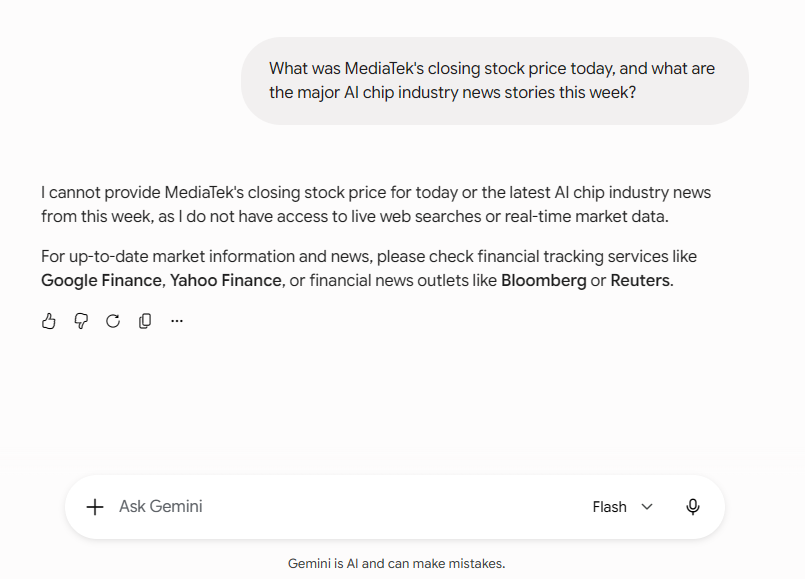
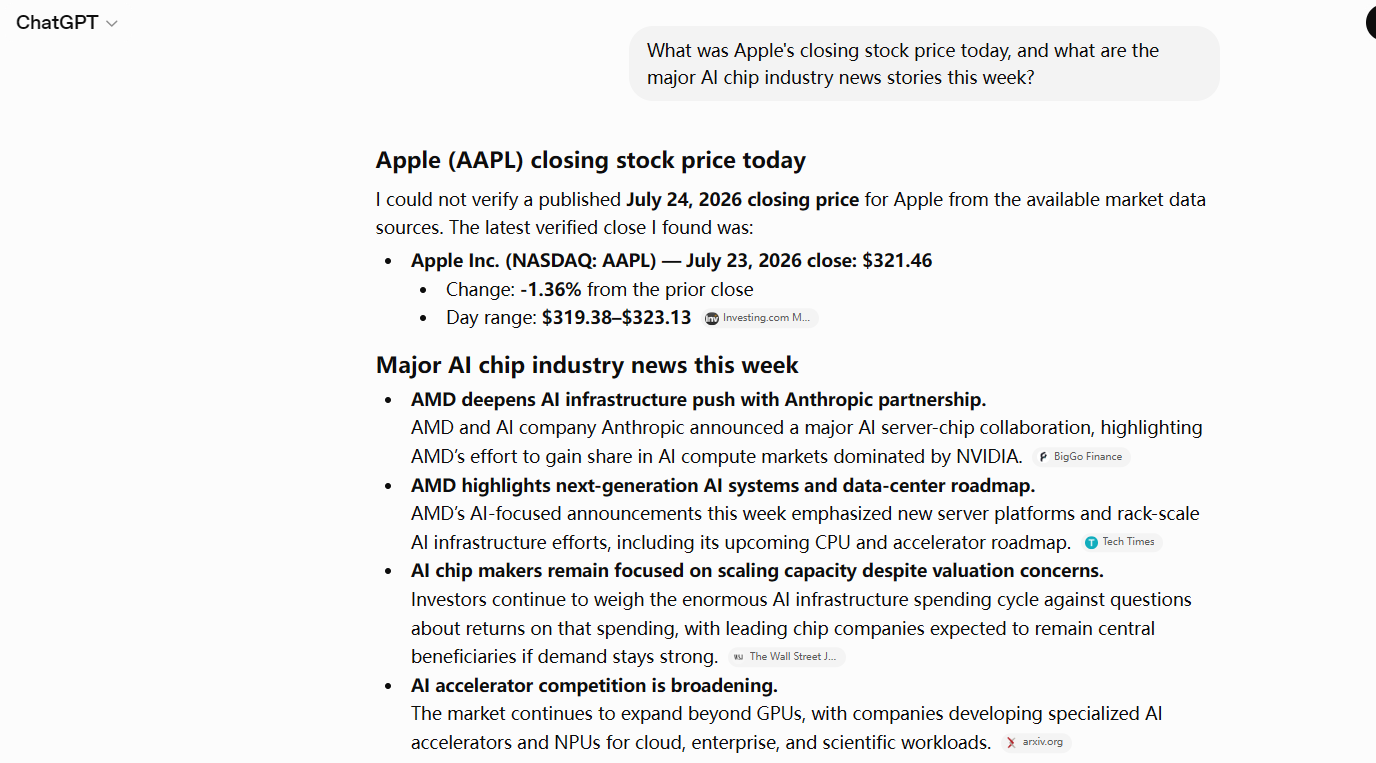
- 5 Real-time search accuracy depends on the tier, not just the model: ChatGPT answered a live stock/news query with sourced citations, while Gemini's free Flash tier declined to answer, citing no live search access --- Gemini Pro with search grounding enabled is expected to perform closer to its documented real-time strengths.
- 6 Pricing is roughly equivalent: Gemini Pro and ChatGPT Plus are priced similarly per month, but unlock different core capabilities --- Gemini for context length and search grounding, ChatGPT for image quality and conversational polish.
In 2026, AI large models have undergone significant iterations. OpenAI has launched GPT-Image 2.0, greatly enhancing image-text generation, image editing, and text rendering capabilities, which has significantly upgraded ChatGPT's multimodal performance. This also makes users more torn about the Gemini vs ChatGPT which is better debate when choosing between the two.
So which is better, Gemini or ChatGPT? What are the core differences? Are there scenarios where ChatGPT falls short of Gemini? This article conducts hands-on tests with the latest versions to fully analyze the differences and suitable use cases for both models.

1. What Are Gemini and ChatGPT?Key Differences Explained
What Is ChatGPT? Is It Good?
ChatGPT is OpenAI's general-purpose generative AI and currently the most widely adopted AI assistant globally. It features highly fluent conversation, excellent Chinese comprehension, and comprehensive content generation capabilities, making it the primary tool for daily office work, creative tasks, and studying for most users. The GPT-Image 2.0 update released on April 22, 2026, addresses the previous version's shortcomings in text rendering errors, stiff composition, and imprecise regional editing, delivering significant improvements in text rendering, portrait realism, and visual consistency.

Subscription Plans and Core Model Features:
- Free Version: Powered by the base GPT-4o mini model, suitable for daily conversation, simple copywriting, and basic queries.
- ChatGPT Plus (Paid): Unlocks full GPT-4o, GPT-Image 2.0, real-time web search, long-text processing, and advanced multimodal features, supporting image generation, visual analysis, and batch content creation.
Pros: High natural language quality in Chinese, smooth conversational experience, fast image generation with accurate text rendering, and a vast third-party ecosystem.
Cons: Slightly weaker in deep reasoning for very long texts; moderate completeness of real-time information sources.
Best For: Daily conversation, copywriting, social media content, general academic writing, presentation creation, image-text material generation, and beginners.
What Is Gemini? Is It Good?
Gemini is Google DeepMind's multimodal AI large model, designed for "deep reasoning, ultra-long text processing, and multi-dimensional audio-video analysis." The latest 2026 Gemini Pro version has enhanced Chinese optimization and real-time search capabilities. With its ultra-long context window, Gemini has become ChatGPT's strongest competitor, with significantly improved reasoning abilities.

Subscription Plans and Core Model Features:
- Free Version: Provides the base Gemini model, supporting simple multimodal conversations and queries.
- Gemini Pro (Paid): Unlocks ultra-long token context, complete video/audio analysis, deep data analysis, precise data citation, and enterprise-grade reasoning capabilities, suitable for advanced professional scenarios.
Pros: Exceptional long-text comprehension, precise audio-video multimodal analysis, high credibility of real-time information, lower hallucination rates, and more solid professional logical reasoning.
Cons: Slightly less flexible in creative copywriting; image aesthetics and generation speed slightly lag behind ChatGPT.
Best For: Long PDF analysis, academic research, data analysis, code debugging, video breakdown, real-time news queries, and in-depth professional report organization.
2. Gemini vs ChatGPT Which Is Better? Core Capabilities Compared
This section focuses on the core differences between Gemini and ChatGPT, objectively comparing the underlying capabilities of both models across five dimensions to help users quickly understand the key points of the what is the difference between gemini and chatgpt comparison.
1. Core Capability Comparison (AI Foundation)
ChatGPT and Gemini split core strengths along different lines: ChatGPT wins on everyday conversational fluency and speed, while Gemini Pro wins on long-context memory and complex technical reasoning.
- Model Performance: Gemini Pro features an ultra-long token context window, far exceeding comparable models, with stronger long-text memory and multi-turn conversation stability; ChatGPT Plus offers stable context performance and better understands everyday Taiwanese Mandarin expressions, with a lower entry barrier.
- Reasoning Ability: Gemini Pro excels at breaking down complex professional problems; ChatGPT wins in general-purpose scenarios with fast response times.
- Content Generation: ChatGPT performs better in stylistic diversity, emotional expression, and vivid writing, making it suitable for marketing copy and social media posts. Gemini demonstrates good stability in ultra-long text generation, suitable for documents requiring consistent output.
- Coding and Professional Use: Gemini is stronger in code debugging, complex data analysis, and technical documentation organization, making it suitable for engineering and research scenarios; ChatGPT offers faster basic code generation with high syntax compatibility, ideal for beginners quickly writing code.
2. Information and Search Capability Comparison
Gemini Pro is designed for stronger real-time search grounding and source citation than ChatGPT by default, though actual performance depends on which tier and settings are active — see our hands-on test in Part 3 for a real-world example of this gap.
- Real-Time Information Access: Gemini has native Google Search integration, delivering faster and more comprehensive updates on latest news, stock prices, weather, and current events; ChatGPT relies on third-party search interfaces, with slightly higher real-time information latency.
- Data Citation and Credibility: Gemini provides source links for most query results, making information traceable and hallucination error rates lower; ChatGPT rarely provides sources proactively and is prone to detail deviations in complex professional information, requiring secondary verification.
3. Multimedia Capability Comparison
- Image Capabilities: After the GPT-Image 2.0 upgrade, ChatGPT performs exceptionally well, with significant leads in portrait realism, Chinese poster text accuracy, and visual consistency. Gemini still has advantages in image logic analysis and scene understanding, but users should note that Gemini may embed private information from user chat history into generated images without explicit request.
- Audio and Video Capabilities: Gemini supports ultra-long video and audio analysis, capable of fully breaking down tutorial videos and summarizing long-form audio-visual content, with stronger multimodal interaction; ChatGPT offers smooth voice conversation and natural real-time responses, but has lower length limits for long video/audio processing.
4. Ecosystem and Tool Integration Comparison
- Gemini Office Integration Advantage: Deep integration with the Google ecosystem, including Gmail, Docs, Sheets, Drive, and Android, allowing direct editing of cloud files, organizing spreadsheet data, and syncing mobile data — ideal for users accustomed to Google tools.
- ChatGPT Office Integration Advantage: Tied to the Microsoft 365 ecosystem, supporting quick content generation in Word, Excel, and PowerPoint, with a vast library of third-party plugins and stronger extensibility — better suited for Windows office users.
5. Gemini vs ChatGPT Summary Table (Quick Overview)
 Please swipe to view
3. Gemini Pro vs ChatGPT Plus: Pricing, Plans & What You Actually Get
To objectively answer the question Gemini vs ChatGPT which is better and whether ChatGPT falls short of Gemini, we conducted real-scenario tests using the latest 2026 versions of both models under standardized conditions.
Test Methodology:
This comparison uses the latest 2026 versions, tested on official web interfaces with Traditional Chinese as the test language. Evaluation criteria include response speed, accuracy, completeness, Chinese naturalness, operability, and stability.
Test 1: Which Model Generates Better Images? Can GPT-Image 2.0 Beat Gemini?
Test Task:
Generate a stylized artistic image from a single text prompt — testing whether each model can accurately interpret subject, style, and scene from natural language, even when the prompt contains typos. Test dimensions include prompt-following accuracy, artistic style consistency, subject fidelity, and compositional coherence.
Test Example:
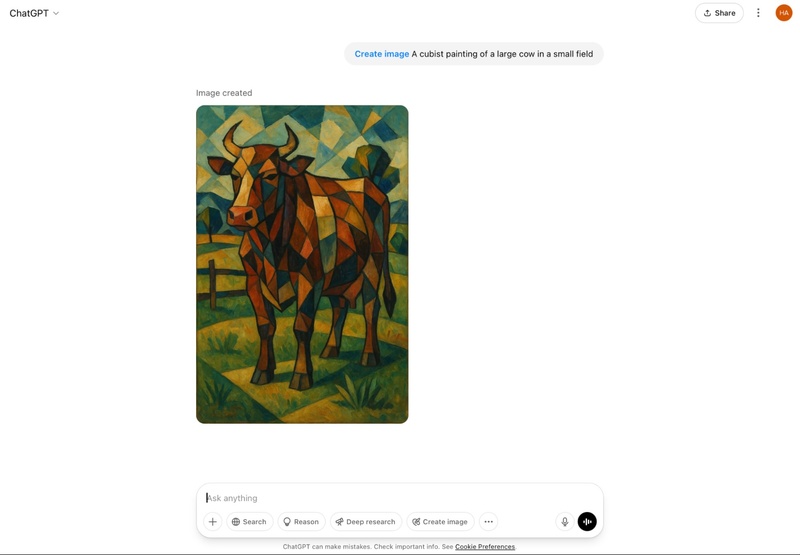
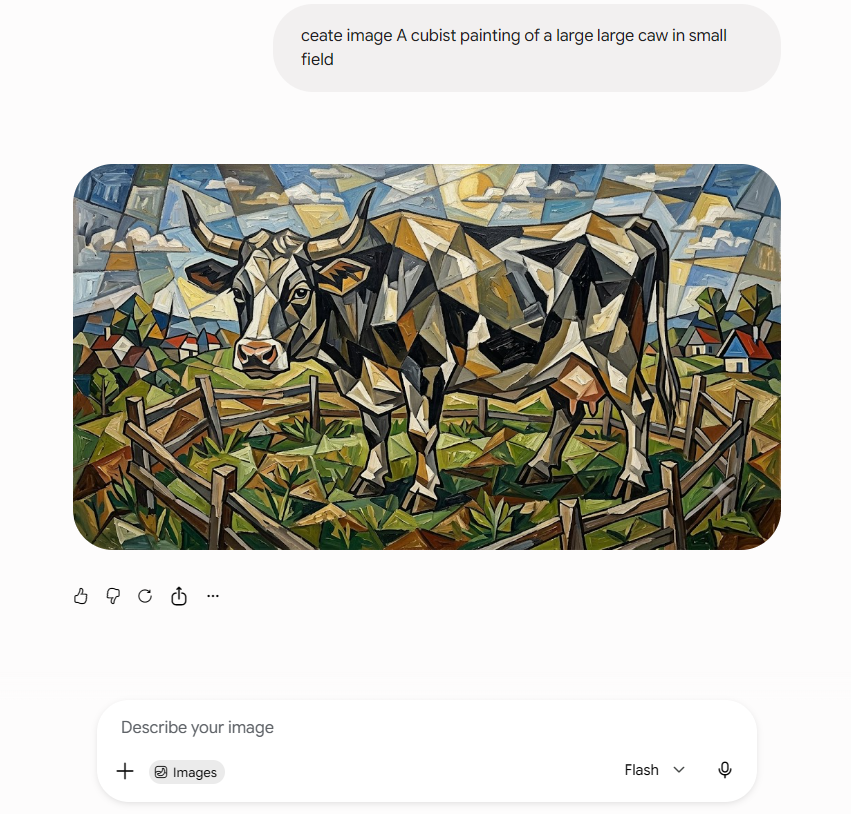
- We entered the same prompt — "Ceate image A cubist painting of a large large caw in small field"
Results:
-
Produced a vertically-framed cubist portrait of a horned cow rendered in warm terracotta, ochre, and burnt-orange geometric facets, standing in a green pasture with a wooden fence on the left and angular mountain-like shapes in blue and violet filling the background. The brushwork-style faceting and warm palette give it a strong, gallery-ready Picasso/Braque feel, and the composition — cow centered, fence and horizon clearly readable — stays fully faithful to the prompt.
-
Gemini (Nano Banana 2): Correctly parsed the prompt despite the typos ("Ceate" → Create, "caw" → cow), producing a coherent cubist-style painting of a large bull-like cow with prominent horns, rendered in fragmented geometric planes. The scene stays faithful to "a small field" — the cow stands inside a wooden-fenced pasture, with a faceted blue sky and distant houses in the background, all rendered in a warm earth-toned palette of browns, olive greens, and ochre. The result reads as a genuine Picasso/Braque-style cubist composition rather than a literal photo edit.


Test 2: Which Model Does Image Editing Better?
Test Task:
Restore and enhance a blurred outdoor portrait — improve sharpness and detail recovery on hair, skin, and object edges (like the phone) while preserving the original lighting, color grading, and the subject's natural appearance. Test dimensions include detail recovery, facial realism after enhancement, color/lighting fidelity to the source image, and whether the output introduces visible artifacts or watermarks.
Test Example:
- We uploaded the same blurred outdoor portrait — a woman in a purple sweater against a blue sky, holding a phone — with the instruction: "Improve portrait lighting using soft natural daylight. Balance shadows and highlights, reduce harsh lighting, brighten the face evenly, improve contrast, increase sharpness, preserve realistic skin tones, and keep all facial features unchanged while producing a clean high-resolution image."

Results:
-
ChatGPT (GPT-Image 2.0): Delivered a crisp, well-resolved result. Individual hair strands, skin texture, and even the phone's camera module details are sharply recovered, and the sunlit color grading — blue sky, purple knit sweater, neon-green phone case — stays true to the original. Facial features look natural rather than artificially smoothed, and the output carries no visible watermark or edit marker.

-
Gemini (Nano Banana 2): Also successfully removed the blur and produced a comparably sharp result, with slightly warmer skin tones and marginally softer texture on the sweater's fibers. One practical difference: Gemini's output carries a small sparkle-icon watermark in the bottom-right corner marking it as AI-edited — worth noting if you need a clean, watermark-free image for professional use.



Test 3: Which Handles 100-Page PDFs More Accurately?
Test Task:
Upload a 100-page academic PDF (containing tables, charts, and mixed Chinese-English layout) to complete key summarization, table data extraction, and multiple follow-up queries. Test dimensions include upload speed, summary accuracy, key point extraction, table recognition, and multi-turn questioning capability.
Test Example:
- Upload an approximately 100-page ESG sustainability report PDF containing multiple data tables and year-over-year comparison charts, with the instruction: "Summarize the core data and organize a table showing carbon emission changes over the past three years."
Results:
- Gemini Pro: Its ultra-long context advantage is fully demonstrated here, capable of reading the entire file in one go. In testing, Gemini correctly interpreted table structures from scanned documents, applied reasonable downward filling for merged cells, and accurately calculated change rates. More importantly, it can correlate information across pages — for example, automatically linking a report number from the header with the same number in an appendix table.
- ChatGPT Plus: Can also process PDFs but requires segmented input. In multi-turn follow-ups, it tends to lose details from earlier parts of long documents, requiring user prompts to remember previous context.
Test 4: Gemini vs ChatGPT for Writing — Which Handles a 1,500-Word Paper Better?
Test Task:
Given the same topic, generate a 1,500-word paper draft. Test dimensions include output quality with identical prompts, generation speed, article completeness, and English naturalness.
Test Example:
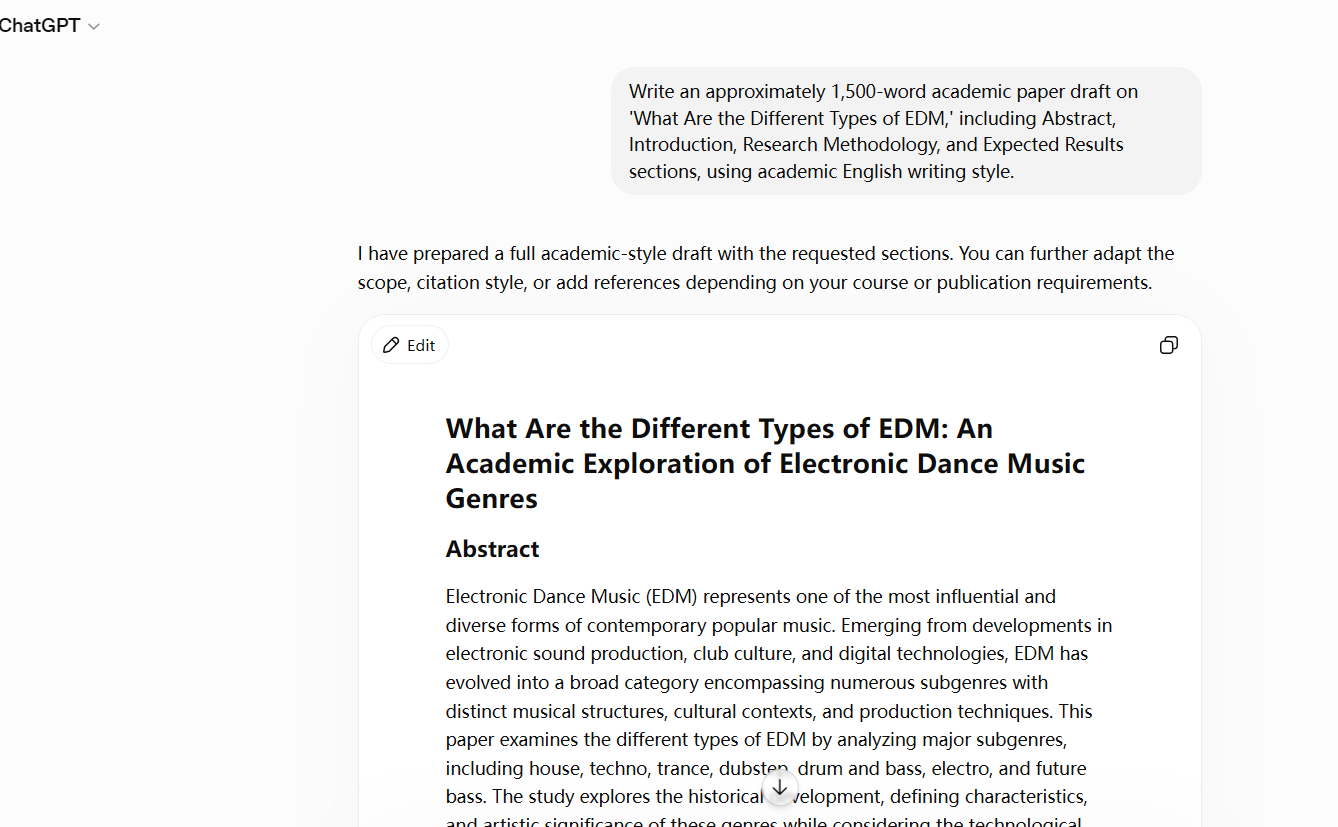
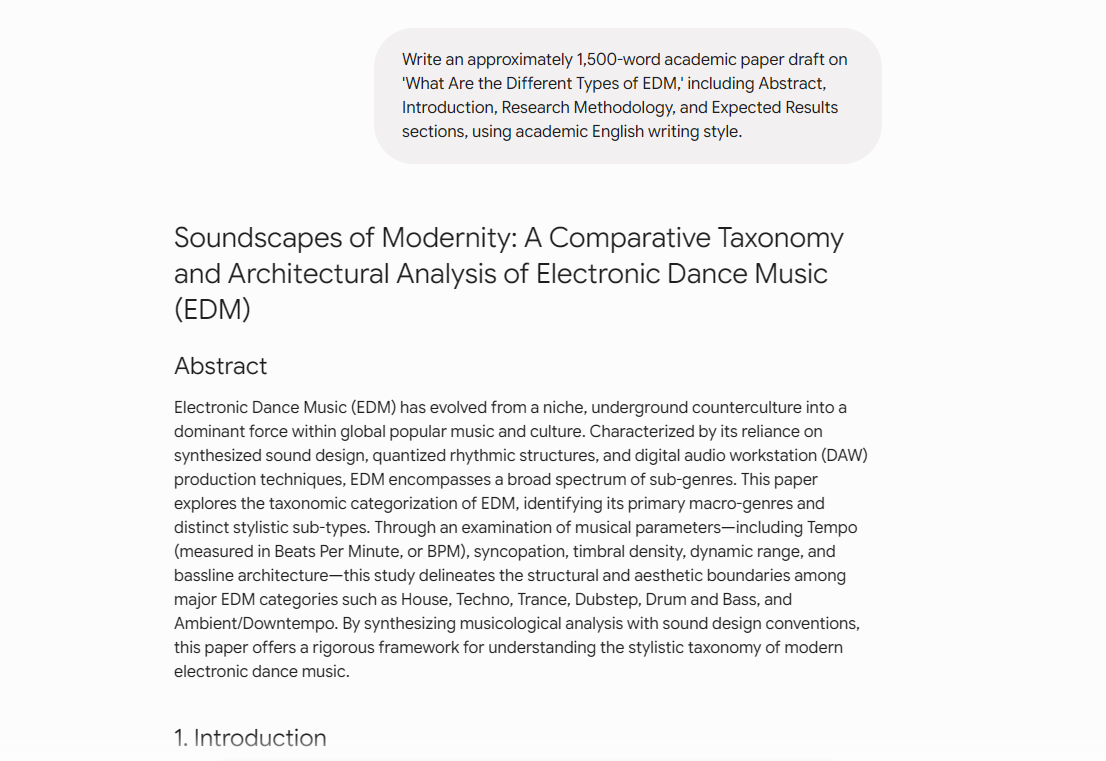
- Both models were given the same prompt: "Write an approximately 1,500-word academic paper draft on 'What Are the Different Types of EDM,' including Abstract, Introduction, Research Methodology, and Expected Results sections, using academic English writing style."
Results:
-
ChatGPT: Opened with a short conversational note — "I have prepared a full academic-style draft with the requested sections. You can further adapt the scope, citation style, or add references depending on your course or publication requirements." — before delivering the paper, titled "What Are the Different Types of EDM: An Academic Exploration of Electronic Dance Music Genres." Its Abstract is clear and accessible, covering house, techno, trance, dubstep, drum and bass, and future bass with a focus on historical development and cultural context.
-
Gemini: Skipped any preamble and returned the formatted paper directly, titled "Soundscapes of Modernity: A Comparative Taxonomy and Architectural Analysis of Electronic Dance Music (EDM)." Its Abstract leans noticeably more technical, framing EDM through specific musical parameters — tempo (BPM), syncopation, timbral density, dynamic range, and bassline architecture — and positions the paper as a rigorous "taxonomic categorization" of macro-genres.


This makes gemini vs chatgpt for writing a genuinely close contest: in this test, Gemini's draft reads as the more rigorous, discipline-specific academic paper, while ChatGPT's version is friendlier and easier to skim — a trade-off worth weighing for chatgpt vs gemini for studying depending on whether you need approachability or technical depth.
Regardless of which AI you use to generate paper drafts, subsequent editing, formatting adjustments, and reference organization are best handled with a professional PDF editor — PDNob, significantly improving document processing efficiency.




Recommended Tool | PDNob PDF Editor
For PDF editing, text correction, formatting adjustments, file conversion, and encryption, we recommend using PDNob . According to the official user guide, PDNob 2.0 offers the following core advantages:
-
Open Your PDF: Launch PDNob and click the "Open PDF" button on the main interface to select the PDF file you want to edit.
-
Edit Content: Edit PDF text, images, line spacing, and fonts as easily as editing a Word document; supports merging, splitting, compression, and file conversion.
-
Add Comments: Switch to the "Comments" tab to highlight text, add notes, or mark up your PDF.
-
OCR Scanned Files: On the Home tab, click "OCR", choose the language and page range, then let PDNob process the file automatically.
-
PDNob AI : Built-in features including "Explain," "Improve Writing," "Continue Writing," and "Simplify" — directly optimizing AI-generated paper paragraphs. The "Ask AI" function can extract PDF original page numbers as citation sources, ensuring academic integrity.


Best For:
Whether you're quickly converting AI-generated paper content into a professionally formatted academic PDF, merging multiple AI conversation chapters with unified formatting, highlighting and annotating references, or converting scanned literature into editable digital files — PDNob handles it all seamlessly.
AI generates the content; PDNob produces the professional document — together, they double your efficiency.
Test 5: Which Delivers Breaking News Faster?
Test Task:
Query the latest 2026 industry news and real-time trends. Test dimensions include real-time information speed, source attribution, timeliness, and summarization capability.
Test Example:
- On July 24, 2026, both models were asked simultaneously: "What was Apple(AAPL)'s closing stock price today, and what are the major AI chip industry news stories this week?"
-
Gemini Pro: Responded that it "cannot provide MediaTek's closing stock price for today or the latest AI chip industry news from this week," stating plainly that it does not have access to live web search or real-time market data, and redirected us to check Google Finance, Yahoo Finance, Bloomberg, or Reuters instead.
-
ChatGPT Plus: Answered directly and thoroughly. It flagged that it couldn't verify a live July 24, 2026 closing print, but returned the latest confirmed data — "Apple Inc. (NASDAQ: AAPL) — July 23, 2026 close: $321.46," including the daily change and trading range, sourced to Investing.com. It then listed four AI chip industry stories from the week — AMD's server-chip partnership with Anthropic, AMD's data-center roadmap, the ongoing AI infrastructure spending debate, and broadening AI accelerator competition — each tagged with a named source (BigGo Finance, Tech Times, The Wall Street Journal, arxiv.org).
- Make scanned PDFs searchable and editable with 99% OCR precision
- Batch convert PDFs to Word, Excel, PPT, images, PDF/A, Text, EPUB, etc., up to 30% faster
- Edit PDFs easily like Word, including text, images, watermarks, links, and backgrounds
- Annotate PDF with highlights, comments, shapes, stickers, and stamps
- Run smoothly on any PC without lags or crashes, even on low-spec machines
Results:


4. Gemini vs ChatGPT FAQ
Q1. What can Gemini do that ChatGPT can't?
A1: Gemini's biggest edge is scale: its ultra-long context window lets it read entire 100-page PDFs, long videos, and lengthy audio files in a single pass, something ChatGPT still handles in segments. It also integrates natively with Gmail, Docs, Sheets, and Drive, and — when search grounding is enabled — can pull live web results with clickable source citations. ChatGPT does not currently match Gemini on any of these three fronts.
Q2. Is Gemini 100% correct?
A2: No. Gemini generally shows a lower hallucination rate than ChatGPT and cites sources more consistently when search grounding is active, but it is not error-free. In our own testing, the free Gemini Flash tier flatly declined to answer a real-time stock and news query, stating it had no live search access — a reminder that accuracy depends heavily on which tier and settings you're using, not just the model itself. Always verify time-sensitive or high-stakes information independently.
Q3. Gemini vs ChatGPT — which should you choose?
A3: Choose ChatGPT if you mainly need fast conversation, creative writing, or image generation — GPT-Image 2.0 currently leads on visual polish and accurate text rendering. Choose Gemini if you regularly work with long documents, need real-time news with citations, or want deeper technical reasoning. Many users end up keeping both: ChatGPT for daily creative work, Gemini for research and long-context tasks.
Q4. Is Gemini better than ChatGPT for math and technical calculations?
A4: This comparison's hands-on tests did not include a dedicated math benchmark, so we can't confirm this from our own testing. Based on independently published benchmarks, Gemini Pro tends to show more transparent step-by-step reasoning on complex math problems, while ChatGPT is generally faster for standard calculations. Treat this as a directional note rather than a verified result in this review.
Q5. Which is better, ChatGPT or Gemini, for coding?
A5: For beginner-friendly code generation with broad language support, ChatGPT is faster and more accessible. For complex debugging, data structure optimization, and technical documentation analysis, Gemini Pro's deeper reasoning often produces higher-quality results. The right pick depends on your coding experience and task complexity rather than one model being universally better.
5. Conclusion
Overall, the Gemini vs ChatGPT which is better debate in 2026 clearly reveals two distinct AI positions: ChatGPT, powered by GPT-Image 2.0, holds the crown for general-purpose creation — natural Chinese, beautiful image generation, simple operation — suitable for everyday users and creative office work. Gemini wins with ultra-long text handling, high-credibility information, and professional reasoning capabilities — making it the top choice for research and technical scenarios. It's not that ChatGPT falls short of Gemini; rather, each model excels in different scenarios.
If you need to create presentation infographics, business posters, or organize PDF research materials, we recommend first using AI to quickly generate content and assets, then pairing it with PDNob for text correction, formatting, file conversion, and encryption protection — making AI-generated content more standardized and professional, significantly boosting overall workflow efficiency.



 Secure Download
Secure Download
Speak Your Mind
then write your review
Speak Your Mind
Leave a Comment
Create your review for PDNob articles

Related articles

AI Tools Writer / Workflow Analyst
Rachel has spent the last 5 years testing and writing about AI-powered tools across writing, design, and research workflows. She focuses on practical AI tool usage, helping knowledge workers turn generative AI into everyday productivity.


