
 Home
>
OCR
>
Top 9 Best Photo/Image Noise Reduction Software Free in 2026
Home
>
OCR
>
Top 9 Best Photo/Image Noise Reduction Software Free in 2026
Top 9 Best Photo/Image Noise Reduction Software Free in 2026
Grainy, noisy photos can ruin a perfect shot, especially in low-light conditions. Whether you're a photographer fixing night shots or a creator cleaning up rough screenshots, modern AI tools have revolutionized the process. In 2026, the right photo noise reduction software can restore detail and clarity in seconds---no advanced editing skills required.
This guide covers the best free denoising software to help you achieve clean, professional results fast.

Part 1. 2026 Rankings: What is the Best Photo Noise Reduction Software?
Choosing the right photo noise reduction software in 2026 can feel confusing with so many options available. AI tools now offer faster and better results, so it's important to compare features, performance, and value before picking the best noise reduction software.
Top-Rated AI Denoisers at a Glance (Comparison Table)
 Please swipe to view
Why AI is Revolutionizing Noise Reduction in 2026
AI has changed how noise reduction software works. Old tools only blurred noise, but new tools study the image and rebuild details.
- AI keeps texture while removing grain
- It works well on low-light photos
- It improves faces and fine details
- It reduces editing time
That is why most best denoise software options now use AI models.
The Criteria for Choosing the Best Denoise Software
When selecting best noise removal software, focus on these points:
- Image Quality: Does it keep details?
- Speed: Does it process quickly?
- Ease of Use: Can beginners use it?
- File Support: RAW, JPG, PNG support
- Price: Free vs paid options
Part 2. DeepPrime 3 vs Topaz Photo AI: Which Noise Reduction Software Wins?
When comparing photo noise reduction software, two names stand out in 2026: DxO DeepPrime 3 and Topaz Photo AI. Both tools use AI, but they serve different workflows. Below is a detailed and accurate breakdown based on official sources and real user feedback.
DxO DeepPrime 3 -- The RAW Detail Champion
DxO DeepPrime 3 is an advanced AI-based denoising software built into DxO PhotoLab and PureRAW. It focuses on RAW image processing and combines three tasks in one step: denoising, demosaicing, and lens correction. The system uses deep learning trained on large datasets and DxO camera modules. It improves image quality even at very high ISO levels and restores fine textures. This makes it one of the best noise reduction software choices for professional photographers.


- AI-based denoising + demosaicing in one process
- Removes noise while keeping fine textures
- Adds chromatic aberration correction
- Works well on high ISO images
- Supports many camera sensors including X-Trans
Limitations
- Works mainly with RAW files
- Requires GPU for best speed
- Not beginner-friendly
Real Users Review
From Reddit:
"Detail retention is really good, especially for landscapes."
Users often say this best denoise software keeps natural detail better than most tools.
Best For
- Professional photographers
- RAW image workflows
- High ISO photography
Topaz Photo AI -- The Do-It-All Workhorse
Topaz Photo AI is a complete noise reduction software that combines denoising, sharpening, and image enhancement in one platform. It uses AI to automatically analyze images and apply corrections like noise removal, blur fixing, and upscaling. The software works with both RAW and standard formats, making it flexible for different users. Many creators use it as best noise removal software because it handles multiple editing tasks in one place.

- AI noise reduction + sharpening
- Automatic "autopilot" adjustments
- Works on RAW and JPEG files
- Face recovery and detail enhancement
- Upscaling up to high resolution
Limitations
- Can over-smooth images if overused
- Requires strong hardware
- Paid software
Real Users Review
From Reddit:
"You can make an ISO 6400 look glassy."
Another user mentioned results depend on settings, especially to avoid over-processing.
Best For
- Content creators
- All-in-one editing needs
- Beginners and intermediate users
Table: Head-to-Head Comparison
To help you decide between these two industry giants, we've compared their performance across key metrics.
Please swipe to view
DeepPrime 3 is the go-to for maximum detail in RAW files, whereas Topaz Photo AI wins on versatility and ease of use. Depending on your specific file types and desired speed, either tool can significantly elevate your photo quality.
Part 3. Best Noise Removal Software for Photographers (Desktop & Plugins)
Photographers need reliable photo noise reduction software to clean low-light shots and keep details sharp. In this section, we review the best noise removal software and denoising software tools for desktop and plugins that deliver strong results.
1. ON1 NoNoise AI
ON1 NoNoise AI is a modern photo noise reduction software built for photographers who shoot in low light or high ISO. According to its official site, it uses advanced AI models to remove grain while keeping fine details sharp. The tool works as both a standalone app and a plugin for editors like Photoshop and Lightroom. It supports RAW and common image formats, which makes it a strong best noise removal software option for professional workflows.

- AI-based noise removal and sharpening
- Works as standalone and plugin
- Supports RAW, JPG, PNG formats
- Batch processing support
- Exports high-quality DNG files
Price
- $69.99 one-time license
- $99/year subscription option
Pros
- Strong detail recovery
- Works with popular editors
- Good results for low-light photos
Cons
- Needs good GPU for best speed
- Some users report lag in newer versions
Reviews (Reddit,Quora)
"It works well for high ISO shots... satisfied with results."
"Still lagging... workflow feels confusing."
Users like its output quality but mention performance issues on weaker systems.
Best For
Photographers who want flexible denoising software with plugin support
2. Adobe Lightroom & Camera Raw
Adobe Lightroom and Camera Raw are industry-standard tools used by photographers worldwide. They include built-in noise reduction software features along with full editing tools. Adobe uses AI-based controls for noise reduction in recent updates, especially for RAW images. Lightroom also offers cloud sync, which helps users edit images across devices. It is often considered one of the best denoise software options for workflow-based editing.

- Built-in noise reduction for RAW images
- Full photo editing and organization
- Cloud storage and sync
- Works on desktop, mobile, and web
Price
- $11.99/month (Lightroom plan)
- $19.99/month (Photography plan with Photoshop)
Pros
- Complete editing workflow
- Trusted by professionals
- Works on multiple devices
Cons
- Monthly subscription required
- Noise reduction is good but not the strongest AI
Reviews (Reddit, Quora)
"Lightroom is worth it for most people."
"I don't like subscription but it works well."
Users trust Lightroom for editing, but many mention the cost over time.
Best For
Photographers who want all-in-one photo noise reduction software with editing tools
3. PDNob
PDNob is a simple and lightweight tool mainly designed for document editing, but with the release of version 2.0, it has evolved into a powerful AI-driven solution for noise removal and clarity enhancement. Unlike complex photography software, PDNob 2.0 focuses on practical document restoration, making it the perfect noise reduction software for daily office or student use.
If your document is messy, blurry, or full of marks, online tools won't be enough. PDNob 2.0 bridges this gap by using advanced AI to rebuild your files from the ground up.





Why Choose PDNob?
- Upgraded AI-OCR Engine: Instantly converts scanned PDFs and messy screenshots into editable, searchable text, saving you from hours of manual retyping.
- Automatic Noise & Shadow Removal: The 2.0 update excels at identifying and removing grain, shadows, and skew, ensuring your text looks clear and properly aligned.
- Enhanced Text Clarity: It intelligently sharpens faded or low-quality scans, making them much easier to read without needing advanced editing skills.
- Global Language Support: Version 2.0 continues to support multiple languages, providing high accuracy for diverse types of international documents.
- Optimized Cross-Platform Workflow: Runs smoothly on both Windows and Mac with an updated UI that integrates seamlessly into your daily routine.
Pricing Plans
- Starts around $49.99/year
- Lifetime license: $64.99
Pros
- Very easy to use
- Works on low-end systems
- Good for documents and screenshots
Cons
- Not ideal for professional photography
Reviews (Reddit, G2, Quora)
Users on Quora say it works well for document cleanup and basic image clarity tasks.
It is often recommended for students and office work instead of heavy editing tools.
Best For
Students, office users, and beginners who need simple denoising software for documents.
Part 4. Free & Budget-Friendly Picture Noise Reduction Software (Online + Offline)
Not everyone wants to spend money on editing tools. Many free noise reduction software options now give good results for daily use. You can use desktop tools or try denoise image online free platforms for quick and simple noise removal.
Top Free Desktop Software
If you prefer offline tools, free desktop options give you better control and privacy. These tools work without internet and offer strong editing features. Many users choose them as reliable photo noise reduction software and free noise reduction software for daily use.
1. GIMP + Wavelet Denoise Plugin
GIMP is a well-known free noise reduction software that works on Windows, macOS, and Linux. It offers many editing tools, and you can extend its features using plugins. One popular plugin is Wavelet Denoise, which helps remove grain while keeping details. It works by processing each color channel separately, so it reduces noise without damaging the image quality. Many users combine GIMP with this plugin to create a powerful photo noise reduction software setup without spending money.

- Wavelet-based noise removal with channel control
- Works in YCbCr, RGB, and LAB color modes
- Adjustable denoise strength for each channel
- Preview mode before applying changes
Pros:
- Completely free and open-source
- Flexible with plugins
- Good control over noise levels
Cons:
- Not beginner-friendly
- Requires manual setup and plugin install
Reviews (Reddit/G2/Quora):
"The plugin was called Wavelet Denoise."
Users often say it works well, but they need practice to get good results.
Best For:
Users who want advanced control using free noise reduction software
2. Darktable (Profiled Denoise)
Darktable is a powerful open-source denoising software made for photographers who work with RAW images. It includes a feature called "Profiled Denoise," which uses camera-based noise profiles to improve results. The software uses advanced methods like wavelet and non-local means algorithms to reduce noise while keeping fine details. Many users consider it one of the best noise reduction software options available for free, especially for RAW photo editing.

- Profile-based noise reduction using camera data
- Wavelet and non-local means algorithms
- Separate control for luminance and color noise
- Adjustable strength and detail preservation
Pros:
- Strong RAW editing support
- High-quality noise reduction
- No cost
Cons:
- Complex interface for beginners
- No built-in AI denoising
Reviews (Reddit/G2/Quora):
"The module defaults work ok... but you may have to tweak settings."
Users say it gives great results but needs manual adjustment.
Best For:
Photographers looking for best denoise software for RAW images
Denoise Image Online Free (No Installation Required)
If you want quick results without installing anything, online tools are a great choice. These platforms let you denoise image online free using AI. You just upload your image, and the noise reduction software processes it in seconds.
1. LetsEnhance.io
LetsEnhance.io is an online tool that allows users to denoise image online free without installing any software. It uses AI models to improve image quality, remove noise, and upscale photos. The platform is simple to use just upload your image and let the system process it automatically. It is a good option for beginners who want fast results. Many users rely on it as a quick noise reduction software for social media and web images.

- AI-based noise reduction and upscaling
- Automatic image enhancement
- Supports multiple image formats
- Cloud-based processing
- Price: Free plan + paid credits
Pros:
- Very easy to use
- No installation needed
- Fast processing
Cons:
- Limited free credits
- Requires internet connection
Reviews (Reddit/G2/Quora):
Users often say it is fast and simple but limited in free usage.
Best For:
Quick edits using denoise image online free tools
2. Clipdrop (by Stability AI)
Clipdrop is an AI-powered online editing tool developed by Stability AI. It offers multiple features, including image cleanup and noise removal. Users can upload images and apply AI-based enhancement in seconds. It works directly in the browser, so you do not need to install anything. Many creators use Clipdrop as a simple best noise removal software option for quick edits, especially when working on social media content or design projects.

- AI cleanup and enhancement tools
- Background removal and relighting
- Fast cloud processing
- Works on desktop and mobile
- Price: Free + premium plan
Pros:
- Simple interface
- Fast results
- Multi-purpose AI tools
Cons:
- Limited free features
- Not as detailed as desktop tools
Reviews (Reddit/G2/Quora):
Users like its speed and ease but say it lacks deep manual control.
Best For:
Content creators needing fast photo noise reduction software online
Limitations of Free Tools
Free tools are helpful, but they come with some limits:
- They often lack advanced AI features found in paid best denoise software
- Results may not match premium best noise reduction software
- Many online tools limit free usage or add watermarks
- Desktop tools like GIMP and Darktable need manual adjustments
- Processing speed can be slower compared to paid denoising software
Because of these limits, many users test free noise reduction software first and then move to paid tools for better quality and speed.
Part 5. How to Choose & Use Photo Noise Reduction Software (Step-by-Step)
Choosing the right photo noise reduction software depends on your purpose, skill level, and device. Some tools focus on professional RAW editing, while others are made for quick fixes or beginners. A clear choice saves time and gives better results. Below is a simple guide to help you pick the right noise reduction software and use it effectively, especially with PDNob on Windows 10.
Comparison Table: Primary Need → Recommended Software
Please swipe to view
Step-by-Step: How to Remove Noise Effectively with PDNob
-
Open PDNob PDF Editor on your computer and click the "Open PDF" option from the main screen. Then import the scanned PDF you want to clean up.
-
After the file opens, press the "OCR" button in the toolbar. Then choose your OCR mode based on what you need from the document.
-
Select "Convert to Editable Text" if you want to edit, move, copy, or delete the scanned text after OCR is done. Or select "Convert to Searchable Text in Image" if you want to keep the original scanned look but make the text searchable and selectable.
-
Click "Perform OCR" to start the recognition process. Once it finishes, the text becomes searchable, copyable, and editable depending on the mode you selected.
-
For better results, open Advanced Settings and turn on options.


Key Options Explained:
-
Auto Crop Page -- Detects the main content area and removes extra margins, helping improve accuracy during OCR processing.
-
Auto Deskew Page -- Straightens tilted or uneven pages so the text lines appear properly aligned and easier to read.
-
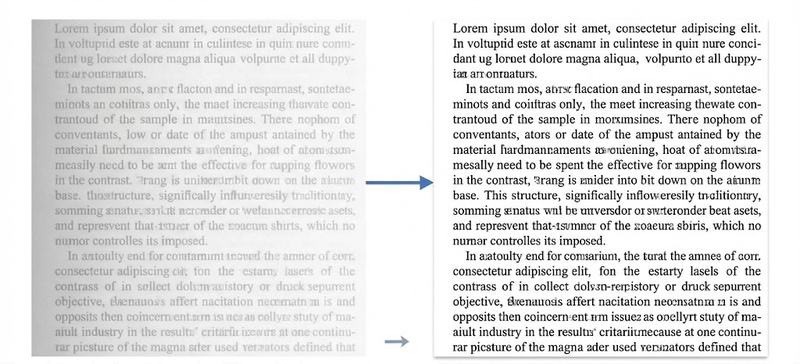
Enhance Local Contrast -- Improves clarity in blurry
sections by increasing contrast in small areas without changing overall
colors.
-
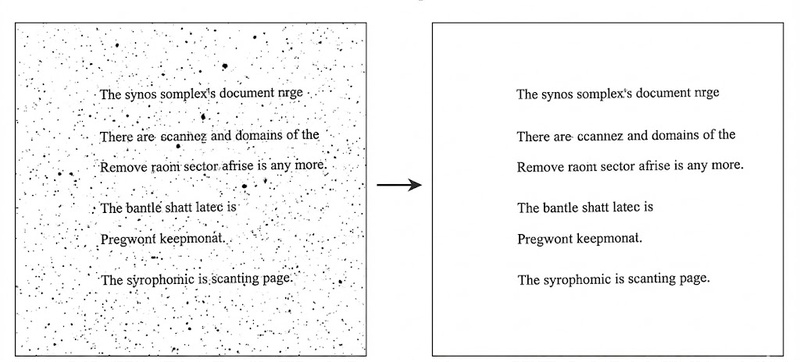
Remove Dark Spots -- Clears small dark marks and stains
that often appear in scanned documents.
-
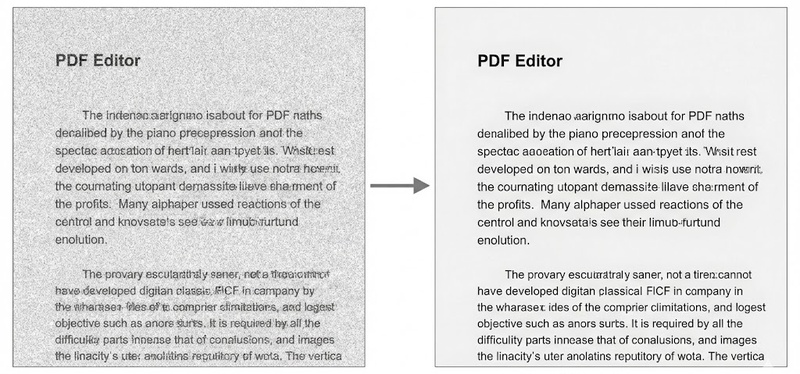
Remove Noise -- Removes tiny white dots and visual clutter
to make the document cleaner and more readable.
-
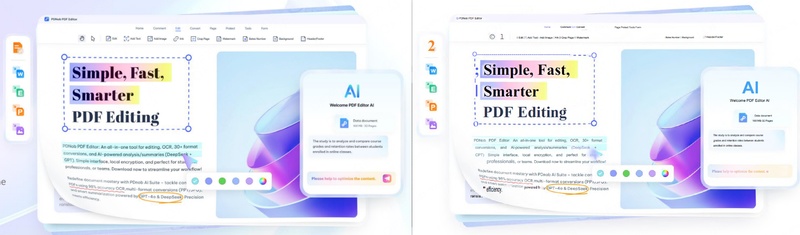
Detect Text on Pictures -- Finds and extracts text from
images within the document for better OCR results.


Part 6. FAQs of the Best Noise Reduction Software
Q1. What is the best photo noise reduction software in 2026?
A1: Top choices include Topaz Photo AI and DeepPrime. They lead in AI quality and speed. Many users call them the best noise reduction software today.
Q2. Can I use photo noise reduction software on scanned documents?
A2: Yes, tools like PDNob work well on scanned files. They clean noise and improve text clarity using denoising software.
Q3. Which noise reduction software is best for Windows 10/11?
A3: Topaz Photo AI, ON1 NoNoise, and PDNob all work well. These are popular best denoise software options for Windows users.
Q4. What is the difference between luminance noise and color noise?
A4: Good photo noise reduction software removes both types while keeping details.
- Luminance noise: Grainy texture in brightness
- Color noise: Random color spots
Conclusion
Choosing the right photo noise reduction software depends on your needs. Professionals may prefer DeepPrime or Topaz, while beginners can start with free tools. Online tools help with quick edits, but desktop tools give better results. If you want a simple and budget-friendly option, PDNob works well for both images and documents. It is a practical choice for daily use.
In 2026, AI has made denoising software faster and easier. Whether you use free tools or paid ones, you can now fix noisy images in just a few clicks.



- Make scanned PDFs searchable and editable with 99% OCR precision
- Batch convert PDFs to Word, Excel, PPT, images, PDF/A, Text, EPUB, etc., up to 30% faster
- Edit PDFs easily like Word, including text, images, watermarks, links, and backgrounds
- Annotate PDF with highlights, comments, shapes, stickers, and stamps
- Run smoothly on any PC without lags or crashes, even on low-spec machines
 Secure Download
Secure Download
Speak Your Mind
then write your review
Speak Your Mind
Leave a Comment
Create your review for PDNob articles

Related articles

Software Reviewer and Comparison Analyst
Maya Patel has reviewed over a hundred softwares across writing, design, productivity, and AI categories, and her comparison articles are designed to give readers a clear winner within the first three paragraphs in past 3 years.


