
 Home
>
PDF Editor
>
Adobe Acrobat Download for Windows 11 64-Bit Free: Full Guide 2026
Home
>
PDF Editor
>
Adobe Acrobat Download for Windows 11 64-Bit Free: Full Guide 2026
Adobe Acrobat Download for Windows 11 64-Bit Free: Full Guide 2026
- 1 Free download Adobe Acrobat for Windows 11 64-bit means one product, not four: Reader is permanently free, the rest need a subscription.
- 2 Windows 11 only exists in 64-bit, yet Adobe still ships a 32-bit Reader for legacy plug-ins, listed below the recommended 64-bit option.
- 3 Activation uses your Adobe ID or with Adobe Acrobat activation serial number (license key), and uninstalling does not release the slot, so deactivate from the app.
- 4 Free Adobe Acrobat licence keys and activation key generators are usually for malwares with extra steps --- the only legitimate routes are an Adobe ID sign-in, a 7-day trial, or a serial number you bought.
Adobe Acrobat download for Windows 11 64-bit free mixes one genuinely free product with three paid ones, and that is where people get stuck. On Windows 11 Adobe Acrobat Reader has a free tier; Standard, Pro and Studio all sit behind a subscription. This guide is for Windows 11 users who need a dependable PDF reader now.
Everything below points at Adobe's own servers. We do not host, mirror or modify any installer. Version numbers, sizes and prices were checked against Adobe's release notes and the Microsoft wing manifest repository on 27 October 2026.

Part 1. Adobe Acrobat Download Version and Channel Overview
Adobe ships Acrobat and Reader on two separate tracks, and the track decides your upgrade path. The Continuous track ships a build every two to three weeks; the Classic track is frozen at a yearly release. A Classic licence will not activate a Continuous installer, and a Continuous account will not unlock a Classic package. For an Adobe Acrobat download for Windows 11 64-bit free, take Continuous, currently at 26.002.22031.

Channels and Official Destinations to Download Acrobat
 Please swipe to view
Part 2. What Is Actually Free in Adobe Acrobat
An Adobe Acrobat download for Windows 11 64-bit free covers two very different things. A permanent no-strings download does exist, and it is Acrobat Reader, but there is no such 'free Acrobat Pro' in any legitimate form. What does exist is a 7-day trial, a one-time purchase running three years, and a paid AI add-on people assume is bundled.

What Adobe Acrobat Reader Gives You Free
- Open and view any PDF, including forms and media, plus print and full-text search.
- Comment, highlight, strike through, add sticky notes and draw on the page.
- Fill in forms, add a digital signature and share a file through a link for once.
- 100 GB of cloud storage, a mobile app and a Chrome extension, with no account needed.
- Not included: permanent edits, Word and Excel conversion, OCR, permanent redaction, comparison.
Trial and Paid Plan Prices
Please swipe to view
The trial starts when you sign up, not when you install, payment lands on the eighth day, and you have 14 days to cancel and be refunded. If it lapses you keep the application, and it drops back to viewing, commenting and form filling.
Part 3. Feature Set, Pros and Cons of Adobe Acrobat
Across the 4 tiers the toolset covers editing, conversion, OCR, comparison, redaction, signing and protection. This suits anyone handling contracts, invoices or scanned paperwork.
Core Capabilities of Adobe Acrobat
- Edit text and images, reorder pages, and convert to or from Word, Excel and PowerPoint.
- OCR scanned pages into searchable, selectable text across dozens of languages.
- Compare two versions, redact permanently, and build fillable forms with certificate signing.
- Protect files with passwords, permissions, certificate encryption and expiry policies.
Adobe Acrobat Edition Differences Compared
Please swipe to view
Part 4. Adobe Acrobat 32-Bit Versus 64-Bit Decision
The Adobe Acrobat Windows 11 32-bit vs 64-bit choice looks trivial, but it affects memory access, large-file stability, Office integration, and whether your old plug-ins will load at all---so use the table below to pick the right build before installing.

Adobe Acrobat 32-Bit Versus 64-Bit Differences
Please swipe to view
Adobe Acrobat 32-Bit Versus 64-Bit Which to Choose
Choose 64-bit if
- You work with large PDFs, scanned documents, multi-page contracts, or image-heavy files --- 64-bit uses more memory and reduces lag and crashes.
- You rely on OCR, document comparison, batch processing, or permanent redaction --- these are memory-hungry and run more reliably in 64-bit.
- You have 64-bit Office and need smooth Word/Excel/PowerPoint conversion and plug-in integration.
Choose 32-bit only if
- You depend on a 32-bit-only legacy plug-in or third-party extension (e.g., an old scanner driver or industry add-in) that you've confirmed won't run under 64-bit Acrobat.
- You're on a very low-memory older machine (4 GB or less) doing only light viewing and annotation.
Bottom line: For the vast majority of Windows 11 users, download 64-bit Adobe Acrobat. Pick 32-bit only when you've confirmed a 32-bit-only plug-in, legacy driver, or mandatory IT requirement.
Part 5. How to Download Adobe Acrobat for Windows 11 64-Bit Free
Four routes get you a working copy, and they differ in bandwidth and control. The Reader Download Center suits a single machine because it needs no account and no card. For a locked-down network or a multi-PC rollout, the offline package or command line wins. Either way the Adobe Acrobat download for Windows 11 64-bit free is the same product.
Method One, Reader Download Center
This is where an Adobe Acrobat download for Windows 11 64-bit free is simplest.
-
Open the Reader Download Center and select Windows version and your language, then start the download.
-
Clear any pre-selected add-on offers, including the bundled photo editor. Open your browser's Downloads folder, locate the installer and run it.
-
At the User Account Control prompt, confirm the publisher reads Adobe Inc. Follow the prompts to completion, choose Finish, then launch Reader from the Start menu.

Method Two, Microsoft Store

Open Microsoft Store and search for Adobe Acrobat Reader.
-
Select the official Adobe listing and check the publisher is Adobe Inc.
-
Choose Get, then Install, and approve any administrator prompt.
-
Right-click a PDF, choose Open with > Choose another app and tick Always use this app.
Method Three, Winget Command Line
If you prefer a command-line approach, Windows 11 ships with Winget (Windows Package Manager), which lets you install, update, and manage Acrobat without opening a browser. Open Terminal (or PowerShell) and run the commands below as needed.
-
Install the free 64-bit Reader. Run the following command
to download and install the standard desktop edition of Acrobat Reader:
winget install --id Adobe.Acrobat.Reader.64-bit -
Install the Microsoft Store edition (optional). If you
prefer the Store version of the app, install it from the msstore source
instead:
winget install --id xpdp273c0xhqh2 --source msstore -
Update an existing installation. If Acrobat Reader is
already installed, use the upgrade command to fetch the latest version
without reinstalling:
winget upgrade -e --id Adobe.Acrobat.Reader.64-bit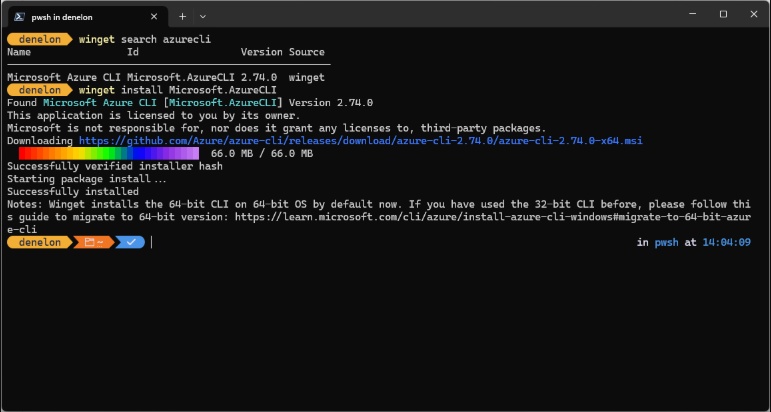

The command reference is in Microsoft's winget documentation (learn.microsoft.com).
Part 6. How to Activate Adobe Acrobat on Windows 11 64-Bit Licence
Activation in the Acrobat family means telling Adobe which account or which licence is entitled to the features. The term is used loosely across the download-site world, so it is worth being precise. There is a 7-day trial that converts to $19.99 a month, a one-time purchase that activates with a serial number, and a two-device limit on both. There is no legitimate way to get the paid tier without paying, and we do not distribute licences, keys or bypass tools.
Activating a Subscription With Adobe ID
-
Install Acrobat using any of the four methods above and launch it from the Start menu.
Click the profile icon in the upper right and choose Sign in.
-
Sign in with the Adobe account that holds the trial, the subscription or the AI add-on.


Activating a Subscription With Adobe Serial Number (License Key)
-
Open Acrobat and go to Help > Activate.A confirmation dialog box will appear.
-
Choose the third option ("Activate Acrobat with a serial number"), enter your serial number, and click Next.Click Continue.
-
Acrobat will remove the trial version and download a serial-number-compatible installer to finish the installation.


Pricing and the full comparison are on Adobe's Acrobat plan comparison page (adobe.com).

Any site offering a "free Adobe Acrobat license key" or crack is high-risk---such keys are stolen or fake and often bundle malware that can steal your credentials and files.
Part 7. Five Common Adobe Acrobat Download Problems and Fixes
Installer Freezes Mid-Progress
Cause:
- Setup.exe was run from inside the archive, not an extracted folder.
- The web installer lost its connection and stalled waiting for components.
- Insufficient disk space. The requirement is 4.5 GB free, and the archive needs about 1.6 GB before extraction.

right-click Setup.exe in the extracted Adobe Acrobat folder and choose Run as administrator.
Product Appears Unlicensed on Launch
Cause:
- Acrobat is signed out, or signed in with an account holding no entitlement.
- The 7-day trial ended and the account was not cancelled, so the plan lapsed on the eighth day.
- A trial installer removed the paid installation, because the trial downloader removes earlier versions by default.
sign in with the entitled account, then check the plan page.
Sign-In Loop Keeps Redirecting
Cause:
- An extension, ad blocker or proxy is blocking the authentication callback.
- Pop-ups are blocked for the site, so the authorisation window never opens.
- The system clock is skewed, which makes the secure token exchange fail.
use a private window with extensions disabled, allow pop-ups for adobe.com, and check the clock.
Device Activation Limit Reached
Symptom: an error on launch saying the activation limit has been reached, or that sign-in failed.
Cause: the account is signed in on two computers and you are trying to add a third.
- In the activation dialog, choose to sign out other computers, then sign in again.
- On the machine you no longer use, reinstall the app, connect to the internet, and run Deactivate from the Help menu.
Adobe documents the error in its activation limit article (helpx.adobe.com).
Build Is Too Old to Stay Secure
Risk:
- Bulletin AP-26-141, published 8 September 2026, listed Continuous builds 26.002.21900 and earlier as affected.
- The same bulletin covered Classic builds 24.001.30383 and earlier, fixed in 24.001.30429..
The build we recommend, 26.002.22031, has no known unfixed vulnerability, and 1,800+ findings were corrected before it.
Part 8. Conclusion and Editorial Notes
An Adobe Acrobat download Windows 11 64 bit free comes down to one product, one download and one decision. Reader costs nothing and stays free, while Standard, Pro and Studio start billing on day eight of a trial. Take build 26.002.22031 from the 64-bit channel, and reach for the 32-bit Reader only when a legacy plug-in needs a 32-bit process. Sign in with an Adobe ID, respect the two-device limit, and treat every free licence key as malware. When the installer stalls, the licence will not validate or the build looks stale, the five fixes in Part 7 have you covered. If you still meet some less seen problems, you can also consider to seek help from Adobe Acrobat forums.
Part 9. FAQ on Adobe Acrobat Download for Windows 11 64-Bit
Q1. Is Acrobat Really Free on Windows 11?
A1: Adobe Acrobat Reader is genuinely free, permanently, and needs no account to install. It covers viewing, printing, searching, annotating, form filling and signing. The paid tiers are Standard, Pro, Studio and the AI Assistant add-on, and each needs a subscription.
Q2. Is There a Free Version of Acrobat Pro?
A2: No. A 7-day trial of the complete Pro feature set exists, and so does a one-time purchase covering three years, but there is no free perpetual Pro and no free way to unlock the paid tools.
Q3. Which Build Should I Download on Windows 11?
A3: The 64-bit build, without exception, because Windows 11 is 64-bit only and the 32-bit package is no longer supported on 32-bit operating systems. The real choice is the small web installer, the 1.6 GB offline archive or the Microsoft Store version.
Q4. How Many Computers Can I Activate?
A4: Two at a time on a personal plan, for the subscription tiers and the one-time purchase alike. A third device is not permanently blocked: release a slot from the activation dialog or the activated devices page. Uninstalling is not enough.
Q5. What Is the Latest Version Right Now?
A5: Right now the Continuous build is 26.002.22031, which shipped on 14 October 2026, for both Acrobat and Reader. The Classic track is at 24.001.30429 for Acrobat 2024. Version numbers change every few weeks, so check the release notes rather than trusting a number you read somewhere.
Q6. Do I Need an Adobe Account to Install?
A6: No. Individual Reader downloads through the Reader Download Center and the Microsoft Store both work without a sign-in. You need an Adobe ID only when you install through Creative Cloud, or want the paid tiers or cloud storage.



- Make scanned PDFs searchable and editable with 99% OCR precision
- Batch convert PDFs to Word, Excel, PPT, images, PDF/A, Text, EPUB, etc., up to 30% faster
- Edit PDFs easily like Word, including text, images, watermarks, links, and backgrounds
- Annotate PDF with highlights, comments, shapes, stickers, and stamps
- Run smoothly on any PC without lags or crashes, even on low-spec machines
 Secure Download
Secure Download


Speak Your Mind
then write your review
Speak Your Mind
Leave a Comment
Create your review for PDNob articles

Related articles

AI Tools Writer / Workflow Analyst
Rachel has spent the last 5 years testing and writing about AI-powered tools across writing, design, and research workflows. She focuses on practical AI tool usage, helping knowledge workers turn generative AI into everyday productivity.


