
 Home
>
PDF Editor
>
PDNob vs Foxit PDF Editor: Price, OCR and AI Compared
PDNob vs Foxit PDF Editor: Price, OCR and AI Compared
Looking for a versatile PDF editor without paying for features you don't need? PDNob and Foxit PDF Editor both give you tools to edit, convert and manage your PDFs, but they don't answer exactly the same expectations.
PDNob takes a lightweight, practical approach, with tools to handle scanned documents, translate whole PDFs and make use of their content thanks to AI, plus a lifetime license. Foxit PDF Editor is aimed more at users who want features that fit their professional document workflows. In this PDNob Foxit comparison, we look at their main differences, their pricing and their use cases to help you pick the PDF editor that suits you best.
- 1 Price and license: PDNob offers an annual plan at $49.99 and a lifetime license at $64.99, while Foxit PDF Editor lists an annual price of $129.99 per user. PDNob's lifetime license can be worthwhile if you plan to use the software over several years.
- 2 OCR, translation and AI: PDNob includes six OCR preprocessing settings to prepare pages before text recognition, along with whole-PDF translation and a side-by-side view of the original and the translation. Its AI tools can also make documents easier to process and understand.
- 3 Which one should you choose? PDNob may suit you if you are looking for a versatile PDF editor, in particular for scanned or multilingual documents, with the option of a lifetime license. Foxit PDF Editor may be a better fit if its professional tools, such as document comparison, match your needs more closely.

Part 1. In Brief: PDNob or Foxit, Which One to Choose?
PDNob and Foxit PDF Editor both let you edit, convert and annotate PDFs. To choose, take your working habits, the features you actually need and the cost of the license into account.
When to Choose PDNob ?

- You want one versatile tool for all your PDFs. PDNob brings several PDF processing features together in a single program, so you don't have to juggle separate tools depending on the task.
- You regularly work with mixed document types. If you work with standard PDFs as well as scanned documents or files written in a foreign language, its specialized tools can come in handy.
- You prefer buying a lifetime license. PDNob offers this option, which can be attractive if you plan to use the software long term. Compare its price with the Foxit plan that matches your needs.


When to Choose Foxit PDF Editor ?

- You already use Foxit every day. If your working methods rely on this software, keeping it can make the day-to-day continuity of your work easier.
- You have specific professional requirements. Check that the plan you are considering includes the editing, form or document management features you actually need.
- You work in teams or with complex PDFs. Compare the collaboration features and test your own files to make sure the layout, fonts and forms are preserved correctly.
Part 2. PDNob vs Foxit: Comparison Table
PDNob and Foxit PDF Editor answer different needs. PDNob focuses on a versatile and lightweight PDF editor designed to simplify everyday tasks. Foxit PDF Editor draws on its market experience and offers tools suited to professional needs and document management. This PDNob Foxit comparison lays out the main differences between the two programs.
The choice depends first and foremost on your needs. If you are looking for a versatile PDF editor to handle scanned documents, translate whole PDFs and simplify certain tasks with AI, PDNob deserves your attention. Its lifetime license can also be attractive if you want to use the software long term without renewing a subscription every year. Foxit PDF Editor remains relevant if you already use this tool in your professional environment, or if its features, document comparison in particular, fit your working methods better.
Part 3. Positioning and User Needs
PDNob and Foxit PDF Editor are two complete PDF editors, but they do not put the same emphasis on the same needs. PDNob positions itself as a versatile and lightweight PDF tool built to simplify everyday tasks: editing and converting documents, handling scanned files with OCR, or making use of their content with AI. Its accessible interface and the range of features gathered in a single program make it an interesting option for individuals, students and small businesses that want a practical tool without a pile of separate applications.

Foxit PDF Editor targets professionals and organizations that need a more complete document management environment. Beyond standard editing, it offers tools for document comparison, form management, security and collaboration, depending on the version you choose. It can therefore be worth considering if you work in teams, manage complex documents, or already use Foxit in your professional processes.

In short, PDNob favors a versatile and accessible approach to handling PDFs efficiently, while Foxit offers a set of tools aimed more at professional needs and enterprise document workflows. The best choice depends on the features you actually use and the level of document management you need.
Part 4. Pricing and Value for Money
PDNob offers a lifetime license at $64.99, on top of an annual plan at $49.99. For comparison, the annual price listed for Foxit PDF Editor on its official site is $129.99 per user. The difference is noticeable, but value for money also depends on the features and the license terms you need.

A PDNob license can be used on two devices, in the supported combinations: two Windows devices, two Mac devices, or one Windows device and one Mac device. A free iOS version is also available. The AI credits and the included cloud storage can vary depending on the plan you choose. Check the plan details on the official site for the applicable terms.

The Foxit annual price shown here refers to the PDF Editor edition for Windows, macOS and Web. Before you compare the offers, check the features included, the renewal terms and any paid options: two licenses at different prices do not necessarily answer the same needs.
Over the long term, PDNob's lifetime license can be cheaper. At $64.99, it costs $65.00 less than one year of a Foxit license at the listed price. It is also $34.99 cheaper than two years of the PDNob annual license, which comes to $99.98 in total. This calculation relies on the prices currently listed and assumes they stay unchanged.
Part 5. Features and Everyday Use
Editing and Organizing PDFs
PDNob and Foxit PDF Editor let you edit the text and images of a PDF and rearrange its pages. PDNob also lets you make edits from the reading view, while Foxit has a comparison tool to spot the differences between two versions of a document. This feature is particularly useful to spot the changes made to a contract, a report or a document that has been through several revisions.
PDNob Editing Interface

Foxit Editing Interface

OCR and Scanned Documents
A PDF created from a scan often contains an image of the page rather than text you can work with directly. Optical character recognition (OCR) turns that image into searchable and reusable text.
PDNob offers six OCR preprocessing settings to prepare the pages before recognition. They let you crop or straighten a page, improve contrast and reduce noise. These adjustments are particularly useful when the scans are skewed, carry unnecessary margins or vary in quality.
In a test on 309 pages of the F1-Core dataset, preprocessing improved the measured F1-Core score by 1.55%. This result concerns that dataset and the conditions of the test; it does not guarantee the same gain on every document. Foxit also offers OCR. To compare the results in your own context, the most relevant thing is still to test both programs on a few scans that represent the files you handle day to day.
PDNob OCR Settings

Foxit OCR Settings

PDNob OCR Result

Foxit OCR Result

Converting and Translating PDFs
PDNob supports more than 30 conversion formats, including Word, Excel and PowerPoint. This makes it easier to reuse the content of a PDF in another format, for example to rework a report or work with data in a spreadsheet.
For translation, PDNob lets you read the original text and its translation side by side. You can check a technical term, a proper noun or a phrasing without switching between two versions of the document. This layout can be practical to read reports, contracts or working documents written in another language.
Foxit also offers AI-assisted translation. To choose between the two, check above all the display mode each one offers and how easily you can control the translation according to your needs.
PDNob Translation Settings

PDNob Translation Result

AI Tools and Productivity
AI tools can make a PDF easier to read by helping summarize its content or by finding precise information. PDNob goes further with its AI Agent, which can run certain PDF operations from instructions in natural language. Instead of looking for the right command by hand, you can for example ask it to run an OCR, compress a file or convert it.
The AI terms differ from one plan to another. PDNob's AI features are sold as a separate $39.99 per year add-on, with a 7-day free trial and unlimited AI usage once it is active, while the Foxit plan shown in this comparison includes a monthly free quota for the Foxit AI Assistant, 300 credits per month. Credits are not necessarily equivalent from one service to the other: their value also depends on the operations available and the number of credits each one consumes.
PDNob AI Settings
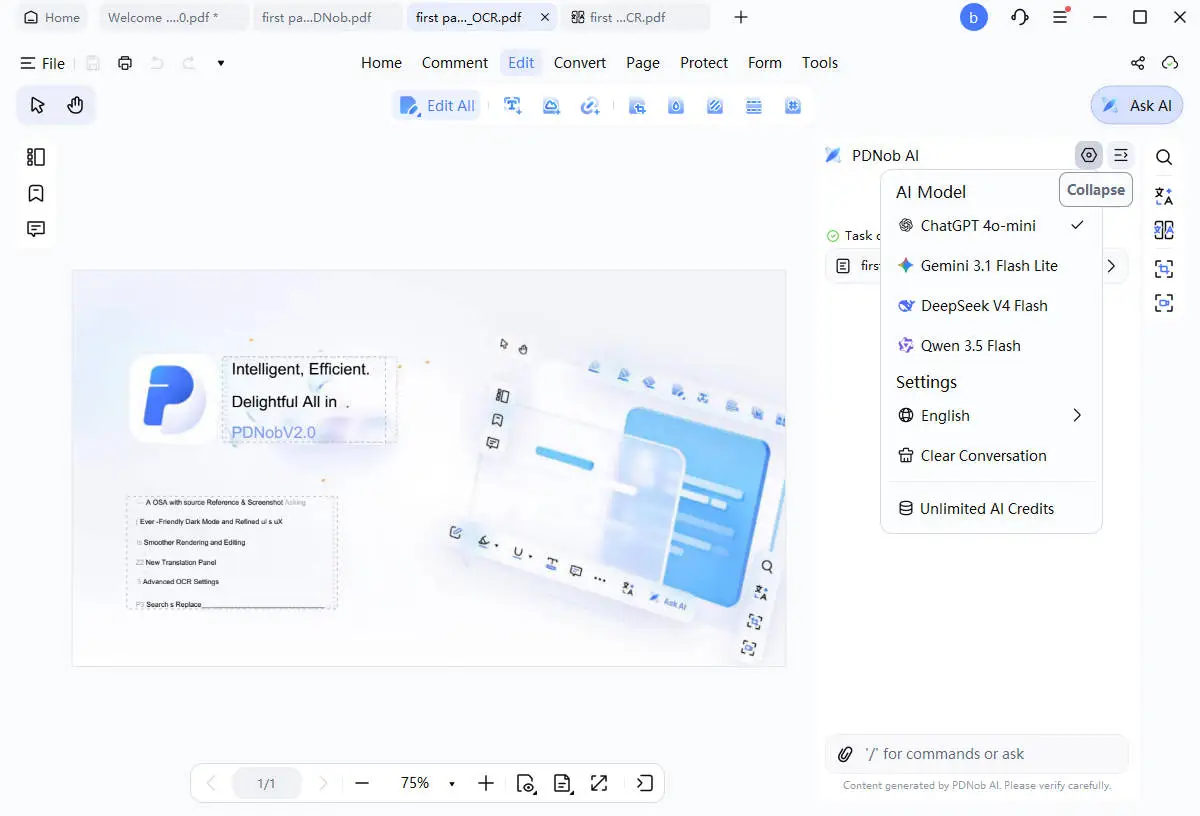
PDNob AI Workflow

Part 6. Conclusion: PDNob or Foxit, Which Is the Better Choice?
If you are looking for a versatile, lightweight and practical PDF editor with a lifetime license, PDNob deserves to be your first choice. It gathers tools to edit and convert PDFs, handle scanned documents with OCR, translate whole PDFs and make certain tasks easier with AI. Its lifetime license can also be attractive if you want to use the software long term without renewing a subscription every year.
Foxit PDF Editor remains a relevant choice if you already use it in your professional environment or if its features, document comparison in particular, answer your needs better. In the end, pick the tool that matches your daily tasks and your budget. If PDNob's features cover what you need, you can start by downloading it and trying it out.
FAQ: PDNob vs Foxit
Is PDNob better than Foxit PDF Editor?
It depends on the features you need. PDNob may suit you if you are looking for a versatile PDF editor with a lifetime license. Foxit PDF Editor may be preferable if its tools match your professional needs or your working environment more closely.
What does PDNob cost compared with Foxit PDF Editor?
Based on the prices listed in this comparison, PDNob costs $49.99 per year or $64.99 for a lifetime license, against $129.99 per user per year for Foxit PDF Editor. Prices and terms can change, so check the official pages before you subscribe.
Is Foxit PDF Editor free?
No, Foxit PDF Editor is paid software. Foxit also offers Foxit PDF Reader, a free version mainly intended for reading and annotating PDFs. A 14-day free trial of Foxit PDF Editor+ is advertised, subject to the terms of the offer.
Does PDNob offer a lifetime license?
Yes. PDNob lists a lifetime license at $64.99 on its purchase page. Before buying, check the terms that apply to the included features, the AI credits and the cloud storage.
Do PDNob and Foxit support OCR?
Yes, both programs offer OCR to recognize the text of scanned PDFs. PDNob in particular has six preprocessing settings to prepare the pages before recognition. The result depends on the quality of the scan and on the layout, among other things.
Which PDF editor should I choose to translate a whole document?
PDNob can translate whole PDFs with a side-by-side view of the original text and its translation. This layout makes it easier to check translated passages. For Foxit, check the translation features available in the plan you are considering.



- Make scanned PDFs searchable and editable with 99% OCR precision
- Batch convert PDFs to Word, Excel, PPT, images, PDF/A, Text, EPUB, etc., up to 30% faster
- Edit PDFs easily like Word, including text, images, watermarks, links, and backgrounds
- Annotate PDF with highlights, comments, shapes, stickers, and stamps
- Run smoothly on any PC without lags or crashes, even on low-spec machines
 Secure Download
Speak Your Mind
then write your review
Speak Your Mind
Leave a Comment
Create your review for PDNob articles
Related articles

AI Tools Writer / Workflow Analyst
Rachel has spent the last 5 years testing and writing about AI-powered tools across writing, design, and research workflows. She focuses on practical AI tool usage, helping knowledge workers turn generative AI into everyday productivity.


