
 Home
>
PDF Editor
>
PDF XChange Editor License Key: Buy, Activate & Fix It 2026
Home
>
PDF Editor
>
PDF XChange Editor License Key: Buy, Activate & Fix It 2026
PDF XChange Editor License Key: Buy, Activate & Fix It 2026
- 1 Since version 9, entering your key is only half the job. You first add the key to the program (Help → License Key → Add New License Key), and then activate it (Activate via Internet, or Activate Manually on an offline machine).Skip that second step and the editor still behaves as if you had no license at all.
- 2 Offline activation exchanges files, not codes --- Activation.request goes up through the Offline Serial Key Activation page, and Activation.response comes back down.
- 3 Every licensed user gets one desktop and one laptop --- a five-user pack covers up to ten machines, and uninstalling the editor does not release an activation slot. Deregister does.
- 4 A single-user Editor license costs $62, Editor Plus $79, and Pro $131 --- a one-time purchase, with volume tiers and PDF-XChange Pro bundles priced lower per seat.
PDF-XChange Editor is one of the quickest and most configurable PDF tools on Windows. It edits text in place, annotates without fuss, and converts in batches, which is why both long-time legal and finance teams and people who only need to redact a single page keep coming back to it. The catch is that the free build stops short. Advanced OCR, clean exports without a demo stamp, and the heavier batch and comparison tools all sit behind a paid license, but Since PDF-XChange Editor version 9, the key adding and activating are separated into defferent steps.
This guide covers where a PDF XChange Editor license key comes from, how to activate one on a machine that is online or entirely offline, and what to do when the key refuses to take. The steps below follow the current build of the editor and Tracker Software's 2026 licensing rules.

Part 1. What Is a PDF-XChange Editor License Key
A PDF XChange Editor license key is the official credential Tracker Software issues to unlock the paid half of the editor. Viewing, commenting, highlighting and page management are open to everyone; the rest --- advanced OCR, watermark-free exporting, batch conversion, document comparison --- waits for a license.
Search results pile these terms on top of each other, so it pays to sort them out:
- License key / serial key / activation code: the real thing, issued by the vendor. Genuine credentials are secure, legitimate, and open every licensed feature on the product they belong to.
- Keygen: a "key generator" is an unofficial, usually illegal tool that fabricates codes to slip past licensing. Beyond the legal exposure, these files are a standard malware carrier, and a machine that uses one is often blocked from updates and support.

Most of what a search for "PDF-XChange Editor license key free""Cracke PDF-XChange Editor" returns is not a gift. Keygens ship keyloggers, cracked installers rewrite your system behind your back, and fake license forms are built to harvest personal details — and the genuine free edition already gives you more than 70% of the editor, unlimited, with no key at all. Everything that follows sticks to legitimate methods only.
Part 2. Where to Get a PDF XChange Editor License Key
The PDF XChange Editor license key buy process takes a couple of minutes, whether you are a first-time buyer or moving up from an older release. Here is the route that gets you a genuine key without the gray-market detour.
How to Buy a PDF XChange Editor License Key
-
Start at the official website. Tracker Software's own store is the only source that guarantees a genuine PDF XChange Editor license key. Third-party resellers exist, but they add a markup and another link in the chain between you and support.
-
Pick the plan that fits. Open the Buy Now or Licensing section to see live pricing for each edition and seat count. As of 2026, the PDF XChange Editor license key cost starts at approximately $62.00 USD for a single-user license, and volume or bundle deals --- most commonly alongside PDF-XChange Pro --- bring the per-seat figure down for organizations and campuses.
-
Check out. Choose the license type, fill in the billing details, and pick a payment method. A confirmation email carrying your key arrives as soon as the payment clears.
-
Know where it landed. Your PDF-XChange Editor license key location is either that confirmation email or your Tracker Software account, under the "My Products" section. Both work, and both stay available after the fact.
-
Keep a copy somewhere safe. You will need the key again for a reinstall, for an upgrade to a newer build, or for the second machine you are entitled to.

Tracker Software is currently shipping version 11 of the editor, where a single credential unlocks whichever edition you paid for. There is no separate Plus download to hunt down.
What Does a PDF XChange Editor License Key Cost?
It depends on two things: which edition you pick and how many seats you need. A single-user Editor license comes in at approximately $62.00 USD, Editor Plus and the Pro bundle sit above that, and every additional tier discounts the per-user rate. The checkout page shows the live figure for your configuration, and every purchase arrives with one year of maintenance included.
How Can I Get a PDF XChange Editor License Key for Free?
Not through official channels, no. Tracker Software does publish a free tier that leaves more than 70% of the editor open, and it runs indefinitely without a key. What the paid license adds is the remaining 30%: licensed features that work without stamping an evaluation watermark into the file you save. Meanwhile, the open web is full of "free" serials, cracked builds and generator tools that arrive with keyloggers attached, trip the vendor's block list, or expire the week Tracker Software rotates its check.
Upgrading inside PDF-XChange is not always straightforward either --- the editions overlap and the interface is dense enough to make a cheap upgrade feel expensive. Teams who only need everyday PDF work can skip the licensing debate entirely with Tenorshare PDNob: a lightweight, intuitive editor that handles editing, OCR, annotations and conversion out of the box, at a friendlier price.




Part 3. How to Activate a PDF XChange Editor License Key
Tracker Software supports activation over the network and a fully offline exchange, and the credential in your hand comes in one of three shapes:
- A serial key — a long string of characters.
- An activation code — a short one-time code issued by resellers, which you redeem for a serial key.
- An .xcvault file — a container that bundles the serial key for scripted rollout.
Since version 9, applying a key and activating it are two separate acts, and confusing the two is the single most common reason a license appears to be unworkable.
If your goal is simply to activate PDF XChange Editor license key credentials on a locked-down machine with no route to the internet, the offline exchange below is the one you want.
1. PDF XChange Editor Activate License Key Online (Recommended)
-
Open PDF-XChange Editor and head to Help → License Key → Add New License Key.
-
Choose Paste Key from Clipboard, paste the serial key (or point the dialog at an .xcvault file), and click Continue.
-
On the next screen select Activate via Internet. The editor checks the credential against Tracker Software's server and unlocks the licensed features.

2. Offline Activation
-
On the offline machine, open the same Help → License Key dialog and pick Activate Manually (Offline).
-
The editor writes an Activation.request file. It is a file rather than a code, so copy the whole thing without opening it in an editor.
-
On a machine that has internet, sign in to your Tracker Software account, open the Offline Serial Key Activation page, and upload that request file.
-
Download the Activation.response file the account hands back, carry it to the offline machine, and import it to finish the activation.
- Every licensed user is entitled to one desktop and one laptop. A five-user pack therefore covers up to ten machines, and a further attempt fails with the message "Your license key says no activations are left."
- Your account page keeps an Activations List. Deregister releases the slot so an old machine can give way to a new one; Block blacklists that machine so it can never register again.
- Uninstalling the editor does not free a slot. Only deregistering does.
- Activation has to run inside your own user account --- the installer cannot do it on your behalf, and from version 9 onward you must be signed in to your account before it completes.
- For corporate and volume licenses, the .xcvault file makes deployment across multiple machines far less painful.

Part 4. Best Alternative to PDF-XChange Editor - Faster & Smarter
PDF-XChange Editor is powerful, and power has a cost. Plenty of users describe it as complex, dated, or overpriced --- particularly when all they actually need is light to moderate PDF work. Form creation, virtual printing and the more advanced image tools are sold as paid add-ons, and the ribbon can feel like a wall. When that is the situation, a lighter editor usually serves better.
PDNob is built for exactly that audience. PDNob Editor is a desktop lightweigt PDF editor with high precision AI OCR with editing features combo that combines PDF editing, annotation, conversion, merging/splitting, and OCR recognition, designed to help users efficiently read and edit PDF files.It opens fast, stays stable, and keeps the tools that matter in plain sight:

- Editing made simple: a clean interface that behaves the way Word does, so text and image tweaks take seconds rather than a hunt through menus.
- Full OCR and conversion: recognize text in scans, convert between formats, merge or split documents in a couple of clicks.
- Annotations and signatures: comment, highlight, and sign without digging through a toolbar.
- Lightweight and affordable: it starts instantly, stays out of the memory, and costs a good deal less than the premium editors it competes with.
How to Edit PDF with Tenorshare PDNob PDF Editor
-
Open PDNob PDF Editor and click the "Open PDF" button to bring in the file you downloaded.
-
Click "Edit" on the top toolbar and select the text you want to change. A text box appears where you can adjust wording, font, style, size, and color.
-
To insert fresh text, choose "Add Text" in the Edit section and drop it where you want it.
-
To place an image, click "Add Image" and pick the file from your computer.
-
When the edits look right, click "Save" in the top-left corner.
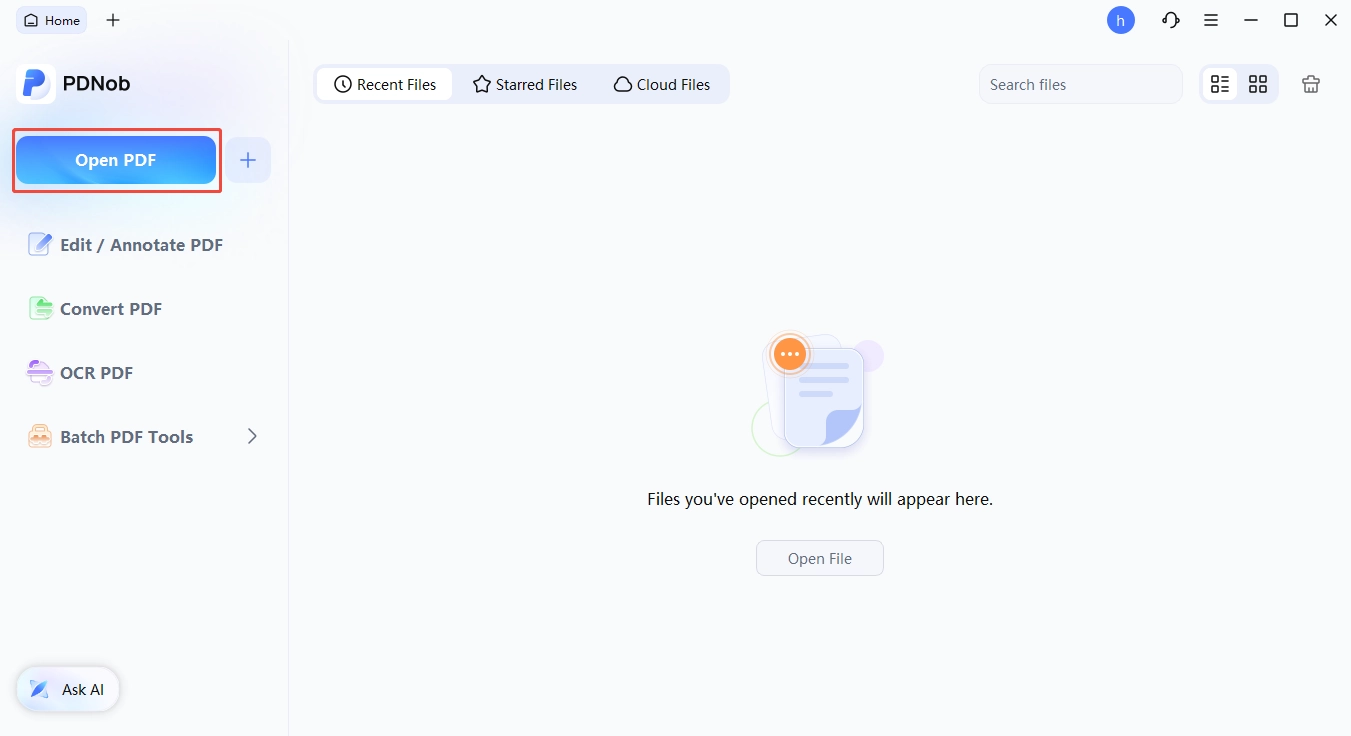


For students, freelancers, and small businesses who don't need every advanced feature of PDF-XChange Editor, PDNob delivers a faster, smarter, and legally safe alternative. It allows you to handle daily PDF tasks efficiently---editing, OCR, batch processing, and signing---without worrying about complicated license management or high upgrade costs.
Part 5. Common PDF-XChange Editor License Key Problems & Fixes
Activation goes wrong in a handful of predictable ways. Knowing them ahead of time saves an afternoon.
1. Activation Fails Online
- Cause: the machine has used up its activation slot, or Tracker Software's server was briefly unreachable.
- Fix: open your account and look at the Activations List. Deregister hardware you have retired, then run the activation again once the count is back inside the limit.
2. Offline Activation Issues
- Cause: the request or response file was incomplete, renamed, or edited on the way between the two machines.
- Fix: redo the exchange carefully --- produce the Activation.request file on the disconnected PC, upload it from the connected one, and import the Activation.response exactly as downloaded. Leave both files untouched.
3. Invalid Key Errors
- Cause: a pirated, shared, or hand-edited credential.
- Fix: stick to keys bought from the Tracker Software store or an authorized reseller. Downloading serial numbers or generators from unverified sites is how people end up with a locked account and a malware problem at the same time.
4. The Key Is Applied but Nothing Unlocks
- Cause: expecting the software catalog entry to decide the edition. It does not. PDF-XChange Editor and Editor Plus ship inside the same installer, and the key you paste is what switches the extra features on. Which is also why an Action1 or Intune library showing only the standard Editor is not a dead end: deploy the standard package, apply the Plus serial key to it, and the Plus features appear.
- Fix: confirm the credential belongs to the product you bought and that it is in the expected shape --- a serial key, an activation code, or a .xcvault container. If it still refuses, send Tracker Software support your purchase details and the exact error text.
Conclusion
A valid PDF XChange Editor license key unlocks the parts of the editor that matter once real work starts --- advanced OCR, batch conversion, exports that carry no evaluation watermark. Follow the official activation path and the license behaves the same across every machine your account covers.
For anyone who finds PDF-XChange Editor heavy going, or simply does not want to manage licenses at all, Tenorshare PDNob PDF Editor is the lighter option. It is quick, compact, and covers the everyday set --- editing, OCR, conversion --- without a complicated setup or an upgrade bill.
Part 6. FAQs of PDF-XChange Editor Key
Q1. What Is the PDF XChange Editor License Key Price?
A1: It depends on the edition and the number of users. Single-user licenses typically start around $62--$70 for the Editor, while Editor Plus, PDF-XChange Pro and any multi-user or volume arrangement cost more. Prices also shift by region and by reseller, so treat the checkout page as the final word.
Q2. Is PDF-XChange a One-Time Purchase?
A2: The license itself never expires --- Tracker Software sells perpetual rights, not a subscription. What does run out is the maintenance window bundled with the purchase, and that is the piece that keeps the current release fully licensed. Twelve months of coverage come included; a second year for an Editor seat runs about $15.50 and a third about $23.25. Renew within 13 months and the cost is a fraction of the original rate. Let it lapse and the editor keeps opening, but major version upgrades and the licensed features in the current build stop being covered.
Q3. Can One PDF XChange Editor License Key Cover Several Machines?
A3: Yes, within the allowance attached to the key. Each licensed user may cover a single desktop and a single laptop, so a five-user license reaches as many as ten machines. Your account's Activations List shows what is currently claimed, and deregistering a machine you no longer use frees the slot for a replacement.
Q4. What If My PDF-XChange License Key Stops Working?
A4: It usually means the device allowance is exhausted or the credential was used outside its terms. Start in your Tracker Software account: check the Activations List, deregister old hardware, and confirm the key matches the edition you actually paid for. If it still fails, hand the details to official support and let them look at the activation record.



- Make scanned PDFs searchable and editable with 99% OCR precision
- Batch convert PDFs to Word, Excel, PPT, images, PDF/A, Text, EPUB, etc., up to 30% faster
- Edit PDFs easily like Word, including text, images, watermarks, links, and backgrounds
- Annotate PDF with highlights, comments, shapes, stickers, and stamps
- Run smoothly on any PC without lags or crashes, even on low-spec machines
 Secure Download
Secure Download
Speak Your Mind
then write your review
Speak Your Mind
Leave a Comment
Create your review for PDNob articles

Related articles

AI Tools Writer / Workflow Analyst
Rachel has spent the last 5 years testing and writing about AI-powered tools across writing, design, and research workflows. She focuses on practical AI tool usage, helping knowledge workers turn generative AI into everyday productivity.


