
 Home
>
PDF Tips
>
Microsoft Office 2010 Free Download: 32/64-Bit Version (2026 Guide)
Home
>
PDF Tips
>
Microsoft Office 2010 Free Download: 32/64-Bit Version (2026 Guide)
Microsoft Office 2010 Free Download: 32/64-Bit Version (2026 Guide)
- 1 There is no new official Microsoft Office 2010 download to find. Microsoft pulled the installer from its own site, the retail trial page is gone, and Office Starter 2010 was discontinued in 2012.
- 2 Mainstream support ended on October 13, 2015, and extended support with security patches ended on October 13, 2020. Nothing has shipped for Word, Excel, or Outlook since.
- 3 Three legal sources still work: your own Microsoft account, an unclaimed product key you can redeem, and your organization's volume licensing portal.
- 4 The final Click-to-Run build is 14.0.7261.5000 from October 13, 2020. If File > Help shows that number, your installed copy is already current.
- 5 Bit choice follows your add-ins, not speed. Legacy COM and ActiveX add-ins still need 32-bit, while 64-bit requires 64-bit Windows and drops XP and Server 2003.
Downloading Office 2010 today means finding licensed installation media for a suite Microsoft stopped supporting in 2020---not a free installer. Mainstream support ended October 13, 2015; extended support ended October 13, 2020, and no security fixes have shipped since. Microsoft has pulled the installer, so there's no official free download or trial. If you own a license, you can usually restore it from your Microsoft account, a redeemable product key, or your organization's volume licensing portal.
In this guide I'll walk you through the three legal sources for Office 2010 media, the 32-bit and 64-bit installs, and the install errors that actually show up on Windows 10 and 11. I'll also be straight about the point where a modern replacement costs you less than keeping a 2010 suite alive.

Part 1. Can I Free Download Microsoft Office 2010 in 2026
Support Timeline and Security Reality
Microsoft ended mainstream support for Office 2010 on October 13, 2015, and extended support on October 13, 2020. The end-of-support notice is blunt about what you lose: technical support, bug fixes, security patches for vulnerabilities found after that date, and the ability to download the software from the Microsoft website.
I check that date whenever a team tells me they are still in 2010, because the practical risk is not that Word stops opening. It is that every document-delivery exploit discovered since 2020 stays open, permanently, in the suite people use to open attachments from clients and vendors. If the machine is online and handles files from outside the organization, that is the issue to plan around rather than the licensing paperwork.
What You Get in Original Office 2010 Editions
- Microsoft Office Home and Student 2010: Word, Excel, PowerPoint, and OneNote; licensed for up to three machines in one household, non-commercial use only
- Microsoft Office Home and Business 2010: the same core applications plus Outlook, for two devices and one user
- Microsoft Office Professional and Professional Plus 2010: the full set with Access, Publisher, Project, and Visio; Professional Plus was volume-licensing only
- Microsoft Office Starter 2010: an ad-supported cut-down edition with Word and Excel only, no PowerPoint or Outlook, discontinued in June 2012

Microsoft phased Office Starter 2010 out in June 2012. There has been no free Office 2010 trial since the beta expired on October 31, 2010. If a page offers you an "Office 2010 free trial" in 2026, it is selling you something that does not exist, usually with a key generator attached.
Microsoft Office 2010 32-Bit vs 64-Bit Differences
The 64-bit build requires a 64-bit operating system, meaning Windows Vista SP1 or Windows 7 and later, and it never ran on Windows XP or Server 2003. The 32-bit build installs on both 32-bit and 64-bit Windows.
Microsoft recommended MS Office 2010 free download 32 Bit for most people at launch, and the reason still holds: legacy COM add-ins, ActiveX controls, and older database drivers were 32-bit only, and they will not load into a 64-bit Office.
- Stay on 32-bit if you rely on legacy Outlook add-ins, ActiveX controls, or older Access data providers
- Choose 64-bit if your workbooks push past 2 GB, or you run 64-bit-only server and database drivers
- Check your Windows architecture first: Settings > System > About, or run systeminfo and read the System Type line
 Please swipe to view
To confirm the copy on a machine is current, open any Office 2010 application, go to File > Help, and read the version under Click-to-Run Product Updates. The final build was 14.0.7261.5000, published on October 13, 2020, the same day extended support ended. If your machine reports that number there is nothing further to install; if it reports an earlier one, the official Click-to-Run update history lists every step in between.
Part 2. Where to Get Microsoft Office 2010 Download in 2026
The free download era is over, so a Microsoft Office 2010 download today is one of three legitimate things: a reinstall you are already entitled to, media your organization owns, or a scam. Here is how each one works, and how to tell them apart before you start pulling files onto a machine.
Reinstall With Your Microsoft Account
For digitally linked licenses
If your Office 2010 purchase or key redemption is tied to a Microsoft account, sign in at account.microsoft.com/services and open Services & subscriptions. The Office entry for 2010 should offer a microsoft 2010 free download option, and older releases often expose language and 32-bit or 64-bit choices before the download starts.
When the entry is missing
If Office 2010 does not appear, the key was probably never redeemed to that account. Redeem it first, then return to Services & subscriptions and refresh the page.
When Microsoft retired it
Some downloads were pulled permanently. Reinstalling will not bring those back, and no account trick will. What remains is your original media or the volume licensing route below.
Redeem an Unclaimed Product Key
-
Find the 25-character key. It is printed on the disc sleeve or product key card, or in the confirmation email from the purchase. Without the key, the account route in the previous section will not surface the installer.
-
Redeem it at redeem.microsoft.com. Sign in with the Microsoft account that should own the license, then enter the key. The 2010 installer attaches to that account.
-
Download the installer from Services & subscriptions. The Office 2010 entry now has an Install button, and you can pick 32-bit or 64-bit there.
-
Install with the same key --- the installer prompts for it again. Enter the same 25 characters and the license activates.

Volume Licensing and Institutional Media
Schools, enterprises, and most IT departments bought Office 2010 under a volume licensing agreement, and that agreement is still the most reliable source of media. In the Microsoft 365 admin center, go to Billing > Your products, open the Volume licensing tab, and choose View downloads and keys. You need the VL Administrator or product download manager role on the agreement, and the product key needs the product keys reader role.
Activation for these installs is MAK or KMS rather than your Microsoft account: a multiple activation key for a fixed number of devices, or a key management server for the fleet. A KMS host on your own network means no internet activation calls at all, which is also why locked-down environments can still install Office 2010 today.
What No Longer Exists in 2026
- Microsoft Office 2010 free trial : the beta expired on October 31, 2010, and the retail trial page was withdrawn years ago
- Office Starter 2010: an ad-supported edition with Word and Excel only, discontinued in June 2012
- The Microsoft website download: the installer is no longer served from Microsoft's own pages
- Any "free Office 2010 ISO" from a third party: expect a modified installer, a stolen key, or both

I would rather say this plainly than bury it: most of the time, the third-party "free Office 2010" downloads that still rank well are the most common source of malware on these search terms, and a key generator does not change that. If you cannot restore a license you own, the answer is a different suite rather than a stranger's ISO.
Part 3. Microsoft 2010 Software Free Download Step by Step
With media and a license in hand, the install itself is unremarkable. What follows is the order that avoids the failures I see most often.
32-Bit Install Steps
-
Check your Windows architecture --- open Settings > System > About, or run systeminfo and read the System Type line. 32-bit Office runs on 64-bit Windows, so this choice is about your add-ins rather than your hardware.
-
Remove any existing Office first --- open Control Panel > Programs and Features, uninstall every Office entry, then restart. 32-bit and 64-bit Office cannot coexist, and a newer Office left on the machine blocks the 2010 installer outright.
-
Run setup as administrator --- mount the ISO or open the extracted folder and start setup.exe with administrative rights. On older systems Click-to-Run also needs Windows Installer 3.0 and MSXML 6.0 SP1 present.
-
Enter the product key and pick your apps: type the 25-character key, accept the license terms, and deselect anything you do not need. Skipping Access, Publisher, and Visio cuts install time noticeably.
-
Let Click-to-Run finish before you restart. Office 2010 installs are sensitive to an interrupted setup, and a forced restart in the middle leaves a half-registered state that is painful to clear.
-
Activate online --- open Word, sign in if prompted, and let the activation wizard run. For volume licenses this is a MAK or KMS activation instead of your Microsoft account.
64-Bit Install Steps
-
Confirm a 64-bit operating system --- the x64 build does not install on 32-bit Windows, and it never supported Windows XP or Server 2003.
-
Uninstall all 32-bit Office copies and restart. Microsoft blocks the mixed-architecture install, and the error message rarely names the real cause.
-
Use the x64 folder of the media --- the installer package ships separate 32-bit and 64-bit folders, and the one you need is the x64 one.
-
Audit your add-ins before you commit: 32-bit COM add-ins and ActiveX controls will not load into 64-bit Office. If a legacy Outlook add-in runs your workflow, stay on 32-bit. A 64-bit Word 2010 installer for Windows 10 is the wrong answer for anyone who depends on one of those add-ins.
-
Install, activate, and verify --- run the setup, activate, then open File > Help and confirm the Click-to-Run version reads 14.0.7261.5000.


Activation and Version Check
-
Open File > Help in any Office 2010 app and look for the version under Click-to-Run Product Updates.
-
Compare it with 14.0.7261.5000 --- that is the last build Microsoft shipped, and the update history in Part 1 lists every step in between if you need to move an older copy forward.
-
If activation fails, work through these in order. Check the system date and time first, since a wrong clock breaks activation; retry online; then use phone activation through the Activation wizard, which still works for older retail keys; and for volume licenses, confirm the KMS host is reachable.
-
Confirm the license is the one you expect. Open File > Account and check that the product shows as activated for your account or key, not a trial state left over from a previous install.
Windows 10 is the practical ceiling for Office 2010. Later Click-to-Run updates added Windows 10 to the supported list, so a 2010 install runs there without heroics. Windows 11 was never supported, and Microsoft's own guidance is that Office 2010 is not fully compatible with it. A machine upgraded in place often still opens Word, but a fresh install can fail outright with "This version of Office is not supported on your operating system".
Part 4. Fixes for Common Install Failures
Most Office 2010 install error messages name a symptom rather than a cause. The fixes below are the ones that resolve them, in the order I would try them.
Corrupt Installer and Media Errors
A truncated download or a scratched disc produces 0x80070002, a setup that stops partway through, or an install that fails the moment it reaches the application files. Re-copy the media from a known-good source, extract the ISO to a local folder on an NTFS volume with no special characters in the path, and run setup.exe from there. Running setup straight off the disc, or from a folder name with spaces, is a reliable way to hit the same error twice.
32-Bit and 64-Bit Conflicts
The classic Office 2010 conflict messages, such as "you have already installed the 32-bit version" or the reverse, mean a leftover registration from the other architecture rather than a missing file. Uninstall every Office entry from Programs and Features, reboot to release locked files, and install again. When entries refuse to uninstall, Microsoft's Support and Recovery Assistant clears the registration keys and Click-to-Run components that the normal uninstaller leaves behind.
Click-to-Run Setup Errors
Click-to-Run installs pull components from Microsoft's content delivery network, so a setup that stalls at 0% or fails with 0x80070005 is often a permissions or antivirus block rather than a broken package. Run the setup as administrator, add the installer's folder to your antivirus exclusion list temporarily, and keep the machine online for the download phase. If setup reports that it needs the original disc, the media is incomplete; go back to the source you licensed from instead of hunting for an ISO online.
Part 5. What to Use Instead of Microsoft Office 2010
Keeping Office 2010 alive is a reasonable decision for one specific legacy workflow, and an expensive habit everywhere else. These are the replacements worth looking at before you commit to another reinstall.
Supported Office Replacements
Microsoft 365 is the direct route: the same Word, Excel, and PowerPoint, kept current, on a subscription rather than a perpetual key. For organizations that want a one-time purchase without a subscription, Office LTSC 2024 is sold that way through volume licensing, with the trade-off that it receives no feature updates and carries its own finite lifecycle.
LibreOffice and OnlyOffice both give you a complete desktop office application at no cost, and both handle .docx and .xlsx files well. The honest caveat is that complex VBA macros, Access databases, and some Excel add-ins behave differently than they do in Microsoft Office, so test against your real files before you migrate a workflow.
Free and Web-Based Office Options
If the document work is mostly reading, commenting, and light editing,
- Office on the web gives you current Word, Excel, and PowerPoint in a browser at no cost,
- and free web suites such as Google Docs or Zoho Office do the same.
Where PDNob Fits the PDF Workflow
One gap survives every upgrade path: the PDF step. Office 2010 can export to PDF and open a PDF, but it has no PDF editor, no OCR, and no way to turn a PDF back into an editable document. To fine a most cost-effective partner, PDNob can be an ideal choice.
PDNob PDF Editor is a desktop-based PDF editor built for fast response and AI high-precision OCR. It opens documents instantly and turns scanned pages into searchable text across 16 languages at 99% accuracy, which suits people working in Office 2010 who need the PDF step handled without moving to a different suite. It can manage to insert more than 10,000 characters of text took roughly 5 to 6 seconds. Best for individuals, students, and small teams who want a lightweight, one-time-purchase tool at $64.99 for life, with no monthly subscription, across desktop and cloud workflows.

PDNob's free tier has no time limit, and it has real limits. Across all features the first 20 files carry no watermark, AI is capped at 20 uses, conversion and OCR each run once a week, batch work handles 5 files at a time, and cloud uploads are limited to 15 MB per file with 2 GB of storage across two devices. Local processing has no file-size limit. The paid licenses lift all of it.




Features of PDNob
-
Convert PDF to Word, Excel, PowerPoint, RTF, TXT, PNG, EPUB, JPEG, TIFF, and PDF/A
-
Edit text, images, watermarks, links, and backgrounds directly on the page
-
Merge, split, rotate, crop, compress, and protect files, with local processing and no file-size limit
-
OCR scanned documents into editable, searchable text, with automatic cleanup for tilted pages, black spots, and noise
-
Ask AI to translate, summarize, or run OCR, conversion, and compression straight from the chat panel
-
Pay once at $64.99 for life or $49.99 for a year, with no monthly subscription
Steps Guide of Using PDNob to Edit PDF
-
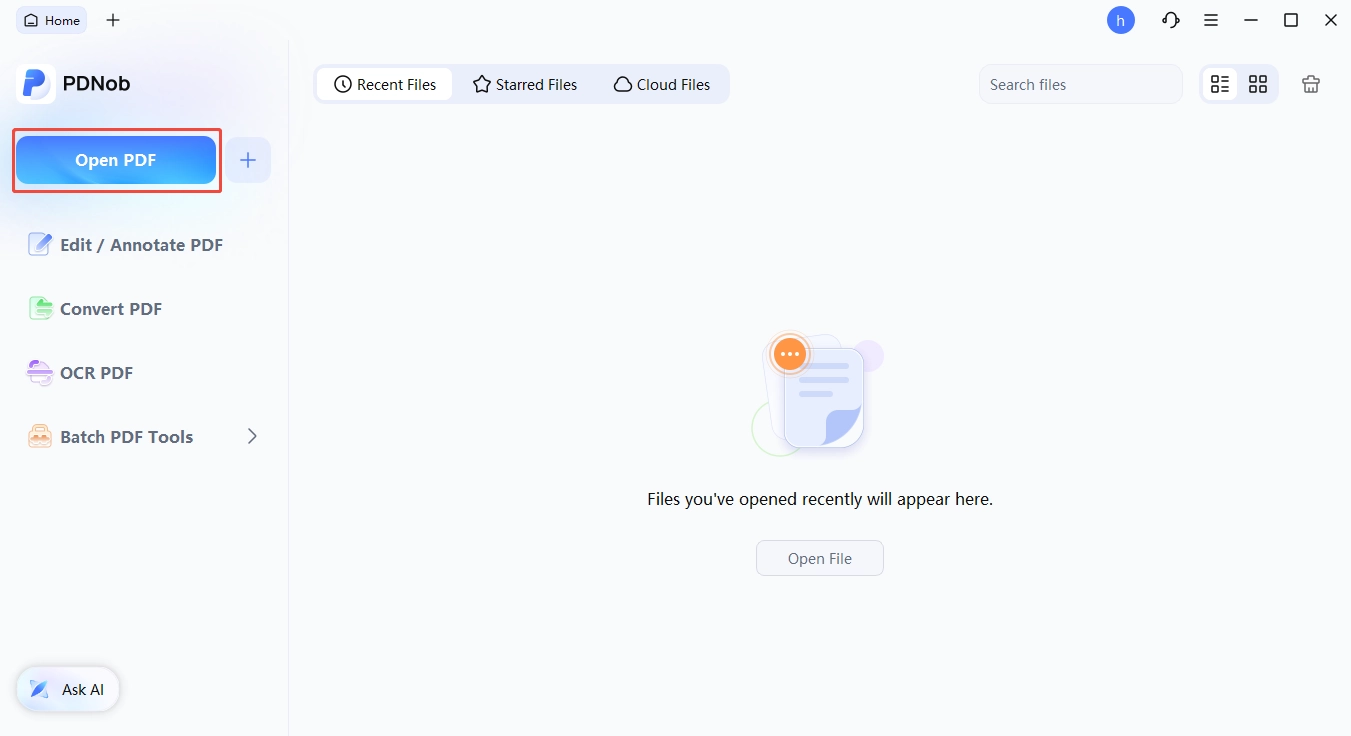
Open the PDF --- launch PDNob and click "Open PDF" to load the file you exported from Office 2010.
-
Enter edit mode --- click "Edit" in the top toolbar, then double-click existing text to open the text box, where you can change the text, font, size, style, and color.
-
Add new elements --- "Add Text", "Add Image", and "Link" sit in the same Edit tab, with Background and Watermark next to them.
-
Save and verify --- click Save, reopen the file, and confirm the text and layout survived the round trip.


Conclusion
A straight answer to Office 2010 download in 2026: there is no free installer and no trial to hunt for, only licensed media you can restore from your own account, your product key, or your organization's licensing portal. If you need Office 2010 for one specific legacy workflow, install the 32-bit build if you rely on old add-ins, keep it in a controlled environment, and plan the move. Microsoft has shipped no security patch since October 13, 2020, and never will.
If the reason you are still on Office 2010 is the PDF work, that is the part you can move on today. Office 2010's PDF handling has not changed since 2010, while PDF has. A one-time $64.99 license covers the editing, conversion, and OCR work that used to send you to a second tool anyway.
My suggestion: start by confirming you can restore your own license. It is often faster than a migration, and it costs nothing to find out.
FAQ on Microsoft Office 2010 Download
Q1. Is Microsoft Office 2010 still available to download?
A1: Not from Microsoft. The installer was removed from Microsoft's website when support ended on October 13, 2020. A legitimate Microsoft Office 2010 download today comes from your own Microsoft account, a redeemed product key, or your organization's volume licensing portal, which are the three routes covered in Part 2.
Q2. Is there a free trial of Office 2010?
A2: No. The last trial was the 2010 beta, which expired on October 31, 2010, and Office Starter 2010, the ad-supported edition with only Word and Excel, was discontinued in June 2012. If you want to evaluate Office before paying, Microsoft 365 offers a current trial, while LibreOffice and OnlyOffice are free outright.
Q3. Can Office 2010 run on Windows 11?
A3: Not officially. Windows 11 was never in Microsoft's supported list for Office 2010, and Microsoft's own guidance says the suite is not fully compatible with it. An in-place upgrade often still opens Word and compatibility mode can help, but a fresh install may be blocked outright. For a fixed legacy workflow, use a virtual machine on an isolated host.
Q4. Should I install the 32-bit or 64-bit version?
A4: Stay on 32-bit if you rely on legacy COM add-ins, ActiveX controls, or older database drivers, because those will not load into 64-bit Office. Choose 64-bit if your workbooks exceed the 2 GB memory ceiling, and note that the 64-bit build requires 64-bit Windows and never ran on XP or Server 2003.
Q5. What is the latest Office 2010 version?
A5: 14.0.7261. 5000, published on October 13, 2020, the same day extended support ended. Check it under File > Help, in the Click-to-Run Product Updates section of any Office 2010 application.
Q6. Can I still activate Office 2010 with an old product key?
A6: Yes, as long as the key is unclaimed or the license is still associated with your account. Redeem it through the Microsoft key redemption page, install from the Services & subscriptions section of your account, and activate with the same key. If online activation fails, the Activation wizard still offers phone activation for older retail keys, and volume licenses activate through MAK or KMS.



- Make scanned PDFs searchable and editable with 99% OCR precision
- Batch convert PDFs to Word, Excel, PPT, images, PDF/A, Text, EPUB, etc., up to 30% faster
- Edit PDFs easily like Word, including text, images, watermarks, links, and backgrounds
- Annotate PDF with highlights, comments, shapes, stickers, and stamps
- Run smoothly on any PC without lags or crashes, even on low-spec machines
 Secure Download
Secure Download
Speak Your Mind
then write your review
Speak Your Mind
Leave a Comment
Create your review for PDNob articles

Related articles

AI Tools Writer / Workflow Analyst
Rachel has spent the last 5 years testing and writing about AI-powered tools across writing, design, and research workflows. She focuses on practical AI tool usage, helping knowledge workers turn generative AI into everyday productivity.


