
 Home
>
PDF Tips
>
Nitro Pro License Activation Key Free: Workable Guide 2026
Home
>
PDF Tips
>
Nitro Pro License Activation Key Free: Workable Guide 2026
Nitro Pro License Activation Key Free: Workable Guide 2026
- 1 A Nitro Pro license activation key free of charge does not exist. The one zero-cost route is the official 14-day trial — no card, no auto-charge, every feature unlocked.
- 2 Nitro has three real credentials: an 18-digit serial for perpetual licences, a .lic file for enterprise Windows deployments, and a signed-in account for subscriptions.
- 3 The perpetual model is being retired in batches, not on one global date. After your own deactivation date, editing, conversion, protection and signing stop; reading keeps working.
- 4 Free serials found online are usually stolen, already-deactivated or fabricated, and the installer that carries them is a common malware route.
- 5 If a key is what you hold, the upgrade page takes your serial and returns a discounted move to a subscription — once per serial, up to twenty licences per purchase.
A Nitro Pro license activation key unlocks the paid features of Nitro PDF Pro, and by 2026 it comes in three forms depending on how the software was bought and which version line you're running. Many pages promise a free Nitro Pro activation key, each using the same loose word "key" for three different things: an 18-digit serial number, a .lic file for enterprise deployment, or a "free key" that is really a pirated serial or malware in disguise. These are not interchangeable, and only one can legitimately cost nothing.
In this guide we summaried cases when you may need the possible Nitro Pro license activation key and resaons why you failed to activate it. Method below covers Nitro Pro license official activation. We don't publish serial numbers, don't point to key generators.

Part 1. Nitro Pro License Keys and Activation Methods
Most people searching for a Nitro Pro license activation key free of charge are solving one of two problems: they bought the software and cannot find where to enter it, or they want the paid features without paying for them. The first has a menu path. The second has one legal answer and a great deal of bad advice. Work out which credential you actually hold before following anything else.

Prices, version numbers and license terms were checked on October 26, 2026. Nitro ships updates often and rewrites its licensing terms at the vendor's discretion, so confirm anything you plan to rely on against the official pages linked throughout.
What a Nitro Pro License Key Is
There are three credentials in the Nitro PDF Pro world, and they get mixed up constantly.
An 18-digit serial number is the credential for a perpetual license --- the one-time-purchase model that Nitro sold for years and is now winding down. A `.lic` file is the enterprise credential, deployed through an organization's own systems and valid on Windows only. A signed-in account is the subscription credential, and it does not involve a key at all.
That last one catches people out. A nitro pdf pro license key is only ever accepted by the license type it was issued for, so if you buy Nitro PDF Standard or Plus there is no serial number to type anywhere. You sign in, and the entitlement arrives with your account. Any page that insists you need a key for a subscription purchase is describing a workflow that no longer exists.
When You Actually Need a License Key
 Please swipe to view
Activating With an 18-Digit Serial Number
If you are trying to activate the nitro pro 14 serial number on a machine, this is the menu path. It works the same way on v14 and on the current line, although the surrounding interface differs.
Go to gonitro.com and click "Try for Free."
-
Enter your email address and click "Start Your Free Trial," then click the link in the verification email from Team Nitro.
-
Set a password and click "Confirm" to complete your account setup.
-
Install the app for Windows, Mac, or iOS and log in with your new account.


Open Help > About Nitro PDF Pro to see the serial attached to your install. The original purchase email is the authoritative copy---search your inbox for Nitro's order confirmation. If it's gone, support can reissue details through the Nitro knowledge base and community forum, confirming what's tied to your email first.
What Happens When Nitro Deactivates a Key
Nitro is retiring perpetual licenses. It stopped supporting v12 and earlier in June 2025, and v14 permanent licenses now get deactivation notices in batches---your date arrives by email. After that, Windows premium features (editing, conversion, protection, signing) stop; reading still works. The Nitro upgrade page handles migration: enter your 18-digit serial, confirm eligibility, and lock in a discounted subscription. Each serial works once; one purchase covers up to twenty licenses.
Where Offline Activation Happens
Offline activation still exists and happens entirely inside the app: the app generates a request, sends it to Nitro, and the response unlocks the install. No third party is involved, and no activation code goes to a stranger's inbox. A legitimate "activator" is just this small in-app workflow. Any standalone activator asking you to paste a serial into a third-party program is not Nitro's tool---it's the most common malware delivery pattern here.
A Nitro PDF Pro serial key only works for the exact version you bought---upgrade to a newer release and you'll have to pay for a fresh license. That's exactly why many users turn to PDNob PDF Editor, which offers lifetime free updates and zero activation headaches. One purchase, all the PDF editing power you need, with no trial limits or version-upgrade worries.
Part 2. Activating Nitro PDF Pro Free With the Official Trial
Starting the Official 14-Day Trial
Check Your Email
Download and Install Nitro PDF Pro 14
Start Activation and Enter Your License Number
Copy, Send, and Complete Activation
After payment, your license number arrives by email---check your inbox and spam/junk folder if you don't see it.
If you haven't already, download Nitro from the official website and install it.
Open Nitro, click "Activate Now" (or choose Advanced/Manual activation), paste your license number into the box, and click Next.

Copy the activation code shown on screen and email it to [email protected]. Keep the activation window open---once you receive the certificate code, paste it in, tick the checkbox, and click Activate.

If you are moving to a new computer, deactivate on the old one first --- open Help > About Nitro PDF Pro, note the serial, click Activate, then Deactivate. The covers the full sequence, including reinstalling the same version from the product downloads page.official guide for moving Nitro to a new computer
What the Trial Includes and Excludes
A full Nitro trial covers Nitro PDF Pro on Windows, macOS and iOS, plus Nitro Sign Standard and the Nitro Workspace web tools. You get one seat, and you can install it across your devices with that same account.
Three limitations catch people out. There is no credit card involved, but equally there is no way to extend the trial --- Nitro's own FAQ states that extensions are not available. And customer support is not part of the trial package; the only help available during those fourteen days is self-serve documentation.
That last point explains a large share of "Nitro keeps asking me to buy it" complaints: people assume the trial never started, then spend a week trying to reach a human who was never part of the deal. Check the account you signed in with, confirm the trial is live in the Nitro Workspace, and the prompt disappears.
Part 3. Nitro Pro Activation Failed: Six Causes and Fixes
Invalid Product Key Error
Problem
The key doesn't match the edition or version line you installed. Perpetual serials are bound to their version family, so a v13-era serial won't silently work inside a v26 install.
Fix
Match the installer to the license. Older builds are hosted on the Nitro product downloads page, which lists the v26 and v14 lines separately. If you can't find the version your serial belongs to, that itself signals a retired batch---see the next section.
Serial Number Not Found
Problem
This message catches the most people, and it's rarely a typo. Nitro returns it when a serial belongs to a license already deactivated. June 2025: v12-and-earlier permanent license support ended. After that, remaining v14-era permanent licenses received deactivation notices in batches, each with its own date.
Fix
Use the official upgrade page linked in Part 1: enter the 18-digit serial, confirm eligibility, and unlock the discounted subscription move. There is no legitimate workaround, and anyone offering one for a fee is selling a pirated serial that will fail the same way.
Mismatched Installer and License
Problem
Nitro ships four deployment models---subscription, named user, perpetual serial, enterprise file---and their installers aren't interchangeable. A valid serial typed into a named-user build reports itself as an invalid license even though your entitlement is perfectly good.
Fix
Check Help > About Nitro PDF Pro to establish which credential type you hold, then install the matching package. The Nitro activation guide walks through each path; enterprise administrators work through the Nitro Admin portal instead of any of these menus.
Reached Maximum Activations
Problem
The license is still attached to a machine you no longer use---the usual cause after a reinstall or a hardware change.
Fix
Deactivate it in the app before activating elsewhere: Help > About Nitro PDF Pro, note the serial, click Activate, then Deactivate. One caution: the domain license.gonitro.com does not currently resolve, so any walkthrough pointing there is stale. Organizations use the Nitro Admin portal; individuals use the in-app button above.
Connection Issues During Activation
Problem
Two separate causes hide behind this error. On v12 or earlier, Nitro no longer supports the product and activation simply cannot complete. If you're current, it's usually an account-state problem.
Fix
For v12 or earlier, the only fix is to upgrade. If current, sign out of Nitro PDF Pro and back in, and the entitlement refreshes. The release notes list the exact build required for any given fix, so check the version on the About screen against the latest entry before troubleshooting further. release notes
Trial Expiry and Repeated Purchase Prompts
Problem
The trial ended, or it never started because the account you're signed into isn't the one you registered with.
Fix
Open the app, confirm the email in the top-right corner matches the address you verified in Part 2, then sign out and back in. If the trial genuinely ran out, the free options are gone; the honest choices are a subscription, a perpetual license converted through the upgrade page, or a different editor.

Treat any "free activation key" you find with suspicion. Some of these sites distribute stolen or cloned license data, and a meaningful share of them exist to push a download that is not the tool it claims to be. Two habits close most of the risk: take key material only from the vendor's own domain, and never run a "crack," "activator" or "keygen" executable that you found through a search result. If a page needs you to disable antivirus protection before the program will work, stop there --- that is the malware talking.
Part 4. Nitro PDF Pro vs Tenorshare PDNob: Pricing and Features
Searching for a free Nitro Pro license activation key? Before you go down that road, it's worth seeing how Nitro PDF Pro's actual pricing stacks up against Tenorshare PDNob---and whether PDNob's free tier or lower cost could be the legitimate alternative you're looking for.
Editing a PDF With Tenorshare PDNob
Tenorshare PDNob is a desktop-and-cloud PDF editor that unlocks its paid features through a signed-in account instead of a typed-in serial number. It edits text, runs OCR on scans, converts between more than 20 formats and applies AI to documents in seconds, which suits individuals and small teams who want full editing without a per-seat subscription. The lifetime licence is $64.99 with free upgrades on two devices, the yearly licence is $49.99, and the free tier has no time limit but caps OCR and conversion at one run a week. It is the practical pick for people who want to own the tool outright, while organisations that need single sign-on, domain control and round-the-clock support should still weigh Nitro Plus.

-
Open PDNob and click Open PDF to bring in the file you want to work on.
-
Choose Edit in the top toolbar, then select the text you want to change. A text box appears where you can adjust the wording, font, size and colour.
-
To add new text instead, pick Add Text under the Edit section and place it where you want it. To insert an image, click Add Image and select the file from your computer.
-
For a scanned document, open the OCR option under Edit to turn the page into editable, searchable text before you start changing anything. Click Save in the top-left corner to write the changes back out.
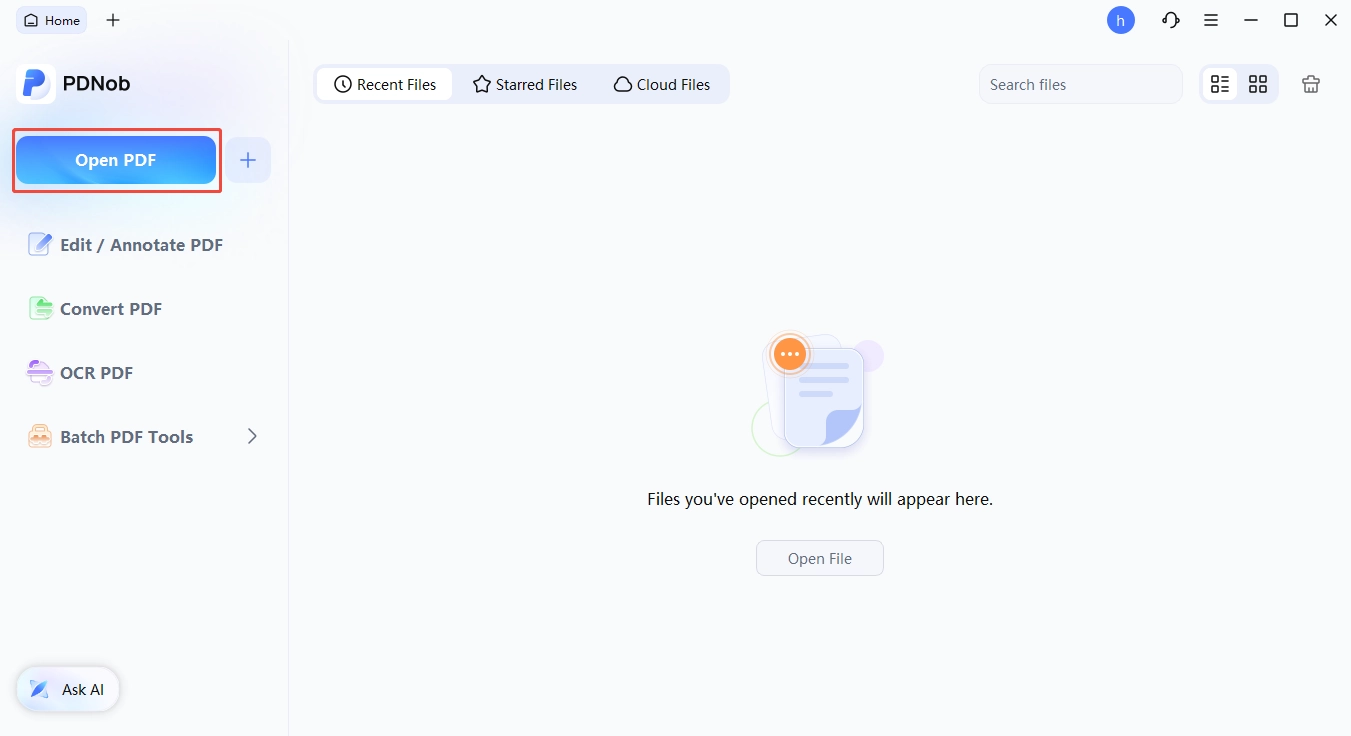






If what you were really after is a Nitro Pro license activation key free of charge, the tables below are the part that matters. What you are actually comparing is two different ways of owning a PDF editor, and the gap between them is wider than the feature lists suggest.
License and Pricing Compared
Please swipe to view
Choosing the right PDF tool can make or break your workflow. If you are still not sure which to pick based on price, you can also have a look on security or features.
- Choose Nitro PDF Pro if you need team admin/SSO, multi-party signature envelopes, Smart Redact, or SOC 2/HIPAA/ISO 27001 for procurement.
- Choose PDNob if you want a one-time $64.99 perpetual license, broader format/translation workflow, annotations that follow edits, and AI that actually runs PDF tools.
Conclusion
Nitro PDF Pro has three activation routes, only one requiring a typed key: subscription users sign in with no serial; permanent license holders enter an 18-digit number during a transition as Nitro retires that model in batches; enterprise deployments use a .lic file on Windows. A free 14-day trial unlocks everything, but no legitimate free activation key exists---circulating keys are retired serials that fail with "serial number not found," or malware traps. If the trial convinces you, keeping Nitro means a $180/year Standard subscription.
To own software once and stop renewing, Tenorshare PDNob's $64.99 lifetime license covers Windows, macOS, iOS, and web. PDNob's free tier has no time limit, and the lifetime license includes free upgrades; compare full plans on the PDNob purchase page.
FAQ About Nitro PDF Pro Licenses and Keys
Q1. Is there a free Nitro Pro license activation key?
A1: A Nitro Pro license activation key free of charge does not exist. The only free access to Nitro PDF Pro is the 14-day official trial, which unlocks every feature and needs no credit card. Keys sold online as free are usually retired serials that fail with "serial number not found," pirated serials, or bait for a download.
Q2. Do I need a license key if I bought a subscription?
A2: It depends. Subscription activation is a sign-in. Purchase the plan, sign out of Nitro PDF Pro and sign back in, and the entitlement comes with your account. For a Nitro Workspace purchase, refresh the page instead. There is no serial number to enter anywhere in that flow.
Q3. Can I still activate Nitro PDF Pro 14?
A3: Yes, on a supported license. v14 is still maintained --- the last build, 14.43.7.0, shipped on June 3, 2026 with security fixes --- but it no longer receives feature updates, and the Smart Tools features in v26 do not exist there. The current release is v26 (Windows 26.2.5.1, October 23, 2026; macOS 26.4; iOS 26.2).
Q4. Is Nitro PDF Pro free?
A4: There is no permanently free edition of the desktop app. You get a 14-day trial and nothing after that. Pricing runs from Standard at $15 per user per month, billed annually at $180, up to Plus on request, with Classic at $270 for three years on Windows only and no AI tools.
Q5. Does Nitro offer a lifetime license?
A5: Not any more. The closest option, Nitro PDF Classic at $270, is a three-year term on Windows only, and it leaves out the AI tools that ship with the subscription. After three years you buy again. For a genuine buy-once arrangement, PDNob's $64.99 lifetime licence is the alternative most people in this situation end up with.
Q6. Is Nitro PDF Pro worth paying for?
A6: That depends on the work. If you need enterprise identity management, automated redaction across 30+ categories of personal data, or multi-party signature envelopes with an audit trail, Nitro's strengths are real and hard to match elsewhere. If you mostly edit, convert and OCR documents on your own schedule and want to stop paying rent, a lifetime licence fits the job better.



- Make scanned PDFs searchable and editable with 99% OCR precision
- Batch convert PDFs to Word, Excel, PPT, images, PDF/A, Text, EPUB, etc., up to 30% faster
- Edit PDFs easily like Word, including text, images, watermarks, links, and backgrounds
- Annotate PDF with highlights, comments, shapes, stickers, and stamps
- Run smoothly on any PC without lags or crashes, even on low-spec machines
 Secure Download
Secure Download
Speak Your Mind
then write your review
Speak Your Mind
Leave a Comment
Create your review for PDNob articles

Related articles

AI Tools Writer / Workflow Analyst
Rachel has spent the last 5 years testing and writing about AI-powered tools across writing, design, and research workflows. She focuses on practical AI tool usage, helping knowledge workers turn generative AI into everyday productivity.


