
 Home
>
PDF Tips
>
Microsoft Office 2010 Free Lisence Key
Home
>
PDF Tips
>
Microsoft Office 2010 Free Lisence Key
Microsoft Office 2010 Free Lisence Key
- 1 A Microsoft 365 subscription does not use a product key at all. It activates by signing in with the account that carries the license, so a key prompt usually means something else is installed.
- 2 Perpetual Office (Home 2024, Home & Business 2024) still needs a 25-character key, redeemed once into your Microsoft account. After that the license lives in the account, not on the card.
- 3 Volume licenses (Office LTSC 2024) use a multiple activation key entered under File > Account. No Microsoft account sign-in is required, and one key can cover up to five PCs.
- 4 Free key lists and key generators are not a shortcut. They break the license terms, are a common malware route, and can leave your documents read-only when Microsoft flags the key later.
- 5 Most activation failures trace back to one cause: the wrong license type in the wrong place. Match the license first, then follow the matching activation path.
A Microsoft Office product key is a 25-character code, normally printed as five groups of five letters and numbers, that proves you hold a valid license. What happens after you enter it depends entirely on which kind of license you bought. A Microsoft 365 subscription does not need a key at all and activates through your account. A perpetual copy of Office still needs one. An organizational volume license uses a different key type again, and needs no account at all.
Mixing those three paths up is where most activation trouble starts, so this guide separates them first, then walks through buying, finding, and activating each one.

Part 1: Does Microsoft 365 Still Need a Product Key?
It depends on what you bought, and the answer changed within the last few years. A Microsoft 365 subscription activates through your account rather than a key. A perpetual copy of Office still needs one. An organizational volume license needs a different kind of key and no account at all.
We have split them into three types below. Nearly every activation headache comes from using the right key in the wrong place.
Type 1: Microsoft 365 Subscription — Activated by Sign-In, Not a Key
- No product key is issued when you buy a subscription. You activate by signing in to Word, Excel, or Outlook with the account that carries the license.
- A 25-character key can still reach you when an organization prepays the subscription. That key is redeemed once on the Microsoft 365 setup page, and the account holds the license from then on.
- On a work or school account, your IT administrator has to assign you a license first. Without that assignment, Office keeps asking for a key no matter how many keys you hold.
- The device has to reach the internet at least every 30 days. Go a month without a connection and Office falls into reduced functionality mode: files open and print, but nothing can be edited or created.
Type 2: Perpetual License — Pay Once, Let the Key Do the Work
Perpetual Office is still on sale and still supported. Microsoft has not retired it and has stated that another on-premises release will follow Office 2024. What it has done is freeze it. A perpetual copy gets security patches until its support date and never receives a new feature.
- Office Home 2024 — Word, Excel, PowerPoint, and OneNote. One PC or one Mac. Non-commercial use only, so it suits a student or a household rather than a business.
- Office Home & Business 2024 — the same suite plus Outlook and commercial rights. Same one-device limit. This is the edition most home offices and freelancers end up buying.
- Office Professional 2021 — the last perpetual edition to include Publisher. It is still listed in some markets.
- Access is not part of any Office 2024 retail edition. Buying it separately, or moving up to the volume edition, is the only route.
- Office 2024 editions receive security updates until 9 October 2029. Perpetual releases have run on a three-year rhythm since 2019, so 2027 is the reasonable expectation for the next one, though Microsoft has not confirmed a name or a year.
Type 3: Volume License (Office LTSC) — A Key With No Account Attached
- Office LTSC Standard 2024 and Office LTSC Professional Plus 2024 are sold to organizations through Microsoft CSP partners rather than the consumer store.
- They activate with a multiple activation key entered inside the app under File > Account. Signing in to a Microsoft account is not required.
- Windows only, and a single key can cover 1, 3, or 5 PCs depending on the option you buy.
- Professional Plus adds Access. Neither edition includes Publisher, and Teams is a separate download.

Support dates move quickly in the Office world. Office 2019 and Office 2016 lost support on 14 October 2025. Office 2021 and Office LTSC 2021 lost support on 13 October 2026, so anything still running that build is now unpatched. Publisher followed suit in October 2026 and is no longer part of Microsoft 365. If your copy of Office stopped receiving updates, check the product name under File > Account before deciding what to do next.
Part 2: How to Buy and Find a Microsoft Office 365 License Key
Buying a genuine key is straightforward once you know which license you want. Finding a key you already own is a different job, because for most subscriptions the key no longer exists in a form you can look up. In this part we cover both.
Step 1: Buying a Genuine Microsoft Office Product Key
- Buy a Microsoft 365 subscription from the Microsoft Store on the web or in the Store app on Windows. Microsoft 365 Personal is $9.99 per month and Microsoft 365 Family is $12.99 per month, covering up to six people and 1 TB of OneDrive each. A free trial runs for one month.
- Buy a perpetual edition from the same store if you would rather pay once. Office Home 2024 is $149.99 and Office Home & Business 2024 is $249.99, each covering one PC or one Mac. Prices are regional, so the Chinese official store lists Office 家庭版 2024 at ¥898 and Office 小型企业版 2024 at ¥1,998.
- Buy volume licenses through a CSP partner when you are buying for a company. Office LTSC Standard 2024 starts around $495 per user for commercial use, and Professional Plus adds Access.
- Physical key cards still work. Authorized retailers sell sealed boxes with the 25-character code printed under the foil on the back.
- Steer clear of third-party sellers with no track record. A genuine key from Microsoft costs less than the legal trouble and the reactivation you avoid.

Step 2: Finding a Key You Already Own
- If Office came preinstalled on a new PC, there may be no printed key at all. Since 2022 many machines ship a digital store package instead. Open the Microsoft Store app, go to Library, switch to the Included with device tab, and claim it there.
- If you bought from the Microsoft Store yourself, the key appears in your order history, and sometimes on the printed receipt. The license itself also shows up under account.microsoft.com/services.
- If you bought through the Microsoft Workplace Discount Program, check the order details in your confirmation email. These licenses can be activated without signing in, which is unusual.
- If you already redeemed a perpetual key, you do not need to find it again. The license lives inside your Microsoft account, and you can reinstall from the services page on any machine you are allowed to use.
- On a Windows machine with Office already installed, a third-party tool such as Belarc Advisor can read an OEM key off the system. It will not recover a subscription, because a subscription never had one.


Part 3: Microsoft Office Product Key Free List & Key Generator
Search results for a free Office key are crowded with download sites and key generators. Before you follow one, it is worth knowing what these listings actually are, because the cost of using one is rarely the price of the key.
- Legality: These keys are resold without Microsoft's permission. Using one breaks the terms you accepted at purchase and puts your employer or your client files in the middle of a dispute you never agreed to.
- Security: Key generators are a well-worn malware delivery route. The tool asks for admin rights, then quietly installs something you never see coming.
- Functionality: Even when a key works on day one, nothing stops Microsoft from flagging it later. When that happens the license disappears and your documents go read-only without warning.
There are better routes to free Office, and Microsoft funds several of them:
- A one-month trial of Microsoft 365 gives you the full desktop suite and 1 TB of OneDrive. No card is charged until the trial ends, and you can cancel from your account page before it does.
- Students and educators get Microsoft 365 Education A1 free with a qualifying school email address. It includes the web apps, Teams, and Microsoft 365 Copilot Chat. In some markets college students can also claim 12 free months of Microsoft 365 Premium with a college email address.
- If opening and editing a document once is all you need, Microsoft 365 for the web gives you Word, Excel, and PowerPoint in the browser at no cost.
Looking for a free key often leads to a second question: can document work be handled without a subscription at all? If your needs are mostly PDFs, PDNob is worth a look. It edits, converts, merges, and signs PDFs, fills forms, removes pages, and inserts images, all without an Office 365 plan attached.




Part 4: How to Activate Microsoft 365: Account Sign-In or Product Key
Two different paths, and picking the wrong one is what produces the message you saw in the title of this guide. If you hold a subscription, there is no key to enter. If you hold a perpetual or volume license, there is.
Path A: Activating a Subscription by Signing In
- Sign in with the Microsoft account that carries the subscription. On a work or school account, your administrator has to assign the license to you before this works.

- If Office is already installed, open Word or Excel and choose Sign in on the activation screen. Do not choose the option that asks for a product key; a subscription does not have one.
- If Office is not on the machine yet, open account.microsoft.com/services, pick the subscription, and use the install link there. Then sign in to Office when it asks.
- Keep the device online at least once every 30 days. That check-in is what keeps the license active and Office out of reduced functionality mode.

Path B: Redeeming a Key for a Perpetual or Volume License
- Open the Microsoft 365 setup page and sign in with the account that should own the license. Use an account you will still have in a year, because the license attaches to it.
- Enter the 25-character key in the form XXXXX-XXXXX-XXXXX-XXXXX-XXXXX, taken from your card, receipt, or confirmation email, and continue.
- Download and install Office from the same page. Once the key is redeemed, the license lives in your account, so future reinstalls come from account.microsoft.com/services rather than from the key.
- For a volume license, the route differs. Run the installer from the Office Deployment Tool and enter the multiple activation key under File > Account inside Office. No account sign-in is needed, and the key can cover up to five PCs depending on the license you bought.
Still being asked for a key on a subscription license? The usual cause is a leftover trial or perpetual copy of Office sitting on the same machine. Uninstall it from Settings > Apps, restart, then sign in again. Two versions installed side by side will fight each other every time.
Part 5: Common Issues with Microsoft Office 365 Product Key & Fixes
Activation problems cluster around a handful of causes. These are the ones we see most often, and what to check for each.
- Office asks for a product key instead of asking you to sign in: the installed copy is a trial, perpetual, or OEM version, your license was never assigned, or you signed in with a personal account instead of the licensed one.
- No key on a new PC with preinstalled Office: there is no card to find. The license is a digital store package, claimed through the Microsoft Store app under Library > Included with device.
- Office wants a key again after an online repair: repairs can drop the sign-in. Open Word, go to File > Account, and sign in again. Confirm the subscription still shows as active on account.microsoft.com/services.
- The key is rejected as already used: a key can only be redeemed once. Check that you are signed in with the account that owns the license, and that it was not redeemed on another account first.
- Everything is read-only and editing is blocked: the device has gone past the 30-day check-in. Reconnect to the internet and the restriction lifts on its own.
- Publisher has disappeared from the suite: Microsoft retired Publisher in October 2026. It is not in Office 2024, and the last perpetual edition carrying it, Office Professional 2021, reached end of support on 13 October 2026.
Microsoft's own support pages on using product keys and on Office activation cover the remaining cases in detail.
Part 6: Best Alternative to Microsoft Office 365 – Smarter, Faster
If what you actually do every day is read, edit, and send documents, a full Office subscription may be more than you need. PDNob handles the document side of the job in a single tool.
It converts PDFs into Word, Excel, PowerPoint, and plain text, then lets you edit the result. You get more than 100 editing operations: changing text, inserting images, adding watermarks, adjusting page backgrounds, and more. OCR turns scanned pages into searchable, editable text, so a stack of paper contracts does not have to stay a stack of paper contracts.

Why Choose Tenorshare PDNob PDF Editor
- Turn a PDF into Word, Excel, PowerPoint, or another format and keep working on it after the conversion.
- Rework the text, drop in an image, add a watermark, or repaint the page background.
- Combine several PDFs into one document, or split a long file into separate pieces.
- Lock a file with a password before it goes to someone outside your team.
- Run the built-in OCR over a scan and edit the text it pulls out.
How to Edit PDF with Tenorshare PDNob PDF Editor
- Launch PDNob PDF Editor and hit the "Open PDF" button to pull in the document you want to work on.
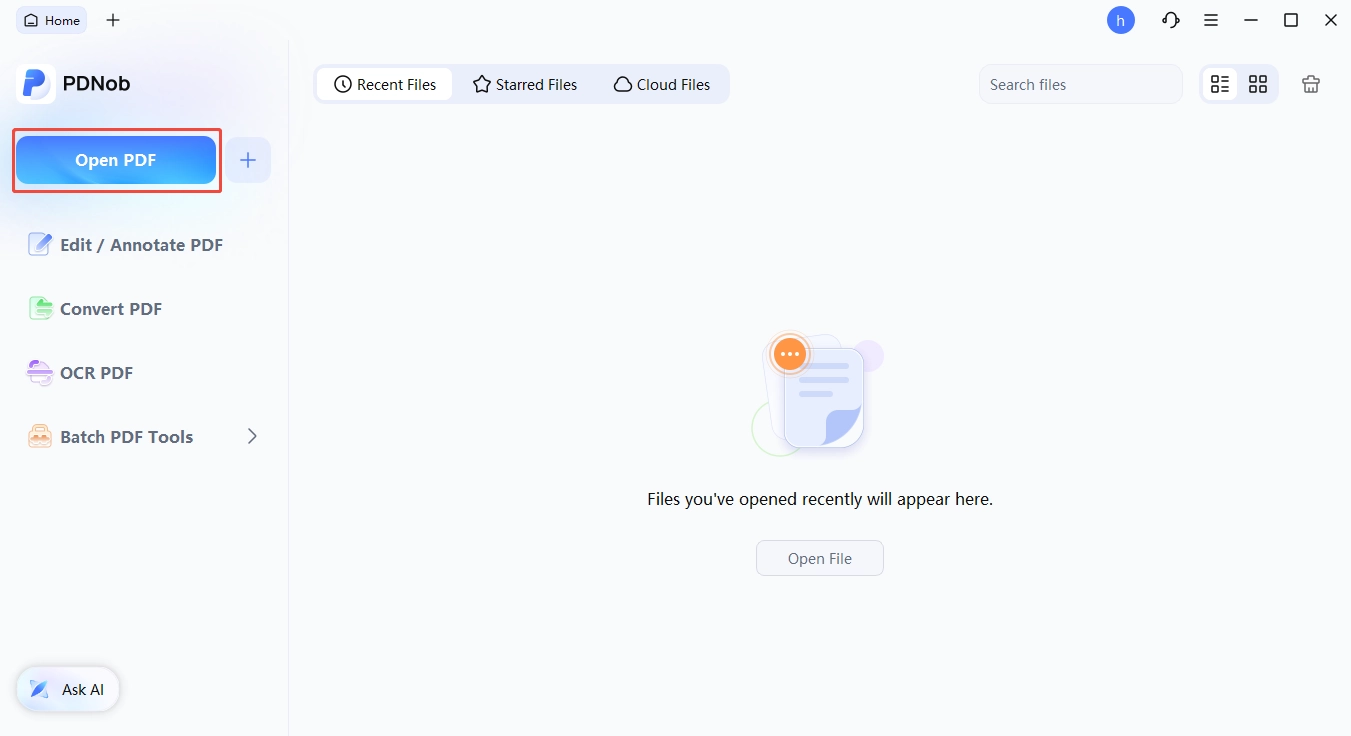
- Choose "Edit" in the top toolbar and click the text you want to change. A text box opens up, and you can adjust the wording, font, style, size, and color from there.

- For a brand-new line of text, pick "Add Text" inside the "Edit" panel and drop it wherever it belongs on the page.
- For a picture, pick the "Add Image" button and choose the file from your computer.

- When the changes look right, save the file with the "Save" button in the top left corner.
Conclusion
Back to the question that started this. If your company gave you a key for a work laptop, the key is almost certainly not what Office is asking for. A Microsoft 365 subscription activates by signing in with the account your IT department assigned a license to. The key, if there was one, was spent once when the subscription was paid for.
Keys still matter for the other two licensing types. Perpetual editions use one to redeem the license into your Microsoft account, and volume licenses use a multiple activation key that skips the account entirely. Both are worth buying from Microsoft directly.
Free key listings are worth skipping. The legal exposure is real, the malware risk is real, and Microsoft can pull a license at any time. If the budget is the issue, a one-month trial, a free education plan, or the web versions of Office will cover most of what those listings promise. And if your work is mostly PDFs rather than spreadsheets and slide decks, PDNob handles that side without a subscription attached.



- Make scanned PDFs searchable and editable with 99% OCR precision
- Batch convert PDFs to Word, Excel, PPT, images, PDF/A, Text, EPUB, etc., up to 30% faster
- Edit PDFs easily like Word, including text, images, watermarks, links, and backgrounds
- Annotate PDF with highlights, comments, shapes, stickers, and stamps
- Run smoothly on any PC without lags or crashes, even on low-spec machines
 Secure Download
Secure Download
Speak Your Mind
then write your review
Speak Your Mind
Leave a Comment
Create your review for PDNob articles

Related articles

AI Tools Writer / Workflow Analyst
Rachel has spent the last 5 years testing and writing about AI-powered tools across writing, design, and research workflows. She focuses on practical AI tool usage, helping knowledge workers turn generative AI into everyday productivity.


