Home
>
PDF Tips
>
Is There Nitro PDF Perpetual License? Pricing & Alternative 2026
Is There Nitro PDF Perpetual License? Pricing & Alternative 2026
- Nitro no longer offers a true perpetual license — Classic is a 3-year, Windows-only term, not lifetime.
- Old "lifetime" Nitro keys are risky — tied to old versions, no upgrades, and some have been deactivated.
- Subscriptions cost far more over time — Standard runs ~$15/user/month; Classic must be rebought every 3 years.
- PDNob Lifetime ($64.99 one-time) is one of the top perpetual alternative — includes free lifetime updates, OCR, and multi-platform support.
- Nitro Classic has real limits — no OCR, no Mac/iOS, no AI tools, and no legitimate free full version exists.
For years, Nitro Pro was the PDF editor you could buy once and keep. That's exactly why so many people still search for a Nitro PDF perpetual license today. The problem is that Nitro has changed how it sells its software, and some older "lifetime" keys have stopped working.
This guide explains what happened to Nitro's perpetual license, what Nitro sells now and how much it costs, what to expect if you still have Nitro Pro 14 or an older version, and which option gives you a true one-time purchase with free updates.

Part 1. Does Nitro PDF Still Offer a Perpetual License?
No. Nitro no longer sells a perpetual license. The closest one-time option today is Nitro PDF Classic, and it covers a 3-year term, not a lifetime.
Perpetual vs Classic vs Subscription: The 3 License Types Explained
If the words "PDF license" are confusing, here's what each Nitro license type means in plain terms:
 Please swipe to view
A Real Case: When a "Perpetual" Nitro License Stopped Working
On June 26, 2025, a Nitro user posted on the official Nitro community forum asking the company to reinstate a perpetual license that had been deactivated. They said the license was "clearly marketed as perpetual" and asked Nitro to either restore it or issue a license for a current version at no cost.

Similar reports from owners of older Nitro perpetual licenses appear across Nitro's community forum and review sites: keys that no longer activate unless the user moves to a newer, paid option. The takeaway is simple: an old "lifetime" key is only as safe as the vendor's willingness to keep supporting it.
Part 2. Nitro PDF Pricing 2026: Plans and Prices
Here's current Nitro PDF pricing for individuals and teams:
Please swipe to view

Nitro shows prices in your local currency, and the figures above are approximate. Check Nitro's pricing page for the exact Nitro PDF Pro price in your country. You can buy up to 20 licenses online, and every plan comes with a 14-day free trial that doesn't need a credit card.
Nitro PDF Classic: What You Get and What You Don't
- You get: Nitro's core PDF tools on Windows: create, edit, convert, combine, split and password-protect PDFs.
- You don't get: OCR and most AI tools, and no Mac or iOS apps.
- After 3 years: editing stops, though your PDFs stay viewable. To keep editing, you buy Classic again.
Nitro PDF Pro Perpetual License vs Subscription: Which Costs Less?
Most guides stop at the sticker price. Here's what you'd actually pay over time:
Please swipe to view

Over five years, a Nitro subscription costs more than ten times as much as a one-time PDNob Lifetime license, and Classic still needs to be bought twice.
Part 3. Nitro PDF Pro 14 and the Latest Version
Nitro Version Timeline
- Nitro Pro 12 (2018): discontinued and no longer supported.
- Nitro Pro 13 (2019): previous release.
- Nitro PDF Pro 14 (2023): the last version with the old numbering.
-
Nitro PDF Pro 26 (October 2026): the Nitro PDF Pro latest
version, with Smart Tools (form and table extraction, Smart Redact, Nitro
Assistant), a new OCR engine and support for right-to-left languages.
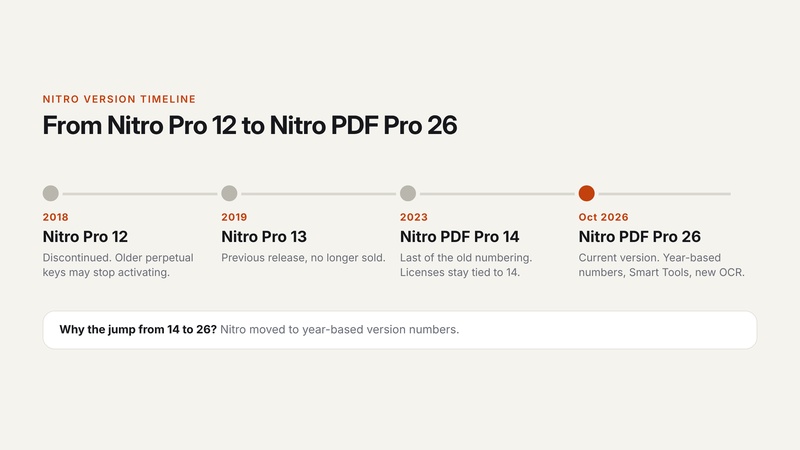

Why the jump from 14 to 26? Nitro switched to year-based version numbers.
Will My Old Nitro PDF Pro 14 Perpetual License Still Work?
- It stays tied to the version you bought. A Nitro PDF Pro 14 perpetual license doesn't include a free upgrade to version 26.
- Older keys may fail to re-activate. Owners of version 12 and earlier have received notices with their own cut-off dates, and some see a "Serial Number Not Found" error.
- Tip: keep your installer and license key saved, and don't reinstall on a new PC until you've checked that the key still activates.
Beware of "Nitro Pro 14 Lifetime Key" Deals
You'll find reseller sites selling cheap "lifetime" keys for Nitro Pro 14 and older. It's best to avoid them. These keys can be revoked at any time, they don't get updates or support, and some come bundled with unsafe installers. If you want to pay once, choose a product that sells a lifetime license directly.
Part 4. Nitro Pro PDF Editor: Key Features
The Nitro Pro PDF editor is still a capable tool. Its main features:
- Editing: edit text, images and pages, annotate, and compare two PDFs.
- Nitro PDF converter: convert to and from Word, Excel and PowerPoint; export PDF to JPG, PNG or TIFF; turn web pages into PDFs; save as PDF/A.
- OCR: turn scanned documents into searchable, editable PDFs (Standard and Plus).
- Signing and security: e-signatures and certificate signatures, plus redaction (Smart Redact is a paid add-on).
- AI tools: Nitro Assistant can summarize and rewrite documents, and Smart Tools extract form and table data.
Part 5. Nitro Pro Download, Free Trial and Nitro Reader
How to Download Nitro PDF Pro (Free Trial)
-
Go to gonitro.com and click "Free Trial." The 14-day trial doesn't need a credit card.
Download the installer for Windows or Mac.
-
Sign in to activate it. Buy a plan before the trial ends, or editing will stop.

Is There a "Nitro Pro Full" Free Version?
No. There's no legitimate free full version of Nitro Pro. "Nitro Pro full" cracked downloads carry malware and legal risk, so skip them.
Is Nitro Reader Still Available?
Nitro Reader, the old free PDF viewer, has been discontinued and is no longer supported. If you need a free PDF reader and editor, PDNob's free plan is a good place to start (see Part 7).
Part 6. Is a Nitro PDF Perpetual License Worth It in 2026?
Pros of Nitro
- Classic lets you avoid a monthly subscription.
- Standard includes OCR, AI tools and apps for Windows, Mac and iOS.
- A familiar Office-style interface that's easy to learn.
Cons of Nitro
- No true perpetual license anymore; Classic expires after 3 years.
- Classic is Windows-only and lacks OCR and most AI tools.
- Older "perpetual" keys can stop working.
Who should choose what:
- Classic suits Windows-only users who want basic editing without a subscription and don't mind buying again every 3 years.
- Standard suits teams that need Mac or iOS apps, OCR and AI.
- Neither is worth it if you want a true one-time purchase that keeps updating.
Part 7. Best Nitro PDF Perpetual License Alternative: PDNob
If what you liked about Nitro was paying once, PDNob is the most cost-effective replacement.

Its Lifetime license is a real one-time purchase, and unlike Nitro's old keys, it comes with lifetime free updates and no upgrade fees.


- PDNob Lifetime: $64.99 one time (list price $349.95), with lifetime free updates, use on 2 devices (any mix of Windows and Mac, plus iOS), no watermark, free tech support and a 30-day money-back guarantee.
- A free plan with no time limit, so you can try it first. The free plan adds a watermark after 20 exported files and limits AI to 20 uses.
- The features Nitro users rely on: edit text and images, OCR scanned files in 20+ languages, convert PDFs to Word, Excel and PowerPoint, batch-process many files at once, and use AI to summarize, translate and chat with PDFs. The AI Assistant is an optional add-on at $39.99/year.
Please swipe to view
How to switch to PDNob in 3 steps:
-
Download PDNob for Windows or Mac and install it. Click "Free Download" on pdnob.com.
Open your PDF. Launch PDNob and click "Open PDF."
-
Edit, convert or run OCR, and activate the Lifetime license when you're ready. Click "Edit" to change text and images, or use Convert and OCR from the top menu. After you buy the Lifetime plan, click your profile icon and choose "Redeem Membership" to activate it.


Want a deeper side-by-side? Read our full PDNob vs Nitro PDF comparison, or see the six features that set PDNob apart.
Final Verdict
Nitro no longer sells a true perpetual license. Classic is a 3-year license, and older keys can be retired. If you want to pay once and keep getting updates, PDNob's Lifetime plan is the more cost-effective choice.
FAQ on Nitro PDF Perpetual License
Q1. Does Nitro PDF still offer a perpetual license?
A1: No. Nitro stopped selling perpetual licenses. Its only one-time option, Nitro PDF Classic, covers a 3-year term.
Q2. Is Nitro PDF Classic a lifetime license?
A2: No. Classic is a one-time payment for 3 years of use on Windows. After that, you need to buy it again to keep editing.
Q3. How much is a Nitro PDF Pro 14 perpetual license now?
A3: Nitro no longer sells Nitro PDF Pro 14 perpetual licenses. Classic costs about $270 for 3 years, and Standard costs about $15 per user per month, billed yearly.
Q4. What happens when the Nitro Classic license expires?
A4: Editing stops, but you can still view your PDFs. You'll need to buy Classic again or switch to a subscription.
Q5. Will my old Nitro Pro 12, 13 or 14 license still work?
A5: It may, but only for the version you bought, with no free upgrade. Older keys, especially version 12 and earlier, may fail to re-activate.
Q6. What is the latest version of Nitro PDF Pro?
A6: Nitro PDF Pro 26, released in October 2026. Nitro moved to year-based version numbers after version 14.
Q7. Is Nitro Reader still free?
A7: Nitro Reader has been discontinued and is no longer supported.
Q8. Is there a Nitro PDF free trial?
A8: Yes. Nitro offers a 14-day free trial with no credit card required.
Q9. Is there a PDF editor with a real lifetime license and free updates?
A9: Yes. PDNob's Lifetime license costs $64.99 one time and includes lifetime free updates with no upgrade fees.



- Make scanned PDFs searchable and editable with 99% OCR precision
- Batch convert PDFs to Word, Excel, PPT, images, PDF/A, Text, EPUB, etc., up to 30% faster
- Edit PDFs easily like Word, including text, images, watermarks, links, and backgrounds
- Annotate PDF with highlights, comments, shapes, stickers, and stamps
- Run smoothly on any PC without lags or crashes, even on low-spec machines
 Secure Download
Speak Your Mind
then write your review
Speak Your Mind
Leave a Comment
Create your review for PDNob articles
Related articles

AI Tools Writer / Workflow Analyst
Rachel has spent the last 5 years testing and writing about AI-powered tools across writing, design, and research workflows. She focuses on practical AI tool usage, helping knowledge workers turn generative AI into everyday productivity.