Home
>
PDF Tips
>
PDF-XChange Editor Mac: Does It Work, and Qualified Alternatives?
PDF-XChange Editor Mac: Does It Work, and Qualified Alternatives?
- 1 PDF-XChange Editor is Windows-only---there is no official Mac build and the vendor has confirmed there never will be one, because the program relies on Windows-only system functions.
- 2 You can still run PDF-XChange Editor on a Mac via four routes: Windows 11 in a virtual machine (best for Apple chips), CrossOver (~$74), Whisky (free but unmaintained), or a shared Windows computer over your network.
- 3 The free Windows build isn't really free---locked tools stamp a permanent demo watermark that paying later won't remove, so treat it as a trial and hide paid tools before opening real files.
- 4 For everyday PDF work on a Mac, a native app wins: options like PDF Expert, PDNob, PDFgear (free), UPDF, Nitro, Foxit, and Adobe Acrobat Pro each have honest strengths and limits.
- 5 Match your path to your need---occasional editing favors a Mac app, company-wide PDF-XChange use favors a virtual machine, precision drawing work favors a real Windows box, and reading/signing is already covered by free Preview.
You can find multiple pages promising a download "PDF-XChange Editor for Mac" option---but here's the question that matters: does it actually work, or are you chasing a version that doesn't exist? If you're a Mac user who loves PDF-XChange's speed and 400+ tools, the answer may frustrate you. There is no Mac build, and the vendor says there never will be---not because of schedules, but because the program is built on Windows-only foundations.
Yet that doesn't mean you're stuck. In this guide, we'll explain exactly why there's no Mac version, rank four real ways to run it anyway (and what each truly costs you), expose the free-tier watermark trap, and compare seven native Mac alternatives with honest limits---so you can stop hunting and start editing.
Part 1. PDF-XChange Editor on Mac: Supported Devices and OS
PDF-XChange Editor is released by Tracker Software, a British company founded in 1997. PDF-XChange Editor has 400+ tools. The version history shows the current build, 11.1.1.0 from October 2026. The main installer weighs 383.6 MB. One-time pricing: Editor $62, Editor Plus $79, Pro $131 --- a year of updates included, license never expires.
Locked tools in PDF-XChange Editor can run normally but stamp a demo watermark into the document --- paying later doesn't remove it, so treat the free build as a trial. The older PDF-XChange Viewer (last version 2.5.322.10, Dec 2018) is discontinued and was never a Mac program.

Part 2. Why PDF-XChange Doesn't Offer a Mac PDF Editor
There is no officially released Mac build, and there will not be one. The reason has nothing to do with schedules or money. It is about how the program is put together. Staff at Tracker Software have said so on their public support forum. They have no plans for a native Mac version. Their words: "a very large number of our systems rely on core windows functions."
What does that mean? The buttons, menus and letters on screen are built from Windows-only parts. Words are drawn with Windows-only engines. Printing talks to the Windows print system, and macOS has no copy of any of these to borrow. A Mac edition would mean rebuilding the program from scratch.
The reason behind "pdf xchange editor mac os" questions is that one. People hunt for a Mac download and find pages promising one. That promise comes from those pages, not the vendor. The answer for "does pdf xchange work on mac" is no.

Part 3. How to Use PDF X-Change on Mac: Four Ranked Routes
The Four Routes to Use PDF X-Change on Mac at a Glance
 Please swipe to view
On a Mac, "pdf xchange editor mac" leads to four possible routes. We ranked them by what each one really costs you, not by whether the program opens.
We also have to answer "using pdf x-change on mac" for readers who want a simple yes or no. It works by one of these four methods.
Route 1: Windows 11 Running Inside a Mac
This is the best option on an Apple chip. A virtual machine is a pretend computer running inside your real one. It behaves like a PC, and the PDF-XChange Editor download includes an ARM64 installer made for Apple chips.
-
Install a virtual machine app. VMware Fusion has been free for personal and school use since November 2024.
-
Create a Windows 11 virtual machine. The app walks you through the install in a few clicks.
-
Add the PDF-XChange Editor installer. Choose the ARM64 version. It runs at full speed on the Apple chip, with no slow translator in the middle. Buy a Windows 11 Home license. It costs about $139. Microsoft counts the virtual machine as one device.
-
Install PDF-XChange Editor and enter your license key. Your key covers one desktop and one laptop, and the virtual machine takes one of those places.
-
Hide the paid tools from the toolbar before you open any real file. That way a stray click cannot brand a document.


This route works, but it is the heaviest. A full Windows install wants several gigabytes of memory and tens of gigabytes of disk just to edit a PDF. Not worth it for one quick fix.
Route 2: CrossOver
CrossOver is the polished option, and the one to trust for real work. CodeWeavers has shipped it for over twenty years. It translates Windows calls into Mac commands, so no emulated PC is involved. Each program gets its own bottle, and many popular apps come with one-click installers. A compatibility database shows how your app behaves before you install it. The full trial runs 14 days and needs no credit card. The paid plan costs $74 a year for twelve months of upgrades and support, or $494 once for lifetime updates. No Windows license is needed.

Route 3: Whisky
Whisky is the free option, and it is still good for a quick test. It is a native wrapper around Wine. That lets it run a Windows build on an Apple Silicon Mac with no cost and no extra setup. The catch is maintenance. The last release arrived in April 2025, and the project was archived soon after. Its Wine engine stays frozen on an older build. Most apps still open, but a few rough edges show up in daily use. Treat it as a testing tool, and check the list below before moving real work into it.
Possible problems you may meet when using Whisky:
- Text looks soft and fuzzy on a Retina screen, because the translator assumes an old-style monitor.
- Scrolling a large drawing jumps in steps instead of gliding.
- Printing can shift line weights or cut off page margins.
A community fork under the same name still ships updates, so search for it if you need a maintained build.
Between the two, CrossOver is the safe pick for daily work. Whisky still costs nothing, but the frozen build will not improve on its own.
Route 4: A Shared Windows Computer
When a team already runs PDF-XChange everywhere, the honest answer is simple. Keep one licensed Windows machine and reach it over the network. Nothing changes about how the program feels, and you cannot stamp a watermark on the wrong file by accident.
The costs are network delay and moving files back and forth. It also needs somebody to own that computer and keep it switched on.
Boot Camp Is Gone
Many guides from 2026 still tell Mac users to boot Windows with Boot Camp. That advice is out of date. macOS 26 Tahoe is the last version that runs on Intel chips.
macOS 27 Golden Gate arrived in September 2026, runs only on Apple chips, and removed Boot Camp Assistant completely. Rosetta 2, which lets Apple chips run older Intel programs, gets one more full release. macOS 28 drops most of it.
If a tutorial tells you to install Boot Camp in 2026, it was written before macOS 27 and never checked.

- The free build does not switch off the paid buttons. Press one and a demo mark appears inside the document itself.
- Paying afterwards does not remove that mark. The vendor tells you to delete it by hand inside the editor — and in a virtual machine, one wrong click can brand a file you were about to send to a client.
- Two habits help. Hide the paid tools from the toolbar first, and test on a copy.
Part 4. Best 7 PDF-XChange Mac Alternatives in 2026
Before the list, one honest note. We make PDNob, so it sits here with the same limits as everyone else. If "pdf xchange editor mac" was your search, this is the list to keep.
We ranked these seven by the jobs a PDF-XChange user came here for. Changing words already in the file, text recognition (OCR), forms and signing are the ones that matter.
The Seven Alternatives at a Glance
Please swipe to view
What Each One Is Best At
- PDF Expert is the smoothest Mac app here. The yearly plan covers Mac, iPhone and iPad. The $139.99 lifetime price covers the Mac only, and Readdle says new features may cost extra later.
- PDNob is a streamlined cost-effective PDF editor pairing AI with highly accurate ABBYY OCR SDK. It costs $64.99 once, with lifetime free upgrades and two devices. Text recognition runs on your own machine, and it translates into more than 40 languages.
- Its honest limits: macOS 26 and earlier, no Android, no Linux. The license checks online every 30 days. There is no built-in two-version comparison, and the AI add-on costs $39.99 a year.
- PDFgear is free, with no account and no watermark on saved files. One warning: the AI assistant sends your document to a cloud service, so it needs the internet.
- UPDF costs $49.99 a year or $79.99 for life, and it works across Mac, Windows and phones. The AI features are a paid add-on.
- Nitro PDF Pro is one of the last big PDF brands selling a true one-time purchase at $179. The price is high, but it beats three years of a subscription. New major versions cost extra.
- Foxit PDF Editor costs $129.99 a year, or $209.99 once. The one-time price covers the desktop program only. AI Assistant, Workspace and cloud features are not included.
- Adobe Acrobat Pro is the reference implementation, at $19.99 a month. Its 2024 desktop term lasts three years and does not renew. Adobe's cloud and AI features are missing.
Part 5. A Highly Cost-Effective PDF-XChange Editor Alternative
If you're a Mac user who's just learned PDF-XChange Editor has no native Mac version, PDNob is one of the most practical alternatives to consider---especially if you want a one-time purchase instead of another subscription.
PDNob is a lightweight AI PDF editor for Windows, Mac, iOS, and web that pairs AI features with the highly accurate ABBYY OCR SDK. At $64.99 once, it includes lifetime free upgrades and covers two devices, with text and image recognition running on your own machine across 40+ languages. For everyday editing, OCR, and annotation work, it delivers strong value without the Windows workarounds.


-
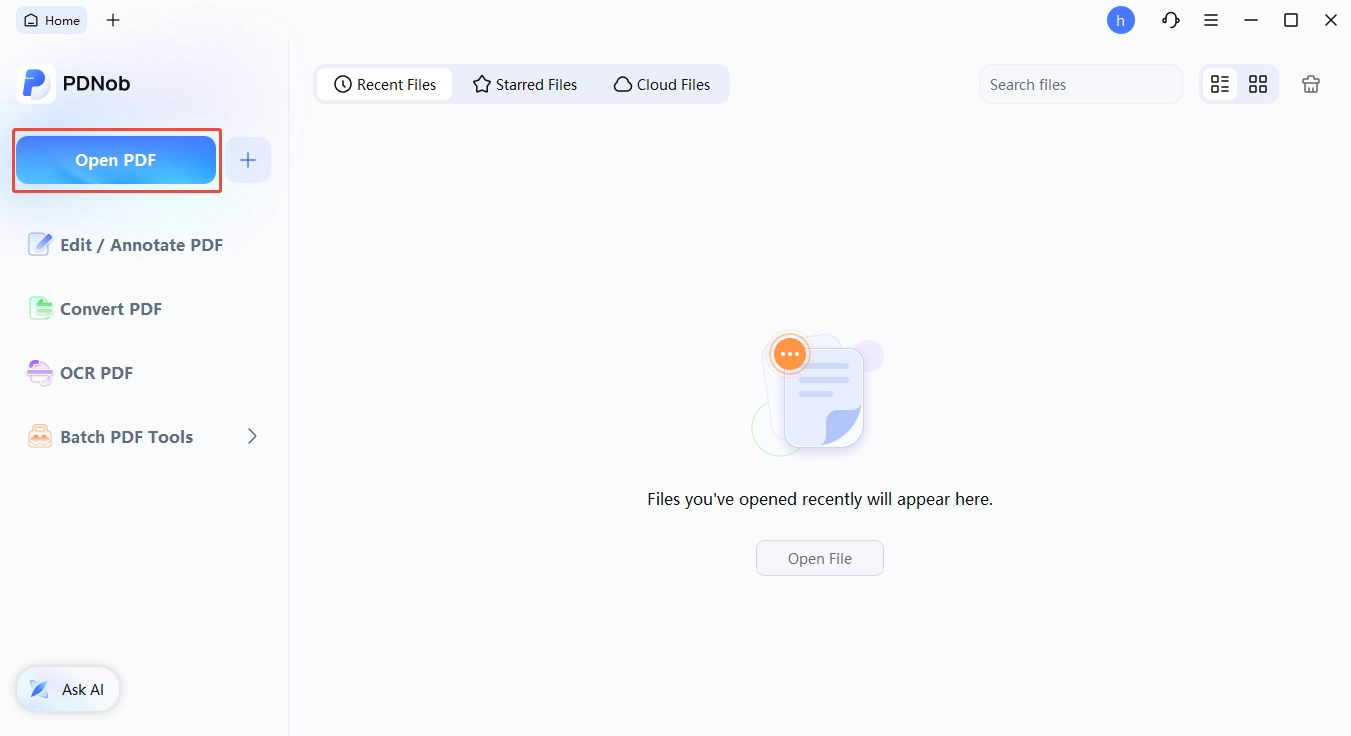
Download and install PDNob from the official website, then launch it on your Mac (requires macOS 26 or earlier).
-
Open your PDF by dragging it into the window or using File > Open---work on a copy first if the document is important.
-
Edit the file directly: change existing words, add or adjust images, and modify layout using the built-in editing tools.
-
For scanned documents, run on-device OCR and pick your language (40+ supported) to make text searchable and editable, then save and verify your changes before sending.


Part 6.Tip: Which Path Should You Take
How to Pick Your Path
- You edit PDFs every week on a Mac and nothing else. Stop hunting for PDF-XChange. The free options in Part 4 cover most work.
- Your company runs PDF-XChange and you need it on your Mac. Use Windows 11 in a virtual machine with the ARM64 installer. Budget the Windows license and one key.
- You only read, mark up and sign. Use Preview. It is already installed, and it is already free.
Checking Your Choice Before Real Work
-
Install one editor and give it a week. Five apps side by side helps nobody.
-
Open a real document that needs fixing, not a test file. The differences show up fast.
-
Check the result before you send it. Search for the words you changed to confirm they took.
Conclusion
The short answer to "pdf xchange editor mac" has not changed. There is no Mac version, and there is not going to be one.The program stays on Windows. Every workaround costs money, time or both. The cheapest one is a Mac app. If you are on Windows and love PDF-XChange, keep it. It is still one of popular PDF editors you can buy. You still pay once instead of every year.
For everyday PDF work on a Mac, a native app wins. Several are free. Part 4 shows what each one does well and where it stops.
FAQs on PDF-XChange Editor Mac
Q1. Does PDF-XChange Work on Mac?
A1: If your search was "does pdf xchange work on mac", the answer is no. Part 2 explains why the vendor will not build one. Part 3 shows the four ways to run it anyway.
Q2. Is There a PDF Editor for Mac?
A2: "Is there a PDF editor for Mac" splits into two different jobs. Markup tools add notes and signatures on top, while editors change the words already inside the file. Part 4 marks which is which.
Q3. Can I Use PDF X-Change on a Mac?
A3: "Using PDF X-Change on Mac" has four answers, and Part 3 ranks them. A virtual machine wins on Apple hardware. CrossOver suits occasional work.
Q4. Is There a Free PDF-XChange Editor for Mac?
A4: There is no free PDF-XChange Editor for Mac at all, because there is no Mac edition. Part 1 explains the free Windows build and the catch that comes with it. Searches for "free pdf xchange editor mac" miss the catch.
Q5. What Is PDF-XChange Viewer?
A5: "PDF-XChange Viewer" was the old free reader, and Part 1 covers where it ended. Its last version was 2.5.322.10 from December 2018. The name still pulls a lot of old search traffic.
Q6. Will PDF-XChange Editor Ever Release a Mac Version?
A6: Probably not. The vendor has said there are no plans, and the reason is structural rather than a schedule. Most people searching "pdf xchange editor mac os" want that same short answer.



- Make scanned PDFs searchable and editable with 99% OCR precision
- Batch convert PDFs to Word, Excel, PPT, images, PDF/A, Text, EPUB, etc., up to 30% faster
- Edit PDFs easily like Word, including text, images, watermarks, links, and backgrounds
- Annotate PDF with highlights, comments, shapes, stickers, and stamps
- Run smoothly on any PC without lags or crashes, even on low-spec machines
 Secure Download
Speak Your Mind
then write your review
Speak Your Mind
Leave a Comment
Create your review for PDNob articles
Related articles

AI Tools Writer / Workflow Analyst
Rachel has spent the last 5 years testing and writing about AI-powered tools across writing, design, and research workflows. She focuses on practical AI tool usage, helping knowledge workers turn generative AI into everyday productivity.