
 Home
>
PDF Tips
>
Gemini Error 1099,1097 and 1037:What It Means & 10 Fixes 2026
Gemini Error 1099,1097 and 1037:What It Means & 10 Fixes 2026
- Error 1099 is a generic server-side processing error, usually not your fault — Google groups it with other 1000-series codes as an unexpected processing issue and hasn't published a specific definition, so it often clears on its own.
- Do an easy check within 60 seconds whether it's your or Google's problem — Check the Google Workspace Status Dashboard, Downdetector, and r/GeminiAI, then test a new chat, another device, another network, and another Google account.
- Start with the fastest fixes: resend, new chat, remove attachments — Most people recover by Fix 3; long threads hit context limits and large PDFs, scans, or videos commonly trigger processing failures.
- Platform-specific fixes target session and sign-in problems — Browser users should try incognito and clear site data; Android/Pixel users should reset the digital assistant setting; iPhone/Mac users should update or reinstall the app and sign in again.
- Errors 1097 and 1037 are different problems with different fixes — 1097 is mostly a Workspace account or licence sync issue (wait up to 48 hours, check Admin Console), while 1037 means paid users hit the Pro/Thinking model quota — switch to the faster model or wait for reset.
You type a prompt, Gemini thinks for a moment, and then the reply disappears. In its place: "Something went wrong (1099)." Try again, and the same banner appears. If that sounds familiar, take a breath: Gemini error 1099 is a generic server-side processing error. In most cases it isn't your prompt or your account, and it often clears on its own or after a fresh chat.
This guide explains what Google says about error code 1099, how to tell in 60 seconds whether it's you or Google, 10 tested fixes for web, Android and iPhone, and how to handle the related codes 1097 and 1037.

Part 1. What Is Error 1099 on Gemini?
Error 1099 on Gemini means the service hit an unexpected problem while processing your request. It's one of Gemini's generic "Something went wrong" codes, and it shows up most often during Google-side outages or in long, overloaded conversations.
What Google Officially Says About Gemini Error Code 1099
Google's help page, "Troubleshoot error codes in Gemini Apps," defines only one specific code: 1060, which means Gemini isn't available in your region. Every other 1000-series code, "such as 1099," is grouped together as an unexpected processing issue. In other words, Google hasn't published a dedicated definition for 1099.

Why the Google Gemini 1099 Error Happens
Here are the main causes, marked as confirmed or likely:
- Google-side outage (confirmed). On June 10, 2026, a H2: Partial outage hit Gemini on web, Android, iOS, Mac and Workspace, with users seeing 1099 errors. Google's Josh Woodward acknowledged it publicly. It recurred on October 8, 2026, mostly in Mexico according to Downdetector.
- Long or overloaded conversation (likely). Very long chats can hit context limits, and the thread gets stuck returning 1099.
- Android session or sign-in failure (likely). A handshake problem between the Google app and Gemini, often tied to the Pixel side-button assistant setting.
- Large or unsupported attachments (likely). Big PDFs, scanned files or videos can fail during processing.
- Unstable network, VPN or proxy (likely). Interrupted connections or VPN routing can break the request.
- Account flags (likely). For example, an account wrongly marked as underage, or a Workspace account where Gemini isn't enabled.
Gemini Error Codes at a Glance
1099 rarely travels alone. Here's how it compares with the other codes you might see:
 Please swipe to view
These are Gemini app codes. They're different from Gemini API errors like 429 (rate limit) or 503 (overloaded). If you're a developer hitting API errors, see our guide to the Gemini API free tier and its limits.
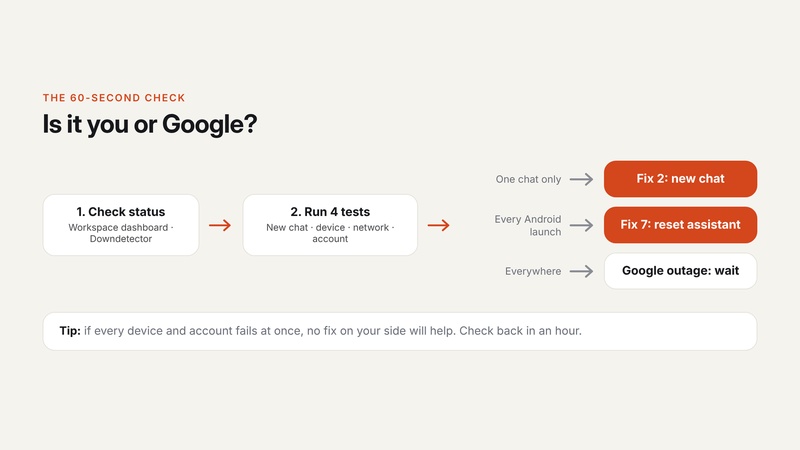
Part 2. Is It You or Google? A 60-Second Check
Before you clear caches or reinstall anything, spend one minute finding out where the problem is. If Gemini is down for everyone, no fix on your side will help.
Check the status pages.
- Look for confirmed incidents on the Google Workspace Status Dashboard.
- See whether other users are reporting problems on Downdetector's Gemini page.
- Check the r/GeminiAI subreddit, where outages usually show up within minutes.
Run four quick tests.
- Same error in a new chat?
- Same error on another device?
- Same error on another network (switch Wi-Fi to mobile data)?
- Same error on another Google account?
Follow the decision path.
- Error in one chat only → go to Fix 2 (start a new chat).
- Error on every launch on Android → go to Fix 7 (reset the assistant setting).
-
Error everywhere, on every device and account → it's a
Google outage. Wait it out.

Part 3. How to Fix Gemini Error 1099: 10 Tested Fixes
Following are most seen Gemini Error 1099 fixes, you can start with the fastest fixes.
Quick Fixes (All Platforms)
Fix 1. Resend the prompt. Copy your prompt first so you don't lose it, then hit send again.
Why it works: many 1099 errors are a one-off server hiccup that clears on the next request.
Fix 2. Start a new chat. Open a new conversation and paste a short summary of the old one, instead of the whole thing. You can also try a Temporary chat.
Why it works: long threads can hit context limits or get stuck in an error loop; a fresh chat resets that.

Fix 3. Remove or shrink attachments. Delete the uploaded file and paste the relevant text instead, or upload a smaller, text-based version.
Why it works: large PDFs, scans and videos are a common trigger for processing failures.
Fix 4. Type instead of using voice or Gemini Live. Switch from voice input to a typed prompt.
Why it works: voice sessions add another processing step that can fail on its own.
Fix 5. Switch networks or turn off your VPN or proxy. Move from Wi-Fi to mobile data (or the reverse), disable your VPN, and wait about 5 minutes.
Why it works: unstable connections and VPN routing can break the request mid-way.
Browser Fixes (gemini.google.com)
Fix 6. Reset your browser session.
-
Open gemini.google.com in a private or incognito window.
-
If it works there, disable your extensions one by one in your normal window.
-
Clear site data for gemini.google.com (Settings > Privacy > Site data).
-
Hard refresh with Ctrl + Shift + R (Windows) or Cmd + Shift + R (Mac).
Why it works: corrupted cookies or an extension that blocks scripts can break Gemini's session.

Android and Pixel Fixes
Fix 7. Reset the digital assistant setting.
-
Open the Google app and tap your profile picture > Settings > Gemini.
-
Tap Digital assistants from Google and switch to Google Assistant.
Restart your phone.
-
Go back and switch to Gemini again.
Why it works: this forces a fresh sign-in handshake, which fixes the Pixel side-button conflict that causes 1099 on every launch.

Fix 8. Update the Google app and Google Play Services. Update both from the Play Store. As a last resort, go to Settings > Apps > Google > Uninstall updates, then update again.
Why it works: outdated app versions can lose compatibility with Gemini's servers.
iPhone and Mac App Fixes
Fix 9. Update or reinstall the Gemini app, then sign out and back in. Update from the App Store (or Mac App Store). If that doesn't help, delete the app, reinstall it and sign in again.
Why it works: a fresh install clears a corrupted local session.
Account and Workspace Fixes
Fix 10. Rule out your account. Test Gemini with a second Google account. If you're prompted to complete age verification, finish it. Workspace users should ask their admin to confirm Gemini is turned on for their organizational unit (OU).
Why it works: an account flag or a disabled Workspace service can cause 1099 even when Gemini is up for everyone else.
Still seeing it after 24 hours on every device and account? Contact Google through Help > Send feedback in Gemini. Include the error code (1099), the time it happened, your platform (web, Android, iPhone, Mac), and whether a file was attached. Clear details get your report triaged faster.
Part 4. How to Fix "Something Went Wrong 1097" and Gemini Error 1037
Codes 1097 and 1037 often show up in the same searches as 1099, but they point to different problems. Google hasn't officially defined either one, so treat the explanations below as community findings.

Something Went Wrong 1097 Gemini
"Something went wrong 1097" in Gemini is mostly reported on Google Workspace accounts, often on the second message in a conversation. It appears to be linked to account or licence syncing.
How to fix it:
- Wait up to 48 hours if your account or Gemini licence is new; activation can take time to sync.
- Ask your admin to check the Admin Console: the Gemini service must be on for your organizational unit (OU).
- Try an incognito window and turn off your VPN.
- Contact Workspace support if it continues after 48 hours.
Gemini Error 1037
Gemini error 1037 is tied, in community reports, to paid users hitting the usage quota for the Pro or Thinking model.
How to fix it:
- Switch to the faster model in the model picker for now.
- Wait for your quota to reset, which usually happens within a day.
- Check your plan limits in your Google One or Gemini settings. Heavy users may need a higher plan.
Part 5. Gemini Keeps Failing on PDFs? A Faster Workaround
Attachments are one of the top triggers for 1099, along with errors 13 and 1155. If Gemini keeps failing every time you upload a PDF, there are two ways around it.
Some PDFs cannot go to a cloud chatbot. PDNob PDF Editor is an all-in-one desktop PDF tool for Windows, Mac, and iOS that edits, converts, annotates, and manages PDF files, with OCR and AI agent. PDNob runs entirely on your machine: ABBYY OCR for scans, text and image editing, page reorganization, compression, nothing waiting in an upload queue. Pay $64.99 once and the license is yours for life, updates free after that. Gemini failed to edit it? Nothing left to fix, because the file never left the machine.


Option A. Prep the file before you upload it. Compress it, split it into smaller H2: Parts, or run OCR on the scanned PDF so Gemini reads real text instead of page images. A scanned 80-page PDF is far more likely to fail than a 10-page text PDF.
Option B. Skip the upload entirely. Use PDNob's built-in AI to summarize, chat with or translate the PDF directly, with no upload to Gemini and no 1099 error to work around.
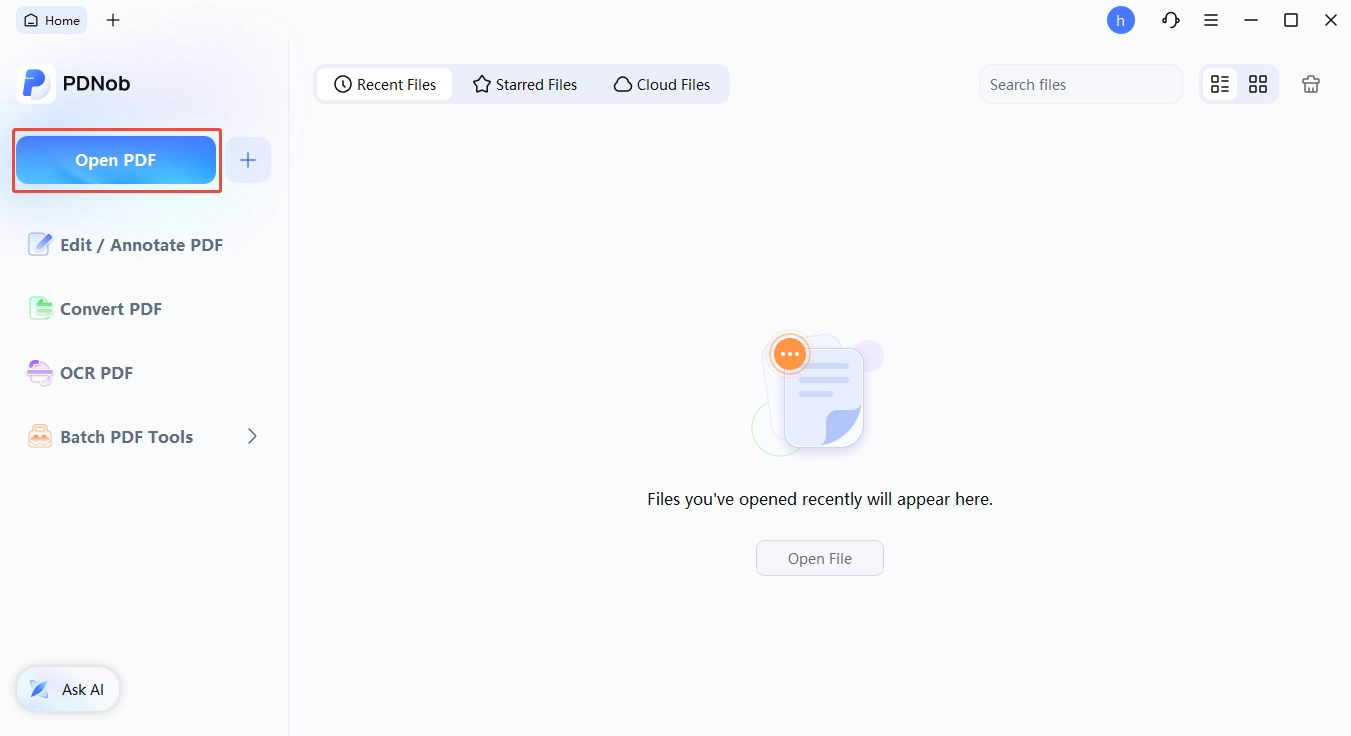
How to do it in PDNob (3 steps):
Open the PDF in PDNob.
-
Click AI, then choose Chat with PDF or Summarize.
Ask the same question you gave Gemini, then export the result.


Try it free: You can chat with a PDF or summarize a PDF in PDNob on the free plan, with no credit card needed. It runs on Windows, Mac and iPhone.
Part 6. How to Avoid Gemini Error 1099 in the Future
You can't prevent Google outages, but you can make the 1099 error a lot less likely on your side:
- Keep chats short. Start a new chat for each new topic instead of reusing one long thread.
- Keep uploads small. Split large files and OCR scanned PDFs before you upload them.
- Keep the app and browser updated. Most session bugs are fixed in updates.
- Bookmark the status dashboard. When 1099 hits, check it first and save yourself the troubleshooting.
Final Verdict
Gemini error 1099 is usually on Google's side or caused by a long chat, not your account. Check the status dashboard first, then start a new chat, remove any attachments, and try the fix for your platform. For PDF-heavy work, keep PDNob as a backup so a 1099 error never blocks your document tasks.
FAQ on Gemini Error 1099
Q1. What is error 1099 on Gemini?
A1: Error 1099 is a generic "Something went wrong" code that means Gemini hit an unexpected problem processing your request. Google groups it with other 1000-series codes and hasn't published a specific definition.
Q2. Is Gemini down right now?
A2: Check the Google Workspace Status Dashboard and Downdetector. If both show problems and the error appears on every device and account, Gemini is down and you'll need to wait.
Q3. Why does Gemini keep saying "something went wrong 1099"?
A3: The usual causes are a Google-side outage, a conversation that's grown too long, a large attachment, a network or VPN problem, or an Android sign-in issue. Starting a new chat fixes most cases.
Q4. Does a VPN cause the Gemini 1099 error?
A4: It can. VPNs and proxies can interrupt the connection or route you through an unsupported region. Turn the VPN off, wait a few minutes and try again.
Q5. How long does Gemini error 1099 last?
A5: If it's a Google outage, it usually clears within a few hours. If it's on your side, it lasts until you apply the right fix, often just a new chat.
Q6. Is error 1099 an account problem?
A6: Usually not. It can be account-related if Gemini isn't enabled for your Workspace account or your account is flagged for age verification. Test with a second Google account to find out.
Q7. Is Gemini error code 1099 the same as Gemini API error 429 or 503?
A7: No. 1099 is a Gemini app error. 429 (too many requests) and 503 (service unavailable) are Gemini API errors that developers see when calling the API.
Q8. What does Gemini error 1037 mean?
A8: Community reports link error 1037 to paid users running out of their Pro or Thinking model quota. Switch to the faster model or wait for the quota to reset.



- Make scanned PDFs searchable and editable with 99% OCR precision
- Batch convert PDFs to Word, Excel, PPT, images, PDF/A, Text, EPUB, etc., up to 30% faster
- Edit PDFs easily like Word, including text, images, watermarks, links, and backgrounds
- Annotate PDF with highlights, comments, shapes, stickers, and stamps
- Run smoothly on any PC without lags or crashes, even on low-spec machines
 Secure Download
Speak Your Mind
then write your review
Speak Your Mind
Leave a Comment
Create your review for PDNob articles

Related articles

AI Tools Writer / Workflow Analyst
Rachel has spent the last 5 years testing and writing about AI-powered tools across writing, design, and research workflows. She focuses on practical AI tool usage, helping knowledge workers turn generative AI into everyday productivity.


