
 Home
>
PDF Tips
>
Gemini Student Offer 2026: Get Google AI Pro Free for 1 Year
Gemini Student Offer 2026: Get Google AI Pro Free for 1 Year
- Eligible college students use Gemini free for 12 months — Students aged 18+ enrolled at a college or university get Google AI Pro (US) or AI Plus (140+ countries) free for a year, worth about $240 in the US.
- Redeem by December 31, 2026; the clock starts when you claim — Your 12 free months begin on the day you redeem, not when the semester starts, so don't wait — SheerID verification can take up to 48 hours.
- You need a personal Google account and a payment method — School .edu Google accounts can't redeem it, and while you won't be charged during the free year, a card is required because the plan auto-renews at full price unless you cancel.
- SheerID verification is the most common stumbling block — Name mismatches, blurry or expired documents, existing Google One memberships, and school-name issues cause most failures; fixes include matching your account name, uploading current-term enrollment proof, and leaving family plans.
- Watch the storage trap and set a month-11 reminder — AI Pro includes 5 TB (AI Plus 400 GB), but after the free year you drop back to 15 GB, so over-limit Gmail and Drive can stop working until you clean up or pay.
If you're in college, Google will pay for your AI subscription for a year. The Gemini student offer gives eligible students a paid Gemini plan free for 12 months: Google AI Pro in the US and Google AI Plus in 140+ other countries.The catch is the clock. You have to redeem it by December 31, 2026, and the 12 months start on the day you claim, not the day the semester starts.
This guide covers who qualifies for free Gemini for students, exactly what's included, how to claim it step by step, what to do when SheerID verification fails, and what happens to your account (and your storage) after the free year ends.
Part 1. What Is the Gemini Student Offer?
The Gemini student offer is a free 12-month Google AI subscription for college students aged 18 and over. You redeem it at gemini.google/students, verify you're a student, and pay nothing for a year. The redemption deadline is December 31, 2026.
Google relaunched the offer in August 2026 as a back-to-school promotion. That matters because many guides you'll find were written for the 2025 version, which had different plans, different countries and a different deadline. If you've seen a "gemini student offer 15 months" deal mentioned, that refers to the 2025 version, which ran through spring 2026 finals; the current offer is a flat 12 months from the day you redeem.

Google AI Pro vs Google AI Plus: Which Plan Students Get
Which plan you get depends on where you study:
- US students get Google AI Pro, the higher tier.
- Students in 140+ other markets get Google AI Plus.
- Canada was added on October 29, 2026, with AI Plus.
Here's how the two student plans compare with the free version of Gemini:
 Please swipe to view
For US students, the free year is worth about $240. For everyone else, it's worth roughly $60, plus a big jump in storage.

What's Included in the Gemini AI Pro Student Plan
The Gemini AI Pro student plan is the same Google AI Pro subscription anyone can buy, just free for a year. Here's what each feature is actually good for when you're studying:
- Higher usage limits. Four times the free tier means you won't get cut off halfway through a long study session or a big batch of practice questions.
- Deep Research. Ask Gemini to research a topic across dozens of sources and return a cited report. It's a strong starting point for literature reviews and research papers (always check the sources yourself).
- Study notebooks and quizzes. Upload lecture notes or readings and Gemini turns them into a study notebook with diagnostic quizzes for exam prep.
- Gemini in Gmail and Docs. Draft emails to professors, summarize long threads, and get writing help directly inside Google Docs.
- 5 TB of storage. Shared across Google Drive, Gmail and Google Photos, enough for years of lecture recordings and project files.
Google AI Plus covers most of the same study tools with lower limits and 400 GB of storage. Some older pages list extras like NotebookLM Pro or Veo video generation as part of the student deal. Google's current offer pages don't list them, so don't count on them unless you see them in the live terms when you sign up.

Part 2. Who Is Eligible for Free Gemini for Students?
You qualify for free Gemini for students if you're 18 or older, enrolled at a college or university in a supported country, and using a personal Google account. Most failed claims come from one of the less obvious rules below, so check each one before you start.
Eligibility Checklist
- 18+ and enrolled at a college or university. High school students are not eligible, even if they're taking college-level classes.
- A personal Google account. School-issued Google Workspace accounts (the ones ending in your university's domain) can't redeem the offer. Use your own @gmail.com account and verify your student status separately.
- Not in a Google One family group you don't manage, and not getting Google One through a third party, Pixel Pass or Google Fi.
- A valid payment method on file. You won't be charged during the free year, but Google needs a card for the renewal.
- Located in a supported country (see below).
-
Your 2025 trial ended? You can claim again. Students whose
free year from the 2025 offer has expired are eligible for the 2026 offer,
which most guides don't mention.
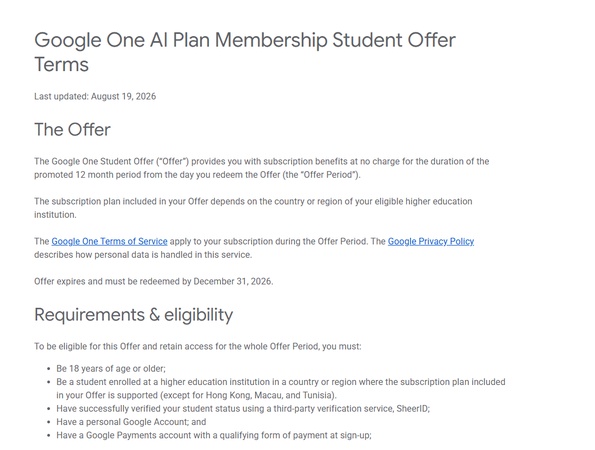

The list changes, so confirm your country in the official Google One student offer terms before you start. If your country isn't listed, the claim page won't show the offer at all.
Part 3. How to Get the Gemini Student Offer: Step-by-Step Guide
Claiming the offer takes about 10 minutes, plus up to 48 hours if your student status needs a manual review. Have your school email or an enrollment document ready before you start.
-
Go to gemini.google/students. (Many people search for it as google.gemini/students or gemini.google.students; the correct address is gemini.google/students.) Sign in with your personal Google account, not your school account.
-
Click "Get offer". The page shows which plan you're eligible for (AI Pro or AI Plus) based on your location.
-
Verify your student status with SheerID. Enter your school name, then confirm with your school email or upload an enrollment document such as a class schedule or tuition receipt. Instant verification is common; manual review can take up to 48 hours.
-
Add a payment method. You won't be charged for 12 months. The card is only there for the renewal. Confirm your subscription. Your plan now appears in your Google One and Gemini settings.


5. Set a reminder for month 11. Put a calendar reminder 11 months out so you can decide whether to keep or cancel before the first charge.

student status has to be re-verified each year, so a free year doesn't automatically roll into a second.
SheerID Verification Failed? How to Fix It
SheerID rejections are the most common reason students get stuck. Here are the usual causes and the fix for each:
Please swipe to view
If you've tried everything and still can't get through, use the help link on the SheerID page to request a manual review.
Part 4. Gemini Student Offer Deadline: When Does It End?
The Google Gemini AI student offer deadline is December 31, 2026. That's the last day to redeem it. Your 12 free months count from the day you redeem, so claiming on December 31 still gives you free access through the end of 2027.
There's no reason to wait, though. Verification can take up to 48 hours, and a failed SheerID check in the last week of December leaves you no time to fix it.
Deadline at a glance: Redeem by December 31, 2026 → 12 months free from your redemption date → first charge 12 months later unless you cancel.
What if you miss it? Google hasn't announced an extension or a 2027 offer. Once the deadline passes, the claim page stops showing the offer, so check gemini.google/students before assuming it's still live.
What Happens After the Free Year?
When your free year ends, the plan renews automatically at the standard price unless you cancel:
- Auto-renewal price: $19.99/month for Google AI Pro in the US, or the local Google AI Plus price elsewhere (around $4.99/month, or $6.99 CAD in Canada).
- How to cancel: open Google One, go to Manage membership, and select Cancel membership. You keep access until the end of the period you've already received.
- Storage warning: if you're using more than 15 GB when the plan ends, you go back to the free 15 GB limit. Gmail can stop receiving new email and Drive stops accepting uploads until you delete files or pay.
- Student bundle: Google has offered a student bundle of AI Pro plus YouTube Premium at a discounted monthly price (around $8.99 in the US). Check the live price in Google One before you renew, since bundle pricing varies by country.
Part 5. Is the Gemini Student Discount Worth It?
For most college students, yes. A year of free storage and higher AI limits costs you nothing as long as you remember to cancel or decide to keep it. The real risks are the auto-charge and leaning on AI in ways your school doesn't allow.
Pros
- Completely free for 12 months, worth up to $240 in the US.
- 5 TB (AI Pro) or 400 GB (AI Plus) of storage for lecture recordings, project files and photos.
- Deep Research and study notebooks save hours on papers and exam prep.
- Works inside Gmail and Docs, where you already write.
Cons
- A card is required, and the plan auto-renews at full price.
- Storage can become a trap: fill it up and you'll feel pressure to keep paying.
- AI answers can be wrong, and Deep Research sources still need checking.
- Many schools restrict AI use in assignments. Know your course policies before you rely on it.
My Recommendation by Student Type
Please swipe to view
Part 6. How to Get More From Gemini as a Student
Most of what you study arrives as a PDF: lecture slides, assigned readings, scanned handouts, and the study guides you export from NotebookLM. Pairing Gemini with a good PDF tool closes the gaps Gemini leaves. Here are four ways to do it.
Tip 1. Turn NotebookLM study slides into editable PowerPoint. NotebookLM exports slides as flat PDFs, so you can't edit them directly. Follow this guide to convert NotebookLM PDF slides to editable PowerPoint, then reorder, edit and present them like any other deck.
Tip 2. Remove the NotebookLM watermark from slides. Before you present in class, remove the NotebookLM watermark from your slides so they look clean and professional.
Tip 3. Connect NotebookLM to Gemini. When you connect NotebookLM to Gemini, you can use your NotebookLM sources inside Gemini chats, so answers stay grounded in your course material.
Tip 4. Create sketchnotes with Gemini. Gemini can help you create sketchnotes that turn dense lecture content into visual notes, which are much easier to review before exams.
Don't qualify, or your free year ended? Consider PDNob as your backup plan. PDNob PDF Editor is an all-in-one light-weight PDF editor with OCR for Windows, Mac, and iOS that handles the PDF work students actually get assigned — highlighting and stamping lecture slides, completing and submitting worksheets, running local OCR on scanned textbooks, converting PDFs to Word for revision notes, and translating papers into 40+ languages PDNob for education has a free plan, with no credit card required, that includes AI summarize, chat with PDF, side-by-side translation and OCR for scanned course readings. It runs on Windows, Mac and iPhone.


Final Verdict
If you're 18 or older and enrolled in college, claim the Gemini student offer before December 31, 2026. It's a full free year of Google AI Pro in the US or AI Plus elsewhere, and the only real cost is remembering to cancel. Set a reminder for month 11, and pair Gemini with PDNob for the PDF-heavy side of studying.
FAQ on Gemini Student Offer
Q1. Is Gemini free for students in 2026?
A1: Yes. Eligible college students get Google AI Pro (US) or Google AI Plus (140+ countries) free for 12 months. Anyone can also use the basic version of Gemini for free with no time limit.
Q2. What is the Google Gemini AI student offer deadline?
A2: You must redeem the offer by December 31, 2026. Your free year starts on the day you redeem it.
Q3. Do I need a credit card for the Gemini student plan?
A3: Yes. Google requires a valid payment method, but you aren't charged during the free year. The plan renews at the standard price unless you cancel.
Q4. Can international students get the Gemini student offer?
A4: Yes. Students in 140+ countries outside the US get Google AI Plus free for a year. The plan you're offered is based on your location, so the claim page will show AI Pro or AI Plus when you sign in.
Q5. Can high school students get free Gemini?
A5: No. The offer is only for students aged 18+ enrolled at a college or university. High school students can still use the free version of Gemini.
Q6. Does it work with a school (.edu) Google account?
A6: No. You need a personal Google account to redeem it. You can still use your school email to verify your student status through SheerID.
Q7. Can I claim the Gemini student 1 year offer again if my 2025 trial
ended?
A7: Yes. If your free plan from the 2025 student offer has expired, you can claim the 2026 offer, as long as you still meet the eligibility rules.
Q8. What happens to my storage after the free year?
A8: If you cancel and you're using more than the free 15 GB, Gmail may stop receiving email and Drive stops accepting uploads until you free up space or subscribe again. Download or clean up files before your plan ends.



- Make scanned PDFs searchable and editable with 99% OCR precision
- Batch convert PDFs to Word, Excel, PPT, images, PDF/A, Text, EPUB, etc., up to 30% faster
- Edit PDFs easily like Word, including text, images, watermarks, links, and backgrounds
- Annotate PDF with highlights, comments, shapes, stickers, and stamps
- Run smoothly on any PC without lags or crashes, even on low-spec machines
 Secure Download
Speak Your Mind
then write your review
Speak Your Mind
Leave a Comment
Create your review for PDNob articles
Related articles

Software Reviewer and Comparison Analyst
Maya Patel has reviewed over a hundred softwares across writing, design, productivity, and AI categories, and her comparison articles are designed to give readers a clear winner within the first three paragraphs in past 3 years.


