
 Home
>
PDF Tips
>
Gemini API Free Tier 2026: Models, Limits & Get Free API Key
Gemini API Free Tier 2026: Models, Limits & Get Free API Key
- The Gemini API has a real free tier — no credit card, no expiry, no billing account — But limits are set per project, and Google may use free-tier prompts and responses to improve its products, with human reviewers possibly reading them.
- Pro models left the free tier in 2026; start with Gemini 3.8 Flash — Flash, Flash-Lite, Live/TTS, Gemma and embeddings are free; Pro and flagship models are paid only, and several older models were retired this year.
- Limits are per project, not per API key, and vary by model — RPM, TPM and RPD caps apply project-wide, your exact numbers live in AI Studio, and extra keys don't add quota — exceeding limits just returns HTTP 429.
- You're only billed after linking a billing account; going back to free means disabling billing — Tiers 1–3 raise limits and remove data-training use, but a $0 balance returns HTTP 402 rather than falling back to free, and the $300 Cloud credit doesn't cover Gemini API usage.
- Don't send sensitive data on the free tier, and skip the API for document work — Free-tier data may be used for training, apps serving EEA/UK/Switzerland users must use paid services, and tools like PDNob handle PDF summaries, chat and translation without any code or key.
The Gemini API is one of the few major AI APIs you can start using for free, today, without a credit card. But "free" comes with fine print that most guides skip: which models are included, how the limits actually work, what Google does with your prompts, and the exact moment you start paying. Google also changed a lot in 2026. Pro models left the free tier, several models were retired, fixed rate-limit tables disappeared from the docs, and API key rules got stricter. If the guide you're reading still says "2.5 Pro gets 50 requests a day," it's out of date.
This guide covers the current Gemini API free tier as of November 2026: every free model, how the limits work, how to get a free API key in Google AI Studio, and when billing kicks in.

Part 1. Is the Google Gemini API Free?
Yes. The Google Gemini API has a free tier you can use through Google AI Studio with no credit card and no billing account. It isn't a trial that expires; it's an ongoing quota for selected models. The trade-offs: limits apply per project, and Google can use your free-tier prompts and responses to improve its products.
Gemini API Free Tier vs Paid Tier at a Glance
 Please swipe to view
The details in this table come from Google's official Gemini API pricing page and its rate limits documentation.
Gemini App vs Gemini API: Not the Same "Free"
The Gemini app and the Gemini API are billed separately. Gemini app plans (Free, Google AI Plus, Google AI Pro) give you more usage in the chat app at gemini.google.com, but they include no API quota. Paying for AI Pro doesn't raise your API limits, and the API free tier doesn't give you anything extra in the app.
If you're a student looking for a free Gemini app plan, that's a different offer: see our guide to the Gemini student offer.
Part 2. Gemini Free Tier Models: What Is the Free Model of Google Gemini in 2026?
The main free model of Google Gemini in 2026 is Gemini 3.8 Flash, Google's recommended model for new projects. Gemini 3.6 Flash, 3.5 Flash-Lite and 3.1 Flash-Lite are also free, along with the Live, TTS and transcription models. Pro models and the newest flagships are paid only.
Free Gemini Models List (Nov 2026)
This is the API and Google AI Studio free tier, not the Gemini app.
Please swipe to view
Availability can change without notice. Check the pricing page for the current list of free-tier models before you build on one.
Is Gemini 3 Flash Free?
Yes. Gemini 3 Flash Preview is still on the free tier. However, Google now points developers to Gemini 3.6 Flash or 3.8 Flash instead, since preview models can be retired with little notice. Use 3 Flash for testing, not for anything you plan to ship.
Which Free Model Should You Use?
Pick by the job, not by the newest version number:
- Chatbot or assistant: Gemini 3.6 Flash for everyday chat; 3.8 Flash if conversations run long or need reasoning.
- Document summaries: Gemini 3.8 Flash for long PDFs and reports; 3.5 Flash-Lite for short documents in bulk.
- Coding: Gemini 3.8 Flash for multi-step coding and debugging.
- Bulk classification: Gemini 3.1 Flash-Lite for tagging, sorting and keyword extraction at the lowest cost per request.
- Voice: the Live and TTS models for real-time voice and text-to-speech.
Models Retired in 2026
Several models left the API this year, which is why older guides list different models and different limits:
- March 9, 2026: Gemini 3 Pro Preview retired.
- May 25, 2026: Gemini 3.1 Flash-Lite Preview retired (replaced by the stable 3.1 Flash-Lite).
- June 1, 2026: Gemini 2.0 Flash and 2.0 Flash-Lite retired.
If your code still calls one of these model names, requests will fail. Switch to a current model from the table above.
Part 3. Gemini API Free Tier Limits Explained
Gemini API free tier limits are set per project and per model, and Google no longer publishes one fixed number for everyone. Your exact limits are shown in Google AI Studio. Here's how to read them.
Is a Gemini API Key Free and Unlimited?
A Gemini API key is free, but it's not unlimited. A few common myths:
- Extra keys don't add quota. Creating five keys in the same project still gives you one project's worth of limits.
- Failed requests still count. Requests that error out or get blocked can count toward your quota.
- Limits aren't guaranteed. Google says free-tier limits can change and capacity isn't promised, so don't run a production app on the free tier alone.
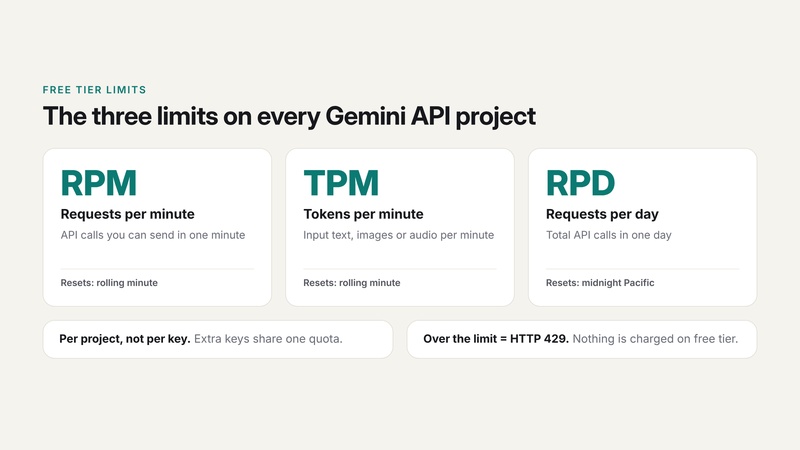
RPM, TPM and RPD: What the Limits Mean
Please swipe to view
Three rules trip people up:
- Limits apply per project, not per API key. All keys in the same Google Cloud project share one quota.
- You hit whichever limit comes first. Long prompts can hit TPM long before you reach RPM.
-
Going over returns an HTTP 429 error. Your request is
rejected until the window resets; nothing is charged on the free tier.

Where to Find Your Exact Gemini API Free Tier Limit
Google's rate-limits page now says per-model values for the free tier are viewed in Google AI Studio rather than listed in a public table. To find your Gemini API free tier limit:
-
Sign in to Google AI Studio.
-
Open Dashboard and select Usage and limits for your project.
-
Pick a model to see its current RPM, TPM and RPD, plus how much you've used today.
If you've seen tables online with numbers like "2.5 Pro: 50 RPD," they're outdated. Pro models are no longer on the free tier for new projects, and Google adjusts free-tier quotas over time.
If you need more, the only supported route is enabling billing to move to Tier 1 (see H2:Part 6).
Part 4. How to Get a Free Gemini API Key in Google AI Studio
Getting a free Gemini API key takes about two minutes. You need a Google account and must be 18 or older.
-
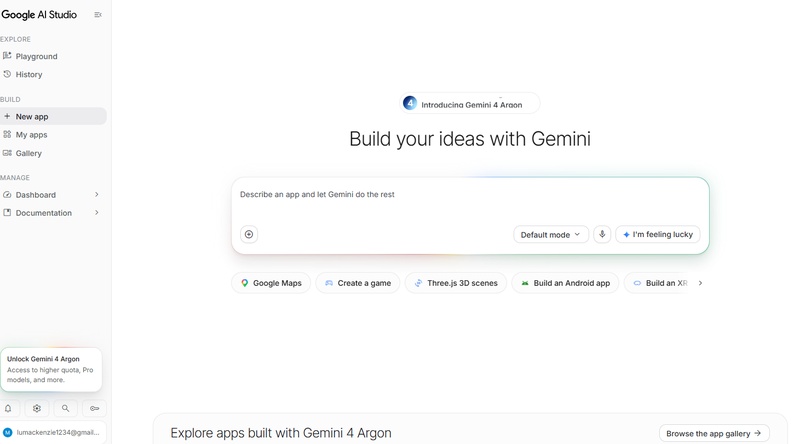
Go to aistudio.google.com and sign in with your Google account. Accept the terms if it's your first visit.
-
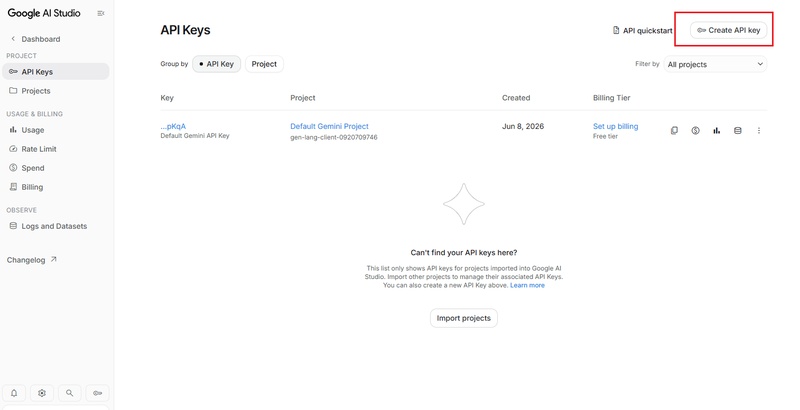
Check your project. New users get a default Google Cloud project and API key automatically. If you already use Google Cloud, import an existing project from Dashboard > Projects. Open API Keys and click "Create API key". Choose the project, then copy the key.
-
Save the key as an environment variable. Set it as
GEMINI_API_KEYon your machine or server. -
Make a test call. This request asks Gemini 3.8 Flash for a one-line reply:
curl "https://generativelanguage.googleapis.com/v1beta/models/gemini-3.8-flash:generateContent" \
  -H "x-goog-api-key: $GEMINI_API_KEY" \
  -H "Content-Type: application/json" \
  -d '{"contents":[{"parts":[{"text":"Explain the Gemini API free tier in one sentence."}}]}'


If you get a JSON response with text, your free key works.

Store it server-side and never paste it into front-end code or a public repo. Since May 28, 2026, new keys are created as "auth keys" by default, and since May 7, 2026, Google blocks dormant keys that have no API restrictions. Restrict each key to the Gemini API in the Google Cloud console.
Part 5. Google AI Studio Free Tier: Data Use, Regions and Rules
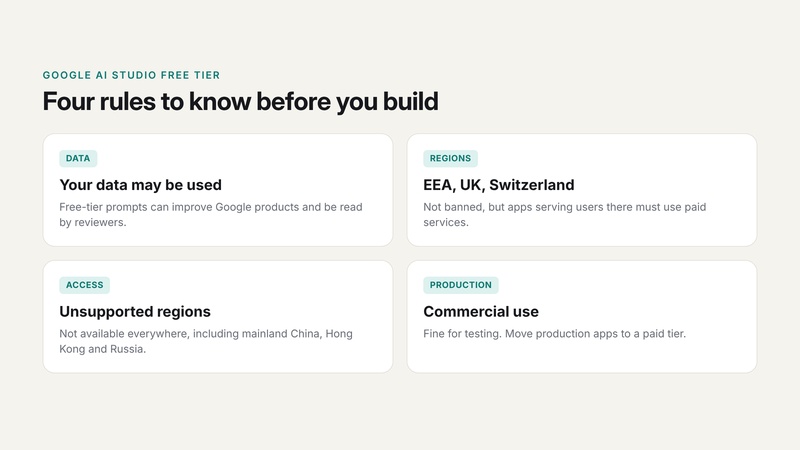
The Google AI Studio free tier is fine for learning and prototypes, but four rules decide whether it fits your project:
- Your data may be used. Free-tier prompts and responses can be used to improve Google products, and human reviewers may read them. Don't send passwords, customer data, health records or anything confidential.
- EEA, UK and Switzerland: not a ban. You can use AI Studio there, but paid data terms apply, and apps that serve users in those regions must use paid services.
- Unsupported regions. The API isn't available everywhere, including mainland China, Hong Kong and Russia. Check Google's available regions page before you build.
-
Commercial use. The free tier is fine for testing and
personal projects. Production apps, especially ones handling user data,
should move to a paid tier for higher limits and data protection.

Part 6. When Do You Get Billed? Free Tier vs Tier 1, 2, 3
You only get billed after you link an active billing account to your project. Until then, you stay on the free tier, and going over a limit just returns a 429 error. Once billing is on, every request is charged at pay-as-you-go rates.
Gemini API Paid Tiers (Usage Tiers 1--3)
These tiers are for the Gemini API only: pay-as-you-go billing for API calls through Google AI Studio or Google Cloud. They are not Gemini app plans like Google AI Plus or AI Pro. You can check per-model token prices on the Gemini API pricing page, while Google explains how projects move between usage tiers and their rate limits in a separate doc.
Please swipe to view
Projects move up automatically once they meet the next tier's criteria, usually within about 10 minutes.

Billing Gotchas
- Prepaid credit expires. You can prepay $5 to $5,000, but unused credit expires after 12 months.
- A $0 balance doesn't fall back to free. Once billing is on, an empty balance returns HTTP 402 errors; your project won't drop back to the free tier on its own.
- The $300 Google Cloud credit doesn't cover it. On billing accounts opened after March 2, 2026, the welcome credit can't pay for Gemini API usage.
- Going back to free: disable billing on the project to return to free-tier limits.
Part 7. Need AI for PDFs, Not Code? A No-API Alternative
A lot of people search "gemini api key free" when what they actually want is to summarize a report, translate a paper or ask questions about a contract. For that, the API is the long way round: The free tier means quotas, 429 errors, prompts that can be used for training, and writing code before you get a single answer.
But PDNob does the same document jobs with no API key and no code.PDNob PDF Editor is an all-in-one desktop PDF tool for Windows, Mac, and iOS that edits, converts, annotates, and manages PDF files, with ABBYY OCR SDK that reads scans on your own machine and nothing queued for upload. It can also offer side-by-side AI translation that keeps the original layout, OCR for scanned files, and an AI Agent that runs batch jobs from a plain-language request.


Following is a quick comparison table of which are suitable use case for each tool:
Please swipe to view
How to do it in PDNob (3 steps):
Open your PDF in PDNob.
-
Click the AI panel.
-
Ask a question, or choose Summarize or Translate.
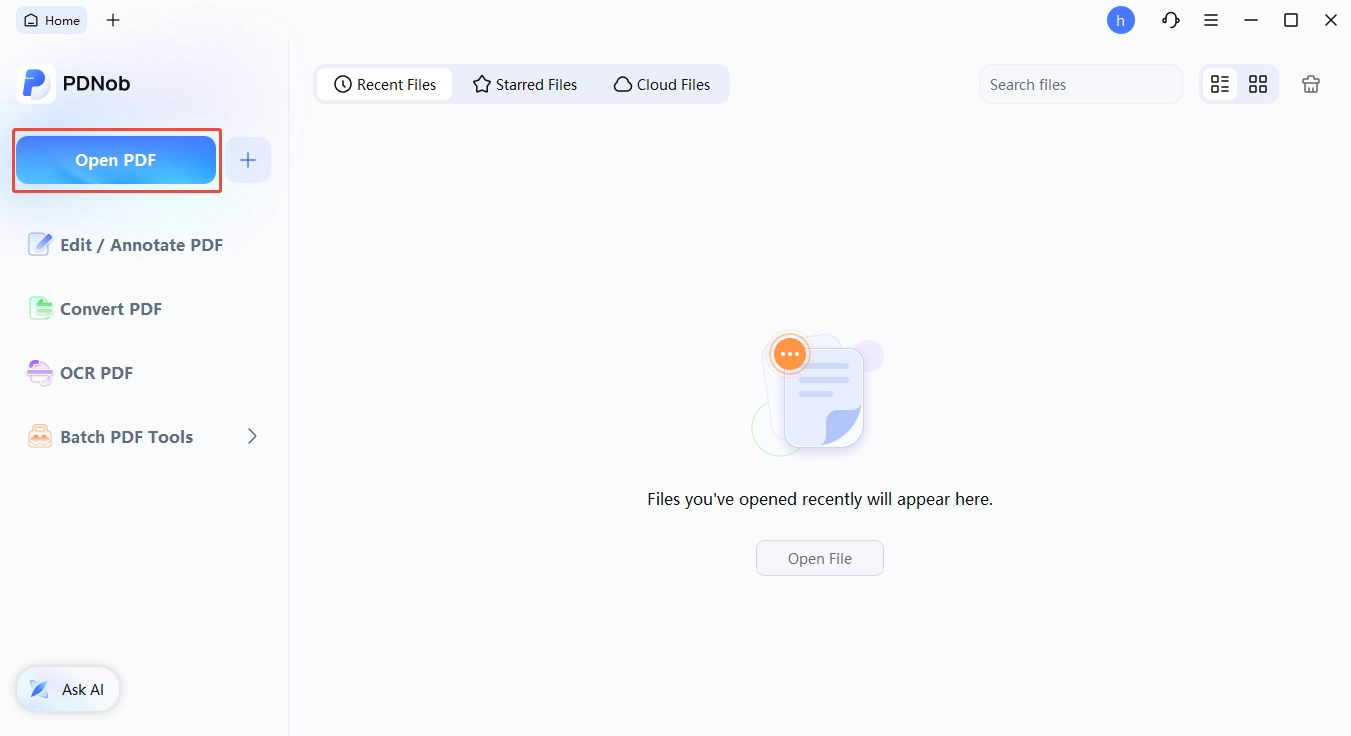


Try it free: With PDNob you can summarize a PDF in seconds, chat with a PDF to pull out answers, or translate a PDF without breaking its layout. The free plan needs no credit card and runs on Windows, Mac and iPhone.
Final Verdict
The Gemini API free tier is a good fit for prototypes, learning and personal projects. Start with Gemini 3.8 Flash or 3.5 Flash-Lite, check your live limits in Google AI Studio, and keep sensitive data off the free tier. When you're ready for production, enable billing to move to Tier 1. If you only need AI for documents, skip the code and use PDNob.
FAQ on Gemini API Free Tier
Q1. Is the Gemini API key free?
A1: Yes. Creating a Gemini API key in Google AI Studio is free and doesn't require a credit card. You only pay if you enable billing on the project.
Q2. Is the Google Gemini API free for commercial use?
A2: You can use the free tier while building and testing a commercial product. For production, Google's terms push you to paid services, and apps serving users in the EEA, UK or Switzerland must use paid services.
Q3. What are the Gemini API free tier limits?
A3: Limits are set per project and per model as requests per minute (RPM), tokens per minute (TPM) and requests per day (RPD). Google shows your exact numbers in Google AI Studio under Usage and limits.
Q4. Does Google AI Studio cost money?
A4: No. Google AI Studio is free to use in all available regions. You're only charged for API usage after you link a billing account.
Q5. Is Gemini 2.5 Pro free on the API?
A5: Not for new projects. Gemini 2.5 models are only available to projects that already used them, and Pro models left the free tier in 2026.
Q6. Do multiple API keys increase my quota?
A6: No. Limits apply to the whole project, so every key in the same project shares one quota.
Q7. When does the Gemini free tier reset?
A7: Requests-per-day limits reset at midnight Pacific Time. Per-minute limits reset on a rolling one-minute window.
Q8. Does Google train on my free API data?
A8: It can. Free-tier prompts and responses may be used to improve Google products and reviewed by humans. Paid-tier data isn't used that way.



- Make scanned PDFs searchable and editable with 99% OCR precision
- Batch convert PDFs to Word, Excel, PPT, images, PDF/A, Text, EPUB, etc., up to 30% faster
- Edit PDFs easily like Word, including text, images, watermarks, links, and backgrounds
- Annotate PDF with highlights, comments, shapes, stickers, and stamps
- Run smoothly on any PC without lags or crashes, even on low-spec machines
 Secure Download
Speak Your Mind
then write your review
Speak Your Mind
Leave a Comment
Create your review for PDNob articles
Related articles

AI Tools Writer / Workflow Analyst
Rachel has spent the last 5 years testing and writing about AI-powered tools across writing, design, and research workflows. She focuses on practical AI tool usage, helping knowledge workers turn generative AI into everyday productivity.


