Home
>
PDF Tips
>
Gemini Canvas Guide 2026 : Tested Review on Apps, Games, PDFs
Gemini Canvas Guide 2026 : Tested Review on Apps, Games, PDFs
- 1 Gemini Canvas is a free AI workspace inside the Gemini app for creating and editing documents, apps, games, and slides---it has nothing to do with the Canva design app. Its interface has been changed in late 2026 different from most 2026 early guides.
- 2 How to access it free: Sign in at gemini.google.com, click + in the prompt box → More tools → Canvas, then type your prompt; Canvas now works inside the chat and automatically opens the right view (editor or Code/Preview) for the task.
- 3 Free for everyone, stronger on paid plans: Canvas is free for all signed-in users; Google AI Pro ($19.99/month) and Ultra subscribers get Gemini 3 and a 1 million token context window.
- 4 Powerful export options: Gemini can create apps and games that can be exported to Google Sites as a publishable site; slide decks export to Google Slides, PDF, or PPTX; LaTeX documents export directly to PDF, while plain documents go through Google Docs first.
- 5 Practical tips: If the Preview button is missing, ask for a single HTML file, refresh or start a new chat, try Incognito, or switch models; Canvas only edits text, so complex PDF layout edits require a PDF editor like PDNob.
Gemini Canvas is Google's free workspace inside Gemini where you write docs, build apps and games, and make slides with AI. To use it, open gemini.google.com, click + > More tools > Canvas, and type your prompt.
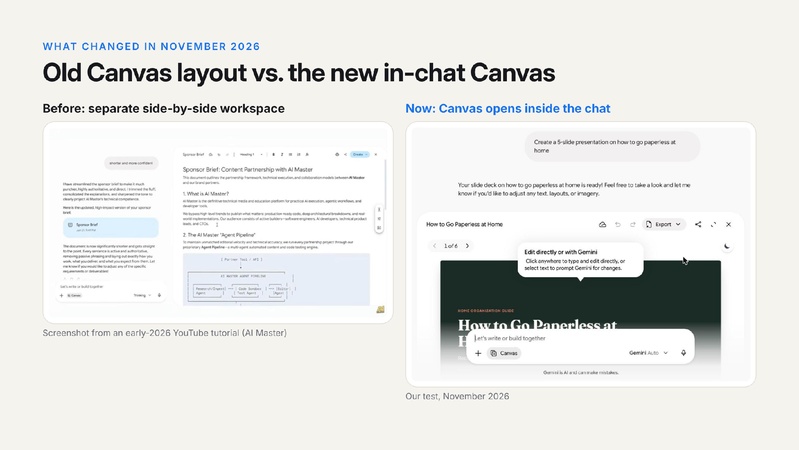
A lot of people search for "gemini canva", but the tool is called Gemini Canvas, and it has nothing to do with the Canva design app. Most tutorials also still show the old layout. In November 2026, we tested Canvas by building a web app, a game and a PDF, and this guide shows what we found, plus how to make slides and PPT files, export to PDF and Google Sites, and fix a missing preview button.
Part 1. What Is Gemini Canvas?
Gemini Canvas is an interactive space in the Gemini app where you create and edit content with Gemini's help. Instead of getting a long answer in the chat, you get a live document, app or slide deck that you can edit, test and export. If you're asking "what is the canvas tool in gemini", that's it: a canvas feature in Gemini for working on one project with AI.
One quick note on the name: Canvas is not Canva. Canva is a separate design app, and "gemini canva" is simply a common misspelling of Gemini Canvas.

1.1 What Does Gemini Canvas Do?
According to Google's Canvas help page, you can:
- Write and edit documents: edit text directly or select text and ask Gemini to change it. Use Suggest edits, Change length and Change tone, plus a formatting toolbar for headings, bold, italics and lists. Changes save automatically, and you can switch between saved versions.
- Build apps and games: Gemini writes the code, and you test it in a live Preview. Click Code to view or edit the code, and open the console to see errors.
- Create slides: ask for a presentation and export it to Google Slides, PDF or PPTX.
- Turn content into something new: the Create menu turns a document into a web page, infographic, quiz or Audio Overview.
That's why many people use Canvas as a free Gemini AI generator for apps, dashboards and study tools, not just for writing.

1.2 What's New in Gemini Canvas in November 2026
- Canvas now works inside the chat. In our tests, typing a prompt no longer sends you to the classic two- or three-column workspace. Gemini opens the right view for the task: a wide editor for docs, slides and PDFs, and a Code/Preview window for apps and games.
- Export to Google Sites. On October 19, 2026, Google added a way to export interactive apps from the Gemini app to Google Sites. One click creates a private site draft you can edit and publish.
-
Sketch to app. In a November 5, 2026 post, Google showed
how to upload a photo of a hand-drawn sketch, choose Canvas and ask, "Can
you code this app?"

Part 2. Is Canvas on Gemini Free?
Yes. Canvas is free for every Gemini user who is signed in to a Google account, and it's available in all countries and languages where the Gemini app is available. Google doesn't publish exact usage limits for free users.
Paid plans don't unlock Canvas. They give you a stronger model and more room for big projects. According to the Gemini Canvas page, Google AI Pro and Ultra subscribers get Canvas with Gemini 3 and a 1 million token context window.
 Please swipe to view
There are also some age limits. Users under 18 can't use the Create menu, copy shared Canvas content, or add Gemini-powered features to an app.
Part 3. How Do I Get to Gemini Canvas? (Login and Canvas Mode)
Here's how to open Gemini Canvas mode on the web:
-
Sign in. Go to gemini.google.com and sign in with your Google account. This is your Gemini Canvas login, and there's no separate account.
-
Turn on Canvas. Click the + button in the prompt box, choose More tools, then click Canvas.
-
Type your prompt and send it. A Canvas chip appears in the prompt box, which shows that Canvas mode is on.


You can open your Canvas projects in the Gemini mobile app too, but text style and formatting tools only work in the web app on a computer. You don't always have to turn Canvas on yourself, either. Asking Gemini for an app, a slide deck or a document often opens Canvas automatically.
Part 4. How to Use Gemini Canvas: 3 Real Tests
We tested Canvas in November 2026 with three common tasks. Each one opened a different kind of workspace, which is the biggest change from older guides.
4.1 Test 1. Use Gemini to Build a Web App and Publish It With Google Sites
Prompt used: "make a web app for me to convert word files to pdf"
Gemini built a single-file Word to PDF Converter right inside the chat. It opened in a Code/Preview window, and the app worked straight away, with an upload box plus paper size and margin options.

Next, we clicked Export and chose Google Sites. This opened the app as a private draft in the Google Sites editor, where you can add pages, change the theme, insert elements and click Publish when you're ready. This makes Canvas a handy Gemini website builder: describe a tool, test it, then publish it as a real site.

The same flow works for a Gemini dashboard. Ask for a team metrics dashboard or a study tracker, test it in Preview, then export it to Google Sites to share with others.
4.4 Test 2. Use Gemini to Create a Game
Prompt used: build a classic Tetris game.
Gemini delivered Neon Tetris, with a score board, a high score, a "next piece" panel, sound and both keyboard and touch controls. We could play it right away in the Preview window.

Games can be exported to Google Sites too, where you can edit the page around the game and share it.

4.3 Test 3. Write a PDF Document
Prompt used: "write me a pdf about how to ocr scanned files"
Gemini wrote the guide in LaTeX and showed a PDF-style preview, with a title page, an abstract and a table of contents. Under Export, the options were PDF, .tex and Drive. There was no Google Sites option for documents.

We could also edit the content in the preview by selecting text and describing a change. But that's where editing stops. You can change the words, but not the layout, the image placement or the styling. For that, you need a PDF editor (see Part 6).

4.4 Bonus: Turn a Sketch Into an App
Draw your app idea on paper, such as a habit tracker or a game board, and take a photo. Upload the photo to Gemini, turn on Canvas and ask, "Can you code this app?" Gemini reads the drawing and writes the code, and you can then ask for changes to colors, fonts or features while you watch the preview.
Part 5. Gemini Canvas Slides: How to Make a PPT With Gemini
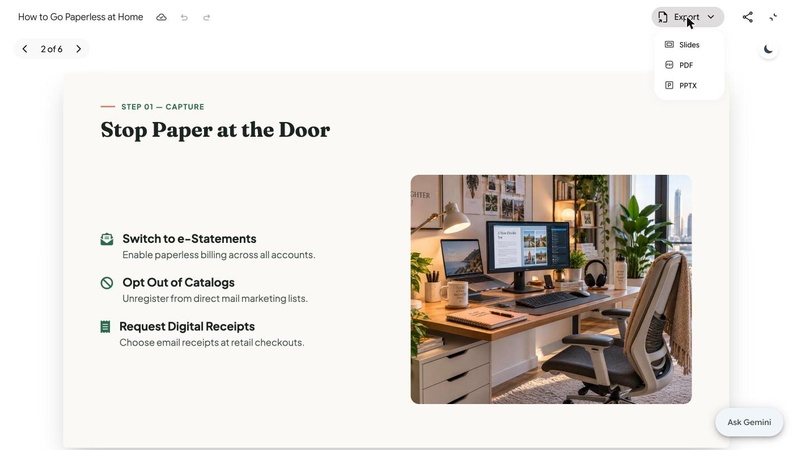
Canvas can build a full slide deck from a topic or an uploaded file, so you don't need a separate Gemini PPT tool. We asked, "Create a 5-slide presentation on how to go paperless at home." Gemini created a 6-slide deck with a title slide, a theme and photos, right inside the chat.

To get your Gemini Canvas for PPT file, click Export at the top of the deck and choose one of these options:
- Slides: opens the deck in Google Slides.
- PDF: downloads the deck as a PDF.
-
PPTX: downloads a Microsoft PowerPoint file.


if a slide's layout needs fixing, export it to Slides or PPTX first. Fine-tuning a layout is easier in a full presentation app.
Can You Make a Gemini Gem That Uses Canvas?
Yes. A Gem's instructions can tell Gemini to work in Canvas, for example: "Always build the answer as an interactive app in Canvas." One thing to know, though: Google is replacing Gems with Gemini Skills. For personal accounts, Gems became read-only on November 17, 2026 and will be removed on December 17, 2026. So build new reusable instructions as a skill instead. Type "/" in the prompt box to use a skill in any chat, including with Canvas turned on.
Part 6. How to Export Gemini Canvas to PDF (and Edit It Properly)
How you export a Canvas to PDF depends on what you made:
- LaTeX documents: Export > PDF.
- Slides: Export > PDF, or PPTX if you'd rather edit it in PowerPoint.
- Plain documents: export to Google Docs, then use File > Download > PDF.
The catch is that Canvas only edits text. If your PDF needs a new image, a moved section, annotations or extra pages merged in, use a PDF editor such as PDNob. It's free to start, and here's how to finish your Gemini PDF in it:
-
Open the exported PDF in PDNob. Click Open PDF and choose your file.
-
Edit text, images and layout. Click Edit to change text, swap images or move blocks. You can also add comments and highlights, or translate the PDF while keeping the layout.
-
Save or convert. Save the PDF, or convert it to Word or PowerPoint if you need more edits.


- Scanned source files: if you upload scanned files to Gemini, run OCR in PDNob first so Gemini can read the text.
- Many exports at once: batch convert, compress or watermark them in one go.
Part 8. 10 Gemini Canvas Prompts to Try
These Gemini Canvas prompts are short and specific, and each shows a different side of the tool:
Habit tracker app
Team KPI dashboard
Quiz from notes
Bakery landing page
Pomodoro timer
6-slide pitch deck
LaTeX PDF report
Infographic from notes
"Turn these notes into a one-page infographic. Extract 5--7 key points,
present them as numbered blocks with short headlines and icons, add a summary
stat or quote at the top, and use a vertical flow layout with a limited
3-color palette."(attach notes)
Snake game
Sketch to app
"Build a single-file HTML habit tracker app. Show a 7-day grid (Mon--Sun) for each habit, let me add/remove habits, mark each day done, and display a weekly streak chart (bar chart) plus the current streak count per habit. Use a clean, calm color theme and save data in localStorage."
"Make a team KPI dashboard from the attached table. Show each KPI as a card with current value, target, and % of target, plus a bar chart comparing KPIs and a trend line if dates are included. Use a consistent blue/gray palette and label all axes." (attach the sheet)
"Create a 10-question multiple-choice quiz from my attached notes. Each question should have 4 options, one correct answer, and a short explanation shown after answering. Include a score at the end and a 'retry' button. Keep questions at recall and comprehension level."(attach notes)
"Design a one-page landing page for a bakery called \Bakery Name. Include a hero section with headline and CTA button, a 3-item menu section with names/prices, an 'About us' block, opening hours, and a contact/footer area. Use warm cream and brown tones, a serif headline font, and make it responsive."
"Build a Pomodoro timer app with a calm theme. Include 25-min work / 5-min short break / 15-min long break cycles, start/pause/reset buttons, an auto-switch between work and break, a session counter, and a soft chime at each transition. Use muted greens and rounded UI elements."
"Make a 6-slide pitch deck about \product name, a \one-line description. Slides: 1) Title + tagline, 2) Problem, 3) Solution, 4) Market size, 5) Business model, 6) Call to action. Keep each slide to a headline plus 3 bullet points, and use a modern, minimal theme with photos."
"Write a PDF report in LaTeX with a cover page, abstract, table of contents, 3 numbered sections, and a references list. Topic: \your topic. Use a clean article class, 11pt font, and include at least one table and one figure placeholder."
"Code a simple snake game in a single HTML file with a high score. Include arrow-key and touch controls, a score display, a persistent high score (localStorage), increasing speed as the snake grows, and a game-over screen with restart. Use a retro pixel style with a dark background."
"Can you code this app from my sketch? Match the layout in the drawing, use placeholder colors, and make the main buttons functional with sample data. Output it as a single HTML file." (attach sketch photo)

Gemini Prompt Tips for Better Results:
- Be specific: say what features, colors and type of output you want.
- Change one thing at a time: ask for one change per message, such as "make the buttons bigger."
- Ask for one file: for apps, ask for "a single HTML file", which helps the preview load.
Upload study guides or notes, and Canvas can also turn them into an interactive quiz like the one below.

Part 9. Gemini Canvas Preview Button Missing? Quick Fixes
If Gemini writes code but the Preview button doesn't show up, try these fixes in order:
- Ask for a single HTML file: add "output it as one HTML file" to your prompt.
- Refresh or start a new chat: turn Canvas on again before you send the prompt.
- Rule out extensions: try an Incognito window, and clear your browser cache.
- Switch the model: some users report the button comes back after switching from Pro to Flash. This is a known, intermittent issue, especially on Workspace accounts.
- Check your account: make sure you're signed in to the right Google account (Gemini Canvas login). Workspace admins may also limit some features.
- Send feedback: if nothing works, use Help > Send feedback in Gemini so Google can fix it.
Final Verdict
Gemini Canvas, or "Gemini Canva" as many people search for it, is free and now works right inside the chat, turning prompts into docs, apps, games and slides. Export apps to Google Sites and decks to Slides or PPTX. For polished PDFs, finish your export in a PDF editor like PDNob.
FAQs About Gemini Canvas
Q1. What is Gemini Canvas?
A1: Gemini Canvas is a free workspace inside the Gemini app where you can create and edit documents, apps, games and slides with AI, then preview, share and export them.
Q2. Is Canvas on Gemini free?
A2: Yes. Canvas is free for all signed-in Gemini users. Google AI Pro and Ultra subscribers get Gemini 3 and a larger 1 million token context window for bigger projects.
Q3. How do I get to Gemini Canvas?
A3: Go to gemini.google.com and sign in. Click + in the prompt box, choose More tools, then Canvas, and type your prompt.
Q4. Is "Gemini Canva" the same as Canva?
A4: No. "Gemini Canva" is a common misspelling of Gemini Canvas, Google's AI workspace. Canva is a separate design app from a different company.
Q5. Can Gemini Canvas make a PPT?
A5: Yes. Ask Canvas for a presentation, then click Export and choose PPTX to download a PowerPoint file. You can also export to Google Slides or PDF.
Q6. How do I save Gemini Canvas as a PDF?
A6: For LaTeX docs and slides, click Export > PDF. For plain documents, export to Google Docs and download it as a PDF. To edit the layout or images afterward, open the PDF in a PDF editor like PDNob.
Q7. Why is the Gemini Canvas preview button missing?
A7: It's a known, intermittent issue. Ask for a single HTML file, refresh or start a new chat, try Incognito mode, or switch to a Flash model.
Q8. What is Gemini AI Lab, and is Canvas part of it?
A8: People often use "Gemini AI Lab" to mean Google's experimental Labs features. In the Gemini menu, these are marked with a "Labs" tag, such as Personal Intelligence. Canvas has no Labs tag. It's a standard Gemini feature that everyone can use.


- Make scanned PDFs searchable and editable with 99% OCR precision
- Batch convert PDFs to Word, Excel, PPT, images, PDF/A, Text, EPUB, etc., up to 30% faster
- Edit PDFs easily like Word, including text, images, watermarks, links, and backgrounds
- Annotate PDF with highlights, comments, shapes, stickers, and stamps
- Run smoothly on any PC without lags or crashes, even on low-spec machines
 Secure Download


Speak Your Mind
then write your review
Speak Your Mind
Leave a Comment
Create your review for PDNob articles
Related articles

Software Reviewer and Comparison Analyst
Maya Patel has reviewed over a hundred softwares across writing, design, productivity, and AI categories, and her comparison articles are designed to give readers a clear winner within the first three paragraphs in past 3 years.