
 Home
>
PDF Tips
>
7 Best Cheap PDF Editors (Affordable Adobe Alternatives)
Home
>
PDF Tips
>
7 Best Cheap PDF Editors (Affordable Adobe Alternatives)
7 Best Cheap PDF Editors (Affordable Adobe Alternatives)
"Why am I paying $20/month just to edit a PDF?"
----Reddit User
Many people ask the same question: why pay high prices just to edit a PDF? People who work with PDFs every day want tools that let them change, fix, or update files without paying a big price. Big apps like Adobe Acrobat cost over $20 per month. Many users want a cheap PDF editor that still works well. This article covers the best cheap PDF editor options in 2026. We list tools that cost less than Adobe Acrobat but still do key PDF tasks. We also show tools that act as a cheap alternative to Adobe Acrobat. This article will explain key features, compare tools, and recommend the best options for different needs.

Part 1. Why People Are Searching for a Cheap PDF Editor
People edit PDFs in school, at work, and at home. Many choose Adobe Acrobat but dislike the price. Adobe charges a subscription that can cost $20 per month. Many users say they want a cheap alternative to Adobe Acrobat that still offers text editing, OCR, and file conversion. A cheap PDF editor helps people save money and still do the same tasks. This need drives searches for better tools. Users want a cheap PDF editor for Windows or a cheap PDF editor Mac that works without complex menus. A good affordable PDF editor should offer basic and advanced features at lower prices. In the next section, we explain key features to look for in cheap PDF editors.
Part 2. Key Features of These 7 Cheap PDF Editors
A good cheap PDF editor must offer essential PDF tasks. These features make editing easier and let you finish work fast.
2.1 Edit Text and Images in PDFs
A basic task for any cheap PDF editor is to let users change text and images. You should be able to remove words, add new sentences, and fix typos. You should also move or delete images without trouble.
2.2 OCR for Scanned PDFs
OCR means Optical Character Recognition. This feature reads text from scanned papers. It lets users edit text from pictures or scanned documents. A good cheap PDF editor must include OCR so you can edit old files or scanned contracts.
2.3 Convert PDF to Word, Excel, PPT
Users often need to convert PDFs into other formats like Word documents, Excel spreadsheets, or PowerPoint slides. A quality affordable PDF editor should convert files while keeping layout and fonts.
2.4 Annotate and Comment
Editing does not always mean changing content. Sometimes you only want to highlight, underline, or comment on a PDF. A cheap PDF editor for Windows or Mac must allow annotation, comments, and stamps.
2.5 Protect PDF
PDF protection lets users add passwords or restrict access. A secure cheap PDF editor lets you protect important files from editing or copying.
2.6 AI PDF
Some editors now offer AI features like quick text summaries or smart editing suggestions. These can save time and make work easier. A few cheap PDF editor tools include AI support in 2026.
Part 3. Top 7 Cheap PDF Editors as Adobe Alternatives
Here are the best cheap PDF editor tools you can choose in 2026. Each one offers great features and lower prices than Adobe Acrobat.
3.1 PDNob PDF Editor
PDNob PDF Editor is an easy PDF editing tool that lets you change text, edit images, annotate PDFs, fill forms, merge and split pages, and convert files to Word, Excel, and PowerPoint. It also includes AI-powered OCR for scanned documents and tools to add watermarks, headers, and footers. PDNob supports both Windows and Mac, and includes AI features to help you summarize, read, or answer questions about your PDFs. Overall, it gives many advanced capabilities without Adobe's high price.

Pricing (Official):
- Lifetime License: ~$64.99 one-time purchase with lifetime updates and AI credits.
- 1 Year License: ~$49.99 per year full access.
- Free Trial: 7-day trial available.
3.2 Foxit PDF Editor
Foxit PDF Editor is a full-featured PDF editing app used by many businesses and individuals as a cheap alternative to Adobe Acrobat. It lets you create, edit, convert, merge, secure, scan with OCR, and annotate PDFs. Foxit also supports collaboration features like commenting and eSign tools. The interface feels familiar for Office users, and the software works across Windows, macOS, iOS, and Android. A free trial is available so you can test before buying.

Pricing (Official/Tiered):
- PDF Editor: ~$10.99 per user /month (billed annually) or ~$129.99/year.
- PDF Editor+: ~$13.99 per user /month or ~$159.99/year, adding mobile access and advanced tools.
- Free Trial: Available before purchase.
3.3 Sejda PDF Editor
Sejda PDF Editor offers both a browser-based and a desktop version. It lets you edit PDF text and images, fill and sign forms, combine or split files, and convert PDFs to Word or other formats. Sejda keeps your files private and automatically deletes them after use when online. The free version has limits (e.g., three tasks per hour), and you can upgrade for more use. Sejda works on Windows, macOS, and web browsers.

Pricing (Official):
- Web Week Pass: ~$5 for 7 days access.
- Web Monthly: ~$7.50/month.
- Annual Desktop + Web Access: ~$63 per year.
- Free Version: Available with limits (tasks/hours, file size limits).
3.4 PDF-XChange Editor
PDF-XChange Editor is a lightweight editor mainly for Windows users that offers strong editing tools at a low cost. It includes text editing, annotation, OCR for scanned documents, and conversion options. You can make comments, stamps, and forms without a recurring subscription. PDF-XChange is known for speed and efficiency, especially with large files or daily tasks. It does not have as many cloud integrations as some competitors but remains a solid cheap PDF editor for Windows.

Pricing (Official):
- PDF-XChange Editor: Starts at ~$62 for a single user.
- PDF-XChange Editor Plus: Starts at ~$79 with enhanced OCR and form tools.
- Optional Maintenance: Additional yearly cost for updates.
3.5 Nitro PDF Pro
Nitro PDF Pro provides robust PDF editing, converting, signing, and collaboration tools. It works on Windows, macOS, and iOS. Nitro includes OCR for scanned text, annotation tools, form creation, and digital signatures. Nitro also integrates with cloud storage and productivity tools. It aims to give many professional-level PDF functions without Adobe's higher subscription costs. A free trial is available to test before purchase.

Pricing (Official/Verified):
- Subscription Plans: Nitro PDF Standard starts around ~$15-$17.70 per user per month (annual billing).
- One-Time License: Nitro PDF Pro one-time license is available around ~$250.
- Free Trial: 14-day free trial typically available.
3.6 Smallpdf
Smallpdf is a cloud-based PDF editor and toolkit. It offers over 30 PDF tools, including text editing, OCR, conversion to Word/Excel/PPT, compression, merge/split, and eSignature. Smallpdf works in web browsers and also has desktop and mobile apps. The free plan lets you do limited tasks, while paid plans unlock unlimited use and advanced features. Smallpdf makes PDF tasks simple without needing heavy desktop software.
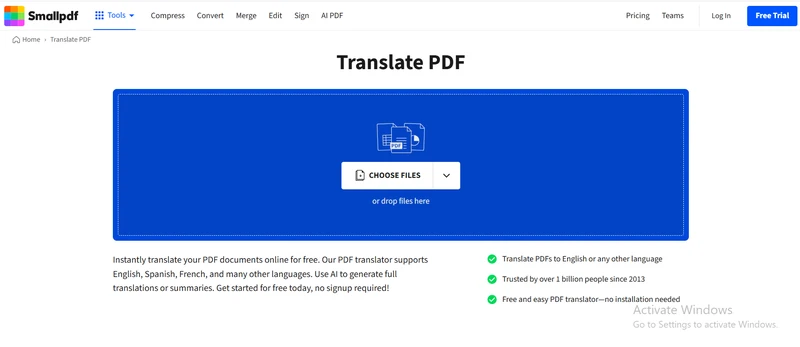
Pricing (Official):
- Free Plan: Basic tasks with limits (free access).
- Pro Plan: ~$12 per month (annual billing) or ~$108 per year.
- Team & Business Plans: Available with shared features and priority support.
3.7 PDFgear
PDFgear is a free PDF editor that lets you view, edit, annotate, fill forms, and convert PDFs. It supports Windows, macOS, and mobile devices like Android and iOS. The tool enables basic PDF text editing and annotation, and it may include more advanced tools in future versions. PDFgear grows in popularity because many functions remain free, though users should always check terms and security updates with any free PDF tool.

Pricing:
- Free to download and use for core PDF editing tasks
- No mandatory subscription for basic features
- Optional advanced features may vary by region and version
Part 4. Recommended Cheap PDF Editors for Different Scenarios
Here are some clear situations where one cheap PDF editor works better than another.
4.1 If You Want Affordable and Fully Functional
For text editing, OCR, and file security with a limited budget, PDNob PDF Editor is a strong choice. You pay low, and you don't give up important features. The lifetime plan makes PDNob one of the best cheap PDF editor tools in 2026.




4.2 If You Prefer Online or Simple Tools
Smallpdf works well for users who want an online tool that edits, converts, and shares files fast. Smallpdf also supports basic annotation and compression.
4.3 If You Edit Business Documents Often
Nitro PDF Pro works well for business needs. It supports review tools, eSign, and professional features while costing less than Adobe.
4.4 If You Use Windows Only
PDF-XChange Editor gives strong tools for Windows users. It includes OCR, markups, and form fill tools.
4.5 If You Want Cross-Platform Editing
Foxit PDF Editor supports Windows, Mac, and mobile devices. It stays a good pick for people working on different systems.
Part 5. Comparison of 7 Cheap PDF Editors
Here is a clear comparison of the 7 tools in price, features, and platform support.
 Please swipe to view
Why PDNob Is the Best Cheap PDF Editor
In this section, we explain why PDNob often tops the list of cheap Adobe alternatives.
Affordable Alternative to Adobe Acrobat
PDNob costs much less than Adobe Acrobat. You can buy a lifetime plan with one payment. This makes PDNob one of the best cheap PDF editor options for long-term use. Most other tools charge monthly or annual fees. PDNob's low price and lifetime option make saving money easy.
Strong OCR for Scanned Documents
PDNob includes OCR that reads text from scanned files. Many competitors charge more for this feature. PDNob users can open a scanned document and edit it as text. This makes PDNob a strong tool for people who work with printed files.
Beginner-Friendly Interface
PDNob uses menus that stay easy for new users. You can edit text without struggle. You can also convert files with a few clicks. The easy screen helps users save time and complete tasks faster.
Part 6. Conclusion
In 2026, finding a cheap PDF editor that works well is easier than ever. Among all options, PDNob PDF Editor stands out as the best cheap PDF editor for both Windows and Mac users. It offers text and image editing, OCR for scanned documents, file conversion, annotation, and PDF protection all at an affordable price. PDNob acts as a reliable cheap alternative to Adobe Acrobat, making it perfect for students, professionals, and small businesses. If you want a powerful yet affordable PDF editor, PDNob provides top features, simple interface, and a lifetime plan that saves money over time.
FAQs of Cheap PDF Editors
Q1. Is there a 100% free PDF editor?
A1: Yes. Some tools offer free versions with basic tools. However, free versions often limit features like OCR, conversion, or page limits. Free tools can edit text or add notes, but are not as full as paid cheap PDF editor tools.
Q2. What Is the Cheapest PDF Editor?
A2: The cheapest PDF editor in 2026 is often PDNob PDF Editor with its lifetime plan. It costs less over time than monthly plans from big brands. Smallpdf and Sejda also offer low monthly prices.
Q3. Can Cheap PDF Editors Handle OCR?
A3: Yes. Many cheap tools like PDNob, Foxit, Nitro, Smallpdf, and PDFgear include OCR. You can edit text from scanned pages and images. OCR makes cheap editors work like expensive tools.



- Make scanned PDFs searchable and editable with 99% OCR precision
- Batch convert PDFs to Word, Excel, PPT, images, PDF/A, Text, EPUB, etc., up to 30% faster
- Edit PDFs easily like Word, including text, images, watermarks, links, and backgrounds
- Annotate PDF with highlights, comments, shapes, stickers, and stamps
- Run smoothly on any PC without lags or crashes, even on low-spec machines
 Secure Download
Secure Download
Speak Your Mind
then write your review
Speak Your Mind
Leave a Comment
Create your review for PDNob articles

Related articles

AI Tools Writer / Workflow Analyst
Rachel has spent the last 5 years testing and writing about AI-powered tools across writing, design, and research workflows. She focuses on practical AI tool usage, helping knowledge workers turn generative AI into everyday productivity.


