
 Home
>
PDF Editor
>
PDNob 2.0: Next-Level Productivity with a Smarter, Faster PDF Experience for Professionals
Home
>
PDF Editor
>
PDNob 2.0: Next-Level Productivity with a Smarter, Faster PDF Experience for Professionals
PDNob 2.0: Next-Level Productivity with a Smarter, Faster PDF Experience for Professionals
Meet PDNob 2.0—our most powerful upgrade yet. We've completely reengineered the PDF experience with a sleek Dark Mode for comfortable late-night work, a blazing-fast AI OCR engine that turns images into editable text with pinpoint accuracy, enhanced rendering that loads even 100+ page documents in an instant, and smarter compression that shrinks file sizes without sacrificing quality.
Whether you're editing, annotating, or converting, every feature has been rebuilt to help professionals work faster, smarter, and with total control. This isn't just an update—it's a whole new way to work with PDFs.




Part 1. New Homepage: An Evolution in Efficiency
Quick Access to High-Frequency Operations
The new shortcut area on the left side of the home screen puts core tools—including Edit/Annotate, PDF Conversion, OCR, and the Batch Tools panel—just one click away, allowing you to jump into your most frequent tasks instantly without navigating through menus.
Redesigned for More Intuitive File Management
Managing your local and cloud files is now more visual and efficient than ever.
- Intuitive Controls: All actions, from open and rename to upload and delete, are designed to be completed in just one or two clicks.
- Visual Previews: File thumbnails and modification times are now displayed, allowing for faster document identification and selection.
- Tab Previews: Hover over any tab to see a thumbnail preview of the page, making it easy to navigate and manage multiple open documents.
- Customizable Shortcuts: View, customize, or reset all keyboard shortcuts. A dedicated shortcut search lets you find the function you need instantly, reducing mouse clicks and menu digging.

Part 2. New Reading Mode: Smoother, Smarter, More Professional
Multi-Theme Reading for Comfort Anywhere
Choose the perfect mode for your environment to ensure comfortable, eye-friendly reading:
- Night Mode: Deep dark background that dramatically reduces glare—perfect for late-night work sessions.
- Day Mode: Crisp, high-contrast display that cuts through glare and reflections in bright environments.
- Eye Care Mode: Optimizes color temperature and minimizes blue light to combat eye fatigue during long reading sessions.
- Parchment Mode: Warm, paper-like tones that simulate traditional paper for a calming, natural reading experience.
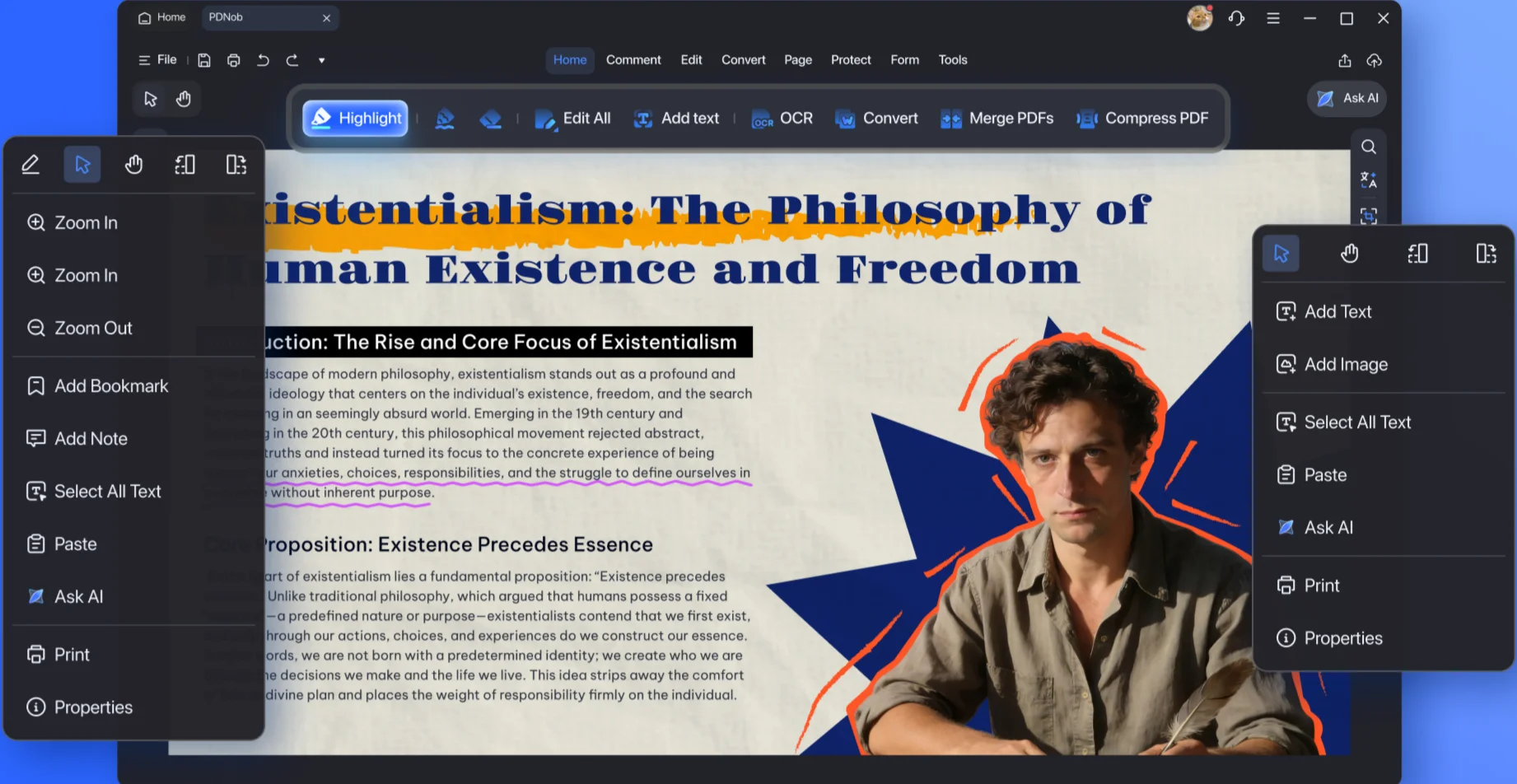

Multiple Page Viewing Modes
Enjoy a fluid, natural reading experience that feels like turning the pages of a book.
- Flexible Layouts: Choose from single page, double page, continuous scroll, or cover view.
- Smart Adaptation: The view automatically adjusts to your screen size, providing the optimal layout for a smooth reading experience.
Smart Annotation Menu
Markup tools appear right where you need them. The moment you select content, context-aware tools for highlighting, underlining, adding notes, or editing text become instantly available, keeping you in your reading flow without interruption.

Images as Editable Content
Images are no longer static content. They've become flexible information blocks that you can interact with—simply copy and export data directly from images within your document, transforming visual elements into usable information.

Smart View System
The system remembers your reading journey, making navigation effortless.
- Reading Footprint: Your reading history is automatically recorded.
- Easy Navigation: Use the "Previous/Next View" buttons to quickly jump back and forth through your document history.
Part 3. New Heights of OCR: Total Control Over Recognition Quality
AI OCR Engine Upgrade
Experience professional-grade OCR with intelligent preprocessing for perfect results.
- Advanced Image Processing: The engine automatically corrects pages, reduces noise, removes speckles, and enhances images for optimal text recognition.
- Precision Output: Converts images into fully editable and searchable text with high accuracy.
- Comprehensive CJK Support: Specialized support for Chinese, Japanese, and Korean fonts ensures accurate recognition and clear display.
- Try for Free: Guest and free users can test the new OCR engine with no commitment.

Part 4. A Leap in AI Capabilities: Moving from Reading to Understanding
AI-Powered Document Understanding
Interact with your documents in a whole new way by asking questions and getting intelligent answers.
- Ask Anything: You can now ask questions about your PDFs or even screenshots and get answers instantly.
- Source-Backed Answers: The AI cites the original text location and page number for every answer, providing full transparency.
- Contextual Suggestions: The AI recommends relevant follow-up questions based on the content you're viewing.

AI Translation: More Accurate and Natural
Break down language barriers with translations that sound natural, not robotic. The upgraded AI translation engine delivers accurate and natural-sounding results that preserve the original meaning and tone of your documents.

AI-Powered Image Understanding
Extract valuable knowledge from visual content, not just text. The AI can now explain screenshots, recognize complex mathematical formulas, and extract useful information from images—turning non-textual data into actionable insights instantly.

Part 5. Comprehensive Editing Capabilities
Faster Editing: A More Efficient Workflow
Editing is now faster and more responsive, allowing you to work without delay.
- Improved Rendering Performance: Large files load faster and editing feels more responsive with lower latency.
- Select and Edit Instantly: Click on any text to start editing immediately—no need to switch modes. The cursor appears right where you click.
- Common Tools Always at Hand: Frequently used tools like font size, color, bold, and alignment are prominently placed for one-click access, streamlining your workflow.

Faster Understanding: Smart AI Assistance
AI helps you grasp complex content quickly, so you spend less time deciphering and more time acting.
- One-Click Translation & AI Interpretation: Select text to instantly trigger translation, along with AI-powered interpretation and polishing.
- AI Polishing & Content Optimization: Let AI summarize and refine complex paragraphs or professional jargon, helping you understand the core message faster.
Advanced Page-Level Editing: Total Control
Customize every aspect of your document with flexible, reusable templates. Create and save your own templates for watermarks, backgrounds, headers, and footers, then reuse them anytime for consistent, efficient page editing across all your documents.
Professional Editing Tools: Powerful Capabilities
Fine-tune your documents with a suite of professional-grade editing features.
- Advanced Text Layout: Precisely control character spacing, line spacing, and font styles for a truly professional look.
- Comprehensive Image Editing: Rotate, flip, crop, replace, copy, and save images directly within the PDF for precise document integration.
- Mixed Object Handling: Maintain perfect proportions when resizing images by locking the aspect ratio, ensuring all elements stay balanced.
- Flexible Sizing Modes: Backgrounds and watermarks now support Absolute and Relative sizing, allowing them to adapt perfectly to different page layouts.

Part 6. A New Annotation Experience
Faster Markup: Streamlined Operations
Adding feedback is now faster and more intuitive, saving you valuable time.
- One-Click Edit: Select text to enter editing mode immediately—no need to switch tools.
- Instant Annotation Pop-up: Selecting text now instantly highlights it and pops up the annotation box, saving you two clicks compared to before.
- Annotations That Move With Text: Text annotations now stay attached to their original content, even if the text is later edited.

Flexible and Personalized Markup
Express your feedback clearly with a wide range of customizable tools.
- Editable Author Info: The author information on comments can be modified for clearer communication in team workflows.
- Comprehensive Markup Tools: Choose from stickers, shapes, stamps, and a pencil tool. Customize transparency, color, and thickness for a more personal touch.
Part 7. One-Stop Batch PDF Processing Center
New & Optimized Batch Functions
Handle repetitive, large-scale tasks with ease using our powerful batch processing tools.
- Flexible Excel Export: Export single sheets or multiple sheets from Excel files within your PDFs.
- Versatile Image Export: Export a single page as an image or convert an entire PDF document into a series of images.
- Optimized Compression: File compression is now more effective, reducing file size while maintaining quality.

Part 8. Smart Search: Precision Finding with AI-Powered Insights
Precision Search with AI Insights
Find exactly what you're looking for, faster, with intelligent search capabilities.
- Precision Search: Each result is displayed and highlighted individually. Use advanced filters like "Whole Word" and "Match Case" for pinpoint accuracy.
- AI-Powered Understanding: The AI generates smart interpretations of your search results, helping you quickly grasp the context without flipping through pages.
- Efficient Batch Replace: Perform single or batch replacements with an intuitive interface. All changes are reversible, ensuring a safe and secure editing process.

Part 9. Other Features
Smart PDF Splitting
Break down large PDF documents with precision and ease:
- Flexible Splitting Options: Split PDFs by page count, file size, or bookmarks—whatever works best for your specific needs.
- Clear, User-Friendly Interface: All configuration options are laid out clearly and intuitively, making the feature accessible even for first-time users. No technical expertise required—just select your preferences and let PDNob handle the rest.
Printing
A new "Collate" option has been added for easier multi-page document printing. Now you can print multiple copies of multi-page documents in the correct page order automatically—no more manual sorting after printing.
Final Words
PDNob 2.0 isn't just another update—it's a complete reimagining of what PDF software should be. From the ground up, we've rebuilt every feature with one goal in mind: to make professional document work faster, smarter, and more intuitive than ever before.
With a redesigned homepage that puts core tools at your fingertips, AI-powered features that don't just read but truly understand your documents, and professional-grade editing capabilities that give you total control, PDNob 2.0 transforms PDF editing from a necessary chore into a seamless part of your workflow.



- Make scanned PDFs searchable and editable with 99% OCR precision
- Batch convert PDFs to Word, Excel, PPT, images, PDF/A, Text, EPUB, etc., up to 30% faster
- Edit PDFs easily like Word, including text, images, watermarks, links, and backgrounds
- Annotate PDF with highlights, comments, shapes, stickers, and stamps
- Run smoothly on any PC without lags or crashes, even on low-spec machines
 Secure Download
Secure Download
Speak Your Mind
then write your review
Speak Your Mind
Leave a Comment
Create your review for PDNob articles

Related articles

AI Tools Writer / Workflow Analyst
Rachel has spent the last 5 years testing and writing about AI-powered tools across writing, design, and research workflows. She focuses on practical AI tool usage, helping knowledge workers turn generative AI into everyday productivity.


