
 Home
>
PDF Editor
>
Kickresume Resume Builder Review 2026: Is It Best Resume Maker?
Home
>
PDF Editor
>
Kickresume Resume Builder Review 2026: Is It Best Resume Maker?
Kickresume Resume Builder Review 2026: Is It Best Resume Maker?
- 1 Kickresume is a legitimate AI-powered resume builder offering a free plan and Premium subscriptions starting at $8/month (billed yearly).
- 2 Kickresume combines resume editing, AI writing, proofreading, ATS checking, and interview prep into a single platform.
- 3 Kickresume is best suited for students, beginners, or LinkedIn-active job seekers who want an all-in-one tool with professional templates, career guidance and even optional job chances collected.
- 4 Users on Trustpilot rate it 4.6/5 and G2 users rate it 4.4/5, with feedback highlighting strong templates and AI assistance.
- 5 For editing existing PDF resumes offline, PDNob PDF Editor provides fast OCR, text editing, and format conversion as a complementary tool.
Kickresume is an online resume builder that uses AI and its resume engine to help job seekers create professional, ATS-friendly resumes and cover letters from customizable templates. Kickresume resume builder makes the resume writing process easier by offering ready-made templates, AI-powered writing tools, and simple customization options.
Whether you are creating your first resume or updating an old one, it gives you everything in one place. But is Kickresume really worth using in 2026? This Kickresume review explores its key features, pricing, and more to help you decide.

Part 1. What Are the Key Features of KickResume Resume Builder?
The Kickresume resume builder is more than a tool for putting your work experience into a nice-looking template. Powered by its resume engine, it combines resume editing, AI writing, proofreading, job-search tools, and interview preparation in one place. Whether you want to create a Resume from scratch or improve one you already have, here are some of its most useful features.

What Can You Do with Kickresume?
- Build and edit your resume: Start from scratch or choose a template and easily add your experience, skills, and education.
- Kickresume AI resume builder: Let AI help you write your resume or improve specific sections.
- Choose professional templates: Pick from different resume and cover letter templates and customize them to your style.
- Check and proofread your resume: Find grammar mistakes and check whether your resume is ATS-friendly before applying.
- Search for job chances: Tailor your resume to job ads, explore job opportunities, and plan your career path.
- Prepare for interviews: Generate interview questions for the job you want and practice your answers.
Pros and Cons of Kickresume
Pros: What I Like About Kickresume
- Easy to use for beginners: You do not need design or formatting skills to create a clean, professional resume.
- Helpful AI writing tools: The AI is useful when you are stuck on a bullet point or need a better way to describe your experience.
- More than just a resume builder: Features like proofreading, resume tailoring, job search, and interview questions make it useful throughout the application process.
- Flexible templates and customization: There are enough options to create professional resume from scratch, from local files or directly from LinkedIn without spending hours
Cons: What I Don't Like About Kickresume
- AI content still needs a human touch: The generated text can be a good starting point, but it is important to review and personalize it so your resume sounds like you.
- Some of the best tools are part of paid access: Users who only need a quick, basic resume may not need every feature available.
- Too many features can feel overwhelming at first: Someone looking for a very simple resume editor may find the additional career tools of less usage frequency.

Kickresume's a smarter choice when you are looking for templates rather than AI resume rewriting. I tested Kickresume to optimize a marketer's resume. The whole flow felt intuitive --- sections were smooth and easy to add, remove, and rearrange. I let the AI help me rewrite three weak bullet points, but the wording felt generic --- I had to rewrite half of them by hand. Then I hit the paywall when trying to edit a second resume.
Part 2. My Tested Rating Table on Kickresume Features
Here I tested Kickresume features and broke them down into 10 metrics for a clearer view, scored each one out of ten, and wrote down what stood out alongside what I would keep an eye on.
 Please swipe to view
Review generated language carefully when you use its AI feature. I found Kickresume AI resume rewriter useful for polishing content, but not trust-worthy to write a complete resume from scratch. Some description of your working experience may be deviated far from the information pieces you offer.
Part 3. How are Comments on Kickresume?
User feedback on Kickresume is generally positive, especially from people who want a simple way to create a resume online. Still, this Kickresume review shows that experiences can vary depending on whether users need basic resume templates or more advanced AI and editing features.
Trustpilot Ratings and Comments on Kickresume
Rating: 4.6 / 5 based on roughly 3,700+ Trustpilot reviews


G2 Trustpilot Ratings and Comments on Kickresume
Rating: 4.4 / 5 based on 10 verified G2 reviews


What Are Reddit Users Saying?
Reddit feedback is more mixed. Some users find the Kickresume ai resume builder helpful for formatting their resumes and improving bullet points, while others feel that the AI limits and paid features can be restrictive.
Positive feedback:
One user from Reddit said Kickresume helped with formatting and rewording bullet points and later received a job offer, although they also noted that they could not credit the result entirely to the tool. The same user described it as useful but not something that would "do magic" or write a complete resume without good input from the user.


Negative feedback:
Other users mentioned problems with AI usage limits, editing restrictions, and ATS recommendations. This means users looking for the best AI for writing resumes should still check the available features and limits before choosing a paid plan.


Part 4. Is Kickresume Legit or Free?
Yes, Kickresume is a legitimate resume-building platform, and it does offer a free plan. You can create a resume and download it without paying, as long as you use the free templates and customization options. Kickresume also offers Premium subscriptions for users who want access to more templates, AI features, and career tools.
Please swipe to view
Does Kickresume Offer Discounts?
Yes. Kickresume currently offers a 20% discount on its Premium plans. The discount may change or end because it is a limited-time offer.
Who can have Kickresume Discounts?
Students and teachers can also get up to 180 days of Premium access for free after verification.
Part 5. Is Kickresume the Best Choice for Your Resume?
The Kickresume resume builder is a good all-in-one option for creating a professional and visually appealing resume. However, the best choice depends on what you need. Some tools focus more on ATS optimization, while others offer stronger AI writing or job description matching.
Practical Selection Rule to Pick AI Resume Builders
- Need a good-looking resume with job market, proofreading or tips & guide interagted → Kickresume
- Already have a resume and need to scan for optimization → Jobscan
- Need a guided builder with more resume template options→ Zety
- Need ATS-first wording and score feedback → Rezi
- Need a resume today, with minimal effort on mobile → Resume Now
Please swipe to view
Part 6. Bonus Tip: How to Edit Your Resume PDF Offline?

Sometimes, Kickresume may not accept an existing PDF or you may simply want to make quick changes without rebuilding your resume. In that case, PDNob PDF Editor is an offline alternative.
PDNob is a fast PDF editor with high-precision, AI-powered OCR for converting scanned or image-based PDFs into editable files. Its edit feature has included elements like text fonts and color settings, hyperlinks management for precise content control for resume, and also can edit images in different layers for neat and polished layout. With its OCR, PDF editing, translation tools, PDNob can be useful when you need to update a PDF resume directly on your computer at a low speed or even bad network.

What Can PDNob Do?
- OCR: Turn scanned or image-based resumes into editable text.
- PDF Editing: Add, delete, or rewrite text and adjust fonts, sizes, and colors.
- Translation: Translate PDF content into another language.
- Conversion: Convert PDFs to other editable formats and vice versa.




How to Edit Your Resume PDF in PDNob
Open your resume PDF
Use OCR to make the PDF editable
Edit your resume
Delete, rewrite, and save
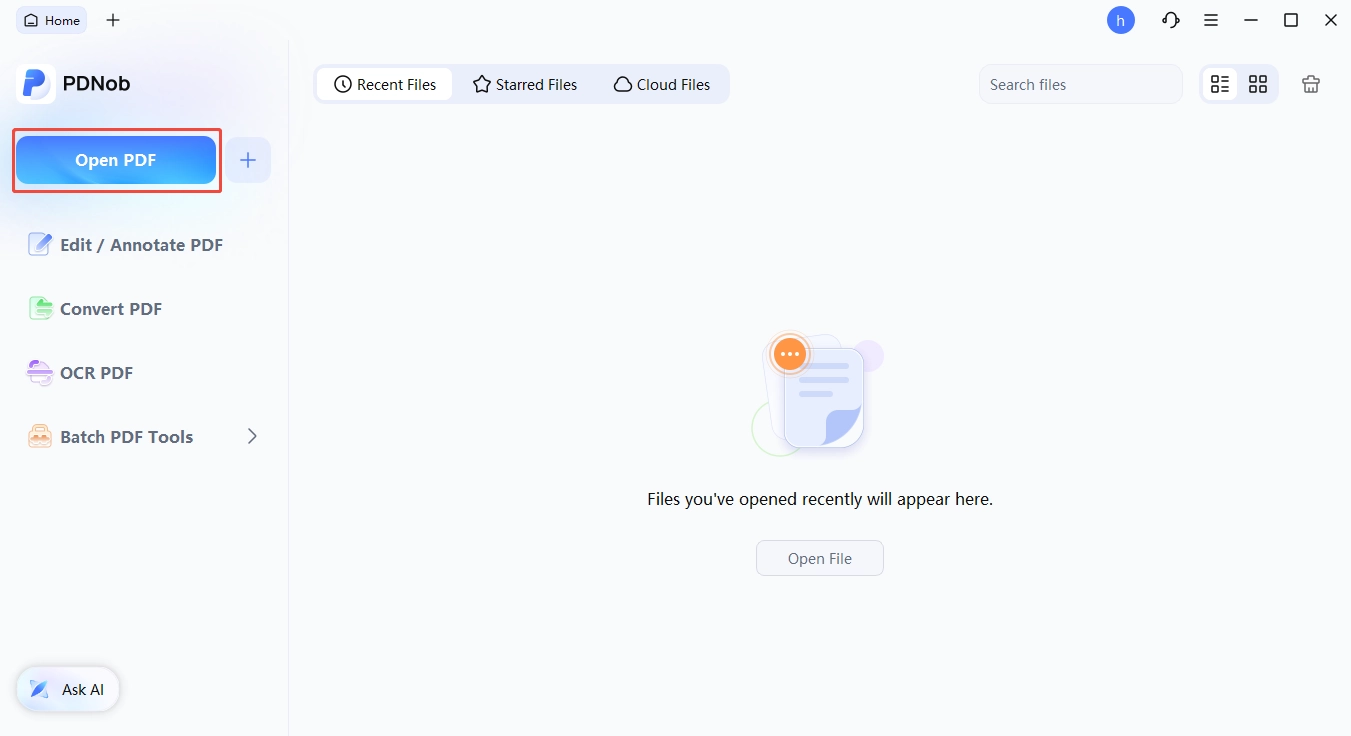
Download and install PDNob on your PC. Open the program, click Open PDF, and select your resume.
Click OCR if your resume is scanned or the text cannot be edited directly. Once the process is complete, the text will become editable.

Click Add Text or Edit to make changes. You can add new information, change the font, size, or color, and update different sections of your resume.

Select any sentence or text you want to remove and delete it. Use Add Text to write the updated content, then save your edited resume PDF when you are finished.

Conclusion
The Kickresume resume builder is a solid choice for students, beginners, and job seekers who want professional templates, AI writing help, and an easy way to create a resume. While it may not be the best AI for writing resumes for everyone, its mix of design and career tools makes it a useful all-in-one option. And if you need to make quick changes to an existing PDF offline, PDNob offers a convenient alternative.
FAQ About Kickresume Resume Builder
Q1. What is Kickresume?
A1: Kickresume is an online platform that helps users create resumes and cover letters. It also offers AI writing tools, resume templates, and other career-related features.
Q2. Is Kickresume free to use?
A2: Yes, Kickresume offers a free plan with basic resume-building features. Paid plans unlock more templates, AI tools, and additional features.
Q3. Is Kickresume legit?
A3: Yes, Kickresume is a legitimate resume-building platform used by job seekers. It provides tools for creating, editing, and improving resumes and cover letters.
Q4. Is Kickresume worth it?
A4: Kickresume can be worth it for users who want professional templates and AI assistance in one place. The free version is useful for basic needs, while Premium may be better for those who need more advanced tools.
Q5. What is Kickresume used for?
A5: Kickresume is mainly used to create professional resumes and cover letters. Users can also use it to improve resume content, prepare for interviews, and explore other career tools.



- Make scanned PDFs searchable and editable with 99% OCR precision
- Batch convert PDFs to Word, Excel, PPT, images, PDF/A, Text, EPUB, etc., up to 30% faster
- Edit PDFs easily like Word, including text, images, watermarks, links, and backgrounds
- Annotate PDF with highlights, comments, shapes, stickers, and stamps
- Run smoothly on any PC without lags or crashes, even on low-spec machines
 Secure Download
Secure Download
Speak Your Mind
then write your review
Speak Your Mind
Leave a Comment
Create your review for PDNob articles

Related articles

AI Tools Writer / Workflow Analyst
Rachel has spent the last 5 years testing and writing about AI-powered tools across writing, design, and research workflows. She focuses on practical AI tool usage, helping knowledge workers turn generative AI into everyday productivity.


