Home
>
PDF Editor
>
7 Best PDFgear Alternatives in 2026 Free and Paid PDF Editors
7 Best PDFgear Alternatives in 2026 Free and Paid PDF Editors
- PDFgear is a legitimate, safe, free PDF editor from a Singapore-based company, but it is only "free for now". Users switch for more advanced features, better performance, timely support, or a better UI.
- PDFgear's gaps include no cloud sync or auto-save, Mac-only redaction, no certificate signatures or collaboration, weaker OCR on poor scans, crashes on large files, and thin support.
- The seven alternatives are PDNob (free-to-start all-in-one with OCR and AI), Adobe Acrobat, Foxit, UPDF, Xodo, PDF24 Creator, and Sejda.
- PDNob is the strongest free-to-start pick: no time-limited free tier, offline editing, fast OCR, 24/7 support, and $49.99/yr or $64.99 lifetime pricing, with a watermark after 20 free exports and weekly OCR/conversion caps.
- Choose PDFgear or PDF24 for basic free tasks, PDNob for advanced editing plus OCR and AI, Acrobat or Foxit for team compliance, and Xodo or Sejda for browser and mobile editing.
PDFgear has become a popular free PDF editor, and for good reason: it's free, it doesn't need an account, and it covers the basics well. But once your work gets more demanding, its limits start to show. People usually look for a PDFgear alternative for one of four reasons: they need more advanced features together, better performance, timely customer service, or simply a better UI.
In this guide, we first answer whether PDFgear is legit and safe. Then we compare 7 free and paid PDF editors side by side, so you can pick the right one for how you work.

Part 1. What Is PDFgear? Is PDFgear Legit and Safe?
Most guides either review PDFgear or list alternatives. Here's a quick, fair answer to both questions before we compare.
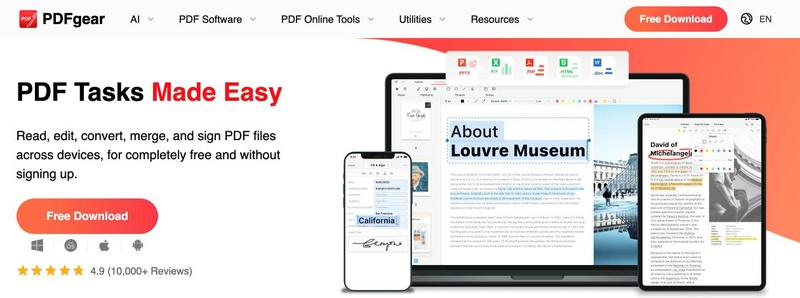
PDFgear PDF Editor at a Glance
- Made by: PDF GEAR TECH PTE. LTD., based in Singapore.
- Price: free for now, with no sign-up. No ads or watermarks have been reported.
- Platforms: Windows, Mac, iOS, Android, online tools and a Chrome extension.
-
Features: edit, annotate, convert, OCR (30+ languages),
merge, split, compress, sign, and a GPT-based AI Copilot that needs an
internet connection.

Is PDFgear Legit?
Yes. PDFgear is a real company with a large user base, and its website shows a 4.9 rating from 10,000+ reviews. User complaints do exist, mostly about crashes and formatting glitches after editing.
How does it stay free? PDFgear is funded by investment to grow its user base, and some features may become paid later. So it's fair to call it "free for now."
Is PDFgear Safe?
- No malware has been reported. Download it only from pdfgear.com.
- Most work happens on your own computer. The AI features and some online tools upload files temporarily, so be careful with sensitive documents.
- Tip: before installing any free PDF program, you can check the installer with a free scanner such as VirusTotal.
Part 2. Why Look for a PDFgear Alternative?
Many of the limits below come from user reviews and competitor tests, so treat them as common reports rather than guarantees. Here are the four main reasons people switch.

You Need More Advanced Features Together
PDFgear covers everyday tasks, but power users hit gaps: there's no cloud sync or auto-save, redaction is only available on Mac, it offers e-signatures but not digital (certificate) signatures, there's no collaboration, and the online version can't edit text.
You Want Better Performance
OCR results are weaker on poor-quality scans and multi-column pages, and some users report crashes when working with large files.
You Need Timely Customer Service
PDFgear's documentation is thin, and it replies to only about half of its negative reviews. When something breaks on a deadline, that matters.
You Simply Want a Better UI
Some people just prefer a different editing flow or layout, for example clicking text to edit it directly instead of switching modes.
Stay with PDFgear if you only need basic free tasks like reading, merging or simple edits. It does those well.
Part 3. Best PDFgear Alternatives at a Glance
 Please swipe to view
Prices are as of November 2026 and can change, so check each official site before you buy.
Part 4. 7 Best PDFgear Alternatives Reviewed
1. PDNob: Best Free PDF Editor With Advanced Features

people who want advanced editing, OCR and AI in one desktop app, with a free plan to start.
PDNob is the closest match to PDFgear's "free to start" approach, but it fixes the four reasons people leave. It has a long-term free tier with no time limit and no credit card, and optional paid plans when you need more: $49.99 per year, or $64.99 for a Lifetime license with free updates.

Here's how PDNob answers each of the four reasons:
- More advanced features together: edit text and images, run OCR on PDFs and images (JPG, PNG, BMP, TIFF, with automatic deskew), convert to Office formats, batch sign and watermark, and use AI to summarize, chat with and translate PDFs in 40 languages while keeping the layout.
- Better performance: in PDNob's own test, OCR produced editable output in about 4 seconds, and core editing works offline.
- Timely customer service: 24/7 support for every user, including free users, plus a 30-day money-back guarantee on paid plans.
- A better UI: click any text to edit it directly, with alignment tools to keep layouts tidy.
Free plan limits: no time limit; a watermark appears after 20 exported files; conversion and OCR once per week; batch processing up to 5 files; 20 AI uses.
Pros: advanced features and AI in one app; a real lifetime option with free updates.
Cons: the free plan has weekly conversion and OCR limits; AI unlimited use is a separate add-on.
For more detail, see our PDNob vs PDFgear comparison and our full PDFgear review.


2. Adobe Acrobat: Best for Industry-Standard Features
professionals who need the most complete, widely compatible PDF toolset.
Acrobat sets the standard for PDF editing, forms, signing and redaction, and its files open reliably everywhere. The free Acrobat Reader lets you view, print and comment, while editing requires a paid plan from $14.99 per month.

Pros: the most complete feature set; strong e-signature and compliance tools.
Cons: expensive over time; the subscription-only model frustrates occasional users.
3. Foxit PDF Editor: Best for Teams
businesses that need secure, managed PDF workflows.
Foxit offers full editing, OCR, redaction and team management at a lower price than Acrobat, starting at $129.99 per year. The free version is a reader only.

Pros: strong security and admin features; fast performance on Windows.
Cons: no real free editor; the interface has many menus to learn.
4. UPDF: Best Low-Cost AI PDF Editor
budget users who want AI features across all their devices.
UPDF covers editing, OCR, conversion and an AI assistant on Windows, Mac, iOS and Android. Paid plans cost $49.99 per year or $79.99 for a lifetime license, and the free version has usage limits and a watermark.

Pros: affordable; works on all four major platforms.
Cons: AI is a separate subscription; the free version is quite limited.
Xodo: Best for Quick Web and Mobile Edits
people who edit PDFs on the go in a browser or on their phone.
Xodo is quick for annotating, filling forms and light edits. The free online tools allow one action per day, and paid plans start from $7.99 per month.

Pros: fast and simple; good mobile apps.
Cons: tight free limits online; less powerful for heavy editing.
6. PDF24 Creator: Best Completely Free PDF Program for Windows
Windows users who want free PDF programs with no limits.
PDF24 Creator is completely free and covers merging, splitting, compressing, converting and basic OCR. It's a toolbox rather than a true editor, so changing existing text is limited.

Pros: 100% free; works offline on Windows.
Cons: Windows only for the desktop app; basic text editing.
7. Sejda: Best for Occasional Online Edits
people who edit a PDF once in a while and don't want to install anything.
Sejda's online editor lets you edit text, fill forms and sign. The free version allows 3 tasks per hour on documents up to 200 pages or 50 MB, and the paid plan costs $63 per year, with desktop apps for Windows, Mac and Linux.

Pros: easy online editing; no install needed.
Cons: daily task and file-size limits on the free plan.
Part 5. How to Edit a PDF File for Free With a PDFgear Alternative
Here's how to edit a PDF file for free with PDNob's free plan, a free PDF application with no time limit:
-
Download and install PDNob. Go to pdnob.com and click "Free Download." It's free, and you don't need a credit card.
-
Open your PDF. Launch PDNob and click "Open PDF" to choose your file.
-
Click "Edit." In the top menu, click "Edit" to turn on editing mode. PDNob detects the text and images on the page.
-
Click any text or image to change it. Type to replace the text, and use the toolbar to change the font, size, color or alignment. If the file is a scan, PDNob detects it and offers to run OCR first, so the text becomes editable.
-
Save or export your file. Press Ctrl+S (Cmd+S on Mac) to save the PDF, or click "Convert" to export it to Word or another format.


for scanned documents, always run OCR first, then edit. You'll get far cleaner results.
Part 6. How to Choose the Right PDFgear Alternative
- You need everything free and basic → stay with PDFgear or PDF24.
- You need advanced editing + OCR + AI, with a free plan to start → PDNob.
- You need team workflows and compliance → Acrobat or Foxit.
- You mostly work on your phone or in a browser → Xodo or Sejda.
Final Verdict
PDFgear is a legit, safe free tool for basic PDF tasks. When you need more advanced features, faster OCR, real customer support or a better editing experience, PDNob is the strongest free-to-start alternative, with a lifetime option when you're ready to upgrade.
FAQ on PDFgear Alternatives
Q1. Is PDFgear really free? How does it make money?
A1: Yes, PDFgear is free for now. It's funded by investment to grow its user base, and some features may become paid in the future.
Q2. Is PDFgear legit?
A2: Yes. It's made by PDF GEAR TECH PTE. LTD. in Singapore and has a 4.9 rating from more than 10,000 reviews on its website.
Q3. Is PDFgear safe to download?
A3: Yes, when you download it from pdfgear.com. AI features upload files temporarily, so avoid using them on sensitive documents.
Q4. Who owns PDFgear?
A4: PDFgear is owned by PDF GEAR TECH PTE. LTD., a company based in Singapore.
Q5. What is the best free alternative to PDFgear?
A5: PDNob is the best free alternative if you want advanced editing, OCR and AI in one app. PDF24 Creator is a good fully free option for basic tasks on Windows.
Q6. Is there a free PDF editor with no watermark?
A6: PDF24 Creator and PDFgear don't add watermarks. PDNob's free plan exports your first 20 files without a watermark, and paid plans never add one.
Q7. Which PDF programs are free for Windows?
A7: PDF24 Creator, PDFgear and PDNob's free plan all run on Windows at no cost.
Q8. What is better than PDFgear for OCR?
A8: PDNob offers stronger OCR for poor-quality scans, with automatic deskew and support for PDFs and images like JPG, PNG and TIFF.


- Make scanned PDFs searchable and editable with 99% OCR precision
- Batch convert PDFs to Word, Excel, PPT, images, PDF/A, Text, EPUB, etc., up to 30% faster
- Edit PDFs easily like Word, including text, images, watermarks, links, and backgrounds
- Annotate PDF with highlights, comments, shapes, stickers, and stamps
- Run smoothly on any PC without lags or crashes, even on low-spec machines
 Secure Download
Speak Your Mind
then write your review
Speak Your Mind
Leave a Comment
Create your review for PDNob articles
Related articles

AI Tools Writer / Workflow Analyst
Rachel has spent the last 5 years testing and writing about AI-powered tools across writing, design, and research workflows. She focuses on practical AI tool usage, helping knowledge workers turn generative AI into everyday productivity.