
 Home
>
PDF Tips
>
The 10 Best Microsoft Word Alternatives Worth Using in 2026
Home
>
PDF Tips
>
The 10 Best Microsoft Word Alternatives Worth Using in 2026
The 10 Best Microsoft Word Alternatives Worth Using in 2026
- 1 Cost, platform lock-in, privacy, and collaboration are the four reasons most readers switch away from Microsoft Word.
- 2 How we tested these alternatives: every tool was scored on DOCX compatibility, pricing, platforms, offline use, collaboration, polish, and its main weakness vs. Word.
- 3 You can pick one based on your actual need according to metrics in the comparison table we have measured on pricing, platform supported, offline support, and suitable user groups.
- 4 These word editing tools don't offer professional PDF features well, if you need a dedicated PDF tool, consider PDNob as your top pick.
Microsoft Word is Microsoft's flagship word processor, part of the Microsoft 365 suite, used by over a billion people to create, edit, format, and share documents in the .docx format. But Word is not free, Word is not native on Linux, and Word does not give you the kind of fine-grained document sovereignty that some of the alternatives on this list do. If you are hunting for a Microsoft Word alternative in 2026, this guide ranks every realistic option against Microsoft Word itself.
- LibreOffice Writer --- Best Free Alternative on PC
- ONLYOFFICE Desktop Editors --- Best for Word/DOCX Compatibility
- Google Docs --- Best Free Choice for Collaboration
- Apple Pages --- Best Pick for Mac
- WPS Writer --- Best Microsoft Word-Like Interface
- Zoho Writer --- Best for Business Teams
- SoftMaker TextMaker --- Pro Pick
- WordPerfect --- Best for Legal and Long Documents
- Apache OpenOffice Writer --- Best Zero-Budget Alternative
- Collabora Office --- Best Alternative for Enterprise

Part 1. Why You Might Need a Microsoft Word Alternative
Before we get into the list, let us talk about why anyone would want a replacement for MS Word in the first place. We hear the same four reasons from readers week after week.
1. Cost is the obvious one. Microsoft 365 Personal now costs $9.99/month, and Microsoft 365 Family is $12.99/month. Over five years, that is between $600 and $780 for software most people use to type letters and reports. A solid ms word replacement software does not have to cost anything.
2. Platform lock-in. Word works best on Windows. The Mac version has improved, but it is still a port, and there is no native Linux build at all. If you live in macOS or Linux, an alternative to MS Word that was designed for your platform will feel like less of a compromise.
3. Privacy and offline work. Microsoft 365 wants you online, signed in, and saving to OneDrive. Some of the word alternatives on this list --- especially LibreOffice Writer and SoftMaker TextMaker --- run entirely on your machine, with no telemetry, no account, and no remote servers.
4. Collaboration and sharing. Word's real-time co-authoring is decent, but Google Docs and Zoho Writer are still easier when you are working with non-Word users or external clients. An alternative to Microsoft Word for collaboration can save you the awkward "Please open this in compatibility mode" conversation.
There are also two niche reasons that come up less often: long-document performance (Word can choke on books and legal briefs), and template/publishing workflows where a desktop layout app like Pages or Affinity Publisher is just better suited than Word.
Part 2. What We Looked For in Microsoft Word Alternatives
To keep this Microsoft Word alternative ranking honest, every tool on this list was scored against the same seven criteria:
- DOCX compatibility --- how cleanly a complex Word document (tables, tracked changes, footnotes, embedded fonts) opens, edits, and re-saves.
- Pricing and licensing --- is it genuinely free, freemium, or paid, and what is the real ongoing cost?
- Platform coverage --- Windows, macOS, Linux, web, iOS, Android.
- Offline use --- can it managed to do real work without an internet connection.
- Collaboration --- real-time co-editing, comments, track changes.
- Polish and stability --- UI quality, performance, bug frequency.
- Main weakness vs. Word --- the one thing that keeps it from being a true Word replacement.
We checked each tool's official release notes as of September 2026, downloaded the public installers where we could, and cross-referenced community feedback. Every version number in this article is the latest version as of September 2026 based on the vendor's own changelog.
Part 3. Microsoft Word Alternative Comparison Table (At a Glance)
Here is the full word alternatives lineup side by side. We will dig into each one after the table.
Reading the table: the "DOCX" column is our compatibility score; the "Offline" column tells you whether the tool works without an internet connection; the "Best for" column is the audience we think gets the most value.
 Please swipe to view
Best MS Word Alternatives by Use Case
If you are still on the fence, here is how we would pick an alternative to Microsoft Word if we were you, broken down by the situation you are actually in.
Free for personal use → LibreOffice Writer
LibreOffice is the best free MS word alternative that runs equally well on Windows, macOS, and Linux, costs exactly nothing, and handles .docx cleanly enough for 95% of documents.
For Mac users → Apple Pages (or ONLYOFFICE if compatibility matters)
If you live inside the Apple ecosystem and you create design-led documents, Pages is the Microsoft Word alternative for Mac that will make you happiest. If you regularly need to round-trip .docx files, ONLYOFFICE is the safer bet.
For collaboration → Google Docs or Zoho Writer
Google Docs is the obvious answer for schools and small teams. Zoho Writer is the better answer for privacy-conscious businesses that want a free tier with serious workflow automation.
For offline work → LibreOffice, SoftMaker TextMaker, or WPS Writer
Any of these three will let you work for an entire transatlantic flight without an internet connection. SoftMaker TextMaker and WPS Writer are the closest to the Word UI; LibreOffice Writer is the most polished for documents.
For Linux → LibreOffice Writer or ONLYOFFICE
Both run natively on Linux. ONLYOFFICE has the better DOCX compatibility; LibreOffice has the bigger template ecosystem.
For legal and long documents → WordPerfect
WordPerfect is still the replacement for MS Word that lawyers and long-document authors trust the most. Reveal Codes, Make It Fit, and the Mail Merge Expert are unmatched.
For business teams → Zoho Writer or Collabora Office
Zoho Writer is the SaaS-style answer; Collabora Office is the self-hosted, on-premises answer. Both are credible free Microsoft Word alternative options for the right size of team.
For Apple ecosystem only → Apple Pages
Already covered, but worth repeating: if every device in your household has an Apple logo on it, Pages is the Microsoft Word alternative for Mac that will get out of your way.
For one-time purchase lovers → SoftMaker Office Professional 2026
If subscriptions make your skin crawl, €140 for SoftMaker Office Professional 2026 buys you a perpetual licence that includes TextMaker, PlanMaker, Presentations, and no recurring fees.
Part 4. The 10 Best Microsoft Word Alternatives in 2026 (Detailed Reviews)
LibreOffice Writer --- Best Free Alternative on PC
LibreOffice Writer is the first best free Microsoft Word alternative option for most people, and it has been for over a decade. The 26.8 release, which dropped in late August 2026, brings the new Paragraph Composer that finally makes Writer's justified text look as clean as Word's, plus much-improved right-to-left and CJK language support, native OpenType variable fonts, and a clever "round-trip" mode that preserves Microsoft chart types it cannot yet edit. Writer can open, edit, and save .docx files, and on most documents the round-trip is invisible. It runs on Windows, macOS, and Linux, costs nothing, and contains no ads, no telemetry, and no upsells.
We like Writer for the boring reasons: it is reliable, it is mature, and it works the way a word processor should. We do not love its UI polish, which still feels a step behind Microsoft 365, and very complex Word documents (multi-section TOCs, advanced mail merge, certain equation layouts) can shift slightly after a round trip. But for a free substitute for Microsoft Word that does not get in your way, Writer is the answer we give nine times out of ten.

Official site: https://www.libreoffice.org
Pricing: Free & open source
Latest version as of 2026-09: LibreOffice 26.8 (released 26 August 2026)
What's special with LibreOffice Writer: In a year when every office suite rushed to embed AI, LibreOffice 26.8 deliberately shipped without it. If you want a word processor that never sends your draft to a remote model, LibreOffice Writer is the only one of these 11 that can promise that without asterisks.
ONLYOFFICE Desktop Editors --- Best for Word/DOCX Compatibility
If you live in Word-formatted documents and you are nervous about losing layout, ONLYOFFICE is another choice worth trying. ONLYOFFICE uses the same OOXML engine for .docx files that Microsoft does, which is why its DOCX compatibility is the highest of any tool on this list. Version 9.4.0 added dark mode for spreadsheet cells, new slide themes, an AI assistant that you can wire up to your own model, and a complete rewrite of the licence page. The desktop editors are free and AGPL-licensed; the cloud and business tiers are paid.
ONLYOFFICE is not as pretty as Word, and its template library is smaller than Microsoft's, but the document round-trip is genuinely the closest to Word you will find. We also like that it works on Windows, macOS, and Linux without compromise. If you are switching from Word and the formatting accuracy matters more than UI polish, this is your pick.

Official site: https://www.onlyoffice.com
Pricing: $0 (personal); Business from about $39/year/user (older desktop pricing reference)
Latest version as of 2026-09: ONLYOFFICE Desktop Editors 9.4.0 (released 19 May 2026)
Where it wins vs. Word: ONLYOFFICE uses the same OOXML rendering path that Microsoft Word does, which is why its .docx round-trip is the cleanest here. Most alternatives translate Word documents into their own format; ONLYOFFICE speaks the format natively.
Google Docs --- Best Free Choice for Collaboration
Google Docs is the best free MS Word alternative if collaboration is your top priority, and the 2026 updates have made it a much more credible Word replacement for serious work. The July 2026 update expanded Gemini in Docs to 11 more languages, added image and diagram generation directly inside Docs, and rolled out AI-powered comment workflows. It is the most ambitious AI integration in any word processor right now.
The catch is the same one Docs has always had: it is web-first, and the offline mode is workable but not as smooth as a true desktop app. Complex page layout, multi-section formatting, and very long documents are still areas where Word and the desktop alternatives on this list are stronger. But for school, small business, and team writing, Google Docs is a fantastic free substitute for Microsoft Word that also happens to be the easiest way to share a document with someone who has never opened a .docx file in their life.

Official site: https://docs.google.com
Pricing: $0 personal; Google Workspace from $7/user/month (annual commitment)
Latest version as of 2026-09: Continuously updated
How it compares to Word: In 2026, Google Docs is no longer a word processor with AI features bolted on — it is an AI workspace that happens to render as a document. For teams already in Gmail, Drive, and Meet, the AI is part of the workspace you already pay for.
Apple Pages --- Best Pick for Mac
Pages is the Microsoft Word alternative for Mac that Apple itself ships, and in 2026 it is more capable than ever. Pages 15.1 brought Apple Creator Studio integration with generative image tools, premium templates, the Content Hub, Super Resolution upscaling, and a 4 GB iCloud collaboration file size limit. Pages 15.2 added the Liquid Glass UI design and editable shapes. It is still free for every Mac, iPhone, iPad, and even web user, with optional paid features for the Apple Creator Studio subscription.
Pages is gorgeous for design-led documents --- flyers, reports, posters, and school projects look better in Pages than they do in Word, in our experience. The flip side is that Pages' DOCX round-trip is the weakest of the major Mac options; complex Word documents with advanced formatting, footnotes, and tracked changes can shift. If you are an Apple user who mostly creates visually rich documents and only occasionally opens .docx files, Pages is a brilliant choice. If you live in Word compatibility, look at ONLYOFFICE or WPS instead.

Official site: https://www.apple.com/pages
Pricing: Free on Apple devices
Latest version as of 2026-09: Pages 15.2 (Pages 15.1 launched with Apple Creator Studio in 2026)
Why we recommend it: Pages is the only word processor on this list that is genuinely free without a catch, and the only one that ships with a full design app for free. If you are on a Mac and have wished Word looked half as good as Keynote, Pages is the answer.
WPS Writer --- Best Microsoft Word-Like Interface
WPS Writer is the Microsoft Word alternative that feels the most like Microsoft Word, because its ribbon UI was clearly designed to look familiar. The 2026 release added WPS AI (a generative AI assistant that lives inside the document), redesigned smart documents, smart tables, and smart forms, and continued the cloud-sync-first experience that WPS has built around free 1 GB cloud storage. WPS handles .docx files extremely well --- compatibility is on par with ONLYOFFICE in our testing --- and WPS Writer is the only tool on this list that ships as a true .docx-native editor with a Word-faithful UI on every platform, including Linux.
The free tier shows ads and disables some advanced templates and PDF features; the paid Premium tier removes the ads and unlocks the rest. If you are switching from Word and your muscle memory is more important than absolute freedom from ads, WPS is the smoothest transition. It is also the most popular ms word replacement software in many Asian markets precisely because the UI and template library feel so familiar.

Official site: https://www.wps.com
Pricing: $0 free tier; Premium around $29.99–69.99/year depending on plan/features
Latest version as of 2026-09: WPS Office 12.1.0 series (Windows 12.1.0.28043, macOS 12.1.26053, Linux 12.1.2.26885, mobile 14.5.x)
Where it wins vs. Word: WPS Office is the most-installed Microsoft Office alternative in the world, with hundreds of millions of users, and English-language coverage consistently underestimates it. The 12.1.0 release made WPS AI a first-class citizen.
Zoho Writer --- Best for Business Teams
Zoho Writer is the Microsoft Word alternative for teams that already use Zoho Workplace (or want a privacy-focused, ad-free alternative to Google Docs). The 2026 desktop app is a real milestone: Zoho Writer Desktop 4.0 shipped in June 2026 with a redesigned GUI that matches the web app, native support for ODT, TXT, and Markdown, offline spell check, and dark mode. The web app keeps adding serious collaboration features --- fillable forms, smart merge templates, Zia (Zoho's AI assistant), webhooks-driven document generation, and a print-preview mode for the desktop app.
Zoho Writer shines in business workflows: contracts, invoices, NDAs, HR letters, proposals. Its mail-merge and template engine is more capable than Word's for this kind of work. The free tier is generous; the paid Workplace tier adds admin controls, audit logs, and integrations. If your team needs a free alternative with a serious business workflow layer, Zoho Writer is a smarter pick than Google Docs for many use cases.

Official site: https://www.zoho.com/writer
Pricing: $0 personal; Zoho Workplace paid plans usually around $3–7/user/month range
Latest version as of 2026-09: Zoho Writer Desktop 4.0 (released June 2026)
How it compares to Word: Zoho Writer is the only one here whose mail-merge and automation features can replace an entire contract pipeline. Merge templates with webhooks, conditional logic, and Zia AI generation turn NDAs and invoices into one-click forms.
SoftMaker TextMaker --- Pro Pick
If you are willing to pay once and own the software forever, SoftMaker Office Professional 2026 is the Microsoft Word alternative we recommend for power users. Released in August 2026, the new generation brings Duden Korrektor for German proofreading, dynamic arrays in PlanMaker, Markdown import and export in TextMaker, a much darker dark mode, and a redesigned ribbon that scales cleanly at 150% display settings. Most importantly, SoftMaker finally fixed the DOCX round-trip so that saving a .docx in TextMaker no longer triggers Word's compatibility warning.
TextMaker runs on Windows, macOS, Linux, and mobile, and you can buy a perpetual license for around €140 (or roughly $150) --- a one-time fee, not a subscription. The subscription tier (SoftMaker Office NX Universal, around €50/year) adds DeepL translation, ChatGPT integration, and LanguageTool. For a power user who wants a traditional desktop word processor that feels like Word, owns its files, and respects your wallet, this is the cleanest option on the market.

Official site: https://www.softmaker.com
Pricing: Free version available; paid approx. $29.90–49.90/year
Latest version as of 2026-09: SoftMaker Office Professional 2026 (released 11 August 2026)
Where it stands out: SoftMaker Office Professional 2026 is one of the very few paid office suites you can still buy once and own forever — no subscription, no required cloud, no telemetry. The 2026 release also fixed the long-standing DOCX compatibility warning.
WordPerfect --- Best for Legal and Long Documents
Corel's WordPerfect Office 2025 (still the current shipping release) brings better Microsoft Office compatibility, faster Quattro Pro search, an improved Macro Manager, and --- most relevant for our readers --- much cleaner DOCX round-trip behaviour. WordPerfect's killer feature, Reveal Codes, remains uniquely powerful for legal professionals, long-document authors, and anyone who needs to see exactly what formatting is applied to each character. Make It Fit, the Mail Merge Expert, the Function Key Template, and the integrated PDF tools are all still there.
The downsides are real: WordPerfect is Windows-only, its collaboration story is decades behind Google Docs, and its UI is unmistakably old-school. But for the niche that needs it --- paralegals, attorneys, technical writers, book authors working on 500-page manuscripts --- WordPerfect is the most reliable replacement for MS Word in existence. Home & Student edition is currently $74.99 (down from $99.99).

Official site: https://www.wordperfect.com
Pricing: Around $100–250+ one-time depending on edition
Latest version as of 2026-09: WordPerfect Office 2026 (continuously updated by Corel)
What Word cannot do: The Reveal Codes feature lets you see, character by character, exactly what formatting is applied to your text. That is the reason legal professionals and long-document authors have stuck with WordPerfect for 40 years.
Apache OpenOffice Writer --- Best Zero-Budget Alternative
Apache OpenOffice Writer is the spiritual ancestor of LibreOffice Writer, and it is still alive. The 4.1.16 release from November 2025 was a security and bug-fix release --- adding AES-256 encryption to ODF 1.2 documents, patching several CVEs, and fixing the long-standing CSV import crash in Base. OpenOffice Writer is still a perfectly serviceable free substitute for Microsoft Word if you need to open, edit, and save .docx files on a machine that cannot run anything else.
The honest truth, though, is that OpenOffice is in maintenance mode. Its UI has not been meaningfully updated in years, its DOCX compatibility is a step behind LibreOffice, and it does not have a large company behind it. But if your school, charity, or small business is already running OpenOffice and it works for you, there is no urgent reason to migrate.

Official site: https://www.openoffice.org
Pricing: Free & open source
Latest version as of 2026-09: OpenOffice 4.1.16 (released 10 November 2025)
Why we recommend it: Apache OpenOffice is in maintenance mode, but that is the point. The 4.1.16 release will keep working on Windows, macOS, and Linux for years, and it costs exactly nothing — the safest zero-budget bet for offline machines.
Collabora Office --- Best Alternative for Enterprise
Collabora Office is the enterprise cousin of LibreOffice, and the 26.04 release (July 2026) is a major step forward. Collabora is now offering native desktop apps for Windows, macOS, and Linux that share the same codebase as the popular Collabora Online server, plus an integrated AI assistant that is disabled by default, runs on your terms, and does not phone home. The 26.04 release also added document comparison tools, a multi-page view in Writer, a new table-design tab in Calc, and improved multi-monitor support in Impress.
For individuals, Collabora Office is a polished LibreOffice alternative with a more modern UI and better enterprise integrations. For organisations, Collabora is the company that actually builds and supports large-scale LibreOffice deployments, so if you are replacing Microsoft 365 for a 500-person company that needs self-hosted document collaboration, Collabora is the right vendor to call. The free community download is for evaluation; production deployments need a paid licence.

Official site: https://www.collaboraoffice.com
Pricing:Free community versions; paid subscriptions/support vary (often enterprise pricing)
Latest version as of 2026-09: Collabora Office 26.04 (released 1 July 2026)
How it compares to Word: Collabora is the company that turns LibreOffice into something enterprises can actually deploy. The 26.04 release added native desktop apps and an AI assistant disabled by default that runs entirely on your terms.
Part 5. A Dedicated PDF Tool Worth Knowing: PDNob PDF Editor
If your work is mostly word processing but you regularly deal with PDF contracts, scanned reports, or signed agreements, a word processor alone will not get you there. For that, we recommend PDNob.PDNob is a lightweight PDF editor built for fast response and AI high-precision OCR — designed to open Word-derived documents in seconds and recognize scanned text accurately across languages and layouts. It supports automatic Word to PDF conversion, and OCR to convert PDF to Word document. If you find yourself constantly converting Word docs to PDF, editing scanned PDFs, inserting PDF to Word document, or pulling text out of image-based files, PDNob can easily give the depth you need while the 11 word processors above will cannot reach.






- Edit existing PDFs as if they were Word documents. PDNob treats PDF text as editable — you can change fonts, reflow paragraphs, swap images, and adjust layouts without going back to the original .docx file.
- Convert PDF to Word (and back) with clean formatting. Round-trip a PDF into a fully editable .docx and back without the tables, footnotes, or numbered lists shifting. WPS Writer, ONLYOFFICE, and LibreOffice can convert PDFs, but they all lose formatting on complex layouts.
- AI-powered OCR for scanned documents. PDNob pulls editable text out of scanned contracts, photographed receipts, and image-based PDFs in 16 languages. Word has no built-in OCR; Google Docs and Zoho Writer can OCR, but only on freshly uploaded scans.
- AI PDF summary and chat. PDNob's built-in AI can summarize a 100-page PDF in seconds and let you ask questions about the document inline. This is the same idea behind Google Docs' Gemini features, but applied to PDFs, which is the format most of your work actually arrives in.
- Sign, redact, and merge PDFs without a separate tool. Combine multiple PDFs, redact sensitive information, and apply electronic signatures inside the same app. None of the 11 word processors on this list can redact a PDF properly.
Steps Guide to Use PDNob to Edit PDF
-
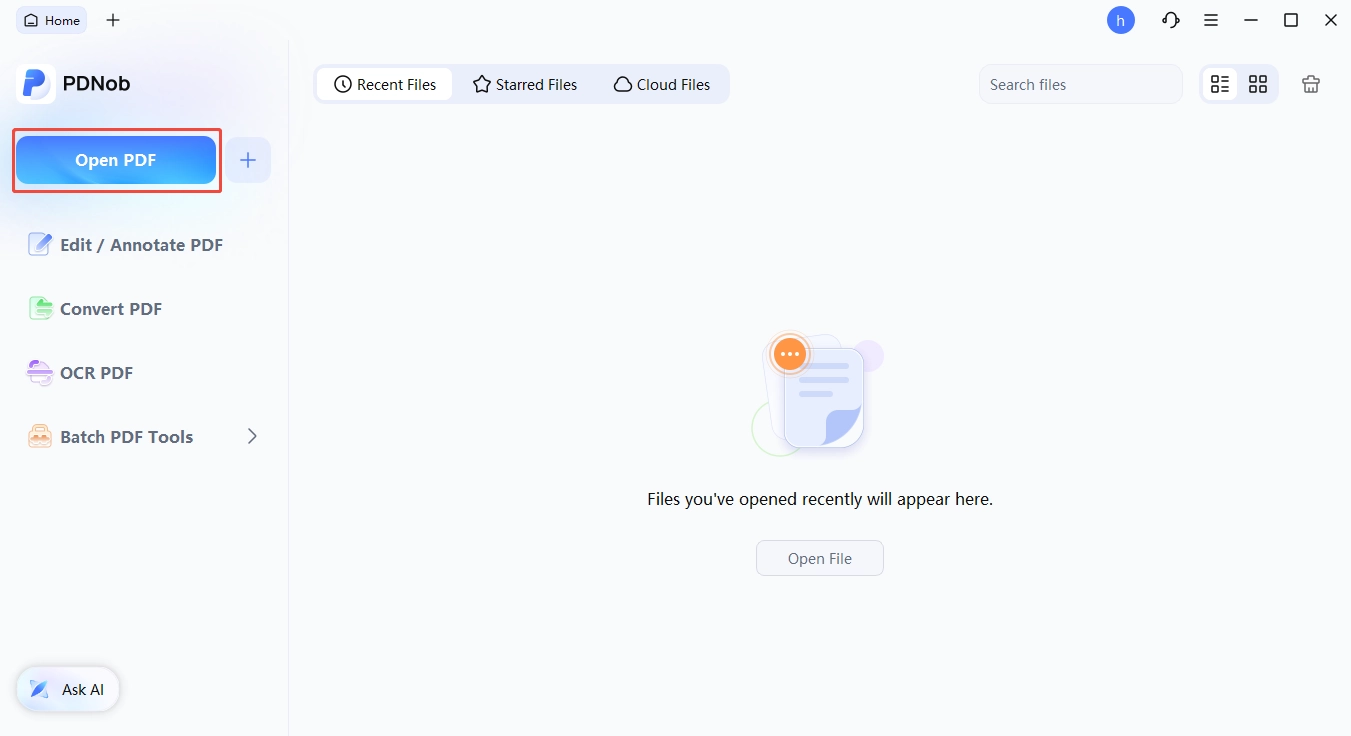
Open the PDF in PDNob. Launch PDNob PDF Editor, click Open File, and load the scanned or bilingual PDF --- the original layout stays intact.
-
Switch to OCR mode. If you have a scanned file to be converted to be a doc file, first perform OCR. Click the OCR button, pick the recognition language(s) (ABBYY's engine handles mixed-language pages automatically), and choose between Editable Text, Searchable PDF, or a custom page range.
-
Edit your PDF using edit, convert,other features in the tool bar.
-
Export and save. Click Apply, then Save or Save As to preserve the original layout, or use Export → Word (.docx) for an editable copy that opens cleanly in any of the 10 Word alternatives in this guide.


Part 6. Final Verdict: Which Should You Pick?
One thing you should know is that Microsoft Word alternative is not a one-size-fits-all decision, and the good news is that in 2026 you have eleven strong options to choose from.
Whatever you pick, you can stop paying Microsoft $9.99/month, stop worrying about OneDrive syncing, and start owning your documents again.
Part 7. Frequently Asked Questions About Microsoft Word Alternatives
Q1. Is there a free version of Office Word?
A1: Microsoft does offer free web and mobile versions of Word (Word for the web, Word Mobile), but they require a Microsoft account, an internet connection, and offer limited offline functionality. If you want a truly free, fully-featured desktop word processor, LibreOffice Writer and OpenOffice Writer are the closest you will get.
Q2. What is the best free alternative to Microsoft Word?
A2: For desktop users, LibreOffice Writer. For collaboration, Google Docs. For Mac users, Apple Pages. The "best" depends on what you are doing, but the safe answer to the question "What is the best free alternative to Microsoft Word?" is LibreOffice Writer, and we say that with the 26.8 release in mind.
Q3. What is the best substitute for Microsoft Word?
A3: If you need a single all-rounder, the answer is ONLYOFFICE for compatibility, LibreOffice for cost, and Google Docs for collaboration. If you want a more opinionated pick, we would say LibreOffice Writer is the best substitute for Microsoft Word for the average user in 2026.
Q4. Which Microsoft Word alternative works offline?
A4: LibreOffice Writer, ONLYOFFICE Desktop Editors, Apple Pages, WPS Writer, SoftMaker TextMaker, WordPerfect, Apache OpenOffice Writer, and Collabora Office all work offline. Google Docs and Zoho Writer offer limited offline modes that need to be enabled in advance, and they are not as smooth as the desktop options.
Q5. Can Google Docs fully replace Word?
A5: For most school, marketing, and small business use cases, yes. For long documents, complex page layout, advanced mail merge, and offline-only workflows, no. Google Docs is a fantastic alternative to Microsoft Word for collaboration, but it is not a full Word replacement for every use case.
Q6. What is the best Microsoft Word alternative for students?
A6: LibreOffice Writer if you want a desktop app. Google Docs if you want to work anywhere. Apple Pages if you are a student on an iPad. All three are free.
Q7. What is the safest paid alternative to Microsoft Word?
A7: SoftMaker Office Professional 2026 and WordPerfect Office 2026 are the safest paid ms word replacement software options. Both are from established vendors, both have been around for decades, and both run on your local machine with no required cloud connection.
We get a lot of the same questions from readers, so we have gathered the most-searched ones here.



- Make scanned PDFs searchable and editable with 99% OCR precision
- Batch convert PDFs to Word, Excel, PPT, images, PDF/A, Text, EPUB, etc., up to 30% faster
- Edit PDFs easily like Word, including text, images, watermarks, links, and backgrounds
- Annotate PDF with highlights, comments, shapes, stickers, and stamps
- Run smoothly on any PC without lags or crashes, even on low-spec machines
 Secure Download
Secure Download
Speak Your Mind
then write your review
Speak Your Mind
Leave a Comment
Create your review for PDNob articles

Related articles

Document Workflow Specialist
Daniel has reviewed and written about PDF editors, document tools, and productivity software for 3 years, with a particular interest in how small teams handle paperwork at scale.


