
 Home
>
PDF Editor
>
Tenorshare PDNob for Windows Review: Safe Download & Price
Home
>
PDF Editor
>
Tenorshare PDNob for Windows Review: Safe Download & Price
Tenorshare PDNob for Windows Review: Safe Download & Price
In this review of Tenorshare PDNob for Windows, the focus is on real testing and user feedback gathered from multiple sources. The software has been evaluated in different usage scenarios to understand its performance, usability, and safety. This article also explains how to download it for free, what the monthly pricing plan includes, and whether it is secure for regular use.
Along with hands-on insights, it also highlights common concerns users face before installation. The goal is to give a clear, practical overview before you decide to install Tenorshare PDNob for Windows.

Part 1. Tenorshare PDNob for Windows – Key Features & Benefits
After conducting in-depth interviews with real PDNob users and spending considerable time testing the software myself, I was able to identify a clear picture of what this tool actually delivers in day-to-day use. Users consistently pointed to the same strengths: a clean interface that doesn't overwhelm beginners, reliable OCR that handles even low-quality scans, and a feature set that punches well above its price point.
Below is a summary of the most critical features, the ideal audience, and the top reasons users keep choosing Tenorshare PDNob for Windows free download over competing tools.





- Seamless compatibility with Windows
- Simple and powerful PDF editing (fonts, layout, text, images, pages)
- Advanced OCR for scanned PDFs
- Wide format conversion support
- High-quality PDF compression

Students, teachers, academic communities, and business professionals.
Why Choose PDNob for Windows
After extensive hands-on testing and conversations with a wide range of PDNob PDF Editor users --- from university students managing research papers to small business owners processing contracts --- we found three key reasons why users choose Tenorshare PDNob for Windows over many alternatives: affordable pricing, strong Windows compatibility, and powerful all-in-one PDF features.
In our tests, PDNob's OCR feature quickly and accurately extracted text from images and scanned PDFs, including blurry and old low-quality documents. Its edit tools covered nearly all common PDF editing needs, while the convert feature efficiently transformed PDFs into formats like Word, Excel, and PowerPoint with solid formatting retention. We also found that its PDF compression significantly reduced file size without noticeable quality loss.
Part 2. Is Tenorshare PDNob for Windows Safe?
This is a common question when users first discover the software, and it needs a clear answer. When you download Tenorshare PDNob for Windows from the official Tenorshare website, it is generally safe to use. The official installer is regularly updated and maintained by the developer. It does not require unusual permissions during installation. Many users on Windows 10 and Windows 11 use it without any reported security issues from the official version.
However, the answer to is Tenorshare PDNob safe depends mainly on where you download it from. Risks usually come from third-party websites and cracked versions. Unofficial downloads may include adware, spyware, or malware. Cracked versions are especially risky because they bypass the original security system. These files can harm your device before any warning appears. To keep your system protected, you can download from the official PDNob website.
Part 3. How to Free Download and Use Tenorshare PDNob for Windows
I tested PDNob PDF Editor for several weeks using different real-world PDF tasks. I also interviewed many users, including students and working professionals, to understand their experience. This section explains what to expect before, during, and after downloading the software. It also covers how to download it for free, what the monthly plan includes, and how to install it safely on Windows.
Ready to start? Click the blue button below and install Tenorshare PDNob for Windows quickly. No account registration is required to begin.
4 Step to Download Tenorshare PDNob for Windows
-
Go to the official PDNob page to make sure you download a safe and genuine version of the software.
-
Click the "Free Download" button. You will see it clearly on the homepage; click it to start the download. No account or email is required.
-
Wait for the setup file to download on your Windows device. The installer is lightweight and usually downloads within a few seconds.
-
Run the installer and follow the on-screen instructions. Open the downloaded file, allow permissions if asked, and complete the installation in under a minute on Windows 10 or Windows 11.

How to Use Tenorshare PDNob for Windows
-
Open Your PDF: Launch PDNob and click the "Open PDF" button on the main interface to select the PDF file you want to edit.
-
Edit Content: Go to the "Edit" tab to modify text, images, fonts, or backgrounds with the built-in tools.
-
Add Comments: Switch to the "Comments" tab to highlight text, add notes, or mark up your PDF.
-
OCR Scanned Files: On the Home tab, click "OCR", choose the language and page range, then let PDNob process the file automatically.
-
PDNob AI : Use the PDNob AI to ask questions or quickly understand key points in your document.


Part 4. Tenorshare PDNob for Windows Individual Plans
While many core features of PDNob are available in the free version, upgrading to a paid plan unlocks full access to advanced tools like OCR text recognition, unlimited file conversion, and enhanced PDF editing features.
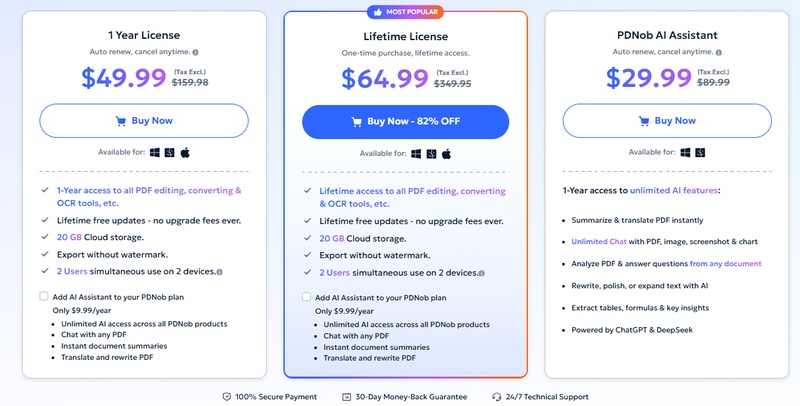
The Tenorshare PDNob for Windows individual monthly plan is designed for users who need consistent access to professional PDF tools. The annual pricing is $49.99, which breaks down to just $4.16 per month, making it a cost-effective option compared to most premium PDF editors in the market.
Tenorshare PDNob for Windows Individual Plan Includes:
- Free Trial (Registered): No time limit; access core features with some restrictions
- 1 Year License: $49.99: Full access to all features for 12 months, including unlimited OCR, conversions, and compression
-
Lifetime License: $64.99: One-time purchase for permanent,
unrestricted access to all features

Is the Individual Plan Worth It?
It is worth noting upfront that PDNob does not offer a standalone individual monthly plan---the minimum subscription commitment is annual. However, this turns out to be an advantage rather than a drawback. At just $49.99 per year, Tenorshare PDNob delivers a powerful all-in-one PDF toolkit at a price that many competing tools cannot match, even on a monthly subscription.
 Please swipe to view
Part 5. FAQs About Tenorshare PDNob for Windows
Q1. Does Tenorshare PDNob work on Windows 11?
A1: Yes, Tenorshare PDNob for Windows works smoothly on Windows 11 as well as Windows 10. It is optimized for modern Windows systems and supports stable performance for editing, converting, and managing PDF files.
Q2. Is Tenorshare PDNob safe to install?
A2: Yes, it is safe to install when downloaded from the official PDNob website. The official version is regularly updated and verified. However, third-party or cracked versions may carry security risks such as malware or modified files.
Q3. How to choose Tenorshare PDNob for Windows individual plans?
A3: You can choose based on your usage needs. If you only need basic features, the free version is enough. For unlimited access like OCR, editing, and file conversion, the yearly plan is the best option at $49.99, offering strong value for regular users.
Conclusion:
After extensive testing and conversations with real users, Tenorshare PDNob for Windows stands out as one of the most practical and affordable PDF editors available today. Whether you need to edit scanned documents, convert file formats in bulk, or compress PDFs without quality loss, PDNob PDF Editor delivers on every front.
Its powerful OCR technology, intuitive Windows-native interface, and budget-friendly annual plan at just $49.99 make it a compelling choice. If you are ready to simplify your PDF workflow, the Tenorshare PDNob for Windows free download is the best place to start.



- Make scanned PDFs searchable and editable with 99% OCR precision
- Batch convert PDFs to Word, Excel, PPT, images, PDF/A, Text, EPUB, etc., up to 30% faster
- Edit PDFs easily like Word, including text, images, watermarks, links, and backgrounds
- Annotate PDF with highlights, comments, shapes, stickers, and stamps
- Run smoothly on any PC without lags or crashes, even on low-spec machines
 Secure Download
Secure Download
Speak Your Mind
then write your review
Speak Your Mind
Leave a Comment
Create your review for PDNob articles

Related articles

AI Tools Writer / Workflow Analyst
Rachel has spent the last 5 years testing and writing about AI-powered tools across writing, design, and research workflows. She focuses on practical AI tool usage, helping knowledge workers turn generative AI into everyday productivity.


