
 Home
>
PDF Editor
>
Tenorshare PDNob PDF Editor: Features & Advantages Revealed
Home
>
PDF Editor
>
Tenorshare PDNob PDF Editor: Features & Advantages Revealed
Tenorshare PDNob PDF Editor: Features & Advantages Revealed
- 1 Comprehensive PDF Toolkit: Tenorshare PDNob PDF Editor combines PDF editing, OCR, conversion, annotation, AI tools, and document security within a single platform.
- 2 Powerful OCR and AI Features: PDNob supports OCR in 20+ languages and includes AI-powered PDF summarization, translation, and document chat capabilities.
- 3 Beginner-Friendly Experience: The software offers an intuitive interface, fast setup, and straightforward workflows suitable for students, freelancers, and small businesses.
- 4 Strong Value for Money: Compared with competitors like UPDF, iLovePDF, and Foxit PDF Editor, PDNob provides comprehensive PDF functionality at an affordable price with both free and paid options.
- 5 Reliable Alternative to Enterprise Tools: For users who need editing, conversion, OCR, and security features without expensive subscriptions, PDNob PDF Editor delivers a balanced combination of performance, usability, and cost-effectiveness.
We've all been there --- needing to edit one line in a PDF and ending up downloading three different tools, hitting a paywall, or getting a watermarked result. It's frustrating, and it happens more than it should.
Tenorshare PDNob PDF Editor was built to fix exactly that. It combines editing, converting, annotating, and AI-powered tools into one clean interface --- no switching between apps, no unnecessary complexity.
In this full breakdown of Tenorshare PDNob PDF Editor features and advantages, we'll cover what it does, how it performs, and whether it's genuinely worth your time.

Part 1. What Does PDNob PDF Editor Offer?
When you look at the full picture of Tenorshare PDNob PDF Editor features and advantages, what stands out immediately is how much ground a single tool covers. Here's a clear breakdown of what you actually get.
OCR for Scanned Documents
If you regularly deal with scanned files, this feature alone makes PDNob pdf editor worth installing.
- OCR PDF to editable text --- Converts scanned PDFs or images containing text into fully editable and searchable documents
- 20+ language support --- Recognizes text across more than 20 languages, useful for multilingual workflows
- AI-powered summarization --- Pair OCR output with the built-in AI summarizer to extract key points from long documents quickly
PDF Text & Page Editing
The editing experience in Tenorshare PDNob is designed to feel close to working in a Word document. You click into any element and change it directly --- no exports, no roundabout workarounds.
- Direct text editing --- Click into any text block to adjust font, size, color, or content inline
- Image & background editing --- Modify, replace, or reposition images, watermarks, and backgrounds without rebuilding the file
- Page management --- Reorder, rotate, insert, split, or delete pages to restructure any document cleanly
- Merge & compress --- Combine multiple PDFs into one or reduce file size without losing quality
Conversion Toolkit
One of the strongest suits of PDNob PDF editor is how it moves flexibly between formats while keeping your original layout intact.
- 10+ supported formats --- Convert between PDF and Word, Excel, PowerPoint, images, EPUB, PDF/A, and more
- Fast turnaround --- Conversions typically complete in around 10--15 seconds, making it practical for real workday use
- Layout preservation --- Formatting and structure are retained throughout conversion, reducing the need for manual cleanup




Annotation & Markup Tools
PDNob PDF editor covers everything you need for both personal review and professional feedback workflows.
- Highlights & underlines --- Mark up key sections for study, review, or client feedback
- Sticky notes & stamps --- Add contextual comments or approval stamps directly onto pages
- Freehand drawing --- Sketch quick notes or corrections naturally on the document
- 200+ annotation options --- Enough variety to support detailed, multi-reviewer workflows
Security & Privacy
For anyone handling sensitive documents, Tenorshare PDNob includes protection tools that go beyond basic password locking.
- Password protection & encryption --- Restrict access and secure file contents before sharing
- Permission management --- Control what others can do with your document --- print, copy, or edit
- Redaction tools --- Permanently remove sensitive content so it can't be recovered after export
Part 2. How Does PDNob PDF Editor Perform?
Features tell you what a PDF editor can do, but performance determines how smoothly those features fit into everyday work. Based on PDNob's product capabilities and feedback from users, the software generally delivers a reliable experience across editing, OCR, conversion, and document management tasks. Here's a closer look at how it performs in the areas that matter most.
Speed and Responsiveness
PDNob PDF Editor is designed to handle common PDF tasks efficiently. Text editing, page organization, annotations, and standard file conversions are generally described as smooth and responsive, allowing users to complete routine document work without unnecessary delays.
Many users highlight the software's lightweight design, which helps maintain usability even when working with larger documents. While occasional slowdowns may occur with particularly graphics-heavy or unusually large PDFs, this is a challenge shared by many PDF editors.
OCR Accuracy
OCR (Optical Character Recognition) is one of PDNob PDF Editor's standout features. The software supports text recognition in more than 15+ languages, allowing scanned PDFs and image-based documents to become searchable and editable.
For clear, high-quality scans, users generally report accurate text recognition and useful formatting retention. As with most OCR solutions, recognition quality can decline when source files are blurry, low-resolution, or heavily distorted. However, for standard business, educational, and administrative documents, OCR remains one of the platform's most valuable capabilities.
Conversion Quality
PDNob PDF Editor supports conversion between PDF and more than 30 file formats, including Word, Excel, PowerPoint, images, EPUB, and PDF/A.
One of the most frequently mentioned advantages is its ability to preserve layouts, formatting, and document structure during conversion. This can help reduce the amount of manual editing required after exporting files. Complex spreadsheets or highly customized document layouts may still require review, but the overall conversion experience is suitable for most everyday workflows.
Stability and Platform Support
PDNob PDF Editor is available for both Windows and Mac, providing a consistent desktop experience across platforms. The software combines editing, OCR, conversion, annotation, and security features within a single application, helping users avoid switching between multiple tools.
Most user feedback points to stable day-to-day performance, particularly for standard office documents, reports, contracts, and study materials. The software is generally considered easy to install and straightforward to learn, making it accessible even for first-time PDF editor users.
Overall Performance
Looking at its editing capabilities, OCR functionality, conversion tools, and usability, PDNob PDF Editor offers a well-rounded performance profile for individuals, students, freelancers, and small businesses. While enterprise users may require more advanced collaboration features, Tenorshare PDNob PDF Editor features and advantages caters for most users need in a single, easy-to-use platform.
Part 3. What Do G2 Users Say About PDNob PDF Editor?
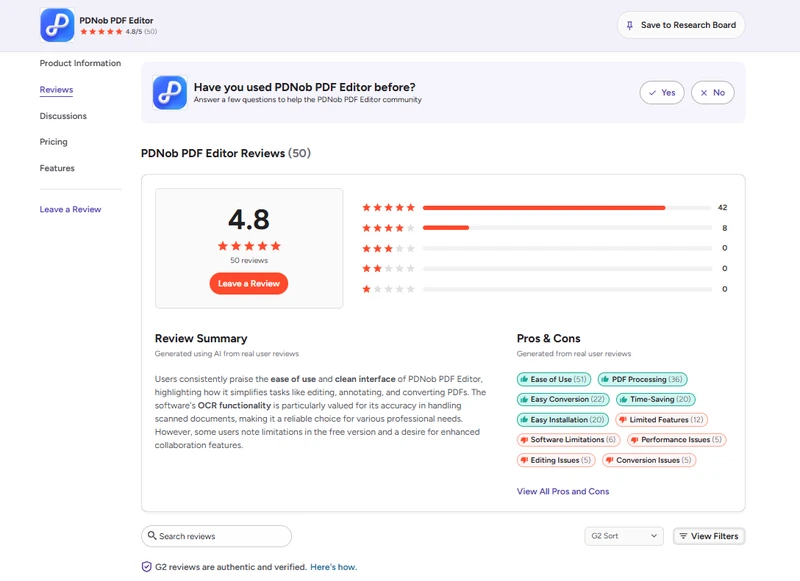
Real user feedback is one of the clearest ways to validate Tenorshare PDNob PDF Editor features and advantages beyond what the product page says. Here's what the G2 community consistently highlights.
What Users Love
- Ease of use --- The intuitive UI and fluid editing experience are mentioned across the majority of reviews
- All-in-one convenience --- Users appreciate handling editing, converting, OCR, and security inside one app without needing external tools
- OCR quality --- The ability to turn scanned files into searchable, editable text is consistently called out as a genuine time-saver
- Quick installation & setup --- Multiple reviewers highlight that setup takes only a few minutes with no steep learning curve
- AI summarizer --- Praised for quickly extracting key points from long documents, especially useful for reports and research
What Users Flag
-
Free version limitations --- The trial is restrictive, and several users feel you can't fully evaluate the tool before hitting a paywall
-
E-signature workflow --- Multi-party signing is limited compared to dedicated signing tools
-
Performance on very large files --- Occasional slowdowns when handling high-resolution or graphic-heavy PDFs
Part 4. What's Included in the PDNob PDF Editor Paid Version?
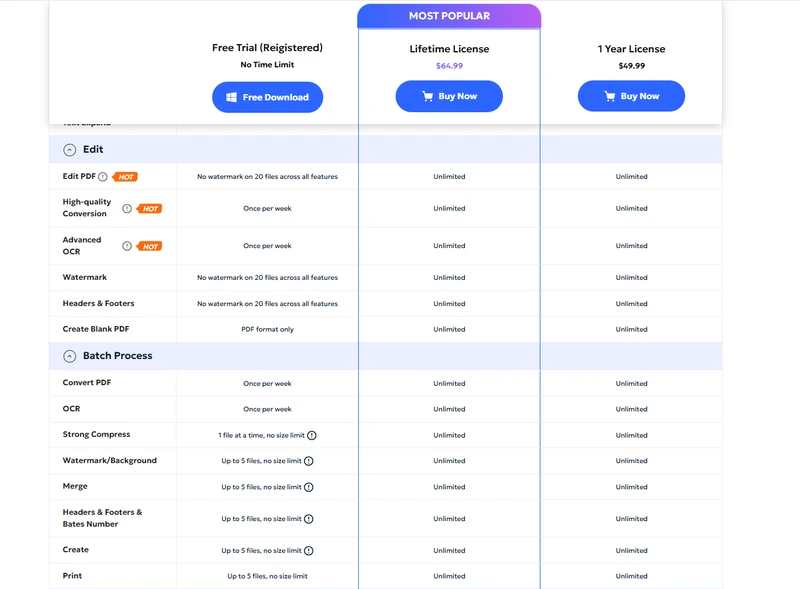
Free Version --- What You Can Try
The PDNob free version gives you a genuine feel for the tool, but it does come with limits:
- AI credits --- 50 free AI credits to test OCR, summarization, and AI tools
- Watermarked exports --- Exported files include a watermark until you upgrade
- Core feature access --- Basic editing, reading, and annotation are available to explore
The PDNob free tier is best treated as an evaluation window rather than a long-term solution. Once you upgrade, the full scope of Tenorshare PDNob PDF editor features advantages opens up.
Paid Plans --- What You Unlock
Is It Worth It?
If PDFs are a regular part of your work or study life, the paid version puts every Tenorshare PDNob PDF Editor features and advantages within reach --- OCR, AI tools, full editing, conversion across 10+ formats, unlimited batch process file size and file numbers, and security features --- all without a recurring Adobe-sized subscription. The PDNob download takes under five minutes to set up, and the learning curve is minimal.
Part 5. PDNob PDF Editor Features Comparison to Other Tools
When you put Tenorshare PDNob PDF Editor features and advantages side by side with the most common alternatives, the differences become pretty clear --- especially when it comes to value, usability, and what you actually get for your money. Here's how it stacks up.
 Please swipe to view
So here we can simply draw a conclusion on feature and performance comparison of these tools, and give answer to the quetion of Tenorshare PDNob PDF Editor features and advantages. For text editing, OCR, and file security on a budget, PDNob is a strong choice with a one-time purchase model well-suited for individuals and small teams. If you don't need enterprise-level collaboration, PDNob PDF Editor gives you everything that matters --- without what doesn't.
FAQ
Q1. Is PDNob PDF Editor free to use?
A1: Yes, PDNob free access is available with 50 AI credits and core features. Exports in the free version include a watermark, so upgrading is recommended for professional use.
Q2. Where can I get the PDNob download?
A2: You can get the PDNob download directly from the official Tenorshare website at PDNob.com. It's available for both Windows and Mac, and setup takes under five minutes.
Q3. Does PDNob work offline?
A3: Yes. Unlike browser-based tools, Tenorshare PDNob processes everything locally on your device --- your files never pass through external servers.
Q4. Is PDNob PDF Editor good for beginners?
A4: Absolutely. The interface is one of its most praised qualities --- clean, clearly laid out, and quick to learn without tutorials. That's one of the coret Tenorshare PDNob PDF Editor features and advantages hat keeps users coming back.
Q5. Does PDNob support OCR in multiple languages?
A5: Yes. PDNob supports text recognition in over 20 languages, making it useful for multilingual document workflows.
Conclusion
The core promise behind Tenorshare PDNob PDF Editor features and advantages is simple: give you a complete PDF toolkit without the enterprise price tag or unnecessary complexity. And from what the tool actually delivers --- solid editing, accurate OCR, flexible conversion, and a genuinely approachable interface --- it largely keeps that promise.
It's not the right fit for large teams that need advanced collaboration or multi-party signing. But for students, freelancers, remote workers, and small business owners who deal with PDFs daily, Tenorshare PDNob PDF Editor features and advantages cover the essentials reliably and at a price that's easy to justify. Just download for a free trial.



- Make scanned PDFs searchable and editable with 99% OCR precision
- Batch convert PDFs to Word, Excel, PPT, images, PDF/A, Text, EPUB, etc., up to 30% faster
- Edit PDFs easily like Word, including text, images, watermarks, links, and backgrounds
- Annotate PDF with highlights, comments, shapes, stickers, and stamps
- Run smoothly on any PC without lags or crashes, even on low-spec machines
 Secure Download
Secure Download
Speak Your Mind
then write your review
Speak Your Mind
Leave a Comment
Create your review for PDNob articles

Related articles

AI Tools Writer / Workflow Analyst
Rachel has spent the last 5 years testing and writing about AI-powered tools across writing, design, and research workflows. She focuses on practical AI tool usage, helping knowledge workers turn generative AI into everyday productivity.


