
 Home
>
PDF Editor
>
Tenorshare PDNob Crack: Risks & Safe Free Download
Home
>
PDF Editor
>
Tenorshare PDNob Crack: Risks & Safe Free Download
Tenorshare PDNob Crack: Risks & Safe Free Download
Many users search for "Tenorshare PDNob crack" to avoid paying for a professional PDF editor. However, downloading cracked software often brings serious risks, including malware infections, activation failures, broken OCR functions, and unstable editing performance.
In this article, we'll explain the dangers of using a PDNob crack, how to safely download the official free version, what free features are currently available, and whether Tenorshare PDNob is truly safe for users.

Part 1. Is Tenorshare PDNob Crack Safe? Security Risks Explained
PDNob Crack Version such as "Tenorshare PDNob crack Windows 10" or "Tenorshare PDNob crack Windows 7" may seem like an easy way to access premium PDF tools for free, but they often create more risks than benefits. Unofficial installers can include malware, fake activation programs, or modified files that may compromise personal data and system security.
In addition, cracked software frequently leads to unstable PDF editing, failed OCR recognition, compatibility problems on Windows devices, and missing updates or technical support. For users who regularly work with important documents, downloading the official version is generally the safer and more reliable option.
Part 2. How to Get the Official PDNob Free — No Crack Needed
Instead of using "Tenorshare PDNob crack free"versions, users can safely download the official PDNob PDF Editor for free. The software is regularly updated, secure to install, and currently supports Windows, macOS, and iOS.
1-Step to Free Download the Official PDNob
Open the official PDNob website,and Click "Free Download" to complete the download.





PDNob System Requirements
Before downloading or installing PDNob, users should check the specific supported system versions and hardware requirements to ensure full compatibility and stable performance.
Tenorshare PDNob for Windows:
Supported OS:Windows 10 and higher (64 bit)
Package Size:136MB (OCR plugin: 1.80GB)
Tenorshare PDNob for Mac
Supported OS:macOS 10.15 - 26
Package Size:Arm version: 163MB (OCR plugin: 1.67GB);Intel version: 179MB (OCR plugin: 2.02GB)
Tenorshare PDNob for iOS:
Supported OS:iOS15.0-iOS26 or later
Package Size:35.7MB
Free Features Available in PDNob
PDNob offers a wide range of free PDF tools that users can access without using Tenorshare PDNob crack version. Features such as Advanced OCR and high-quality PDF conversion are available for free once per week, allowing users to experience core PDF editing capabilities safely and legally.
In addition, PDNob currently allows users to process up to 20 files across all features without watermarks, making it a practical choice for everyday PDF editing, OCR scanning, conversion, and compression tasks.

- Edit text, replace images, add links, and edit scanned PDFs with OCR.
- Convert scanned PDFs and images into editable, searchable PDFs with precise OCR.
- Convert PDFs to Word, Excel, PowerPoint, or images without losing formatting.
- Compress PDFs efficiently without losing quality.
Part 3. How to Use PDNob to Edit Scanned PDF with OCR
Many users download Tenorshare PDNob crack to use OCR features for free. However, the official version of PDNob PDF Editor already provides one free OCR opportunity per week, allowing users to make PDFs searchable and editable safely and efficiently without the risks of cracked software, while offering a more stable user experience.
How to Use PDNob OCR
Launch PDNob PDF Editor and click the "OCR PDF" button.
-
Download and install the OCR component when the software prompts you.
-
Select the OCR feature and choose the OCR recognition mode you need.
-
Run the OCR process and convert the scanned PDF into searchable text.
Edit fonts, layout, text, images, and pages.


- Auto Crop Page
- Enhance Local Contrast
- Remove Dark Spots
- Remove Noise
- Detect Text on Picture

I ran OCR on a scanned finance lecture notes filled with valuation theories, market analysis chapters, and annotated case studies. The recognition results were surprisingly accurate: most financial terminology, numerical tables, and even light handwritten notes in the margins were successfully captured, with only a few errors in heavily marked sections. After conversion, the file became fully searchable, allowing me to quickly jump to concepts like "discounted cash flow," copy key formulas into my study notes, and reuse selected excerpts without needing to manually retype or reformat the original material.
Part 4. PDNob Free Features vs Paid Plan: Is the Official Version Worth It?
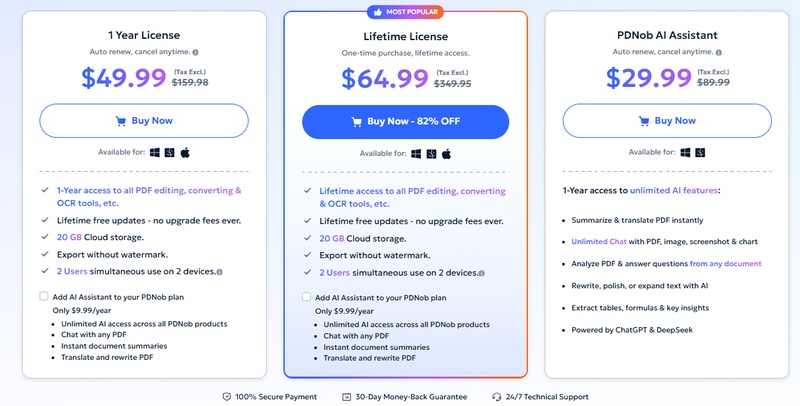
The 1-Year and Lifetime Licenses of PDNob are highly affordable compared to many competing PDF editors. When calculated monthly, the pricing is especially cost-effective while still offering access to advanced PDF editing, OCR, conversion, compression, and AI features.
Subscription Plans of PDNob:
- Free Trial (Registered): No time limit; access core features with some restrictions
- 1 Year License: $49.99: Full access to all features for 12 months, including unlimited OCR, conversions, and compression
-
Lifetime License: $64.99: One-time purchase for permanent,
unrestricted access to all features

Part 5. Quick Comparison: Why PDNob Offers Better Value
Adobe Acrobat remains one of the most authoritative PDF editors on the market. As an emerging PDF brand, PDNob offers a clean, intuitive interface that is easy to use for beginners and non-technical users, especially for everyday PDF tasks. It also stands out for its affordable pricing while still providing powerful features like OCR, editing, conversion, and compression.
After extensive testing, I found that PDNob's OCR performance is even more accurate than Adobe Acrobat in some cases, while still maintaining fast scanning speed and strong multi-language support. It can quickly recognize scanned content and allows users to edit text, images, and layouts with high accuracy.
In addition, user feedback suggests that Adobe Acrobat may struggle with heavily blurred or low-quality scanned documents, while PDNob performs better in extracting text more precisely and consistently, even from difficult-to-read scans.
 Please swipe to view
How we test:
To evaluate both Adobe Acrobat and PDNob PDF Editor fairly, we tested them using real-world scenarios that reflect everyday PDF usage, focusing on OCR accuracy, editing performance, and overall usability.
Our test materials included scanned documents with varying quality (clear prints, low-resolution scans, and lightly blurred pages), multi-language text samples, and content containing tables, formulas, and structured layouts.
We specifically analyzed how accurately each tool extracted text, how well it preserved original formatting, and how much manual correction was required after OCR processing. In addition, we compared performance in editing extracted content, handling complex layouts, and exporting files to ensure consistency and practicality for real user workflows.
Part 6. FAQs about Tenorshare PDNob Crack
Q1. Is Tenorshare PDNob Safe to install?
A1: Yes. Downloading PDNob directly from the official website is safe. The official installer is regularly updated and free from malware or fake activation tools commonly found in cracked software.
Q2. Does PDNob work on Windows 7?
A2: No. Currently, PDNob does not officially support Windows 7. To ensure better performance, security, and compatibility, PDNob is designed for Windows 10 and later versions. Users running older systems may experience installation or functionality issues.
Q3. Why do Tenorshare PDNob Crack Versions often fail?
A3: Tenorshare PDNob crack versions often fail because activation files are modified by third parties. This can break OCR tools, disable updates, cause software crashes, or expose users to malware and privacy risks.
Conclusion
Searching for a Tenorshare PDNob crack may seem like a quick way to access premium PDF editing features for free, but cracked software usually comes with serious risks such as malware, unstable functionality, activation issues, and broken OCR tools. Instead of downloading unsafe cracked installers, users can safely access the official PDNob version through the official website and enjoy many useful free features legally and securely.



- Make scanned PDFs searchable and editable with 99% OCR precision
- Batch convert PDFs to Word, Excel, PPT, images, PDF/A, Text, EPUB, etc., up to 30% faster
- Edit PDFs easily like Word, including text, images, watermarks, links, and backgrounds
- Annotate PDF with highlights, comments, shapes, stickers, and stamps
- Run smoothly on any PC without lags or crashes, even on low-spec machines
 Secure Download
Secure Download
Speak Your Mind
then write your review
Speak Your Mind
Leave a Comment
Create your review for PDNob articles

Related articles

AI Tools Writer / Workflow Analyst
Rachel has spent the last 5 years testing and writing about AI-powered tools across writing, design, and research workflows. She focuses on practical AI tool usage, helping knowledge workers turn generative AI into everyday productivity.


