
 Home
>
PDF Tips
>
Is KUPDF Safe to Use? A 2026 Legal and Safety Review
Home
>
PDF Tips
>
Is KUPDF Safe to Use? A 2026 Legal and Safety Review
Is KUPDF Safe to Use? A 2026 Legal and Safety Review
- 1 KUPDF has been online since 2017, operates as a UGC document-sharing platform under "KUPDF Inc.," and is hosted behind Cloudflare --- which is why it stays up despite enforcement pressure.
- 2 The Lumen Database shows multiple DMCA notices from professional anti-piracy firm Onsist, acting on behalf of named rights holders (Erica Meltzer, Frederick Dodson) and targeting specific kupdf.net URLs.
- 3 Our download test found two buttons: the prominent "Download Compressed PDF" button redirects to an unrelated third-party site, while only the smaller "Download Original PDF" button delivers a clean file.
- 5 Safer alternatives for free PDF books: Internet Archive (legal, 4M+ titles via Controlled Digital Lending), Project Gutenberg (75,000+ public-domain works), and Open Library (CDL model with 4M+ records).
- 5 If you leagally download a scanned version of PDF research or need to translate an intricate paper with table and infographs, PDNob can be an ideal choice for high-precision OCR with bilingual translated PDF view.
KUPDF has been around for nearly a decade, and the question of whether you can safely use it --- and whether you should --- has not gotten simpler. We've spent the last week pulling at this from three angles: what the platform actually is, what the legal record says about it, and what happens when you click a real download button. Here's what we found.

Part 1. What Is KUPDF?
KUPDF Background, Founders, and User Base
KUPDF first appeared online in 2017 (per the copyright notice on kupdf.com) and operates under the parent brand \"KUPDF Inc.\" The site is registered through NameCheap and fronted by Cloudflare, which is part of why it stays online through most enforcement actions --- Cloudflare only acts when abuse reports reach a threshold.
In terms of who uses it, the audience skews international and student-heavy. According to public traffic estimates (Similarweb, May 2026), kupdf.net receives roughly 360,000 visits per month, with the top traffic coming from the United States (~21%), Indonesia (~12%), Colombia (~7%), Brazil (~5%), and India (~5%). That mix tells you a lot about the user base: countries where textbooks, exam prep books, and English-language reference material are expensive or hard to access legally.
There isn't a publicly named founder. The Terms of Service don't disclose ownership beyond a copyright contact email, and the WHOIS record is shielded behind a privacy proxy. That's normal for a UGC platform, but it also means there's no clear accountability line when something goes wrong.

Resources and Features of KUPDF
Here's what the platform actually offers, based on our own walk-through of the site:
- Total volume --- millions of uploaded documents, indexed by topic and search keyword
- File types --- mostly PDF, with a long tail of DOC, DOCX, PPT, PPTX, XLS, and occasionally EPUB or TXT
- Major topics --- education (SAT, GRE, GMAT prep, university textbooks), self-help, business, technology, law, and finance
- Update frequency --- new uploads every few minutes; the homepage rotates "top downloads" daily
- Search --- keyword search is the primary navigation; there's no curation or editorial layer
- Account requirement --- you can browse and download without an account; uploads require a free signup
You can also see file size, page count, and upload date on each document card. There's no preview, no metadata beyond what's user-submitted, and no quality control --- a "calculus textbook" could be a complete scanned volume or a 4-page sample someone uploaded.
When Should (or Shouldn't) You Use KUPDF
Most reviews just say "don't use it." That's not the full picture. There are a few narrow scenarios where the risk is genuinely lower, and a long list where it isn't.
You might use KUPDF for:
- Locating a public-domain title (anything pre-1929 in the US) you can't find on Project Gutenberg
- Verifying whether a book is widely pirated before you buy a legitimate copy
- Cross-referencing citations in a research paper against an actual document
You shouldn't use KUPDF for:
- Any current textbook, exam prep, or commercial title you don't already own
- Anything you'll redistribute, share in a group, or upload elsewhere
- Documents you'll open on a work device or a device with sensitive credentials
- Anything you need to verify as authentic (the metadata and source are unverified)
Part 2. Is KUPDF Legal?
What KUPDF's Terms and DMCA Policy Actually Say
KUPDF publishes a Terms of Service page and a separate Copyright / DMCA page. The language is mostly standard UGC-platform boilerplate, but a few lines are worth reading carefully. From the KUPDF Terms page, the platform states:
"These Terms apply in full force and effect to your use of this Website and by using this Website, you expressly accept all terms and conditions contained herein in full. This Website is not for use by any minors (defined as those who are not at least 18 years of age), and you must not use this Website if you a minor."
The Copyright page (linked from the footer on every page) sets up a DMCA takedown process and names a Copyright Agent you can contact. So on paper, the platform is willing to remove infringing content if a rights holder files a proper notice. The DMCA safe-harbor framework is what lets sites like KUPDF exist without being directly liable for every upload --- provided they act on complaints.
What the Terms don't say is anything about who is uploading what, or what fraction of the content is actually authorized. That's the gap between policy and reality.
What the Lumen Database Tells Us
To check whether the DMCA process is being used in practice, we searched the Lumen Database --- a public archive of takedown notices maintained by Harvard's Berkman Klein Center. Filtering for "kupdf" returns multiple notices, mostly sent to Google rather than to KUPDF directly (the most common enforcement pattern: force de-indexing of infringing URLs from search results).
Two representative notices from our search:
DMCA (Copyright) Complaint to Google --- Date Received: December 09, 2022 --- Sender: Onsist on behalf of The Critical Reader (Erica Meltzer, SAT prep author) --- Reported URLs: multiple kupdf.net links
DMCA (Copyright) Complaint to Google --- Date Received: February 01, 2023 --- Sender: Onsist on behalf of Frederick Dodson (self-help author) --- Reported URLs: multiple kupdf.net links

These are not anonymous complaints or random user reports. Onsist is a professional anti-piracy enforcement firm, acting on behalf of named rights holders, targeting specific KUPDF URLs with the copyright owner's authorization. The keywords in both notices (e.g., "Erica Meltzer kupdf", "Frederick Dodson kupdf") confirm the infringing material was indexed and findable through KUPDF-specific search terms.
If the platform were operating primarily on legitimately uploaded content, you wouldn't expect to see formal rights-holder enforcement notices. The Lumen record is direct evidence that the platform hosts material rights holders consider infringing.
Real Comments from Quora on Copyright and "Personal Use"
A common reader pushback: "I only download for personal use, so it's legal." That intuition is wrong, and the legal commentary is clear. A top-voted answer on Quora, from user Todd Gardiner, addresses this directly (see the full thread on Quora):
"Personal use" only applies to making copies of something you already own. Not acquiring something you do not own. Obviously watching movies and reading books and listening to music is a sort of 'personal use' in common English. That's not the legal meaning of the term. You are expected to pay for the content upfront, and then you have some limited ability to make local, unshared copies with the physical product you own. (Note, you cannot copy digital purchases.)
The distinction matters: "personal use" is a defense for format-shifting something you already own, not a license to acquire copyrighted content for free. Downloading a current textbook from KUPDF, even without sharing it, doesn't fit the personal-use exception.
Part 3. Is KUPDF Safe?
Our Download Flow Test Results
We ran the actual download flow on a KUPDF document page to see what really happens. The page offered two download buttons. Here's what each did:
-
"Download Compressed PDF" (the prominent button) --- clicking it redirected us to an unrelated online PDF conversion tool. No file was delivered to our machine; the redirect went to a third-party domain we hadn't intended to visit.
-
"Download Original PDF" (the smaller, less obvious button) --- this one delivered a clean PDF directly, prompted us with a standard browser save dialog, and asked for a destination path. The downloaded file was a normal PDF, no bundled installer, no .exe in the package, no extra executable, no safety warning from our browser.

The pattern matters: the loudest call to action is the one that bounces you off-site, and the quieter one is the one that actually delivers. Anyone who clicks the first button by reflex is being funneled away from the platform --- likely through an advertising or affiliate chain, possibly into a less trustworthy environment than kupdf itself.
Independent trust scoring backs this up. According to the Gridinsoft report on kupdf.net (August 2026), the site received a 35/100 trust score, with Scamadviser raising a warning. The site is online, but it sits well below the typical safe threshold. As of our test, kupdf.net was also serving a "System Maintenance in Progress" splash page intermittently, which is another reason to be cautious about clicking anything that looks like a download.
Real Comments from Reddit
User experiences in r/Piracy and adjacent communities are mixed. A representative thread, "are kufpdf and pdfcoffee safe", includes this from user _bacon_bacon_:
I scanned the books with virus total, opened them and didn't see suspicious activity, I can't give you an answer, I just downloaded 3 or 5 books from those websites and I haven't had any problem with them.
This is a useful data point, but it has limits. "I scanned a handful of files and didn't see anything" tells you those specific files were clean at that specific moment. It doesn't tell you what happens across the full catalog, after the next upload, or if a malicious file replaces a clean one tomorrow. The absence of evidence in five scans is not the same as evidence of absence across millions of files.
Legal Risk by Usage Type
If you do choose to use KUPDF, the legal exposure scales sharply with what you do, not just whether you visit.
 Please swipe to view
The US framework is the cleanest reference: civil damages run $750--$30,000 per infringed work, and willful infringement can reach $150,000 per work plus criminal penalties of up to five years and $250,000. Other jurisdictions have their own numbers, but the direction is the same.
Part 4. Top KUPDF Alternatives
If you need a specific title, the honest path is to start with a legal source and only fall back to grey-area platforms if the title genuinely isn't available otherwise. Here are the five most-cited alternatives, with what they actually offer.
4.1 arXiv --- Open-Access Preprint Platform
arXiv is an open-access preprint platform founded by Paul Ginsparg in 1991, now hosting over three million papers across eight fields: physics, mathematics, computer science, quantitative biology, quantitative finance, statistics, electrical engineering and systems science, and economics. Papers are submitted by registered users and posted after community volunteer moderation for classification, but they are not peer-reviewed --- responsibility for content rests entirely with the submitter.

- Latest status as of 2026-09: Actively operating, now an independent nonprofit; annual budget of roughly $6 million sustained through a community-funded model.
4.2 OpenStax --- Open Educational Resource

4.3 Project Gutenberg --- 100% Free Public Domain Classics
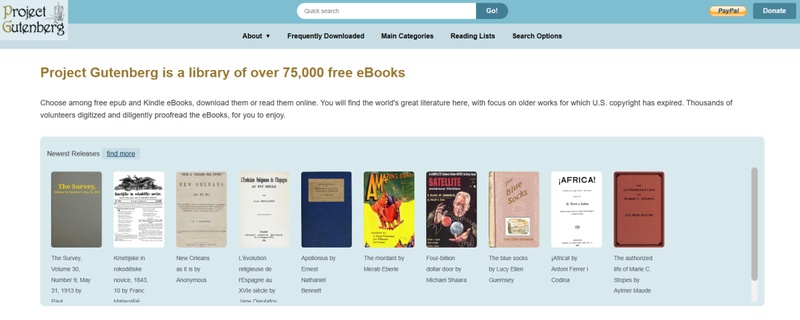
Project Gutenberg has been around since 1971 and now offers more than 75,000 free ebooks, almost all of them public-domain works (anything published before 1929 in the US, plus later titles whose copyright wasn't renewed). Formats include EPUB, Kindle, plain text, HTML, and PDF. No account, no ads, direct download. Browse at gutenberg.org.
-
Latest status as of 2026-09: Active. ~75,000 titles, all verified public
domain.

4.4 Internet Archive --- Non-Profit Digital Library
The Internet Archive is a non-profit that has been running since 1996. It hosts books, audio, video, software, and historical web snapshots. Books are available through Controlled Digital Lending --- you borrow a digital copy for a set window, the way you would a physical library book. Formats include PDF, EPUB, MP3, MP4, and many more, and downloads are direct with no redirects. Visit archive.org to browse.

- Latest status as of 2026-09: Operating normally. The lending catalog continues to expand.
KUPDF vs Alternatives --- Quick Comparison Table
Please swipe to view
For most readers, the right answer is start with Internet Archive, then Project Gutenberg, and only consider the gray-area options if neither has what you need.
Part 5. Bonus --- How to OCR and Translate Scanned PDFs
Why You Need This Workflow
If you've already pulled a scanned or foreign-language PDF --- from any source, legal or otherwise --- the next step is making it useful. Scanned PDFs are image-based, so you can't search them, copy text from them, or run them through a translator without first running OCR. Once the text layer is in place, a translation pass turns a foreign file into something you can actually work with.
This is the part where the right tool saves you hours. Among the options that handle both OCR and translation in one workflow, PDNob is one worth a look.
Step-by-Step Guide Using PDNob
This is the part where the right tool saves you hours.
PDNob is built for fast response and AI high precision OCR — designed to open documents instantly, recognize text accurately across 16+ languages, and translate the file into 40 target languages while preserving the original layout. Its current release, V2.1.1 (as of August 2026), runs OCR at 99% accuracy, and ships with full-document and side-by-side bilingual translation. For anyone working with scanned file , foreign-language research papers, or archived PDFs that need to be re-purposed, PDNob fits directly into the workflow without extra tools.

Latest version as of 2026-09: V2.1.1 (Windows / Mac) / V1.0.0 (iOS). Label: AI-Powered PDF Editor.





- Edit PDFs like Word documents. Change fonts, reflow paragraphs, swap images, and adjust layouts — no need to go back to the original .docx.
- Convert PDF to Word and back. Round-trip a PDF into an editable .docx without breaking tables, footnotes, or numbered lists. WPS Writer, ONLYOFFICE, and LibreOffice convert PDFs too, but lose formatting on complex layouts.
- AI-powered OCR. Pull editable text from scanned contracts, receipts, and image-based PDFs in 16 languages. Word has no built-in OCR; Google Docs and Zoho Writer only handle fresh scans.
- AI summary and chat. Summarize a 100-page PDF in seconds and ask questions about it inline — Gemini-style features, but built for PDFs.
- Sign, redact, and merge in one app. Combine PDFs, redact sensitive info, and add e-signatures without switching tools. None of the 11 word processors here can redact a PDF properly.
For the official feature list and version history, see PDNob's tech spec page.
Steps Guide of Using PDNob to Convert
Open the PDF in PDNob
Switch to OCR mode
Enable translation (optional)
Export and save
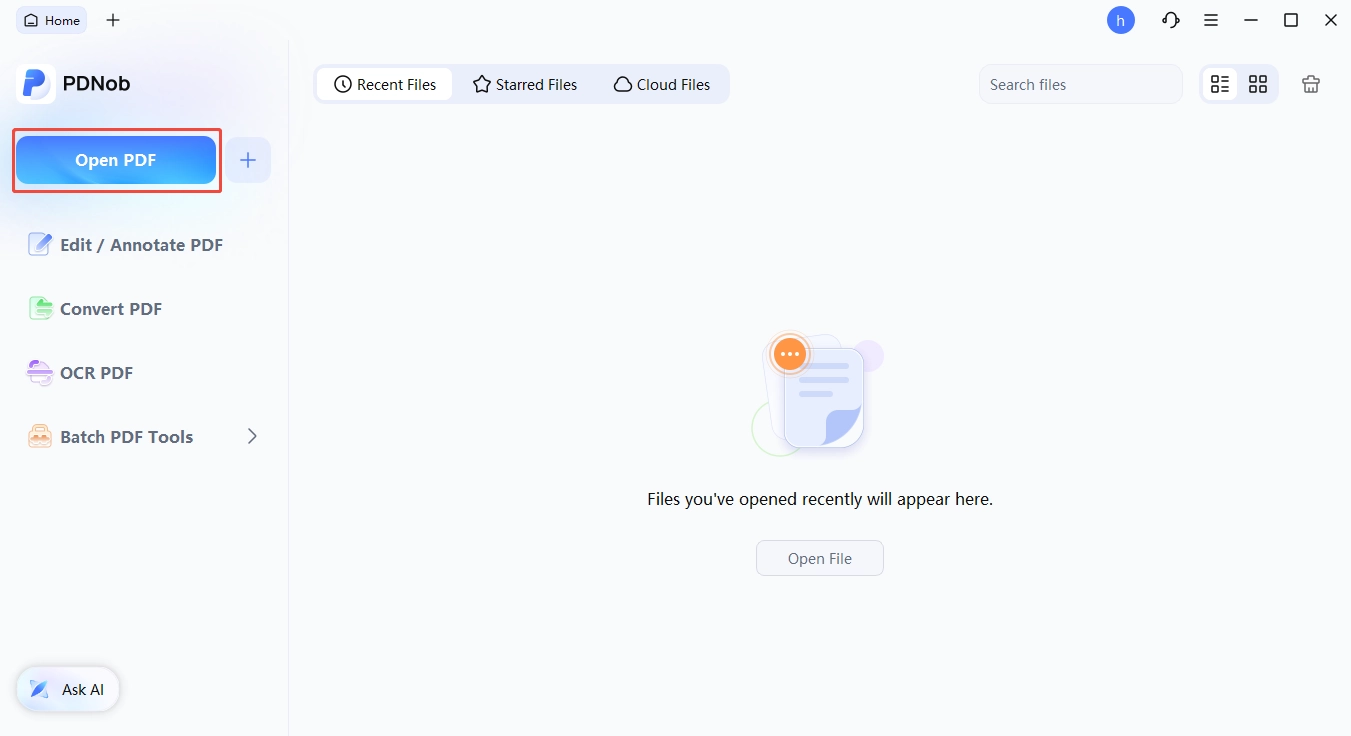
Start by launching PDNob PDF Editor, then click Open File to import the scanned or bilingual PDF you'd like to work with.
In the top toolbar, click the OCR button. PDNob will automatically recognize that the file is a scan and ask you to configure recognition settings. Choose your desired recognition language(s). The ABBYY engine supports mixed-language pages, detecting the script automatically as it processes.

Check the Translate to box and select your target language. For legal and academic documents, the bilingual PDF option is ideal---it preserves the original text on the left page and places the translation on the right, with paragraphs aligned side by side.

Once processing is complete, export your file and save it to your preferred location.
Part 6. What To Do If You Downloaded Malware by Mistake
Take care of those unknown links from forums or threads disguised as a 'kupdf mirror link'. If you did and finally end up with a bad file, here's a recovery flow.
How to Tell If Your File Is Compromised
A suspicious file often shows one or more of these signs: your browser flags the download as dangerous; your antivirus quarantines it on open; the file extension doesn't match (a "PDF" that opens as an .exe); the file size is much smaller or larger than expected; or the file asks you to "enable content" or "update your viewer" before it opens. None of these are definitive, but any of them is reason to pause.
Safe Handling: Sandboxing and Scanning
Don't open the file directly on your main machine. Two safer options:
- Use a sandbox. Windows 10/11 includes Windows Sandbox (a clean virtual machine that resets after you close it). Open the file there first and watch its behavior.
- Scan without opening. Upload the file to scan without opening. Upload the file to VirusTotal, which runs it against 70+ antivirus engines. If even a handful flag it, treat it as compromised.
For PDFs specifically, watch for embedded JavaScript. A malicious PDF can execute JavaScript on open. Most modern PDF readers (including PDNob, Adobe Acrobat, and Foxit) disable JavaScript by default --- verify that setting is on.
Cleanup Steps
If you've already opened the file:
- Disconnect from the internet to prevent any outbound connection the malware might try to make.
- Run a full system scan with your primary antivirus (Windows Defender,
- Run a full system scan with your primary antivirus (Windows Defender, Malwarebytes, or another reputable tool).
- Change passwords for any account you were logged into, especially email and banking --- use a different device if you can.
- Check browser extensions and startup programs for anything new.
- If the scan finds nothing but you remain suspicious, the cleanest path is a full system reset and restore from a known-clean backup.
If the file came from a workplace device, notify your IT team before doing anything else --- they may want to preserve forensic evidence.
Final Words
So, is KUPDF safe to use? The honest answer is it depends on what you do with it. Online reading is low risk. Downloading copyrighted content exposes you to civil liability. Downloading anything exposes you to redirect chains, ad networks, and the occasional malicious upload, even on the smaller "Download Original PDF" button. KUPDF is a real, functioning platform --- not a phishing site --- but its legal and safety profile is several notches below mainstream alternatives.
FAQ on KUPDF
Q1. Q1. Is KUPDF legal to use?
A1: Generally no. The Lumen Database shows repeated DMCA notices from rights holders targeting kupdf.net URLs, meaning a meaningful share of content is unauthorized --- and downloading that content is what copyright law targets.
Q2. Q2. Is KUPDF safe from viruses?
A2: Online reading is low risk; downloading isn't. Our test showed the prominent "Download Compressed PDF" button redirected off-site, and Gridinsoft rated kupdf.net 35/100. Scan any file in VirusTotal first.
Q3. Q3. Can I get in trouble for downloading from KUPDF?
A3: Yes. In the US, civil damages run $750--$30,000 per work (up to $150,000 for willful infringement), plus criminal penalties up to five years. The more you download and redistribute, the higher your exposure.
Q4. Q4. Is KUPDF the same as Library Genesis or Z-Library?
A4: No, but the same model: UGC document platforms hosting both legitimate and unauthorized content. If you wouldn't use LibGen or Z-Library, don't use KUPDF.
Q5. Q5. What's the safest legal alternative to KUPDF?
A5: Internet Archive. It's been online since 1996, hosts 4M+ titles, and operates under a Controlled Digital Lending model that rights holders have largely accepted.
Q6. Q6. Does KUPDF cost money?
A6: No --- it's free, monetized through ads and the off-site redirect chains we saw during testing. Free doesn't mean safe or legal.
Q7. Q7. Can I use KUPDF for public-domain books?
A7: Technically yes, but Project Gutenberg is strictly better: same content, no ads, no redirects, no malware risk. No reason to use KUPDF for what Gutenberg already does cleanly.



- Make scanned PDFs searchable and editable with 99% OCR precision
- Batch convert PDFs to Word, Excel, PPT, images, PDF/A, Text, EPUB, etc., up to 30% faster
- Edit PDFs easily like Word, including text, images, watermarks, links, and backgrounds
- Annotate PDF with highlights, comments, shapes, stickers, and stamps
- Run smoothly on any PC without lags or crashes, even on low-spec machines
 Secure Download
Secure Download
Speak Your Mind
then write your review
Speak Your Mind
Leave a Comment
Create your review for PDNob articles

Related articles

AI Tools Writer / Workflow Analyst
Rachel has spent the last 5 years testing and writing about AI-powered tools across writing, design, and research workflows. She focuses on practical AI tool usage, helping knowledge workers turn generative AI into everyday productivity.


