
 Home
>
PDF Tips
>
How to Convert CBZ to PDF: Best CBZ to PDF Converters
Home
>
PDF Tips
>
How to Convert CBZ to PDF: Best CBZ to PDF Converters
How to Convert CBZ to PDF: Best CBZ to PDF Converters
Does anyone know a simple way to convert CBZ to PDF without losing image quality? - Reddit
For comic book lovers, managing CBZ files can be tricky, especially on devices that don't support them. Converting these files into PDFs makes reading and organizing collections much easier. With reliable online tools, you can quickly convert CBZ to PDF without losing quality.
This guide highlights the top free converters, showing how to convert CBZ to PDF efficiently and safely. You can enjoy your favorite comics anytime, anywhere, on any device.
Part 1. Why Convert CBZ to PDF
What Is a CBZ File
A CBZ file is a popular format used to store digital comics. The name stands for Comic Book ZIP, which means the file is actually a ZIP archive containing multiple images. Each image represents a page of the comic, and comic reader apps display them in order.
This format works well for comic libraries because it keeps all pages inside a single file. However, CBZ files usually require a special comic reader to open and read them.
CBZ vs CBR vs PDF
Comic files often appear in several formats, and understanding the differences helps explain why many users convert CBZ to PDF.
 Please swipe to view
Both CBZ and CBR are designed for comic readers, while PDF files are universally supported across computers, tablets, and e-readers.
Why Convert CBZ to PDF
Many users choose to convert CBZ to PDF to make their comics easier to access and share. Here are some common reasons:
- More compatible with devices: PDFs can be opened on almost any device.
- Easier sharing: Send comics to friends or colleagues without worrying about special readers.
- Print comics: PDFs are printer-friendly and maintain page order.
- Read on Kindle or tablets: PDFs work on popular e-readers and tablets.

After you convert CBZ to PDF, you may want to adjust page order, remove extra pages, or add notes. This is where a simple PDF editor becomes useful. Tools like PDNob PDF Editor make it easy to organize comic pages, edit text, rotate or reorder pages, and add highlights or comments. It also supports OCR, file conversion, and quick PDF merging, helping you keep your comic files clean and easy to read.




Part 2: How to Convert CBZ to PDF Online
Converting CBZ files to PDF online is a convenient solution for comic fans who want to read, share, or print their collections without installing software. Online converters make it simple to turn CBR CBZ to PDF or CBZ to PDF files quickly, securely, and in high quality. Here are two of the best options available:
Method 1. CloudConvert
CloudConvert is a versatile online conversion tool supporting over 200 file formats, including CBZ, PDF, EPUB, AZW, and more. It uses advanced software partnerships to deliver high-quality results and ensures your files remain secure.
Why Use CloudConvert:
- Supports CBZ to PDF converter online tasks and preserves image quality.
- ISO 27001 certified for data security.
- No software download required; works entirely in your browser.
- Offers optional advanced settings to customize output PDFs.
Steps to Convert CBZ to PDF Online via CloudConvert:
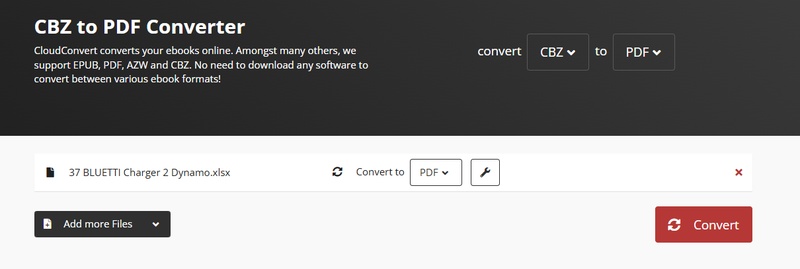
- Open CloudConvert CBZ to PDF Converter.
-
Click Select File and upload your CBZ file. You can also upload files from
Google Drive, Dropbox, or via URL.

- Choose PDF as the output format.
-
Click Convert to start the conversion process. Once the status shows Done,
click Download to save your PDF.


Method 2: FreeConvert
FreeConvert is a simple and reliable online tool that allows you to convert CBZ to PDF online without downloading any software. It supports large files (up to 1GB for free users) and offers optional advanced settings to make sure your PDF looks exactly how you want. Whether you are converting a single comic or multiple CBZ files, FreeConvert is a user-friendly solution for both beginners and experienced users.
Why Use FreeConvert:
- Completely free and browser-based; works on Windows, Mac, and mobile devices.
- Supports batch conversion for multiple CBZ files.
- Allows optional adjustments like PDF page size, orientation, and image alignment.
- Keeps your files secure with 256-bit SSL encryption; files are automatically deleted after a few hours.
Step to Convert CBZ to PDF Online via FreeConvert:
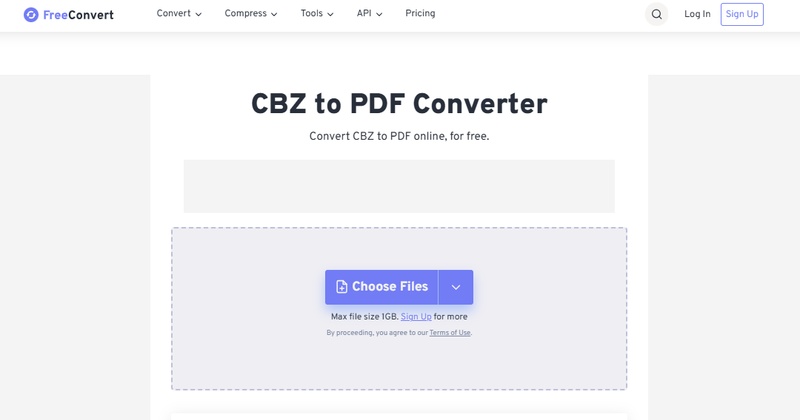
- Visit FreeConvert CBZ to PDF in your browser.
-
Click the Choose Files button and select the CBZ file from your device. You
can also drag and drop files or upload from Google Drive, Dropbox, or via a
URL.
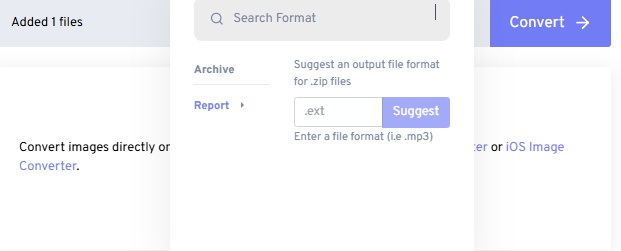
- Make sure PDF is selected as the output format for your CBZ file.
-
Optional: Advanced Settings:
- PDF Page Size: Choose A4, Letter, or custom size.
- Orientation: Select Portrait or Landscape to fit your comic pages.
- Image Alignment: Center images or adjust placement if needed.
- Enlarge Small Images: Automatically resize smaller comic pages to fit the PDF page.
-
Click the Convert to PDF button. The website will process your CBZ file and
convert it to a PDF format.
- When the conversion is complete, click Download PDF to save your newly converted comic.

These settings help maintain the layout and readability of your comics.


Pros and Cons of CBZ to PDF Converters Online
Pros:
- No software installation required; works in any browser.
- Supports CBR CBZ to PDF converter and multiple comic formats.
- High-quality output with options for page size, orientation, and image alignment.
- Free and secure; most use SSL encryption and auto-delete uploaded files.
- Batch conversion possible on some platforms, saving time for multiple comics.
Cons:
- Requires a stable internet connection.
- Free versions may have file size limits (e.g., 1GB).
- Some advanced features may be limited compared to desktop software.
- Upload and download times depend on file size and internet speed.
Part 3: How to Batch Convert CBZ to PDF on Windows or Mac
Batch conversion is useful when you have many comic files to process at once. Desktop tools provide better control and speed for large collections. Calibre is a popular open-source eBook manager that supports many formats, including CBZ. It allows users to organize their comic library, edit metadata, read eBooks, and easily convert CBZ to PDF in bulk on both Windows and Mac.
Steps to Convert CBZ to PDF with Calibre
- Go to the official Calibre website and download the software for Windows or Mac. Install it and launch the program on your computer.
- In the main interface, highlight the CBZ files you want to convert. If you want to process multiple comics at once, hold Ctrl (Windows) or Command (Mac) to select several files.
- In the conversion window, find the Output Format option in the top-right corner and select PDF. You can also adjust layout settings if needed.
- Click OK to begin the process. Calibre will convert the selected CBZ files and save them as PDF documents.
-
Click the Add Books button in the top menu. Select the CBZ files from your computer. The files will appear in the Calibre library.
Click Convert Books in the top menu. You will see two options:
-
Convert individually (for one file)
-
Bulk convert (for multiple files)

Part 4: How to Convert CBZ to PDF Without Losing Image Quality
When you convert CBZ to PDF, image quality is very important because each page of a comic is an image. A good CBZ to PDF converter should keep the original resolution so the text, colors, and artwork remain sharp. Following the right settings during conversion can help maintain the best visual quality.
Tips to Retain Image Quality
- Choose the Highest Output QualityAlways select the highest quality settings when using a CBZ to PDF converter. Some tools allow you to disable compression or choose maximum quality. This helps preserve the original comic images.
- Use High DPI SettingsDPI (dots per inch) affects the clarity of images in the final PDF. If the converter provides this option, select 300 DPI for better viewing and printing results. This ensures that the images remain sharp and detailed.
- Avoid Compressed PDF OptionsMany converters offer a "compressed PDF" setting to reduce file size. However, this often lowers image resolution. When converting CBR CBZ to PDF, avoid compression options if maintaining quality is your priority.
- Use Reliable Conversion ToolsChoose trusted tools that support high-quality conversions. A good CBZ to PDF converter keeps the original images intact without unnecessary resizing or quality loss.
Part 5: How to Edit and Organize Your Comic PDF
After converting CBZ to PDF, the next step is managing your comics. You may want to reorder pages, add notes, or prepare them for printing. A normal PDF reader can only show the file, so a PDF editor is needed for editing and organizing.
PDNob is a powerful and user-friendly tool designed to help you edit, organize, and manage PDF files easily. Once you convert CBR CBZ to PDF, this software allows you to refine the document, adjust pages, and improve the overall structure of your comic file. It offers professional editing features while keeping the interface simple, making it suitable for beginners as well as advanced users.

- Edit text and images easily inside your converted comic PDFs.
- Highlight, annotate, and comment on important parts of the comic.
- Merge multiple PDFs to combine comic chapters into one file.
- Accurate OCR technology to recognize text in scanned or image-based pages.
- Fast and smooth performance without affecting the original quality of the PDF.
- Beginner-friendly interface that makes editing and organizing files simple
How to Edit Comic PDF with PDNob PDF Editor
- Step 1: Open Your PDF: Launch PDNob and click “Open PDF” to load your Comic PDF file. Use the zoom controls for a clearer view if needed.
- Step 2: Edit Content: Go to the “Edit” tab to modify Comic PDF text, images, fonts, or backgrounds with the built-in tools.
- Step 3: Add Comments: Switch to the “Comments” tab to highlight text, add notes, or mark up your PDF.


- Step 4: OCR Scanned Files: On the Home tab, click “OCR”, choose the language and page range, then let PDNob process the Comic PDF file automatically.

- Step 5: AI Summarizer: Use the AI Summarizer to ask questions or quickly understand key points in your document.

Part 6. FAQs About CBZ to PDF
Q1. Can you convert CBZ to PDF online for free?
A1: Yes. Many websites offer a free CBZ to PDF converter online, such as CloudConvert and FreeConvert. You simply upload the CBZ file, convert it, and download the PDF without installing any software.
Q2. Does converting CBZ to PDF reduce image quality?
A2: Not necessarily. If you use a reliable CBZ to PDF converter and choose high-quality settings without compression, the images usually remain clear.
Q3. How do I convert CBR to PDF?
A3: You can use the same tools that convert CBR CBZ to PDF. Upload the CBR file to an online converter or use desktop software like Calibre, then choose PDF as the output format.
Q4. Can Kindle read CBZ files?
A4: Most Kindle devices do not support CBZ files directly. Converting CBZ to PDF makes the comic easier to open and read on Kindle or other e-readers.
Conclusion:
Converting comics using a reliable CBZ to PDF method makes them easier to read, share, and organize on any device. A good CBZ to PDF converter keeps all images clear and pages in order. For editing, annotating, or organizing your comic PDFs, PDNob PDF Editor is a perfect choice. It is powerful yet easy to use, helping you manage and enhance your files efficiently.



- Make scanned PDFs searchable and editable with 99% OCR precision
- Batch convert PDFs to Word, Excel, PPT, images, PDF/A, Text, EPUB, etc., up to 30% faster
- Edit PDFs easily like Word, including text, images, watermarks, links, and backgrounds
- Annotate PDF with highlights, comments, shapes, stickers, and stamps
- Run smoothly on any PC without lags or crashes, even on low-spec machines
 Secure Download
Secure Download
Speak Your Mind
then write your review
Speak Your Mind
Leave a Comment
Create your review for PDNob articles

Related articles

AI Tools Writer / Workflow Analyst
Rachel has spent the last 5 years testing and writing about AI-powered tools across writing, design, and research workflows. She focuses on practical AI tool usage, helping knowledge workers turn generative AI into everyday productivity.


