
 Home
>
PDF Editor
>
How To Use ChatGPT Images 2.5 --- Features, API, and Real Results
Home
>
PDF Editor
>
How To Use ChatGPT Images 2.5 --- Features, API, and Real Results
How To Use ChatGPT Images 2.5 --- Features, API, and Real Results
- 1 The new ChatGPT Images 2.5 model released on September 8, 2026, with sharper details, 50% faster generation, and much better editing precision than the previous version.
- 2 The new model comes in two API flavors: Flare (fast, best for portraits) and Sunburst (slower, best for text in images).
- 3 It is free to use on ChatGPT Web, with a daily limit on the Free plan and higher quotas on Plus and Pro. You can access ChatGPT Images 2.5 through ChatGPT web, app, API, or third-party tool.
- 4 It still struggles with text-heavy edits after multiple rounds, and the content filter is stricter than before — Reddit users have flagged both.
- 5 For pure text editing inside an image (catalogs, posters, flyers), a dedicated PDF or image text editor still beats the model for the final pass.
The new ChatGPT Images 2.5 model released on September 8, 2026, and the headline is control, not raw beauty. Generation is up to 50% faster than the previous version, but the real change is that you can finally ask for a small edit and only get a small edit.
Yesterday I opened ChatGPT, typed a rough shape of butterfly into the chat box, and watched the new release turn it into a clear butterfly photo shot. Below I walk through what's new, how the API split works, what real users are saying on Reddit, where the model still falls short, and my personal test on it. The full announcement lives on OpenAI's launch page.

Part 1. What's New in ChatGPT Images 2.5
Sketch, Comments, Templates, and Sharing
The ChatGPT Images 2.5 model released on September 8, 2026, and the changes are less about raw beauty and more about control. Earlier versions regenerated the whole picture every time you asked for a small tweak --- change the shirt and the face drifted, swap the background and the lighting shifted. This update targets that pain head-on.
Four capabilities now do real work in everyday editing:
- Sketch input. Type @Sketch in the chat box, draw a quick outline, and the model fills in the rest. This is the fastest way to go from rough outline to finished image without writing a wall of prompt text.
- Image comments. Click any part of the generated picture, leave a written note, and only that region changes. It feels closer to a Figma comment than a chat prompt.
- Templates. Start from a poster, merch, or product layout instead of a blank canvas.
- Prompt sharing. When you share a result, the prompt can travel with it so others can swap in their own photos.
The OpenAI announcement page links to the official help center article with screenshots of each capability.

Pros and Cons of ChatGPT Images 2.5 at a Glance
Before getting into the ChatGPT image generation model, the accessibility, its pricing, and the benchmark numbers, here is the short version. I want to flag both sides honestly, because the first wave of reactions after the September 8 launch is more mixed than OpenAI's announcement suggests.
On the plus side:
- Generation is up to 50% faster than the previous version.
- Multi-turn editing actually preserves earlier changes --- face, composition, and lighting stay put.
- The new @Sketch feature turns rough doodles into usable reference images.
- The image comments workflow feels closer to Figma than a chat prompt.
- All ChatGPT tiers (Free included) get access on day one.
On the downside:
- A faint watermark or noise pattern is still visible, especially in text-heavy outputs.
- The content filter is stricter, and some paying users say it is over-eager on certain styles.
- The Templates feature is, in some cases, just a prompt wrapper rather than a real structure.
- Heavy users on the previous model report a perceived quality regression, not an upgrade.
Part 2. What Real Users Are Saying on Reddit
Here is what the first wave of Reddit users is reporting after roughly nine hours with the new release. I pulled the threads with the most engagement and kept quotes that line up with what I saw in my own tests. The signal is consistent enough to act on.
What Reddit Users Liked
-
Generation speed is noticeably faster.
"I can notice two details: the speed and second, it seems that the default version of the model already 'thinks' by default." --- u/sammoga123 (6 upvotes)
-
Editing instructions are followed more reliably by comments.
"It seems to listen to instructions better... The fact it seems to listen to instructions better implies it would work better for editing." --- u/unethicalpigeon
-
The new Sketch feature delivers on its promise.
"I drew a goal scorer and a keeper diving, then told it to make it photorealistic. It made an image exactly what I wanted." --- u/reddit4485
-
Visible UI cues confirm rollout.
"On the website, it has a new animation when generating images, blue moving dots." --- u/Smile_Clown. "There is 'Updated' next to the Images \button." --- u/_DearStranger
What Reddit Users Complained About
-
Watermark or noise pattern is still visible, especially in text-heavy images.
"If you look at any image ChatGPT generated with a lot of text you can spot a pattern of light/dark warping in between the lines. The more it's edited the more obvious it becomes." --- u/Wise-Reflection-7400 (20 upvotes)
-
Content moderation is stricter and is pushing some paid users away.
"The filter that has to do with generating sexy outfits seems to be way more strict now. It seems to audit itself a lot more strictly." --- u/sendhelp (52 upvotes).
-
The new Templates feature feels like a prompt wrapper, not a real structure.
"I tried one of those new 'templates'. But it was basically just a prompt that said 'create a poster that expresses the user's idea...' ... the model immediately created a poster with the questions on it and lines for the answers." --- u/Musing_About (4 upvotes)
-
Some heavy users perceive a quality regression, not an upgrade.
"I have been severely downgraded. Even my images look identical to the poor repetitive downgraded results I was getting. So, I'm going to assume that... my requests are still not accessing it." --- u/ShowaEmergency (2 upvotes).
"It's a sidegrade for me. I've used the previous model to generate hundreds of anime images, but for some reason it's hard to apply cold/cool color grading with this model." --- u/Gustev4565

Part 3. Where to Access the New Model
ChatGPT Web, Mobile, and Desktop
You can reach the new model from any of the official ChatGPT surfaces:
- Web. Open chatgpt.com, sign in, and look for the Images button in the left sidebar. Reddit users report an "Updated" label appearing next to it on day one.
- Mobile (iOS and Android). Open the ChatGPT app, tap the menu, and pick Images. A new loading animation (blue moving dots) shows the new release is rendering.
- Desktop app (Mac and Windows). The same sidebar layout as web, with the Images entry point.
No special command is required to switch --- the rollout is the default. If you want to drive generation with a ChatGPT image generator command, just type it directly in the message box.
API Endpoints and Model IDs
If you are a developer, you can also call the model through the API. The two model IDs are:
- gpt-image-2.5-flare --- default, fast
- gpt-image-2.5-sunburst --- high-precision, slower
Both are available through the standard /v1/images/generations and /v1/images/edits endpoints, and they can also be called from the Responses API's image generation tool. The API supports 1024x1024, 2048x2048, and 4K (3840x2160) outputs, with a single side up to 3840 pixels and a total pixel range between 655,360 and 8,294,400. Create images with GPT Images 2.5 through any of these surfaces with the same model IDs.
Third-Party Image Tools That Already Have It
If you are in mainland China or the Middle East region and want a similar workflow without a VPN, you can look at alternative options below to get access to it without visiting ChatGPT directly.
A few platforms integrated the new release on day one:
-
Higgsfield AI. The Head of Product at Higgsfield publicly endorsed Flare, noting that it "understands what not to change."
-
Adobe Firefly. Integrated both Flare and Sunburst inside the Firefly creative AI studio, with the bonus of Adobe's commercial indemnification.
-
Magnific. It directly added the API into its optional model in its image editing dashboard, with other older versions available.

Part 4. Is ChatGPT Images 2.5 Free?
Can I Use ChatGPT Images 2.5 for Free?
Yes, the new release is free to use --- OpenAI shipped it to all ChatGPT tiers on day one, including the Free plan. But "free" comes with the usual limits: a daily image quota, possible rate throttling during peak hours, and standard-priority generation.
I tested this on a free account and hit the cap after about six images in one session. The good news is that the quota resets at midnight PT, and the speed felt close to Plus in my off-peak tests.
Plans Comparison of ChatGPT Plan with Images 2.5 Access
 Please swipe to view
ChatGPT Images 2.5 API Pricing
The API uses token-based billing. Per million tokens:
- Image input: $8.00
- Image output: $30.00
- Text input: $5.00
- Cached image input: $2.00
- Cached text input: $1.25
A typical mid-quality image (1024x1024, standard detail) runs around $0.04--$0.08. The Flare and Sunburst variants share this rate card, so you are paying for time, not for the model itself.
Part 5. ChatGPT Images 2.5 API: Flare vs Sunburst
For developers, the model is no longer one endpoint. The new API ships two siblings and the split is straightforward. The full lineup lives on the OpenAI API docs.
Pick Flare or Sunburst?
Please swipe to view
Flare vs Sunburst Feature Detailed Comparison in Price and Use Case
Please swipe to view
Part 6. ChatGPT Images 2.5 vs Other Image Models
Arena.ai Benchmark Ratings on ChatGPT Images 2.5
If you are interested in the performace ChatGPT Images 2.5 behaved compared to other AI image generation model, here I pulled the September 8 snapshot from arena.ai to see how the public is actually scoring these models head-to-head. The numbers are ELO ratings from real votes, not vendor claims. The full leaderboard is on the arena.ai image category page. The numbers will settle as more people vote. The lead is real. The exact score isn't carved in stone yet.
Text-to-Image Arena --- Topline
Please swipe to view
OpenAI's two new models are #1 and #2, and the rest of the field is 100+ points behind. In a leaderboard where 5-20 points counts as a close race, that's a blowout.
The honest caveat
- Sunburst wins at: Text inside images (1481) and 3D-looking objects (1405)
- Flare wins at: Portraits and people (1456)
The difference is small (20-ish points), but if your work is one specific type, the choice does matter.
- gpt-image-2.5-sunburst --- Pick it when text in the image has to be perfect (menus, signs, posters, UI mockups) and you can wait the extra 2-4× time. Skip it when you need hundreds of images fast --- use Flare instead.
- gpt-image-2.5-flare --- Pick it when you work mostly with people, faces, or photos, and you need high volume at speed. Skip it when text in the image is the priority --- Sunburst beats it by 47 points on Text Rendering.
- mai-image-2.6 (Microsoft) --- Pick it when you live in the Microsoft / Azure ecosystem and want one vendor for everything. Skip it when you need top-tier text or portrait quality --- it sits 90+ points behind Sunburst on both.
- muse-image (Meta) --- Pick it when you are working inside Instagram, WhatsApp, or Messenger and want a generous free tier. Skip it when you need professional output --- it has no standout category on the board.
- gemini-3-pro-image-2k (Google) --- Pick it when you need real-time factual grounding (current logos, live brand assets, today's events) via Gemini's web search during generation. Skip it when pure image quality matters --- it is last on every column.
Part 7. My Real Tests on ChatGPT Images 2.5
I ran the new release through three simple everyday task. Here is what worked, what did not, and how long each took.
Sketch Test (@Sketch)
I typed @Sketch in ChatGPT searching box, drew a 10-second outline of a butterfly,and added "turn this sketch into a butterfly in a real photo style". The model returned a clean render in about 10 seconds. The proportions matched my rough sketch, the lighting felt natural, and the wings came out where I drew it.
Verdict: ⭐⭐⭐⭐⭐--- the fastest way to turn sketches into realistic images without writing a long prompt.

Creative Editing Test (Image Comments)
I uploaded a poster of Posche with texts and bumbers on it to see its processing capability of image with text. I prompted it to "turn the white car into a blue one in teh picture". It finished in about 9 seconds with correct color changing with other parts intact.
Verdict: ⭐⭐⭐⭐⭐ --- the most effective and precise feature in the release for me.

Text Editing Comments Test
I clicked the poster and clicked on it to switch to the image editing view, and prompted it to move the car below all the text in the poster.
Verdict: ⭐⭐ --- usable, but you need to process it only in the 'Comment' mode. If you require ChatGPT to edit image text or change the text box in the session, it won't realize your promt. For a polished final asset, you probably want a dedicated text-on-image tool. That is what Part 8 is about.

Part 8. Fallback for Text Editing in Image
When ChatGPT Images 2.5 Misses the Text
From my own tests and the Reddit thread, here is the honest picture: the new release is excellent at generating text inside an image, and excellent at large visual edits. It is less reliable when you want to change one specific string in a busy, text-heavy poster without touching the rest of the layout. The model sometimes will process it, but sometimes it just turn the original picture back to you without any changes.

If your work is mostly text edits inside an image (catalogs, posters, flyers, social cards with copy), the better tool for the final pass is a dedicated PDF or image editor with OCR.
A More Reliable Option for Text-Heavy Edits
PDNob PDF Editor is one of the tools I reach for here. It is built around a simple workflow: load the image or PDF, run image or PDF OCR to detect the existing text, click into the text box, and overwrite. The original formatting, font, and color stay in place because you are editing the source file, not regenerating it. For a flyer, a poster, or a screenshot full of text, this is faster and more predictable than prompting an image model five times.





How to Edit Text Inside an Image with PDNob
-
Open PDNob PDF Editor and click Open File to load the image you want to edit (PNG, JPG, and PDF all work).
-
Perform OCR on the file if your file is read-only PDF or pure uneditable image.
-
From the top toolbar, click Edit to switch to editing mode. The app auto-detects text regions on the canvas.
-
Click into the text box containing the string you want to change. Blue selection handles confirm the edit target. Type the new string. The font, size, and color carry over from the original. You can
-
Use File → Save (or Save As) to export the edited image. For a PDF source, you can also export back to PDF without re-rendering.
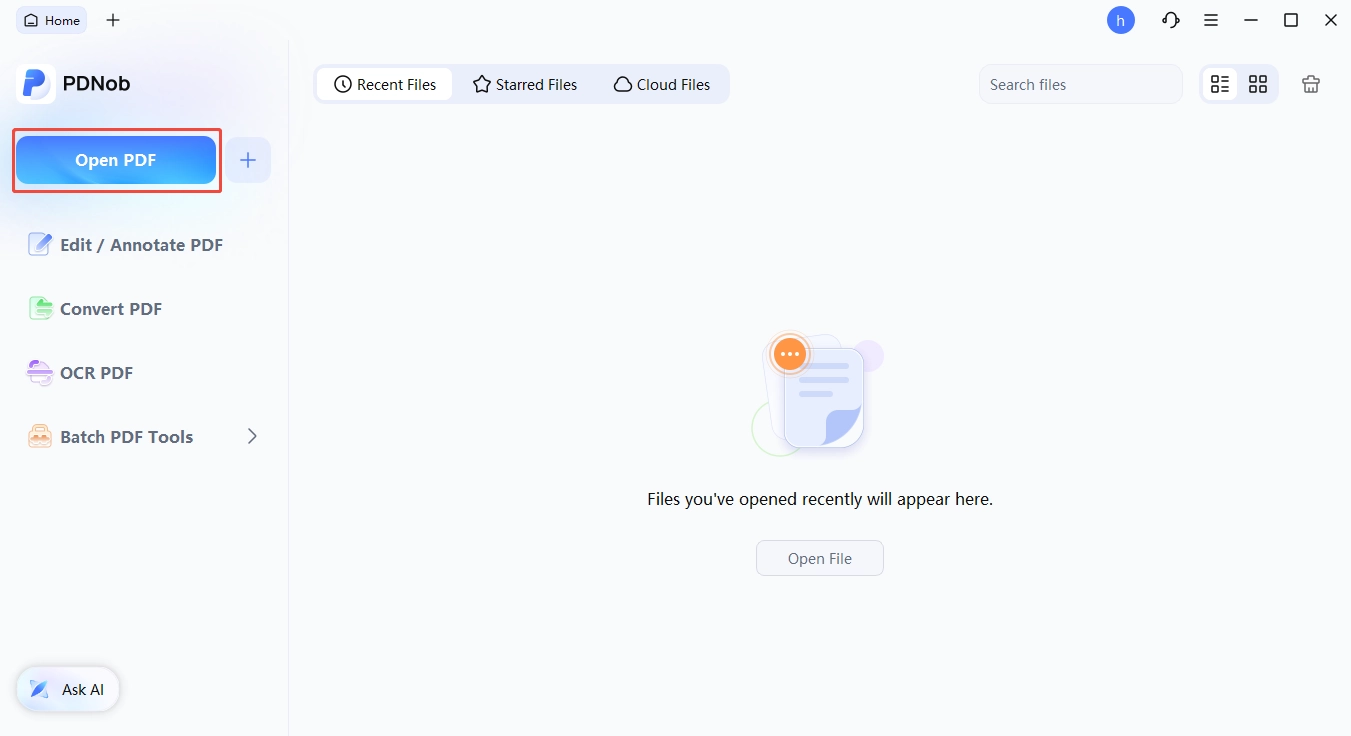


That whole flow runs in under a minute once you have done it twice. For text-heavy edits, I now go to PDNob first and only use image models when the change is visual, not textual.
Part 9. 5 Copy-Paste Prompts
Here are five prompts I tested this week. Each one is copy-paste ready, and each one is paired with what I learned.
Prompt 1. Turn a Sketch into a Product Shot
Sketch with ChatGPT Images 2.5 by typing @Sketch, drawing a coffee mug, then adding: "minimalist white background product shot, soft shadow, photoreal."
@Sketch is the fastest way to turn rough outlines into usable reference images. Stick to one object per sketch for the best results.
Prompt 2. Build a Poster from a Template
Templates with ChatGPT Images 2.5 by picking "Poster," then filling in: event name, date, headline copy, and color palette.
Templates work well when you give them real copy up front. The Reddit complaint about empty posters happens when you leave the placeholders blank --- the model just makes up its own fill-in-the-blank layout.
Prompt 3. Localized Edit with Image Comments
Upload a photo, click the shirt, type "change to navy blue linen," then click the background and type "soft sunset gradient."
Two image comments in a row both worked on the first try. This is the most production-ready feature in the release for catalog work.
Prompt 4. Multi-Turn Consistency
Turn 1: "A 30-year-old woman with short black hair, neutral background." Turn 2: "Now place her in a 1980s disco, same woman." Turn 3: "Same woman, but on a beach at sunset."
The face, the haircut, and the skin tone held across all three turns. Earlier versions lost subject identity after the second turn.
Prompt 5. Convert a Photo to an AI Image Style
How do I convert my photo to an AI image using chatgpt image 2.5? Upload a real photo, then prompt: "Stylize this as a Studio Ghibli watercolor, preserve the composition and the people."
Style transfer respects the original layout. The text and the small details get fuzzy, but the main subject stays where it was. This is the best way I have found to answer the photo-to-AI question without losing the original framing.
Final Word
The new release of ChatGPT Images 2.5 is the most controllable image model OpenAI has shipped. The 50% speed bump is nice; the @Sketch input and the image comments are the real story. If you have been frustrated by AI tools that rebuild the whole image every time you ask for a small change, this is the first release I have tested that genuinely fixes the problem.
The honest gaps are still there: a faint noise pattern on text-heavy edits, a stricter content filter, and a Templates feature that sometimes feels like a dressed-up prompt. The Reddit thread is the best place to keep watching how these settle over the next few weeks. For now, the new release is the model I would pick for everyday creative work --- and a dedicated PDF or image editor for the final text pass.
FAQ on ChatGPT Images 2.5
Q1. Is ChatGPT Images 2.5 free to use?
A1: Yes, the new release is rolling out to all ChatGPT tiers including Free. Free users get a daily quota, standard priority, and the same core features as paid users. Heavy users will want Plus ($20/mo) or Pro ($200/mo) for higher quotas and faster queues.
Q2. How do I use chatgpt image 2.5 image generation in ChatGPT?
A2: You can drive it in three ways. (1) Type a normal prompt and the model defaults to the new release. (2) Type @Sketch followed by a sketch and a text description. (3) Upload an image and click anywhere on it to leave a comment for a localized edit. No menu, no toggle --- the new model is the default.
Q3. Why are my ChatGPT images not loading?
A3: Three common causes: (1) the daily quota is hit on a Free plan, (2) a slow network during peak hours, and (3) a browser cache issue. The fix is usually: refresh the page, switch to a different browser, or check the account's plan page for the current quota.
Q4. What is the difference between Flare and Sunburst?
A4: Flare is the default, fast, cheaper model. Sunburst is the high-precision, slower model for final campaign art. Both share the same token rate card. Pick Flare for volume, Sunburst when every pixel matters.
Q5. How to use chatgpt image 2.5 to enhance a picture?
A5: Upload the picture, click the area you want to change, and leave a written comment ("make the sky a sunset," "sharpen the face," "remove the person on the left"). The model edits only the targeted region. If the change is text-based, see Part 8 for a more reliable workflow.



- Make scanned PDFs searchable and editable with 99% OCR precision
- Batch convert PDFs to Word, Excel, PPT, images, PDF/A, Text, EPUB, etc., up to 30% faster
- Edit PDFs easily like Word, including text, images, watermarks, links, and backgrounds
- Annotate PDF with highlights, comments, shapes, stickers, and stamps
- Run smoothly on any PC without lags or crashes, even on low-spec machines
 Secure Download
Secure Download
Speak Your Mind
then write your review
Speak Your Mind
Leave a Comment
Create your review for PDNob articles

Related articles
Software Reviewer and Comparison Analyst
Maya Patel has reviewed over a hundred softwares across writing, design, productivity, and AI categories, and her comparison articles are designed to give readers a clear winner within the first three paragraphs in past 3 years.


